Employee activation
When scheduling employees, particularly when dealing with external contractors, temporary staff, or managing labor costs, it’s important to optimize which employees are activated and how many shifts they work. For instance, to make sure full-time employees are assigned to shifts before adding contractors.
Employee activation constraints help you:
-
Minimize the number of employees needed to staff a schedule.
-
Reduce costs when using contractors with fixed activation fees.
-
Maintain optimal ratios between different employee groups.
-
Maximize the utilization of activated employees.
This guide explains how to manage employee activation with the following:
Minimize activated employees
Learn how to configure an API Key to run the examples in this guide:
In the examples, replace |
Employee cost groups can define an activation cost that represents the fixed cost incurred when an employee is assigned to at least one shift.
This is useful for:
-
Estimating the minimum number of employees needed to staff a schedule.
-
Minimizing costs when using external contractors or temporary staff who have fixed activation fees.
-
Reducing overhead costs associated with activating employees.
Configuration
Define employee cost groups with activation costs on the top level of the input dataset:
{
  "employeeCostGroups": [
    {
      "id": "Contractors",
      "employeeActivationCost": 200,
      "activationShiftInclude": "MANDATORY_SHIFTS"
    },
    {
      "id": "Regular",
      "employeeActivationCost": 100,
      "activationShiftInclude": "MANDATORY_AND_OPTIONAL_SHIFTS"
    }
  ]
}
Assign employees to cost groups:
{
  "employees": [
    {
      "id": "Ann",
      "costGroup": "Contractors"
    },
    {
      "id": "Beth",
      "costGroup": "Regular"
    }
  ]
}
Activation shift include
The activationShiftInclude field determines which shift types count toward employee activation:
-
MANDATORY_SHIFTS: Only mandatory shift assignments trigger activation costs (default). -
MANDATORY_AND_OPTIONAL_SHIFTS: Both mandatory and optional shift assignments trigger activation costs.
The Minimize activated employees soft constraint is invoked when an assigned shift belongs to an employee whose cost group defines employeeActivationCost and the shift matches activationShiftInclude.
The constraint adds a soft penalty to the dataset score when an employee is activated by one or more matching assigned shifts.
The penalty is calculated per activated employee as employeeActivationCost + (employeeActivationCost * shiftCount), where shiftCount is the number of matching assigned shifts for that employee, incentivizing Timefold to activate fewer employees and prefer lower activation-cost employees.
Shifts will still be assigned even if assigning them breaks this constraint.
|
Every soft constraint has a weight that can be configured to change the relative importance of the constraint compared to other constraints. Learn about constraint weights. |
Minimize activated employees example
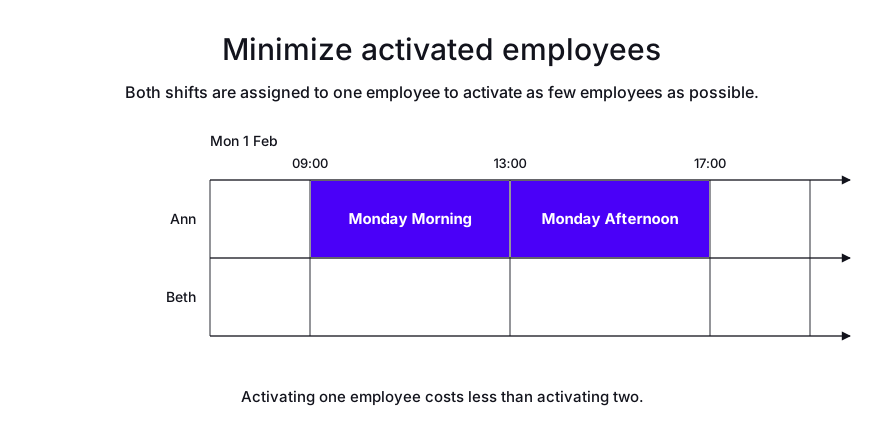
In the following example, two employees belong to the Contractors cost group, which has an activation cost, and two back-to-back shifts need to be staffed.
Timefold assigns both shifts to one employee and leaves the other unactivated, because activating one employee costs less than activating two.
-
Input
-
Output
Try this example in Timefold Platform by saving this JSON into a file called sample.json and make the following API call:
|
curl -X POST -H "Content-type: application/json" -H 'X-API-KEY: <API_KEY>' https://app.timefold.ai/api/models/employee-scheduling/v1/schedules [email protected]{
"config": {
"run": {
"name": "Minimize activated employees"
}
},
"modelInput": {
"employeeCostGroups": [
{
"id": "Contractors",
"employeeActivationCost": 200
}
],
"employees": [
{
"id": "Ann",
"costGroup": "Contractors"
},
{
"id": "Beth",
"costGroup": "Contractors"
}
],
"shifts": [
{
"id": "Monday Morning",
"start": "2027-02-01T09:00:00Z",
"end": "2027-02-01T13:00:00Z"
},
{
"id": "Monday Afternoon",
"start": "2027-02-01T13:00:00Z",
"end": "2027-02-01T17:00:00Z"
}
]
}
}
To request the solution, locate the ID from the response to the post operation and append it to the following API call:
|
curl -X GET -H 'X-API-KEY: <API_KEY>' https://app.timefold.ai/api/models/employee-scheduling/v1/schedules/<ID>{
"metadata": {
"id": "ID",
"originId": "ID",
"name": "Minimize activated employees",
"submitDateTime": "2026-07-28T07:01:16.224100266Z",
"startDateTime": "2026-07-28T07:01:45.293102405Z",
"activeDateTime": "2026-07-28T07:01:45.413478686Z",
"completeDateTime": "2026-07-28T07:02:15.910023934Z",
"shutdownDateTime": "2026-07-28T07:02:15.910029827Z",
"solverStatus": "SOLVING_COMPLETED",
"score": "0hard/0medium/-596soft",
"tags": [
"system.type:from-request",
"system.profile:Standard profile"
],
"validationResult": {
"summary": "OK"
}
},
"modelOutput": {
"shifts": [
{
"id": "Monday Morning",
"employee": "Ann"
},
{
"id": "Monday Afternoon",
"employee": "Ann"
}
],
"employees": [
{
"id": "Ann",
"metrics": {
"assignedShifts": 2,
"durationWorked": "PT8H"
}
},
{
"id": "Beth",
"metrics": {
"assignedShifts": 0,
"durationWorked": "PT0S"
}
}
],
"generatedShifts": []
},
"inputMetrics": {
"employees": 2,
"shifts": 2,
"pinnedShifts": 0,
"mandatoryShifts": 2,
"optionalShifts": 0
},
"kpis": {
"assignedShifts": 2,
"unassignedShifts": 0,
"disruptionPercentage": 0,
"activatedEmployees": 1,
"assignedMandatoryShifts": 2
},
"run": {
"id": "ID",
"originId": "ID",
"name": "Minimize activated employees",
"submitDateTime": "2026-07-28T07:01:16.224100266Z",
"startDateTime": "2026-07-28T07:01:45.293102405Z",
"activeDateTime": "2026-07-28T07:01:45.413478686Z",
"completeDateTime": "2026-07-28T07:02:15.910023934Z",
"shutdownDateTime": "2026-07-28T07:02:15.910029827Z",
"solverStatus": "SOLVING_COMPLETED",
"score": "0hard/0medium/-596soft",
"tags": [
"system.type:from-request",
"system.profile:Standard profile"
],
"validationResult": {
"summary": "OK"
}
}
}Maximize activated employee saturation
The Maximize activated employee saturation soft constraint is invoked when an assigned shift belongs to an employee whose cost group defines employeeActivationCost and the shift matches activationShiftInclude.
The constraint adds a soft reward to the dataset score when an activated employee receives matching assigned shifts.
The reward is shiftCount * shiftCount per activated employee, where shiftCount is the number of matching assigned shifts for that employee, incentivizing Timefold to consolidate shifts on already activated employees.
Shifts will still be assigned even if assigning them breaks this constraint.
The constraint automatically applies to all employees with a cost group that has an employeeActivationCost defined. The constraint considers shifts based on the activationShiftInclude setting of each cost group.
|
Every soft constraint has a weight that can be configured to change the relative importance of the constraint compared to other constraints. Learn about constraint weights. |
Maximize activated employee saturation example
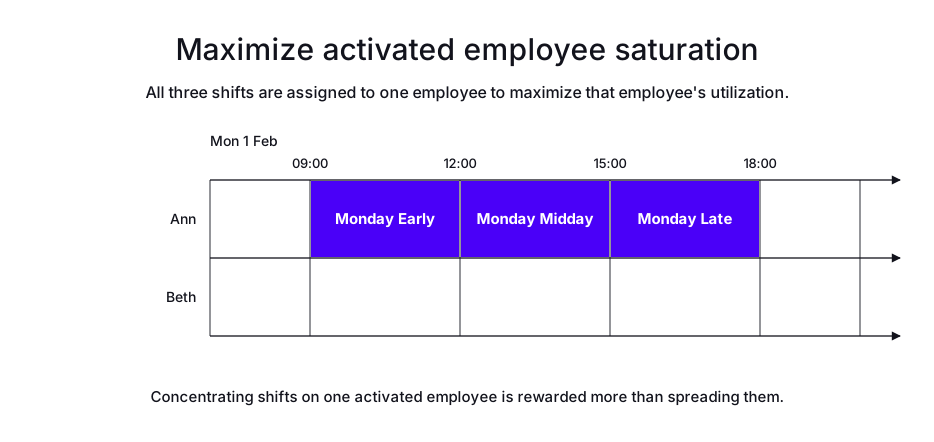
In the following example, two employees in the Contractors cost group are available to cover three back-to-back shifts.
Timefold assigns all three shifts to one employee, because concentrating shifts on one activated employee rewards saturation more than spreading them across both employees.
-
Input
-
Output
Try this example in Timefold Platform by saving this JSON into a file called sample.json and make the following API call:
|
curl -X POST -H "Content-type: application/json" -H 'X-API-KEY: <API_KEY>' https://app.timefold.ai/api/models/employee-scheduling/v1/schedules [email protected]{
"config": {
"run": {
"name": "Maximize activated employee saturation"
}
},
"modelInput": {
"employeeCostGroups": [
{
"id": "Contractors",
"employeeActivationCost": 100
}
],
"employees": [
{
"id": "Ann",
"costGroup": "Contractors"
},
{
"id": "Beth",
"costGroup": "Contractors"
}
],
"shifts": [
{
"id": "Monday Early",
"start": "2027-02-01T09:00:00Z",
"end": "2027-02-01T12:00:00Z"
},
{
"id": "Monday Midday",
"start": "2027-02-01T12:00:00Z",
"end": "2027-02-01T15:00:00Z"
},
{
"id": "Monday Late",
"start": "2027-02-01T15:00:00Z",
"end": "2027-02-01T18:00:00Z"
}
]
}
}
To request the solution, locate the ID from the response to the post operation and append it to the following API call:
|
curl -X GET -H 'X-API-KEY: <API_KEY>' https://app.timefold.ai/api/models/employee-scheduling/v1/schedules/<ID>{
"metadata": {
"id": "ID",
"originId": "ID",
"name": "Maximize activated employee saturation",
"submitDateTime": "2026-07-28T07:01:00.350271459Z",
"startDateTime": "2026-07-28T07:01:10.873209298Z",
"activeDateTime": "2026-07-28T07:01:10.986337819Z",
"completeDateTime": "2026-07-28T07:01:41.478840249Z",
"shutdownDateTime": "2026-07-28T07:01:41.478844235Z",
"solverStatus": "SOLVING_COMPLETED",
"score": "0hard/0medium/-391soft",
"tags": [
"system.type:from-request",
"system.profile:Standard profile"
],
"validationResult": {
"summary": "OK"
}
},
"modelOutput": {
"shifts": [
{
"id": "Monday Early",
"employee": "Ann"
},
{
"id": "Monday Midday",
"employee": "Ann"
},
{
"id": "Monday Late",
"employee": "Ann"
}
],
"employees": [
{
"id": "Ann",
"metrics": {
"assignedShifts": 3,
"durationWorked": "PT9H"
}
},
{
"id": "Beth",
"metrics": {
"assignedShifts": 0,
"durationWorked": "PT0S"
}
}
],
"generatedShifts": []
},
"inputMetrics": {
"employees": 2,
"shifts": 3,
"pinnedShifts": 0,
"mandatoryShifts": 3,
"optionalShifts": 0
},
"kpis": {
"assignedShifts": 3,
"unassignedShifts": 0,
"disruptionPercentage": 0,
"activatedEmployees": 1,
"assignedMandatoryShifts": 3
},
"run": {
"id": "ID",
"originId": "ID",
"name": "Maximize activated employee saturation",
"submitDateTime": "2026-07-28T07:01:00.350271459Z",
"startDateTime": "2026-07-28T07:01:10.873209298Z",
"activeDateTime": "2026-07-28T07:01:10.986337819Z",
"completeDateTime": "2026-07-28T07:01:41.478840249Z",
"shutdownDateTime": "2026-07-28T07:01:41.478844235Z",
"solverStatus": "SOLVING_COMPLETED",
"score": "0hard/0medium/-391soft",
"tags": [
"system.type:from-request",
"system.profile:Standard profile"
],
"validationResult": {
"summary": "OK"
}
}
}Keep employee activation ratio
Employee cost groups can define an activation ratio weight that helps maintain desired proportions of activated employees between different groups.
This is useful for:
-
Maintaining a healthy mix of permanent and temporary staff.
-
Ensuring core employees form the majority of the workforce.
-
Meeting contractual or policy requirements about staff composition.
-
Balancing experience levels by maintaining ratios between senior and junior staff.
Configuration
Define employee cost groups with activation ratio weights:
{
  "employeeCostGroups": [
    {
      "id": "Regular",
      "employeeActivationRatioWeight": 3,
      "activationShiftInclude": "MANDATORY_SHIFTS"
    },
    {
      "id": "Contractors",
      "employeeActivationRatioWeight": 1,
      "activationShiftInclude": "MANDATORY_SHIFTS"
    }
  ]
}
In this example, the model will attempt to maintain a 3:1 ratio of regular employees to external contractors among activated staff.
The Keep employee activation ratio soft constraint is invoked when assigned shifts involve employees whose cost groups define employeeActivationRatioWeight.
The constraint adds a soft penalty to the dataset score when a cost group’s actual share of activated employees differs from the target ratio.
The constraint calculates the percentage of activated employees in each cost group and compares it to the target percentage derived from the ratio weights. If the actual ratio deviates from the target, a soft penalty is applied. The penalty is proportional to the deviation from the target ratio.
Shifts will still be assigned even if assigning them breaks this constraint.
|
Every soft constraint has a weight that can be configured to change the relative importance of the constraint compared to other constraints. Learn about constraint weights. |
Keep employee activation ratio example
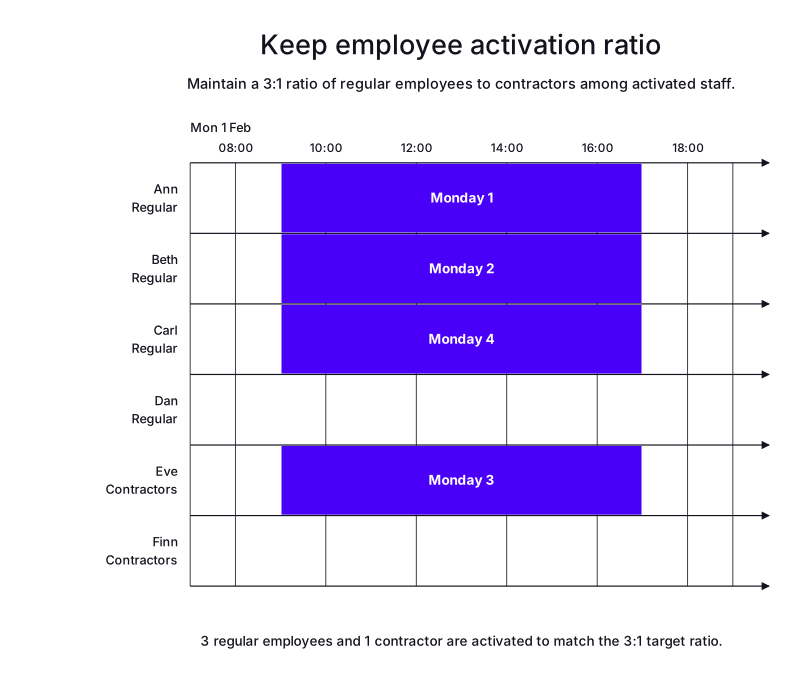
In the following example, four concurrent shifts must be staffed from a pool of 4 Regular employees and 2 Contractors.
The Regular cost group has an activation ratio weight of 3 and the Contractors cost group has a weight of 1, so Timefold activates three regular employees and one contractor to match the 3:1 target ratio.
-
Input
-
Output
Try this example in Timefold Platform by saving this JSON into a file called sample.json and make the following API call:
|
curl -X POST -H "Content-type: application/json" -H 'X-API-KEY: <API_KEY>' https://app.timefold.ai/api/models/employee-scheduling/v1/schedules [email protected]{
"config": {
"run": {
"name": "Keep employee activation ratio"
}
},
"modelInput": {
"employeeCostGroups": [
{
"id": "Regular",
"employeeActivationRatioWeight": 3
},
{
"id": "Contractors",
"employeeActivationRatioWeight": 1
}
],
"employees": [
{
"id": "Ann",
"costGroup": "Regular"
},
{
"id": "Beth",
"costGroup": "Regular"
},
{
"id": "Carl",
"costGroup": "Regular"
},
{
"id": "Dan",
"costGroup": "Regular"
},
{
"id": "Eve",
"costGroup": "Contractors"
},
{
"id": "Finn",
"costGroup": "Contractors"
}
],
"shifts": [
{
"id": "Monday 1",
"start": "2027-02-01T09:00:00Z",
"end": "2027-02-01T17:00:00Z"
},
{
"id": "Monday 2",
"start": "2027-02-01T09:00:00Z",
"end": "2027-02-01T17:00:00Z"
},
{
"id": "Monday 3",
"start": "2027-02-01T09:00:00Z",
"end": "2027-02-01T17:00:00Z"
},
{
"id": "Monday 4",
"start": "2027-02-01T09:00:00Z",
"end": "2027-02-01T17:00:00Z"
}
]
}
}
To request the solution, locate the ID from the response to the post operation and append it to the following API call:
|
curl -X GET -H 'X-API-KEY: <API_KEY>' https://app.timefold.ai/api/models/employee-scheduling/v1/schedules/<ID>{
"metadata": {
"id": "ID",
"originId": "ID",
"name": "Keep employee activation ratio",
"submitDateTime": "2026-07-28T07:00:43.226296794Z",
"startDateTime": "2026-07-28T07:00:59.679269955Z",
"activeDateTime": "2026-07-28T07:00:59.794799078Z",
"completeDateTime": "2026-07-28T07:01:30.225006753Z",
"shutdownDateTime": "2026-07-28T07:01:30.22501693Z",
"solverStatus": "SOLVING_COMPLETED",
"score": "0hard/0medium/0soft",
"tags": [
"system.type:from-request",
"system.profile:Standard profile"
],
"validationResult": {
"summary": "OK"
}
},
"modelOutput": {
"shifts": [
{
"id": "Monday 1",
"employee": "Ann"
},
{
"id": "Monday 2",
"employee": "Beth"
},
{
"id": "Monday 3",
"employee": "Eve"
},
{
"id": "Monday 4",
"employee": "Carl"
}
],
"employees": [
{
"id": "Ann",
"metrics": {
"assignedShifts": 1,
"durationWorked": "PT8H"
}
},
{
"id": "Beth",
"metrics": {
"assignedShifts": 1,
"durationWorked": "PT8H"
}
},
{
"id": "Carl",
"metrics": {
"assignedShifts": 1,
"durationWorked": "PT8H"
}
},
{
"id": "Dan",
"metrics": {
"assignedShifts": 0,
"durationWorked": "PT0S"
}
},
{
"id": "Eve",
"metrics": {
"assignedShifts": 1,
"durationWorked": "PT8H"
}
},
{
"id": "Finn",
"metrics": {
"assignedShifts": 0,
"durationWorked": "PT0S"
}
}
],
"generatedShifts": []
},
"inputMetrics": {
"employees": 6,
"shifts": 4,
"pinnedShifts": 0,
"mandatoryShifts": 4,
"optionalShifts": 0
},
"kpis": {
"assignedShifts": 4,
"unassignedShifts": 0,
"disruptionPercentage": 0,
"activatedEmployees": 4,
"assignedMandatoryShifts": 4
},
"run": {
"id": "ID",
"originId": "ID",
"name": "Keep employee activation ratio",
"submitDateTime": "2026-07-28T07:00:43.226296794Z",
"startDateTime": "2026-07-28T07:00:59.679269955Z",
"activeDateTime": "2026-07-28T07:00:59.794799078Z",
"completeDateTime": "2026-07-28T07:01:30.225006753Z",
"shutdownDateTime": "2026-07-28T07:01:30.22501693Z",
"solverStatus": "SOLVING_COMPLETED",
"score": "0hard/0medium/0soft",
"tags": [
"system.type:from-request",
"system.profile:Standard profile"
],
"validationResult": {
"summary": "OK"
}
}
}Next
-
See the full API spec or try the online API.
-
Learn more about employee shift scheduling from our YouTube playlist.