Employee availability
Employee availability defines when employees are available and unavailable for work.
This guide explains employee availability with the following:
Defining employee availability
Learn how to configure an API Key to run the examples in this guide:
In the examples, replace |
availableTimeSpans and unavailableTimeSpans can be used to describe an employee’s availability:
-
availableTimeSpans: the employee is available for the listed time spans but is unavailable during time spans that are not listed. We recommend using this for contractors who are only available at specific periods of time. -
unavailableTimeSpans: the employee is unavailable for the listed time span but is available durring time spans that are not listed. We recommend using this for full-time employees who are usually available for any shift and have occasional periods of unavailability, such as personal leave.
An employee can define availableTimeSpans or unavailableTimeSpans, but not both. Since one assumes the employee is available by default and the other assumes the employee is unavailable by default, the two can’t be reconciled into a single availability model for the same employee.
|
Employee unavailability times
Employees are considered to be available for any shifts in the schedule unless unavailable time spans are defined.
An employee’s unavailability is defined by adding an unavailableTimeSpans array to the employee with a start and an end time for the period they are unavailable.
Unavailable periods can span multiple days.
{
  "employees": [
    {
      "id": "Beth",
      "unavailableTimeSpans": [
        {
          "start": "2027-02-05T00:00:00Z",
          "end": "2027-02-06T00:00:00Z"
        }
      ]
    }
  ]
}-
startis a date and time (in ISO 8601 date time with offset to UTC format) for the start of the period the employee is unavailable. -
endis a date and time (exclusive) in ISO 8601 with date time offset to UTC for the end of the period the employee is unavailable.
The Employee works during unavailable time hard constraint is invoked when an employee is assigned to a shift that overlaps with their unavailable time spans.
The constraint adds a hard penalty to the plan for each shift that overlaps with an unavailable time span.
Shifts will not be assigned if assigning the shift would break the Employee works during unavailable time hard constraint.
Employee unavailability times example
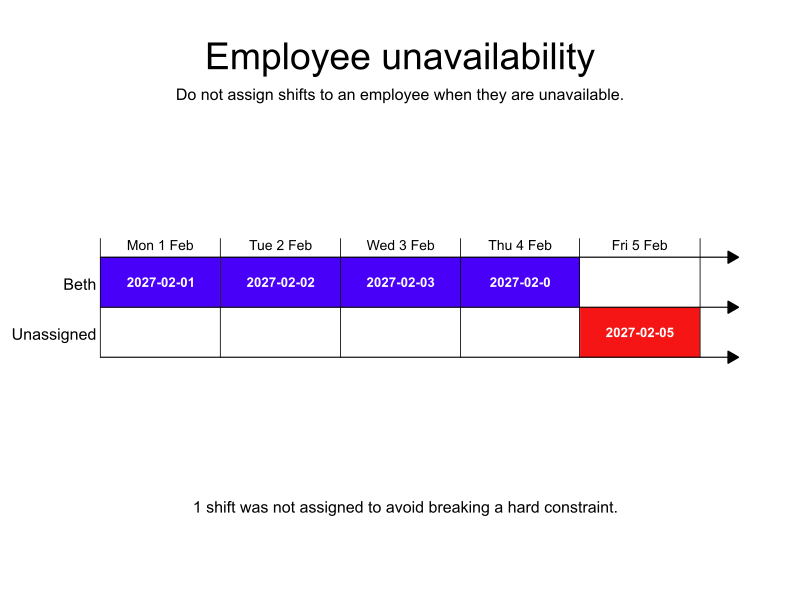
In the following example, Beth is a full-time employee and is generally available for any shift, however, on Friday she has a commitment that means she is not available to cover a shift.
The Monday to Thursday shifts are assigned to Beth, but the Friday shift is left unassigned.
Leaving the shift unassigned breaks the Unassigned mandatory shift medium constraint but the plan is still feasible.
-
Input
-
Output
Try this example in Timefold Platform by saving this JSON into a file called sample.json and make the following API call:
|
curl -X POST -H "Content-type: application/json" -H 'X-API-KEY: <API_KEY>' https://app.timefold.ai/api/models/employee-scheduling/v1/schedules [email protected]{
"config": {
"run": {
"name": "Unavailability example"
}
},
"modelInput": {
"employees": [
{
"id": "Beth",
"unavailableTimeSpans": [
{
"start": "2027-02-05T00:00:00Z",
"end": "2027-02-06T00:00:00Z"
}
]
}
],
"shifts": [
{
"id": "2027-02-01",
"start": "2027-02-01T09:00:00Z",
"end": "2027-02-01T17:00:00Z"
},
{
"id": "2027-02-02",
"start": "2027-02-02T09:00:00Z",
"end": "2027-02-02T17:00:00Z"
},
{
"id": "2027-02-03",
"start": "2027-02-03T09:00:00Z",
"end": "2027-02-03T17:00:00Z"
},
{
"id": "2027-02-04",
"start": "2027-02-04T09:00:00Z",
"end": "2027-02-04T17:00:00Z"
},
{
"id": "2027-02-05",
"start": "2027-02-05T09:00:00Z",
"end": "2027-02-05T17:00:00Z"
}
]
}
}
To request the solution, locate the ID from the response to the post operation and append it to the following API call:
|
curl -X GET -H 'X-API-KEY: <API_KEY>' https://app.timefold.ai/api/models/employee-scheduling/v1/schedules/<ID>{
"metadata": {
"id": "ID",
"name": "Unavailability example",
"submitDateTime": "2024-09-12T09:45:46.822999677Z",
"startDateTime": "2024-09-12T09:45:52.628925423Z",
"activeDateTime": "2024-09-12T09:45:52.728925423Z",
"completeDateTime": "2024-09-12T09:50:53.058023049Z",
"shutdownDateTime": "2024-09-12T09:50:53.158023049Z",
"solverStatus": "SOLVING_COMPLETED",
"score": "0hard/-10000medium/0soft",
"tags": null,
"validationResult": {
"summary": "OK"
}
},
"modelOutput": {
"shifts": [
{
"id": "2027-02-01",
"employee": "Beth"
},
{
"id": "2027-02-02",
"employee": "Beth"
},
{
"id": "2027-02-03",
"employee": "Beth"
},
{
"id": "2027-02-04",
"employee": "Beth"
},
{
"id": "2027-02-05",
"employee": null
}
]
},
"kpis": {
"unassignedShifts": 1
}
}modelOutput contains the employee shift schedule with Beth assigned to the shifts when she is available.
Employee availability times
Not all employees work full-time for a company. Contractors might only be required or are only available for certain periods of time.
An employee’s availability is defined by adding an availableTimeSpans array to the employee with a start and an end time for the period they are available.
Available periods can span multiple days.
{
  "employees": [
    {
      "id": "Carl",
      "availableTimeSpans": [
        {
          "start": "2027-02-02T00:00:00Z",
          "end": "2027-02-06T00:00:00Z"
        }
      ]
    }
  ]
}-
startis a date and time (in ISO 8601 date time with offset to UTC format) for the start of the period the employee is available. -
endis a date and time (exclusive) in ISO 8601 with date time offset to UTC for the end of the period the employee is available.
The Employee does not work during available time hard constraint is invoked when an assigned shift has some minutes not covered by the employee’s matching available time spans.
The constraint adds a hard penalty to the dataset score that is calculated by the number of uncovered shift minutes, incentivizing Timefold to assign employees only to shifts that fall within their declared availability.
Shifts will not be assigned if assigning the shift would break the Employee does not work during available time hard constraint.
Employee availability times example
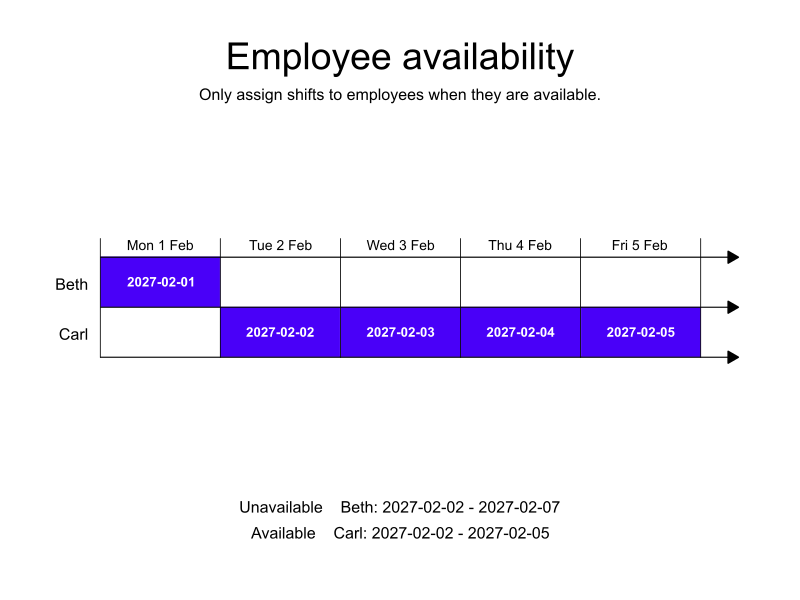
In the following example, Beth is a full-time employee. Carl is a contractor who works when Beth is unavailable.
Beth is only available on Monday. Carl is available from Tuesday to Friday.
The Monday shift is assigned to Beth, and the Tuesday to Friday shifts are assigned to Carl.
-
Input
-
Output
Try this example in Timefold Platform by saving this JSON into a file called sample.json and make the following API call:
|
curl -X POST -H "Content-type: application/json" -H 'X-API-KEY: <API_KEY>' https://app.timefold.ai/api/models/employee-scheduling/v1/schedules [email protected]{
"config": {
"run": {
"name": "Availability example"
}
},
"modelInput": {
"employees": [
{
"id": "Beth",
"unavailableTimeSpans": [
{
"start": "2027-02-02T00:00:00Z",
"end": "2027-02-08T00:00:00Z"
}
]
},
{
"id": "Carl",
"availableTimeSpans": [
{
"start": "2027-02-02T00:00:00Z",
"end": "2027-02-06T00:00:00Z"
}
]
}
],
"shifts": [
{
"id": "2027-02-01",
"start": "2027-02-01T09:00:00Z",
"end": "2027-02-01T17:00:00Z"
},
{
"id": "2027-02-02",
"start": "2027-02-02T09:00:00Z",
"end": "2027-02-02T17:00:00Z"
},
{
"id": "2027-02-03",
"start": "2027-02-03T09:00:00Z",
"end": "2027-02-03T17:00:00Z"
},
{
"id": "2027-02-04",
"start": "2027-02-04T09:00:00Z",
"end": "2027-02-04T17:00:00Z"
},
{
"id": "2027-02-05",
"start": "2027-02-05T09:00:00Z",
"end": "2027-02-05T17:00:00Z"
}
]
}
}
To request the solution, locate the ID from the response to the post operation and append it to the following API call:
|
curl -X GET -H 'X-API-KEY: <API_KEY>' https://app.timefold.ai/api/models/employee-scheduling/v1/schedules/<ID>{
"metadata": {
"id": "ID",
"name": "Availability example",
"submitDateTime": "2024-09-12T09:55:53.15634866Z",
"startDateTime": "2024-09-12T09:55:58.934451453Z",
"activeDateTime": "2024-09-12T09:55:59.034451453Z",
"completeDateTime": "2024-09-12T10:00:59.512605369Z",
"shutdownDateTime": "2024-09-12T10:00:59.612605369Z",
"solverStatus": "SOLVING_COMPLETED",
"score": "0hard/0medium/0soft",
"tags": null,
"validationResult": {
"summary": "OK"
}
},
"modelOutput": {
"shifts": [
{
"id": "2027-02-01",
"employee": "Beth"
},
{
"id": "2027-02-02",
"employee": "Carl"
},
{
"id": "2027-02-03",
"employee": "Carl"
},
{
"id": "2027-02-04",
"employee": "Carl"
},
{
"id": "2027-02-05",
"employee": "Carl"
}
]
},
"kpis": {
"unassignedShifts": 0
}
}modelOutput contains the employee shift schedule with Beth and Carl assigned to shifts that match their availability as defined by Beth’s unavailableTimeSpans and Carl’s availableTimeSpans.
Filtering availability with tags
Tags can be added to availableTimeSpans and unavailableTimeSpans to control which shifts the availability time spans apply to.
For instance, Beth is unavailable for a week, and her shifts must be assigned to a contractor to avoid assigning another full-time employee (and leaving that employee’s regular shifts unassigned).
The contractor who is assigned the shifts must be able to travel to the company’s central office.
Beth’s regular shifts are tagged with "location central":
{
  "shifts": [
    {
      "id": "2027-02-01",
      "start": "2027-02-01T09:00:00Z",
      "end": "2027-02-01T17:00:00Z",
      "tags": [
        "location central"
      ]
    }
  ]
}
Carl and Ann are both available.
Carl can travel to the central office and his availability includes "includeShiftTags": [ "location central" ].
Ann is also available, but she cannot travel to the central office, so her availability includes "excludeShiftTags": [ "location central" ].
includeShiftTags and excludeShiftTags can both be used in the same dataset, but they can’t be used in combination. That is, because Carl’s availableTimeSpans uses includeShiftTags, it can’t also use excludeShiftTags. Similarly, because Ann’s availableTimeSpans uses excludeShiftTags, it can’t also use includeShiftTags.
|
{
  "employees": [
    {
      "id": "Beth",
      "unavailableTimeSpans": [
        {
          "start": "2027-02-01T00:00:00Z",
          "end": "2027-02-06T00:00:00Z"
        }
      ]
    },
    {
      "id": "Carl",
      "availableTimeSpans": [
        {
          "start": "2027-02-02T00:00:00Z",
          "end": "2027-02-06T00:00:00Z",
          "includeShiftTags": [ "location central" ]
        }
      ]
    },
    {
      "id": "Ann",
      "availableTimeSpans": [
        {
          "start": "2027-02-02T00:00:00Z",
          "end": "2027-02-06T00:00:00Z",
          "excludeShiftTags": [ "location central" ]
        }
      ]
    }
  ]
}
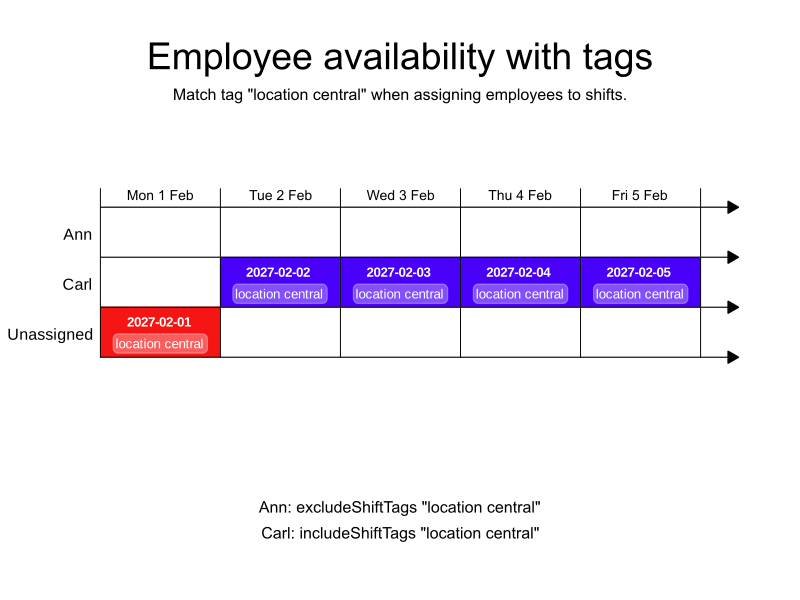
In this instance, Carl is assigned the shifts because he can travel to the central office, however, Carl isn’t available for the Monday shift. Even though Ann is available on Monday, she cannot travel to the central office, and she is not assigned the shift.
-
Input
-
Output
Try this example in Timefold Platform by saving this JSON into a file called sample.json and make the following API call:
|
curl -X POST -H "Content-type: application/json" -H 'X-API-KEY: <API_KEY>' https://app.timefold.ai/api/models/employee-scheduling/v1/schedules [email protected]{
"config": {
"run": {
"name": "Availability with Tags example"
}
},
"modelInput": {
"employees": [
{
"id": "Beth",
"unavailableTimeSpans": [
{
"start": "2027-02-01T00:00:00Z",
"end": "2027-02-08T00:00:00Z"
}
]
},
{
"id": "Carl",
"availableTimeSpans": [
{
"start": "2027-02-02T00:00:00Z",
"end": "2027-02-06T00:00:00Z",
"includeShiftTags": [ "location central" ]
}
]
},
{
"id": "Ann",
"availableTimeSpans": [
{
"start": "2027-02-01T00:00:00Z",
"end": "2027-02-06T00:00:00Z",
"excludeShiftTags": [ "location central" ]
}
]
}
],
"shifts": [
{
"id": "2027-02-01",
"start": "2027-02-01T09:00:00Z",
"end": "2027-02-01T17:00:00Z",
"tags": [
"location central"
]
},
{
"id": "2027-02-02",
"start": "2027-02-02T09:00:00Z",
"end": "2027-02-02T17:00:00Z",
"tags": [
"location central"
]
},
{
"id": "2027-02-03",
"start": "2027-02-03T09:00:00Z",
"end": "2027-02-03T17:00:00Z",
"tags": [
"location central"
]
},
{
"id": "2027-02-04",
"start": "2027-02-04T09:00:00Z",
"end": "2027-02-04T17:00:00Z",
"tags": [
"location central"
]
},
{
"id": "2027-02-05",
"start": "2027-02-05T09:00:00Z",
"end": "2027-02-05T17:00:00Z",
"tags": [
"location central"
]
}
]
}
}
To request the solution, locate the ID from the response to the post operation and append it to the following API call:
|
curl -X GET -H 'X-API-KEY: <API_KEY>' https://app.timefold.ai/api/models/employee-scheduling/v1/schedules/<ID>{
"metadata": {
"id": "ID",
"name": "Availability with Tags example",
"submitDateTime": "2024-09-24T05:10:39.287389671Z",
"startDateTime": "2024-09-24T05:10:47.173446864Z",
"activeDateTime": "2024-09-24T05:10:47.273446864Z",
"completeDateTime": "2024-09-24T05:15:47.71357411Z",
"shutdownDateTime": "2024-09-24T05:15:47.81357411Z",
"solverStatus": "SOLVING_COMPLETED",
"score": "0hard/-1medium/0soft",
"tags": null,
"validationResult": {
"summary": "OK"
}
},
"modelOutput": {
"shifts": [
{
"id": "2027-02-01",
"employee": null
},
{
"id": "2027-02-02",
"employee": "Carl"
},
{
"id": "2027-02-03",
"employee": "Carl"
},
{
"id": "2027-02-04",
"employee": "Carl"
},
{
"id": "2027-02-05",
"employee": "Carl"
}
]
},
"kpis": {
"unassignedShifts": 1
}
}modelOutput contains the employee shift schedule with Carl assigned to the shifts when he is available, and the Monday shift left unassigned because Beth is unavailable and Ann’s availability isn’t for shifts tagged "location central".
If shifts have multiple tags, you decide whether to match ALL or ANY of the tags based on employee availability by including shiftTagMatches.
{
  "availableTimeSpans": [
    {
      "start": "2027-02-01T00:00:00Z",
      "end": "2027-02-03T00:00:00Z",
      "includeShiftTags": [
        "department a",
        "location central"
      ],
      "shiftTagMatches": "ALL"
    }
  ]
}
With shiftTagMatches set to "ALL", a shift must include all the tags defined by the employee to match.
With shiftTagMatches set to "ANY", a shift must include at least one of the tags defined by the employee to match.
If shiftTagMatches is not included in the modelInput, all tags must match.
Next
-
See the full API spec, try the online API, or start a free trial.
-
Learn more about employee shift scheduling from our YouTube playlist.