Lunch breaks and personal appointments
It’s important in any pick-up and delivery routing solution to schedule breaks for drivers.
Drivers who work an eight-hour shift need a lunch break. Lunch breaks can be floating breaks that fit in around the assigned stops and are taken at any location.
Drivers may also need to attend appointments that can’t be arranged outside their regular work hours and must be included in their schedules, including travel time from their last stop to the appointment and from the appointment to the next stop..
Use cases for this feature include:
-
A driver working a long shift needs a floating lunch break that can be taken at any point within a defined time window.
-
A driver has a personal appointment at a fixed time and location, such as a dentist visit, and travel time to the appointment must be included in their schedule.
-
A driver has an appointment at a location they prefer not to share with their employer, such as a medical appointment or job interview.
-
Certain jobs, such as transporting passengers, cannot be interrupted by a break, while others, such as transporting goods, can.
This guide explains how to manage breaks with the following:
Defining breaks
Learn how to configure an API Key to run the examples in this guide:
In the examples, replace |
Breaks are defined in the requiredBreaks array of a shift and can be either FLOATING or FIXED.
Floating breaks
Floating breaks are defined in requiredBreaks with type FLOATING and must include minStartTime and maxEndTime.
{
  "shifts": [
    {
      "requiredBreaks": [
        {
          "id": "Ann Mon Lunch",
          "type": "FLOATING",
          "minStartTime": "2027-02-01T12:00:00Z",
          "maxEndTime": "2027-02-01T14:00:00Z",
          "duration": "PT1H"
        }
      ]
    }
  ]
}
At a minimum, requiredBreaks include, id, type, minStartTime, and duration.
maxEndTime is optional, but if it isn’t included, it’s possible the driver’s lunch break won’t be scheduled until the final hour of the day.
-
idis a unique string that identifies the break, for instance:Ann Mon. -
typecan beFLOATINGorFIXED. Floating breaks use typeFLOATING. -
minStartTimeis a date and time (in ISO 8601 date time with offset to UTC format) for the earliest time the break can start. -
maxEndTimeis a date and time (in ISO 8601 date time with offset to UTC format) for the latest time (exclusive) the break can end. -
durationrepresents the length of the break in ISO 8601 duration format.
Fixed breaks
Fixed breaks are defined in requiredBreaks with type FIXED and must include startTime and endTime, and can optionally include a location.
{
  "shifts": [
    {
      "requiredBreaks": [
        {
          "id": "Ann Dentist",
          "type": "FIXED",
          "startTime": "2027-02-01T14:00:00Z",
          "endTime": "2027-02-01T15:00:00Z",
          "location": [33.79438, -84.13629]
        }
      ]
    }
  ]
}-
idis a unique string that identifies the break, for instance:Ann Dentist. -
typecan beFLOATINGorFIXED. Fixed breaks use typeFIXED. -
startTimeis a date and time (in ISO 8601 date time with offset to UTC format) for the start time of the break. -
endTimeis a date and time (in ISO 8601 date time with offset to UTC format) for the end time (exclusive) of the break. -
locationis the location associated with the break.
Floating lunch breaks
Drivers' shifts run for a specific number of hours per day, for example from 09:00 to 17:00, and must include a break for lunch. It typically doesn’t matter exactly when the lunch break occurs, as long as it’s not too early or too late.
{
  "shifts": [
    {
      "requiredBreaks": [
        {
          "id": "Ann Mon Lunch",
          "type": "FLOATING",
          "minStartTime": "2027-02-01T12:00:00Z",
          "maxEndTime": "2027-02-01T14:00:00Z",
          "duration": "PT1H"
        }
      ]
    }
  ]
}
The Latest floating break end time hard constraint penalizes the solution with a hard score if the break ends after the maxEndTime.
Stops will be left unassigned if assigning them would break this constraint.
Floating lunch breaks example
In the following example, Ann works an eight-hour shift with a one-hour break for lunch that can occur between 12:00 and 14:00.. There are two jobs (Job A and Job B) with two stops each. The stops in Job A and Job B are scheduled first, Ann’s lunch break is scheduled at 12:42 and ends at 13:42, and Ann is free for another job.

-
Input
-
Output
Try this example in Timefold Platform by saving this JSON into a file called sample.json and make the following API call:
|
curl -X POST -H "Content-type: application/json" -H 'X-API-KEY: <API_KEY>' https://app.timefold.ai/api/models/pickup-delivery-routing/v1/route-plans [email protected]{
"config": {
"run": {
"name": "Floating break example"
}
},
"modelInput": {
"drivers": [
{
"id": "Ann",
"shifts": [
{
"id": "Ann Mon",
"startLocation": [33.77284, -84.42989],
"endLocation": [33.77284, -84.42989
],
"minStartTime": "2027-02-01T09:00:00Z",
"maxEndTime": "2027-02-01T17:00:00Z",
"requiredBreaks": [
{
"id": "Ann Mon Lunch",
"type": "FLOATING",
"minStartTime": "2027-02-01T12:00:00Z",
"maxEndTime": "2027-02-01T14:00:00Z",
"duration": "PT1H"
}
]
}
]
}
],
"jobs": [
{
"id": "Job A",
"stops": [
{
"id": "A1",
"location": [33.77911, -84.49644],
"duration": "PT20M"
},
{
"id": "A2",
"location": [33.65979, -84.46366],
"duration": "PT20M"
}
]
},
{
"id": "Job B",
"stops": [
{
"id": "B1",
"location": [34.11110, -84.43002],
"duration": "PT20M"
},
{
"id": "B2",
"location": [33.48594, -84.26560],
"duration": "PT20M"
}
]
}
]
}
}
To request the solution, locate the ID from the response to the post operation and append it to the following API call:
|
curl -X GET -H 'X-API-KEY: <API_KEY>' https://app.timefold.ai/api/models/pickup-delivery-routing/v1/route-plans/<ID>{
"metadata": {
"id": "ID",
"parentId": null,
"originId": "ID",
"name": "Floating break example",
"submitDateTime": "2025-08-05T06:01:57.647392593Z",
"startDateTime": "2025-08-05T06:03:30.535362699Z",
"activeDateTime": "2025-08-05T06:03:35.778590253Z",
"completeDateTime": "2025-08-05T06:03:37.449820561Z",
"shutdownDateTime": "2025-08-05T06:03:38.183414852Z",
"solverStatus": "SOLVING_COMPLETED",
"score": "0hard/0medium/-11055soft",
"tags": [
"system.type:from-request",
"system.profile:default"
],
"validationResult": {
"summary": "OK"
}
},
"modelOutput": {
"drivers": [
{
"id": "Ann",
"shifts": [
{
"id": "Ann Mon",
"startTime": "2027-02-01T09:00:00Z",
"itinerary": [
{
"id": "B1",
"arrivalTime": "2027-02-01T09:47:38Z",
"startServiceTime": "2027-02-01T09:47:38Z",
"departureTime": "2027-02-01T10:07:38Z",
"effectiveDuration": "PT20M",
"kind": "STOP",
"travelTimeFromPreviousStandstill": "PT47M38S",
"travelDistanceMetersFromPreviousStandstill": 55346
},
{
"id": "A1",
"arrivalTime": "2027-02-01T10:49:37Z",
"startServiceTime": "2027-02-01T10:49:37Z",
"departureTime": "2027-02-01T11:09:37Z",
"effectiveDuration": "PT20M",
"kind": "STOP",
"travelTimeFromPreviousStandstill": "PT41M59S",
"travelDistanceMetersFromPreviousStandstill": 52623
},
{
"id": "A2",
"arrivalTime": "2027-02-01T11:26:44Z",
"startServiceTime": "2027-02-01T11:26:44Z",
"departureTime": "2027-02-01T11:46:44Z",
"effectiveDuration": "PT20M",
"kind": "STOP",
"travelTimeFromPreviousStandstill": "PT17M7S",
"travelDistanceMetersFromPreviousStandstill": 18056
},
{
"id": "B2",
"arrivalTime": "2027-02-01T12:22:04Z",
"startServiceTime": "2027-02-01T12:22:04Z",
"departureTime": "2027-02-01T12:42:04Z",
"effectiveDuration": "PT20M",
"kind": "STOP",
"travelTimeFromPreviousStandstill": "PT35M20S",
"travelDistanceMetersFromPreviousStandstill": 34475
},
{
"id": "Ann Mon Lunch",
"kind": "BREAK",
"startTime": "2027-02-01T12:42:04Z",
"endTime": "2027-02-01T13:42:04Z"
}
],
"metrics": {
"totalTravelTime": "PT3H4M15S",
"travelTimeFromStartLocationToFirstStop": "PT47M38S",
"travelTimeBetweenStops": "PT1H34M26S",
"travelTimeFromLastStopToEndLocation": "PT42M11S",
"totalTravelDistanceMeters": 206990,
"travelDistanceFromStartLocationToFirstStopMeters": 55346,
"travelDistanceBetweenStopsMeters": 105154,
"travelDistanceFromLastStopToEndLocationMeters": 46490,
"endLocationArrivalTime": "2027-02-01T14:24:15Z",
"overtime": "PT0S"
}
}
]
}
]
},
"inputMetrics": {
"jobs": 2,
"mandatoryJobs": 2,
"optionalJobs": 0,
"stops": 4,
"drivers": 1,
"driverShifts": 1
},
"kpis": {
"totalTravelTime": "PT3H4M15S",
"travelTimeFromStartLocationToFirstStop": "PT47M38S",
"travelTimeBetweenStops": "PT1H34M26S",
"travelTimeFromLastStopToEndLocation": "PT42M11S",
"totalTravelDistanceMeters": 206990,
"travelDistanceFromStartLocationToFirstStopMeters": 55346,
"travelDistanceBetweenStopsMeters": 105154,
"travelDistanceFromLastStopToEndLocationMeters": 46490,
"totalUnassignedStops": 0,
"totalAssignedStops": 4,
"totalActivatedDrivers": 1,
"totalOvertime": "PT0S"
}
}Personal appointments with a location
Sometimes breaks are fixed and need to occur at a specific time and location, for instance, if a driver has a personal appointment, such as a visit to the dentist.
When this is the case, Timefold will schedule the break at the specified time and include travel time to the location.
{
  "shifts": [
    {
      "requiredBreaks": [
        {
          "id": "Ann Dentist",
          "type": "FIXED",
          "startTime": "2027-02-01T14:00:00Z",
          "endTime": "2027-02-01T15:00:00Z",
          "location": [33.79438, -84.13629]
        }
      ]
    }
  ]
}
The No conflict with fixed location break hard constraint penalizes the solution with a hard score if there is a conflict with the fixed break.
Stops will be left unassigned if assigning them would break this constraint.
Personal appointments with a location example
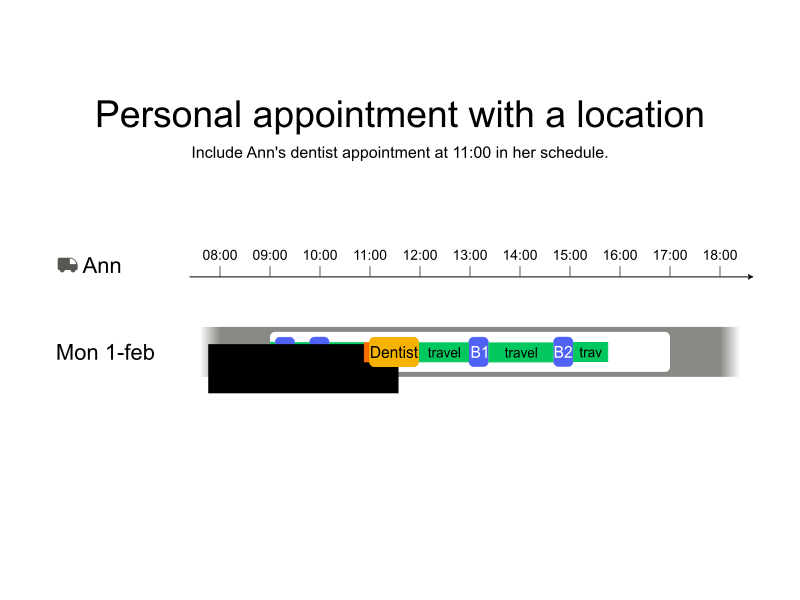
In the following example, Ann works an eight-hour shift, and she has a one-hour dentist appointment at 11:00. There are two jobs (Job A and Job B) with two stops each. The stops in Job A are scheduled first, Ann travels to the dentist’s location, but she arrives early and must wait. The appointment ends at 12:00 and Ann travels to the next stop in her shift.
-
Input
-
Output
Try this example in Timefold Platform by saving this JSON into a file called sample.json and make the following API call:
|
curl -X POST -H "Content-type: application/json" -H 'X-API-KEY: <API_KEY>' https://app.timefold.ai/api/models/pickup-delivery-routing/v1/route-plans [email protected]{
"config": {
"run": {
"name": "Appointment with location example"
}
},
"modelInput": {
"drivers": [
{
"id": "Ann",
"shifts": [
{
"id": "Ann Mon",
"startLocation": [33.77284, -84.42989],
"endLocation": [33.77284, -84.42989
],
"minStartTime": "2027-02-01T09:00:00Z",
"maxEndTime": "2027-02-01T17:00:00Z",
"requiredBreaks": [
{
"id": "Ann Dentist",
"type": "FIXED",
"startTime": "2027-02-01T11:00:00Z",
"endTime": "2027-02-01T12:00:00Z",
"location": [33.79438, -84.13629]
}
]
}
]
}
],
"jobs": [
{
"id": "Job A",
"stops": [
{
"id": "A1",
"location": [33.77911, -84.49644],
"duration": "PT20M"
},
{
"id": "A2",
"location": [33.65979, -84.46366],
"duration": "PT20M"
}
]
},
{
"id": "Job B",
"stops": [
{
"id": "B1",
"location": [34.11110, -84.43002],
"duration": "PT20M"
},
{
"id": "B2",
"location": [33.48594, -84.26560],
"duration": "PT20M"
}
]
}
]
}
}
To request the solution, locate the ID from the response to the post operation and append it to the following API call:
|
curl -X GET -H 'X-API-KEY: <API_KEY>' https://app.timefold.ai/api/models/pickup-delivery-routing/v1/route-plans/<ID>{
"metadata": {
"id": "ID",
"parentId": null,
"originId": "ID",
"name": "Appointment with location example",
"submitDateTime": "2025-08-05T08:24:44.76921252Z",
"startDateTime": "2025-08-05T08:24:50.226082186Z",
"activeDateTime": "2025-08-05T08:24:54.731469264Z",
"completeDateTime": "2025-08-05T08:29:00.207176157Z",
"shutdownDateTime": "2025-08-05T08:29:00.683458919Z",
"solverStatus": "SOLVING_COMPLETED",
"score": "0hard/0medium/-12486soft",
"tags": [
"system.type:from-request",
"system.profile:default"
],
"validationResult": {
"summary": "OK"
}
},
"modelOutput": {
"drivers": [
{
"id": "Ann",
"shifts": [
{
"id": "Ann Mon",
"startTime": "2027-02-01T09:00:00Z",
"itinerary": [
{
"id": "A1",
"arrivalTime": "2027-02-01T09:07:42Z",
"startServiceTime": "2027-02-01T09:07:42Z",
"departureTime": "2027-02-01T09:27:42Z",
"effectiveDuration": "PT20M",
"kind": "STOP",
"travelTimeFromPreviousStandstill": "PT7M42S",
"travelDistanceMetersFromPreviousStandstill": 7661
},
{
"id": "A2",
"arrivalTime": "2027-02-01T09:44:49Z",
"startServiceTime": "2027-02-01T09:44:49Z",
"departureTime": "2027-02-01T10:04:49Z",
"effectiveDuration": "PT20M",
"kind": "STOP",
"travelTimeFromPreviousStandstill": "PT17M7S",
"travelDistanceMetersFromPreviousStandstill": 18056
},
{
"id": "Ann Dentist",
"kind": "BREAK",
"startTime": "2027-02-01T11:00:00Z",
"endTime": "2027-02-01T12:00:00Z",
"travelTimeFromPreviousStandstill": "PT44M19S",
"travelDistanceMetersFromPreviousStandstill": 40283
},
{
"id": "B1",
"arrivalTime": "2027-02-01T13:00:26Z",
"startServiceTime": "2027-02-01T13:00:26Z",
"departureTime": "2027-02-01T13:20:26Z",
"effectiveDuration": "PT20M",
"kind": "STOP",
"travelTimeFromPreviousStandstill": "PT1H26S",
"travelDistanceMetersFromPreviousStandstill": 55479
},
{
"id": "B2",
"arrivalTime": "2027-02-01T14:41:06Z",
"startServiceTime": "2027-02-01T14:41:06Z",
"departureTime": "2027-02-01T15:01:06Z",
"effectiveDuration": "PT20M",
"kind": "STOP",
"travelTimeFromPreviousStandstill": "PT1H20M40S",
"travelDistanceMetersFromPreviousStandstill": 97259
}
],
"metrics": {
"totalTravelTime": "PT4H12M25S",
"travelTimeFromStartLocationToFirstStop": "PT7M42S",
"travelTimeBetweenStops": "PT3H22M32S",
"travelTimeFromLastStopToEndLocation": "PT42M11S",
"totalTravelDistanceMeters": 265228,
"travelDistanceFromStartLocationToFirstStopMeters": 7661,
"travelDistanceBetweenStopsMeters": 211077,
"travelDistanceFromLastStopToEndLocationMeters": 46490,
"endLocationArrivalTime": "2027-02-01T15:43:17Z",
"overtime": "PT0S"
}
}
]
}
]
},
"inputMetrics": {
"jobs": 2,
"mandatoryJobs": 2,
"optionalJobs": 0,
"stops": 4,
"drivers": 1,
"driverShifts": 1
},
"kpis": {
"totalTravelTime": "PT4H12M25S",
"travelTimeFromStartLocationToFirstStop": "PT7M42S",
"travelTimeBetweenStops": "PT3H22M32S",
"travelTimeFromLastStopToEndLocation": "PT42M11S",
"totalTravelDistanceMeters": 265228,
"travelDistanceFromStartLocationToFirstStopMeters": 7661,
"travelDistanceBetweenStopsMeters": 211077,
"travelDistanceFromLastStopToEndLocationMeters": 46490,
"totalUnassignedStops": 0,
"totalAssignedStops": 4,
"totalActivatedDrivers": 1,
"totalOvertime": "PT0S"
}
}Personal appointments without a location
There are occasions when employees need to attend appointments, but the location of the appointment is sensitive information, for instance, if they are receiving medical treatment or attending a job interview, and they do not share the location with their employer.
When the location for a fixed appointment isn’t provided, Timefold can’t schedule travel time.
{
  "shifts": [
    {
      "requiredBreaks": [
        {
          "id": "Ann Apt",
          "type": "FIXED",
          "policy": "PERMIT_JOBS",
          "startTime": "2027-02-01T11:00:00Z",
          "endTime": "2027-02-01T12:00:00Z"
        }
      ]
    }
  ]
}
The No conflict with fixed break hard constraint penalizes the solution with a hard score if there is a conflict with the fixed break.
Stops will be left unassigned if assigning them would break this constraint.
|
Sharing the location of appointments with their employer is a change for many employees who are used to systems where this isn’t required. If employees are comfortable sharing their location, travel time can be included and padding becomes unnecessary. The schedule will then include less driving time and more time available for customer visits. |
Personal appointments without a location example
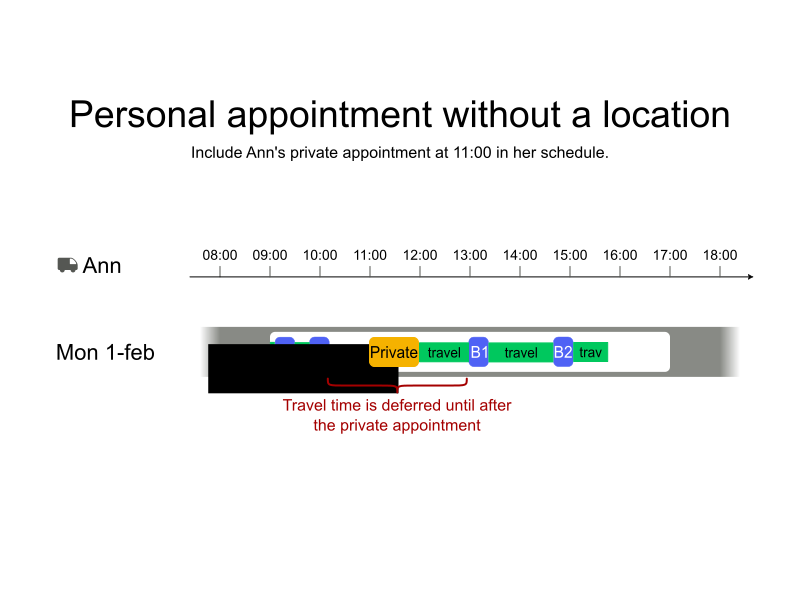
As with the previous example, Ann has a one-hour appointment at 11:00, but this time she hasn’t provided the location. There are two jobs (Job A and Job B) with two stops each. The stops in Job A are scheduled first, Ann then has between 10:04 and 11:00 to travel to her appointment. Without the location information, Timefold delays travel from Stop A2 to Stop B1 until after the appointment.
However, this approach may not provide enough travel time to reach the appointment, and the travel time from the appointment to Stop B is unlikely to be accurate. In such situations, it may be necessary to pad the appointment to provide additional travel time.
-
Input
-
Output
Try this example in Timefold Platform by saving this JSON into a file called sample.json and make the following API call:
|
curl -X POST -H "Content-type: application/json" -H 'X-API-KEY: <API_KEY>' https://app.timefold.ai/api/models/pickup-delivery-routing/v1/route-plans [email protected]{
"config": {
"run": {
"name": "Appointment with no location example"
}
},
"modelInput": {
"drivers": [
{
"id": "Ann",
"shifts": [
{
"id": "Ann Mon",
"startLocation": [33.77284, -84.42989],
"endLocation": [33.77284, -84.42989
],
"minStartTime": "2027-02-01T09:00:00Z",
"maxEndTime": "2027-02-01T17:00:00Z",
"requiredBreaks": [
{
"id": "Ann apt",
"type": "FIXED",
"policy": "PERMIT_JOBS",
"startTime": "2027-02-01T11:00:00Z",
"endTime": "2027-02-01T12:00:00Z"
}
]
}
]
}
],
"jobs": [
{
"id": "Job A",
"stops": [
{
"id": "A1",
"location": [33.77911, -84.49644],
"duration": "PT20M"
},
{
"id": "A2",
"location": [33.65979, -84.46366],
"duration": "PT20M"
}
]
},
{
"id": "Job B",
"stops": [
{
"id": "B1",
"location": [34.11110, -84.43002],
"duration": "PT20M"
},
{
"id": "B2",
"location": [33.48594, -84.26560],
"duration": "PT20M"
}
]
}
]
}
}
To request the solution, locate the ID from the response to the post operation and append it to the following API call:
|
curl -X GET -H 'X-API-KEY: <API_KEY>' https://app.timefold.ai/api/models/pickup-delivery-routing/v1/route-plans/<ID>{
"metadata": {
"id": "ID",
"parentId": null,
"originId": "ID",
"name": "Appointment with no location example",
"submitDateTime": "2025-08-05T09:26:04.038994932Z",
"startDateTime": "2025-08-05T09:27:38.488297635Z",
"activeDateTime": "2025-08-05T09:27:44.128400813Z",
"shutdownDateTime": "2025-08-05T09:31:22.296055Z",
"solverStatus": "SOLVING_COMPLETED",
"score": "0hard/0medium/-12401soft",
"tags": [
"system.type:from-request",
"system.profile:default"
],
"validationResult": {
"summary": "OK"
}
},
"modelOutput": {
"drivers": [
{
"id": "Ann",
"shifts": [
{
"id": "Ann Mon",
"startTime": "2027-02-01T09:00:00Z",
"itinerary": [
{
"id": "A1",
"arrivalTime": "2027-02-01T09:07:42Z",
"startServiceTime": "2027-02-01T09:07:42Z",
"departureTime": "2027-02-01T09:27:42Z",
"effectiveDuration": "PT20M",
"kind": "STOP",
"travelTimeFromPreviousStandstill": "PT7M42S",
"travelDistanceMetersFromPreviousStandstill": 7661
},
{
"id": "A2",
"arrivalTime": "2027-02-01T09:44:49Z",
"startServiceTime": "2027-02-01T09:44:49Z",
"departureTime": "2027-02-01T10:04:49Z",
"effectiveDuration": "PT20M",
"kind": "STOP",
"travelTimeFromPreviousStandstill": "PT17M7S",
"travelDistanceMetersFromPreviousStandstill": 18056
},
{
"id": "Ann apt",
"kind": "BREAK",
"startTime": "2027-02-01T11:00:00Z",
"endTime": "2027-02-01T12:00:00Z"
},
{
"id": "B1",
"arrivalTime": "2027-02-01T12:59:01Z",
"startServiceTime": "2027-02-01T12:59:01Z",
"departureTime": "2027-02-01T13:19:01Z",
"effectiveDuration": "PT20M",
"kind": "STOP",
"travelTimeFromPreviousStandstill": "PT59M1S",
"travelDistanceMetersFromPreviousStandstill": 70725
},
{
"id": "B2",
"arrivalTime": "2027-02-01T14:39:41Z",
"startServiceTime": "2027-02-01T14:39:41Z",
"departureTime": "2027-02-01T14:59:41Z",
"effectiveDuration": "PT20M",
"kind": "STOP",
"travelTimeFromPreviousStandstill": "PT1H20M40S",
"travelDistanceMetersFromPreviousStandstill": 97259
}
],
"metrics": {
"totalTravelTime": "PT3H26M41S",
"travelTimeFromStartLocationToFirstStop": "PT7M42S",
"travelTimeBetweenStops": "PT2H36M48S",
"travelTimeFromLastStopToEndLocation": "PT42M11S",
"totalTravelDistanceMeters": 240191,
"travelDistanceFromStartLocationToFirstStopMeters": 7661,
"travelDistanceBetweenStopsMeters": 186040,
"travelDistanceFromLastStopToEndLocationMeters": 46490,
"endLocationArrivalTime": "2027-02-01T15:41:52Z",
"overtime": "PT0S"
}
}
]
}
]
},
"inputMetrics": {
"jobs": 2,
"mandatoryJobs": 2,
"optionalJobs": 0,
"stops": 4,
"drivers": 1,
"driverShifts": 1
},
"kpis": {
"totalTravelTime": "PT3H26M41S",
"travelTimeFromStartLocationToFirstStop": "PT7M42S",
"travelTimeBetweenStops": "PT2H36M48S",
"travelTimeFromLastStopToEndLocation": "PT42M11S",
"totalTravelDistanceMeters": 240191,
"travelDistanceFromStartLocationToFirstStopMeters": 7661,
"travelDistanceBetweenStopsMeters": 186040,
"travelDistanceFromLastStopToEndLocationMeters": 46490,
"totalUnassignedStops": 0,
"totalAssignedStops": 4,
"totalActivatedDrivers": 1,
"totalOvertime": "PT0S"
}
}Allowing and disallowing breaks during jobs
There are different circumstances when jobs allow or do not allow drivers to take breaks. For instance:
-
Drivers can take a break during a job transporting goods.
-
Drivers cannot take a break during a job transporting passengers.
The No fixed break during job and No floating break during job hard constraints penalize solutions with a hard score if a break is assigned during a job which does not permit breaks, or if a break with REJECT_JOBS policy overlaps a job.
Jobs can specify when breaks are or are not allowed to take place during the job by adding allowInterruption and specifying NONE or BREAKS:
{
  "id": "Job A",
  "allowInterruption": "NONE",
  "stops": [
    {
      "id": "A1",
      "location": [33.77911, -84.49644],
      "duration": "PT20M"
    },
    {
      "id": "A2",
      "location": [33.65979, -84.46366],
      "duration": "PT20M"
    }
  ]
}-
NONEprevents breaks from being assigned during the job. -
BREAKSallows breaks to be assigned during the job.
If omitted, the default behavior is NONE.
There are also times when breaks must not be assigned during a job. For instance:
-
The driver’s vehicle must stop for maintenance and cannot have passengers or goods onboard.
requiredBreaks (both fixed and floating) can specify if the break can be taken during a job or not by adding policy and specifying PERMIT_JOBS or REJECT_JOBS:
{
  "requiredBreaks": [
    {
      "id": "Ann apt",
      "type": "FIXED",
      "policy": "PERMIT_JOBS",
      "startTime": "2027-02-01T11:00:00Z",
      "endTime": "2027-02-01T12:00:00Z"
    }
  ]
}-
PERMIT_JOBSmeans that the break can be assigned during a job, provided the job permits it. -
REJECT_JOBSmeans that the break cannot be assigned during a job, even when jobs permit breaks.
If omitted, the default behavior is PERMIT_JOBS.
No fixed break during job
The No fixed break during job hard constraint penalizes the solution with a hard score if a fixed break overlaps a job when either the job does not permit breaks (allowInterruption: NONE), or the break has a REJECT_JOBS policy.
Stops will be left unassigned if assigning them would break the constraint.
No fixed break during job example
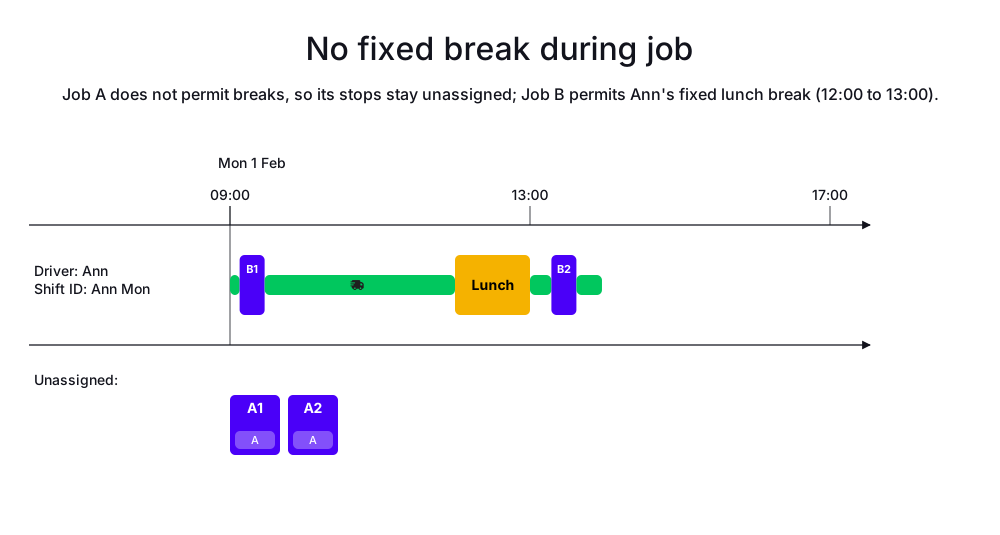
In the following example, there are 2 jobs (Job A and Job B) with 2 stops each. Job A does not permit breaks, and Job B does permit breaks. Ann has a fixed break for a personal appointment at 12:00.
Job B is assigned to Ann, and the fixed break is scheduled at 12:00, but Job A is left unassigned because it does not permit breaks and cannot be scheduled without breaking the constraint.
-
Input
-
Output
Try this example in Timefold Platform by saving this JSON into a file called sample.json and make the following API call:
|
curl -X POST -H "Content-type: application/json" -H 'X-API-KEY: <API_KEY>' https://app.timefold.ai/api/models/pickup-delivery-routing/v1/route-plans [email protected]{
"config": {
"run": {
"name": "No fixed break during job"
}
},
"modelInput": {
"drivers": [
{
"id": "Ann",
"shifts": [
{
"id": "Ann Mon",
"startLocation": [33.77284, -84.42989],
"endLocation": [33.77284, -84.42989],
"minStartTime": "2027-02-01T09:00:00Z",
"maxEndTime": "2027-02-01T17:00:00Z",
"requiredBreaks": [
{
"id": "Ann Mon Appointment",
"type": "FIXED",
"startTime": "2027-02-01T12:00:00Z",
"endTime": "2027-02-01T13:00:00Z"
}
]
}
]
}
],
"jobs": [
{
"id": "Job A",
"allowInterruption": "NONE",
"stops": [
{
"id": "A1",
"location": [33.77911, -84.49644],
"duration": "PT20M",
"timeWindows": [
{
"minStartTime": "2027-02-01T09:00:00Z",
"maxStartTime": "2027-02-01T10:00:00Z",
"maxEndTime": "2027-02-01T10:30:00Z"
}
]
},
{
"id": "A2",
"location": [33.65979, -84.46366],
"duration": "PT20M",
"timeWindows": [
{
"minStartTime": "2027-02-01T13:00:00Z",
"maxStartTime": "2027-02-01T13:30:00Z",
"maxEndTime": "2027-02-01T14:00:00Z"
}
]
}
]
},
{
"id": "Job B",
"allowInterruption": "BREAKS",
"stops": [
{
"id": "B1",
"location": [33.77911, -84.49644],
"duration": "PT20M",
"timeWindows": [
{
"minStartTime": "2027-02-01T09:00:00Z",
"maxStartTime": "2027-02-01T10:00:00Z",
"maxEndTime": "2027-02-01T10:30:00Z"
}
]
},
{
"id": "B2",
"location": [33.65979, -84.46366],
"duration": "PT20M",
"timeWindows": [
{
"minStartTime": "2027-02-01T13:00:00Z",
"maxStartTime": "2027-02-01T13:30:00Z",
"maxEndTime": "2027-02-01T14:00:00Z"
}
]
}
]
}
]
}
}
To request the solution, locate the ID from the response to the post operation and append it to the following API call:
|
curl -X GET -H 'X-API-KEY: <API_KEY>' https://app.timefold.ai/api/models/pickup-delivery-routing/v1/route-plans/<ID>{
"metadata": {
"id": "ID",
"originId": "ID",
"name": "No fixed break during job",
"submitDateTime": "2026-07-14T05:19:05.341362457Z",
"startDateTime": "2026-07-14T05:19:23.096140125Z",
"activeDateTime": "2026-07-14T05:19:23.190124746Z",
"completeDateTime": "2026-07-14T05:19:53.552762358Z",
"shutdownDateTime": "2026-07-14T05:19:53.552765914Z",
"solverStatus": "SOLVING_COMPLETED",
"score": "0hard/-20000medium/-2717soft",
"tags": [
"system.type:from-request",
"system.profile:Standard profile"
],
"validationResult": {
"summary": "OK"
}
},
"modelOutput": {
"drivers": [
{
"id": "Ann",
"shifts": [
{
"id": "Ann Mon",
"startTime": "2027-02-01T09:00:00Z",
"itinerary": [
{
"id": "B1",
"arrivalTime": "2027-02-01T09:07:42Z",
"startServiceTime": "2027-02-01T09:07:42Z",
"departureTime": "2027-02-01T09:27:42Z",
"effectiveDuration": "PT20M",
"travelTimeFromPreviousStandstill": "PT7M42S",
"travelDistanceMetersFromPreviousStandstill": 7661,
"minStartTravelTime": "2027-02-01T00:00:00Z",
"load": [],
"kind": "STOP"
},
{
"id": "Ann Mon Appointment",
"startTime": "2027-02-01T12:00:00Z",
"endTime": "2027-02-01T13:00:00Z",
"kind": "BREAK"
},
{
"id": "B2",
"arrivalTime": "2027-02-01T13:17:07Z",
"startServiceTime": "2027-02-01T13:17:07Z",
"departureTime": "2027-02-01T13:37:07Z",
"effectiveDuration": "PT20M",
"travelTimeFromPreviousStandstill": "PT17M7S",
"travelDistanceMetersFromPreviousStandstill": 18057,
"minStartTravelTime": "2027-02-01T00:00:00Z",
"load": [],
"kind": "STOP"
}
],
"metrics": {
"totalTravelTime": "PT45M17S",
"travelTimeFromStartLocationToFirstStop": "PT7M42S",
"travelTimeBetweenStops": "PT17M7S",
"travelTimeFromLastStopToEndLocation": "PT20M28S",
"totalTravelDistanceMeters": 42081,
"travelDistanceFromStartLocationToFirstStopMeters": 7661,
"travelDistanceBetweenStopsMeters": 18057,
"travelDistanceFromLastStopToEndLocationMeters": 16363,
"endLocationArrivalTime": "2027-02-01T13:57:35Z",
"overtime": "PT0S"
}
}
]
}
],
"unassignedJobs": [
{
"id": "Job A",
"unassignedStops": [
"A1",
"A2"
]
}
]
},
"inputMetrics": {
"jobs": 2,
"mandatoryJobs": 2,
"optionalJobs": 0,
"stops": 4,
"drivers": 1,
"driverShifts": 1,
"pinnedStops": 0
},
"kpis": {
"totalTravelTime": "PT45M17S",
"travelTimeFromStartLocationToFirstStop": "PT7M42S",
"travelTimeBetweenStops": "PT17M7S",
"travelTimeFromLastStopToEndLocation": "PT20M28S",
"totalTravelDistanceMeters": 42081,
"travelDistanceFromStartLocationToFirstStopMeters": 7661,
"travelDistanceBetweenStopsMeters": 18057,
"travelDistanceFromLastStopToEndLocationMeters": 16363,
"totalUnassignedJobs": 1,
"totalAssignedJobs": 1,
"assignedMandatoryJobs": 1,
"totalUnassignedStops": 2,
"totalAssignedStops": 2,
"assignedMandatoryStops": 2,
"totalActivatedDrivers": 1,
"totalOvertime": "PT0S"
},
"run": {
"id": "ID",
"originId": "ID",
"name": "No fixed break during job",
"submitDateTime": "2026-07-14T05:19:05.341362457Z",
"startDateTime": "2026-07-14T05:19:23.096140125Z",
"activeDateTime": "2026-07-14T05:19:23.190124746Z",
"completeDateTime": "2026-07-14T05:19:53.552762358Z",
"shutdownDateTime": "2026-07-14T05:19:53.552765914Z",
"solverStatus": "SOLVING_COMPLETED",
"score": "0hard/-20000medium/-2717soft",
"tags": [
"system.type:from-request",
"system.profile:Standard profile"
],
"validationResult": {
"summary": "OK"
}
}
}No floating break during job
The No floating break during job hard constraint penalizes the solution with a hard score if a floating break overlaps a job when either the job does not permit breaks (allowInterruption: NONE), or the break has a REJECT_JOBS policy.
Stops will be left unassigned if assigning them would break this constraint.
No floating break during job example
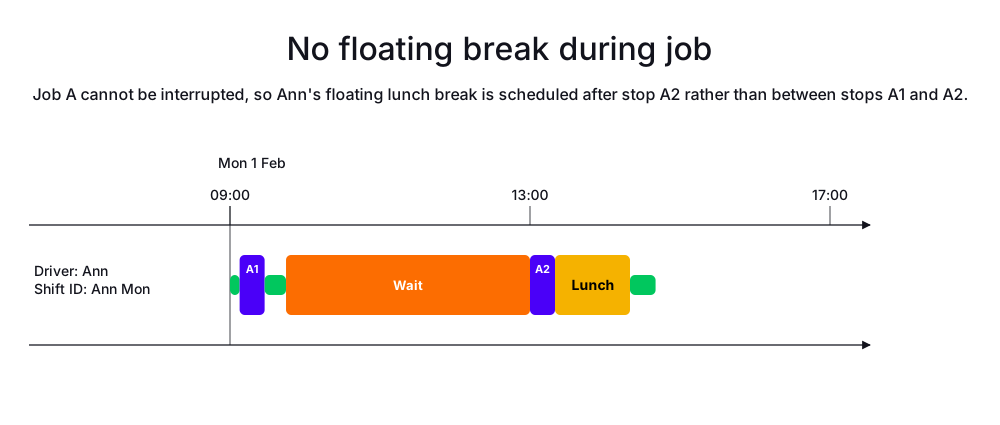
In the following example, Job A does not permit breaks. Stop A1 has a time window from 09:00 to 10:00, and stop A2 has a time window from 13:00 to 13:30. Ann has a floating break for lunch that can occur between 12:00 and 15:00. Because Job A does not permit breaks, the floating break is scheduled at 13:20, after stop A2.
-
Input
-
Output
Try this example in Timefold Platform by saving this JSON into a file called sample.json and make the following API call:
|
curl -X POST -H "Content-type: application/json" -H 'X-API-KEY: <API_KEY>' https://app.timefold.ai/api/models/pickup-delivery-routing/v1/route-plans [email protected]{
"config": {
"run": {
"name": "No floating break during job"
}
},
"modelInput": {
"drivers": [
{
"id": "Ann",
"shifts": [
{
"id": "Ann Mon",
"startLocation": [33.77284, -84.42989],
"endLocation": [33.77284, -84.42989],
"minStartTime": "2027-02-01T09:00:00Z",
"maxEndTime": "2027-02-01T17:00:00Z",
"requiredBreaks": [
{
"id": "Ann Mon Lunch",
"type": "FLOATING",
"minStartTime": "2027-02-01T12:00:00Z",
"maxEndTime": "2027-02-01T15:00:00Z",
"duration": "PT1H"
}
]
}
]
}
],
"jobs": [
{
"id": "Job A",
"allowInterruption": "NONE",
"stops": [
{
"id": "A1",
"location": [33.77911, -84.49644],
"duration": "PT20M",
"timeWindows": [
{
"minStartTime": "2027-02-01T09:00:00Z",
"maxStartTime": "2027-02-01T10:00:00Z",
"maxEndTime": "2027-02-01T10:30:00Z"
}
]
},
{
"id": "A2",
"location": [33.65979, -84.46366],
"duration": "PT20M",
"timeWindows": [
{
"minStartTime": "2027-02-01T13:00:00Z",
"maxStartTime": "2027-02-01T13:30:00Z",
"maxEndTime": "2027-02-01T14:00:00Z"
}
]
}
]
}
]
}
}
To request the solution, locate the ID from the response to the post operation and append it to the following API call:
|
curl -X GET -H 'X-API-KEY: <API_KEY>' https://app.timefold.ai/api/models/pickup-delivery-routing/v1/route-plans/<ID>{
"metadata": {
"id": "ID",
"originId": "ID",
"name": "No floating break during job",
"submitDateTime": "2026-07-13T08:11:17.462876795Z",
"startDateTime": "2026-07-13T08:12:11.413126733Z",
"activeDateTime": "2026-07-13T08:12:11.500920516Z",
"completeDateTime": "2026-07-13T08:12:41.883698386Z",
"shutdownDateTime": "2026-07-13T08:12:41.883701968Z",
"solverStatus": "SOLVING_COMPLETED",
"score": "0hard/0medium/-2717soft",
"tags": [
"system.type:from-request",
"system.profile:Standard profile"
],
"validationResult": {
"summary": "OK"
}
},
"modelOutput": {
"drivers": [
{
"id": "Ann",
"shifts": [
{
"id": "Ann Mon",
"startTime": "2027-02-01T09:00:00Z",
"itinerary": [
{
"id": "A1",
"arrivalTime": "2027-02-01T09:07:42Z",
"startServiceTime": "2027-02-01T09:07:42Z",
"departureTime": "2027-02-01T09:27:42Z",
"effectiveDuration": "PT20M",
"travelTimeFromPreviousStandstill": "PT7M42S",
"travelDistanceMetersFromPreviousStandstill": 7661,
"minStartTravelTime": "2027-02-01T00:00:00Z",
"load": [],
"kind": "STOP"
},
{
"id": "A2",
"arrivalTime": "2027-02-01T09:44:49Z",
"startServiceTime": "2027-02-01T13:00:00Z",
"departureTime": "2027-02-01T13:20:00Z",
"effectiveDuration": "PT20M",
"travelTimeFromPreviousStandstill": "PT17M7S",
"travelDistanceMetersFromPreviousStandstill": 18057,
"minStartTravelTime": "2027-02-01T00:00:00Z",
"load": [],
"kind": "STOP"
},
{
"id": "Ann Mon Lunch",
"startTime": "2027-02-01T13:20:00Z",
"endTime": "2027-02-01T14:20:00Z",
"kind": "BREAK"
}
],
"metrics": {
"totalTravelTime": "PT45M17S",
"travelTimeFromStartLocationToFirstStop": "PT7M42S",
"travelTimeBetweenStops": "PT17M7S",
"travelTimeFromLastStopToEndLocation": "PT20M28S",
"totalTravelDistanceMeters": 42081,
"travelDistanceFromStartLocationToFirstStopMeters": 7661,
"travelDistanceBetweenStopsMeters": 18057,
"travelDistanceFromLastStopToEndLocationMeters": 16363,
"endLocationArrivalTime": "2027-02-01T14:40:28Z",
"overtime": "PT0S"
}
}
]
}
],
"unassignedJobs": []
},
"inputMetrics": {
"jobs": 1,
"mandatoryJobs": 1,
"optionalJobs": 0,
"stops": 2,
"drivers": 1,
"driverShifts": 1,
"pinnedStops": 0
},
"kpis": {
"totalTravelTime": "PT45M17S",
"travelTimeFromStartLocationToFirstStop": "PT7M42S",
"travelTimeBetweenStops": "PT17M7S",
"travelTimeFromLastStopToEndLocation": "PT20M28S",
"totalTravelDistanceMeters": 42081,
"travelDistanceFromStartLocationToFirstStopMeters": 7661,
"travelDistanceBetweenStopsMeters": 18057,
"travelDistanceFromLastStopToEndLocationMeters": 16363,
"totalUnassignedJobs": 0,
"totalAssignedJobs": 1,
"assignedMandatoryJobs": 1,
"totalUnassignedStops": 0,
"totalAssignedStops": 2,
"assignedMandatoryStops": 2,
"totalActivatedDrivers": 1,
"totalOvertime": "PT0S"
},
"run": {
"id": "ID",
"originId": "ID",
"name": "No floating break during job",
"submitDateTime": "2026-07-13T08:11:17.462876795Z",
"startDateTime": "2026-07-13T08:12:11.413126733Z",
"activeDateTime": "2026-07-13T08:12:11.500920516Z",
"completeDateTime": "2026-07-13T08:12:41.883698386Z",
"shutdownDateTime": "2026-07-13T08:12:41.883701968Z",
"solverStatus": "SOLVING_COMPLETED",
"score": "0hard/0medium/-2717soft",
"tags": [
"system.type:from-request",
"system.profile:Standard profile"
],
"validationResult": {
"summary": "OK"
}
}
}Next
-
See the full API spec, try the online API, or start a free trial.
-
Learn about Shift hours and overtime.