Consecutive days worked and shift sequences
There are different techniques for managing employees' working hours.
For different scenarios see Work limits.
When working with consecutive days worked you can define shift sequences, for instance, a sequence of morning shifts or a sequence of afternoon shifts.
With sequences defined you can specify minimum times between employees being assigned different shift sequences. This can prevent an employee finishing a sequence of afternoon shifts one day and being assigned the start of a sequence of morning shifts the following day.
You can also define the start day for shift sequences.
This guide shows you how to manage consecutive day shift sequences with the following examples:
Defining shift sequences
Learn how to configure an API Key to run the examples in this guide:
In the examples, replace |
One or multiple shifts of the same type form a sequence. Sequences can have days off in between the shifts.
Use shiftTypeTagCategories of consecutiveDaysWorkedRules to define the sequences.
{
  "consecutiveDaysWorkedRules": [
    {
      "id": "sequenceExample",
      "shiftTypeTagCategories": ["AM", "PM"]
    }
  ]
}
Shifts must have at most 1 tag from the shiftTypeTagCategories defined in the consecutiveDaysWorkedRules.
The following shift matches the sequence category "AM":
{
  "shifts": [
  {
      "id": "shift-1",
      "start": "2027-02-01T00:00:00Z",
      "end": "2027-02-01T12:00:00Z",
      "tags": [
        "AM", "ICU"
      ]
    }
  ]
}
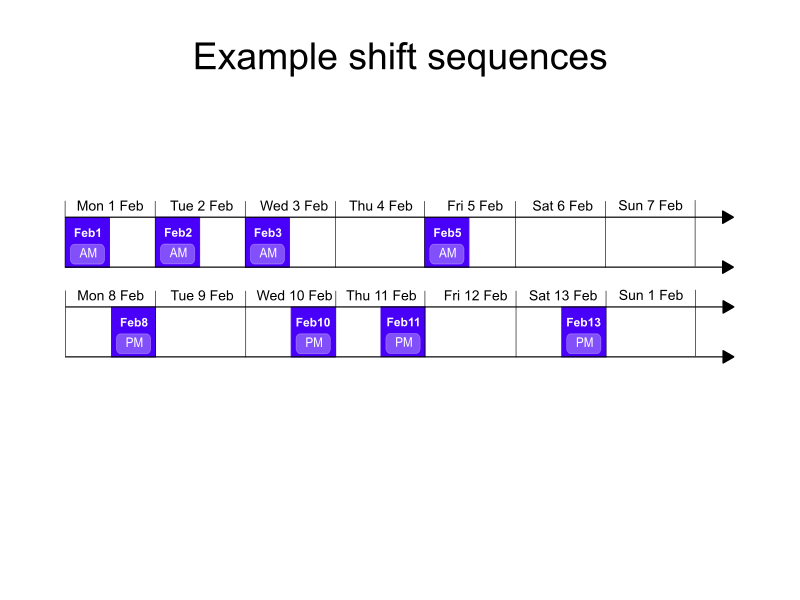
In the following example there are 2 sequences.
-
AM shift sequence between 1st Feb 2027 and 5th Feb 2027.
-
PM shift sequence between 8th Feb 2027 and 13th Feb 2027.
Required minimum time between different sequences
When the satisfiability of the rule is REQUIRED, the Required minimum time between different sequences not met for employee hard constraint is invoked, which makes sure there is enough time between 2 different sequences, for example AM and PM.
There are two ways to define the required time interval between the sequences:
Absolute duration
minDurationBetweenDifferentSequences specifies the absolute duration (ISO 8601 format), for example 24 hours (PT24H).
In that case, the following sequence is required to start no sooner than 24 hours after the previous sequence ended. If the prior sequence ended on 1st Feb 2027, 12:00, the next sequence can start no sooner than 2nd Feb 2027, 12:00.
{
  "consecutiveDaysWorkedRules": [
    {
      "id": "sequenceExample",
      "shiftTypeTagCategories": ["AM", "PM"],
      "minDurationBetweenDifferentSequences": "PT24H"
    }
  ]
}
Required minimum time between different sequences example
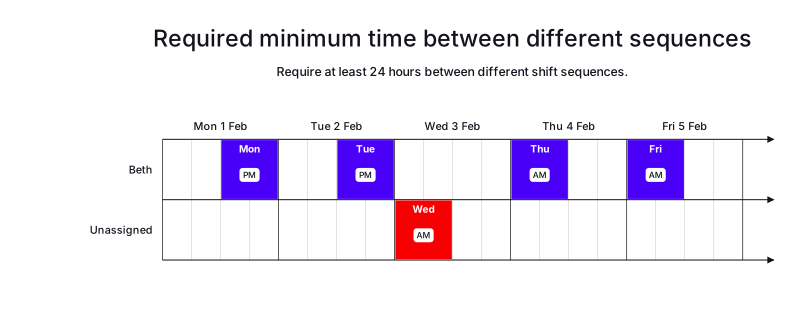
In the following example, there are five shifts and one employee.
A consecutiveDaysWorkedRules that specifies the employee can work three consecutive shifts in a sequence and there must be 24 hours between different shift sequences.
The shifts on Monday and Tuesday are tagged PM, the shifts on Wednesday, Thursday, and Friday are tagged AM
Beth is assigned the Monday and Tuesday PM shifts, there is not 24 hours between the Tuesday shift and the Wednesday shift, so the Wednesday shift is left unassigned.
Beth is assigned the Thursday and Friday shifts.
-
Input
-
Output
Try this example in Timefold Platform by saving this JSON into a file called sample.json and make the following API call:
|
curl -X POST -H "Content-type: application/json" -H 'X-API-KEY: <API_KEY>' https://app.timefold.ai/api/models/employee-scheduling/v1/schedules [email protected]{
"config": {
"run": {
"name": "Required consecutive days and shift sequences example"
}
},
"modelInput": {
"contracts": [
{
"id": "fullTimeContract",
"consecutiveDaysWorkedRules": [
{
"id": "Max3Consecutive12HourShifts",
"maximum": 3,
"minDurationBetweenDifferentSequences": "PT24H",
"shiftTypeTagCategories": ["AM", "PM"],
"satisfiability": "REQUIRED"
}
]
}
],
"employees": [
{
"id": "Beth",
"contracts": [
"fullTimeContract"
]
}
],
"shifts": [
{
"id": "Mon",
"start": "2027-02-01T12:00:00Z",
"end": "2027-02-02T00:00:00Z",
"tags": ["PM"]
},
{
"id": "Tue",
"start": "2027-02-02T12:00:00Z",
"end": "2027-02-03T00:00:00Z",
"tags": ["PM"]
},
{
"id": "Wed",
"start": "2027-02-03T00:00:00Z",
"end": "2027-02-03T12:00:00Z",
"tags": ["AM"]
},
{
"id": "Thu",
"start": "2027-02-04T00:00:00Z",
"end": "2027-02-04T12:00:00Z",
"tags": ["AM"]
},
{
"id": "Fri",
"start": "2027-02-05T00:00:00Z",
"end": "2027-02-05T12:00:00Z",
"tags": ["AM"]
}
]
}
}
To request the solution, locate the ID from the response to the post operation and append it to the following API call:
|
curl -X GET -H 'X-API-KEY: <API_KEY>' https://app.timefold.ai/api/models/employee-scheduling/v1/schedules/<ID>{
"metadata": {
"id": "ID",
"originId": "ID",
"name": "Required consecutive days and shift sequences example",
"submitDateTime": "2025-12-09T06:28:06.099733892Z",
"startDateTime": "2025-12-09T06:28:13.039909151Z",
"activeDateTime": "2025-12-09T06:28:13.129716059Z",
"completeDateTime": "2025-12-09T06:28:43.525618047Z",
"shutdownDateTime": "2025-12-09T06:28:43.525622217Z",
"solverStatus": "SOLVING_COMPLETED",
"score": "0hard/-1medium/0soft",
"tags": [
"system.type:from-request",
"system.profile:default"
],
"validationResult": {
"summary": "OK"
}
},
"modelOutput": {
"shifts": [
{
"id": "Mon",
"employee": "Beth"
},
{
"id": "Tue",
"employee": "Beth"
},
{
"id": "Wed"
},
{
"id": "Thu",
"employee": "Beth"
},
{
"id": "Fri",
"employee": "Beth"
}
],
"employees": [
{
"id": "Beth",
"metrics": {
"assignedShifts": 4,
"durationWorked": "PT48H"
}
}
]
},
"inputMetrics": {
"employees": 1,
"shifts": 5,
"pinnedShifts": 0,
"mandatoryShifts": 5,
"optionalShifts": 0
},
"kpis": {
"assignedShifts": 4,
"unassignedShifts": 1,
"disruptionPercentage": 0,
"activatedEmployees": 1,
"assignedMandatoryShifts": 4
},
"run": {
"id": "ID",
"originId": "ID",
"name": "Required consecutive days and shift sequences example",
"submitDateTime": "2025-12-09T06:28:06.099733892Z",
"startDateTime": "2025-12-09T06:28:13.039909151Z",
"activeDateTime": "2025-12-09T06:28:13.129716059Z",
"completeDateTime": "2025-12-09T06:28:43.525618047Z",
"shutdownDateTime": "2025-12-09T06:28:43.525622217Z",
"solverStatus": "SOLVING_COMPLETED",
"score": "0hard/-1medium/0soft",
"tags": [
"system.type:from-request",
"system.profile:default"
],
"validationResult": {
"summary": "OK"
}
}
}Flexible delay
minDelayBetweenDifferentSequences is a flexible function that allows you to specify a delay until a specific moment, for example next Monday or in 2 full calendar days.
{
  "consecutiveDaysWorkedRules": [
    {
      "id": "sequenceExample",
      "shiftTypeTagCategories": ["AM", "PM"],
      "minDelayBetweenDifferentSequences": {
        "minStartDateAdjuster": "NEXT_DAY",
        "minStartDateAdjusterIncrement": 2,
        "minStartTime": "00:00:00"
      }
    }
  ]
}
The function has 3 components:
minStartDateAdjuster:
The name of the adjuster function for the date part of the start of the following sequence.
The following functions are supported:
-
SAME_DAY -
NEXT_DAY -
NEXT_MONTH -
NEXT_MONDAY -
NEXT_TUESDAY -
NEXT_WEDNESDAY -
NEXT_THURSDAY -
NEXT_FRIDAY -
NEXT_SATURDAY -
NEXT_SUNDAY
minStartDateAdjusterIncrement: The increment that determines how many times minStartDateAdjuster is applied.
The default value is 1.
minStartTime: The time part (ISO 8601 local datetime) of the following sequence start (inclusive).
For example, the following sequence is required to start no sooner than in 1 full calendar day, plus the remaining part of the day, where the previous sequence ends. If the prior sequence ends on 1st Feb 2027, 12:00, the next sequence can start no sooner than 3rd Feb 2027, 00:00.
{
  "consecutiveDaysWorkedRules": [
    {
      "id": "sequenceExample",
      "shiftTypeTagCategories": ["AM", "PM"],
      "minDelayBetweenDifferentSequences": {
        "minStartDateAdjuster": "NEXT_DAY",
        "minStartDateAdjusterIncrement": 2,
        "minStartTime": "00:00:00"
      }
    }
  ]
}
Preferred minimum time between different sequences
The Preferred minimum time between different sequences not met for employee soft constraint is invoked when satisfiability is PREFERRED, minDurationBetweenDifferentSequences or minDelayBetweenDifferentSequences is configured, and the gap between two different sequence types is shorter than the configured minimum.
The constraint adds a soft penalty to the dataset score that is calculated as the missing minutes between the actual and required sequence gap multiplied by the employee priority multiplier and the contract’s priority weight, incentivizing Timefold to leave enough time between different sequence types.
Shifts will still be assigned even if assigning them breaks this constraint.
|
Every soft constraint has a weight that can be configured to change the relative importance of the constraint compared to other constraints. Learn about constraint weights. |
There are two ways to define the required time interval between the sequences:
Absolute duration
minDurationBetweenDifferentSequences specifies the absolute duration (ISO 8601 format), for example 24 hours (PT24H).
In that case, the following sequence is required to start no sooner than 24 hours after the previous sequence ended. If the prior sequence ended on 1st Feb 2027, 12:00, the next sequence can start no sooner than 2nd Feb 2027, 12:00.
{
  "consecutiveDaysWorkedRules": [
    {
      "id": "sequenceExample",
      "shiftTypeTagCategories": ["AM", "PM"],
      "minDurationBetweenDifferentSequences": "PT24H"
    }
  ]
}
Preferred minimum time between different sequences example
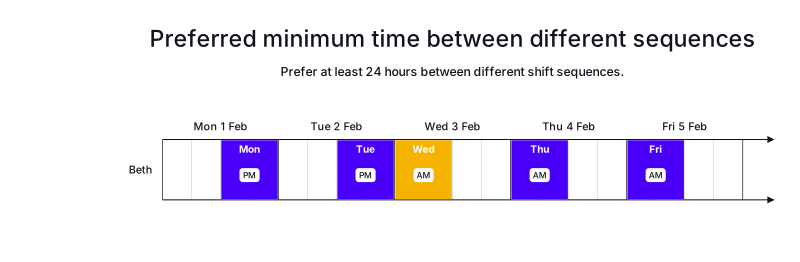
In the following example, there are five shifts and one employee.
A consecutiveDaysWorkedRules that specifies the employee can work three consecutive shifts in a sequence and there should preferably be 24 hours between different shift sequences.
The shifts on Monday and Tuesday are tagged PM, the shifts on Wednesday, Thursday, and Friday are tagged AM
Beth is assigned all five shifts, and a soft score penalty is applied to the dataset score between there is not 24 hours between the Tuesday and Wednesday shifts.
-
Input
-
Output
Try this example in Timefold Platform by saving this JSON into a file called sample.json and make the following API call:
|
curl -X POST -H "Content-type: application/json" -H 'X-API-KEY: <API_KEY>' https://app.timefold.ai/api/models/employee-scheduling/v1/schedules [email protected]{
"config": {
"run": {
"name": "Preferred consecutive days and shift sequences example"
}
},
"modelInput": {
"contracts": [
{
"id": "fullTimeContract",
"consecutiveDaysWorkedRules": [
{
"id": "Max3Consecutive12HourShifts",
"maximum": 3,
"minDurationBetweenDifferentSequences": "PT24H",
"shiftTypeTagCategories": ["AM", "PM"],
"satisfiability": "PREFERRED"
}
]
}
],
"employees": [
{
"id": "Beth",
"contracts": [
"fullTimeContract"
]
}
],
"shifts": [
{
"id": "Mon",
"start": "2027-02-01T12:00:00Z",
"end": "2027-02-02T00:00:00Z",
"tags": ["PM"]
},
{
"id": "Tue",
"start": "2027-02-02T12:00:00Z",
"end": "2027-02-03T00:00:00Z",
"tags": ["PM"]
},
{
"id": "Wed",
"start": "2027-02-03T00:00:00Z",
"end": "2027-02-03T12:00:00Z",
"tags": ["AM"]
},
{
"id": "Thu",
"start": "2027-02-04T00:00:00Z",
"end": "2027-02-04T12:00:00Z",
"tags": ["AM"]
},
{
"id": "Fri",
"start": "2027-02-05T00:00:00Z",
"end": "2027-02-05T12:00:00Z",
"tags": ["AM"]
}
]
}
}
To request the solution, locate the ID from the response to the post operation and append it to the following API call:
|
curl -X GET -H 'X-API-KEY: <API_KEY>' https://app.timefold.ai/api/models/employee-scheduling/v1/schedules/<ID>{
"metadata": {
"id": "ID",
"originId": "ID",
"name": "Preferred consecutive days and shift sequences example",
"submitDateTime": "2025-12-09T06:54:47.566282117Z",
"startDateTime": "2025-12-09T06:54:54.609456133Z",
"activeDateTime": "2025-12-09T06:54:54.697771431Z",
"completeDateTime": "2025-12-09T06:55:25.046055215Z",
"shutdownDateTime": "2025-12-09T06:55:25.046059095Z",
"solverStatus": "SOLVING_COMPLETED",
"score": "0hard/0medium/-2880soft",
"tags": [
"system.type:from-request",
"system.profile:default"
],
"validationResult": {
"summary": "OK"
}
},
"modelOutput": {
"shifts": [
{
"id": "Mon",
"employee": "Beth"
},
{
"id": "Tue",
"employee": "Beth"
},
{
"id": "Wed",
"employee": "Beth"
},
{
"id": "Thu",
"employee": "Beth"
},
{
"id": "Fri",
"employee": "Beth"
}
],
"employees": [
{
"id": "Beth",
"metrics": {
"assignedShifts": 5,
"durationWorked": "PT60H"
}
}
]
},
"inputMetrics": {
"employees": 1,
"shifts": 5,
"pinnedShifts": 0,
"mandatoryShifts": 5,
"optionalShifts": 0
},
"kpis": {
"assignedShifts": 5,
"unassignedShifts": 0,
"disruptionPercentage": 0,
"activatedEmployees": 1,
"assignedMandatoryShifts": 5
},
"run": {
"id": "ID",
"originId": "ID",
"name": "Preferred consecutive days and shift sequences example",
"submitDateTime": "2025-12-09T06:54:47.566282117Z",
"startDateTime": "2025-12-09T06:54:54.609456133Z",
"activeDateTime": "2025-12-09T06:54:54.697771431Z",
"completeDateTime": "2025-12-09T06:55:25.046055215Z",
"shutdownDateTime": "2025-12-09T06:55:25.046059095Z",
"solverStatus": "SOLVING_COMPLETED",
"score": "0hard/0medium/-2880soft",
"tags": [
"system.type:from-request",
"system.profile:default"
],
"validationResult": {
"summary": "OK"
}
}
}Flexible delay
minDelayBetweenDifferentSequences is a flexible function that allows to specify delay until a specific moment, for example next Monday, or in 2 full calendar days.
{
  "consecutiveDaysWorkedRules": [
    {
      "id": "sequenceExample",
      "shiftTypeTagCategories": ["AM", "PM"],
      "minDelayBetweenDifferentSequences": {
        "minStartDateAdjuster": "NEXT_DAY",
        "minStartDateAdjusterIncrement": 2,
        "minStartTime": "00:00:00"
      }
    }
  ]
}
The function has 3 components:
minStartDateAdjuster: The name of the adjuster function for the date part of the following sequence start.
The following functions are supported:
-
SAME_DAY -
NEXT_DAY -
NEXT_MONTH, -
NEXT_MONDAY -
NEXT_TUESDAY -
NEXT_WEDNESDAY -
NEXT_THURSDAY -
NEXT_FRIDAY -
NEXT_SATURDAY -
NEXT_SUNDAY
minStartDateAdjusterIncrement: The increment that determines how many times minStartDateAdjuster is applied. The default value is 1.
minStartTime: The time part (ISO 8601 local datetime) of the following sequence start (inclusive).
For example, the following sequence can start no sooner than after 1 full calendar day, plus the remaining part of the day when the previous sequence ended. If the prior sequence ends on 1st Feb 2027, 12:00, the next sequence can start no sooner than 3rd Feb 2027, 00:00.
{
  "consecutiveDaysWorkedRules": [
    {
      "id": "sequenceExample",
      "shiftTypeTagCategories": ["AM", "PM"],
      "minDelayBetweenDifferentSequences": {
        "minStartDateAdjuster": "NEXT_DAY",
        "minStartDateAdjusterIncrement": 2,
        "minStartTime": "00:00:00"
      }
    }
  ]
}
Required sequence start day
You can specify which days of the week sequences can start on:
{
  "consecutiveDaysWorkedRules": [
    {
      "id": "sequenceExample",
      "shiftTypeTagCategories": ["morning", "afternoon"],
      "allowedSequenceStartDays": ["MONDAY"]
    }
  ]
}
The Required sequence start day not met for employee hard constraint is invoked when the end of the previous sequence prevents the start of the following sequence on one of the configured allowed days.
The constraint is automatically enabled when allowedSequenceStartDays is configured in consecutiveDaysWorkedRules.
Consider the following example that uses allowedSequenceStartDays set to MONDAY.
-
Shift 1 morning 2025-01-01 (Wednesday)
-
Shift 2 morning 2025-01-02 (Thursday)
-
Shift 3 morning 2025-01-03 (Friday)
-
Shift 4 morning 2025-01-04 (Saturday)
-
Shift 5 morning 2025-01-06 (Monday)
-
Shift 6 afternoon 2025-01-07 (Tuesday)
In this example, the morning sequence ends on Monday, effectively blocking the afternoon shift from starting because the next sequence cannot start until the following Monday.
As a consequence the next afternoon shift sequence could start the following week:
-
Shift 1 morning 2025-01-01 (Wednesday)
-
Shift 2 morning 2025-01-02 (Thursday)
-
Shift 3 morning 2025-01-03 (Friday)
-
Shift 4 morning 2025-01-04 (Saturday)
-
Shift 5 morning 2025-01-06 (Monday)
-
Shift 6 afternoon 2025-01-13 (Monday)
When the model does not assign shifts on allowedSequenceStartDays and the previous sequence ends before those days, the constraint is not violated.
|
In the following example the previous sequence ends on 2025-01-04 (Saturday) and the next sequence starts on 2025-01-08 (Wednesday).
-
Shift 1 morning 2025-01-01 (Wednesday)
-
Shift 2 morning 2025-01-02 (Thursday)
-
Shift 3 morning 2025-01-03 (Friday)
-
Shift 4 morning 2025-01-04 (Saturday)
-
Shift 5 afternoon 2025-01-08 (Wednesday)
Required sequence start day example
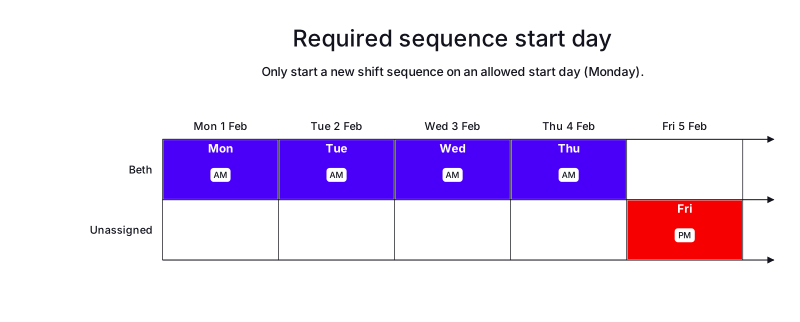
In the following example, there are five shifts and one employee.
A consecutiveDaysWorkedRule sets allowedSequenceStartDays to MONDAY for the AM and PM shift type categories.
There are four AM shifts on Monday, Tuesday, Wednesday, and Thursday (2027-02-01 to 2027-02-04), and one PM shift on Friday (2027-02-05).
Beth is assigned the Monday to Thursday AM sequence, which starts on Monday and satisfies the rule.
The Friday PM shift is left unassigned, because assigning it would start a new sequence on Friday, which is not an allowed start day, so it would violate the hard constraint.
The solver keeps the Friday shift unassigned to respect the required start day.
The resulting score is 0hard/-1medium/0soft, where the medium penalty is for the unassigned mandatory shift.
-
Input
-
Output
Try this example in Timefold Platform by saving this JSON into a file called sample.json and make the following API call:
|
curl -X POST -H "Content-type: application/json" -H 'X-API-KEY: <API_KEY>' https://app.timefold.ai/api/models/employee-scheduling/v1/schedules [email protected]{
"config": {
"run": {
"name": "Required sequence start day"
}
},
"modelInput": {
"contracts": [
{
"id": "fullTimeContract",
"consecutiveDaysWorkedRules": [
{
"id": "SequenceStartsMonday",
"shiftTypeTagCategories": ["AM", "PM"],
"allowedSequenceStartDays": ["MONDAY"],
"satisfiability": "REQUIRED"
}
]
}
],
"employees": [
{
"id": "Beth",
"contracts": [
"fullTimeContract"
]
}
],
"shifts": [
{
"id": "Mon",
"start": "2027-02-01T00:00:00Z",
"end": "2027-02-01T12:00:00Z",
"tags": ["AM"]
},
{
"id": "Tue",
"start": "2027-02-02T00:00:00Z",
"end": "2027-02-02T12:00:00Z",
"tags": ["AM"]
},
{
"id": "Wed",
"start": "2027-02-03T00:00:00Z",
"end": "2027-02-03T12:00:00Z",
"tags": ["AM"]
},
{
"id": "Thu",
"start": "2027-02-04T00:00:00Z",
"end": "2027-02-04T12:00:00Z",
"tags": ["AM"]
},
{
"id": "Fri",
"start": "2027-02-05T12:00:00Z",
"end": "2027-02-06T00:00:00Z",
"tags": ["PM"]
}
]
}
}
To request the solution, locate the ID from the response to the post operation and append it to the following API call:
|
curl -X GET -H 'X-API-KEY: <API_KEY>' https://app.timefold.ai/api/models/employee-scheduling/v1/schedules/<ID>{
"metadata": {
"id": "ID",
"originId": "ID",
"name": "Required sequence start day",
"submitDateTime": "2026-08-11T04:09:28.557965716Z",
"startDateTime": "2026-08-11T04:10:23.788705689Z",
"activeDateTime": "2026-08-11T04:10:23.901622158Z",
"completeDateTime": "2026-08-11T04:10:54.349381126Z",
"shutdownDateTime": "2026-08-11T04:10:54.349385936Z",
"solverStatus": "SOLVING_COMPLETED",
"score": "0hard/-1medium/0soft",
"tags": [
"system.type:from-request",
"system.profile:Standard profile"
],
"validationResult": {
"summary": "OK"
}
},
"modelOutput": {
"shifts": [
{
"id": "Mon",
"employee": "Beth"
},
{
"id": "Tue",
"employee": "Beth"
},
{
"id": "Wed",
"employee": "Beth"
},
{
"id": "Thu",
"employee": "Beth"
},
{
"id": "Fri"
}
],
"employees": [
{
"id": "Beth",
"metrics": {
"assignedShifts": 4,
"durationWorked": "PT48H"
}
}
],
"generatedShifts": []
},
"inputMetrics": {
"employees": 1,
"shifts": 5,
"pinnedShifts": 0,
"mandatoryShifts": 5,
"optionalShifts": 0
},
"kpis": {
"assignedShifts": 4,
"unassignedShifts": 1,
"disruptionPercentage": 0,
"activatedEmployees": 1,
"assignedMandatoryShifts": 4
},
"run": {
"id": "ID",
"originId": "ID",
"name": "Required sequence start day",
"submitDateTime": "2026-08-11T04:09:28.557965716Z",
"startDateTime": "2026-08-11T04:10:23.788705689Z",
"activeDateTime": "2026-08-11T04:10:23.901622158Z",
"completeDateTime": "2026-08-11T04:10:54.349381126Z",
"shutdownDateTime": "2026-08-11T04:10:54.349385936Z",
"solverStatus": "SOLVING_COMPLETED",
"score": "0hard/-1medium/0soft",
"tags": [
"system.type:from-request",
"system.profile:Standard profile"
],
"validationResult": {
"summary": "OK"
}
}
}Preferred sequence start day
The Preferred sequence start day met for employee soft constraint is invoked when allowedSequenceStartDays is configured and a sequence starts on one of the configured allowed days.
The constraint adds a soft reward to the dataset score based on a fixed base of 1, multiplied by the employee priority multiplier and the contract’s priority weight. To ensure this constraint is comparable to time-based constraints, the reward is also multiplied by 480 (an estimated average shift duration in minutes, used for normalization). This normalization helps Timefold balance sequence start preferences against other scheduling preferences.
Shifts will still be assigned even if assigning them breaks this constraint.
|
Every soft constraint has a weight that can be configured to change the relative importance of the constraint compared to other constraints. Learn about constraint weights. |
The constraint is automatically enabled when allowedSequenceStartDays is configured in consecutiveDaysWorkedRules.
{
  "consecutiveDaysWorkedRules": [
    {
      "id": "sequenceExample",
      "shiftTypeTagCategories": ["morning", "afternoon"],
      "allowedSequenceStartDays": ["MONDAY"],
      "satisfiability": "PREFERRED"
    }
  ]
}
Preferred sequence start day example
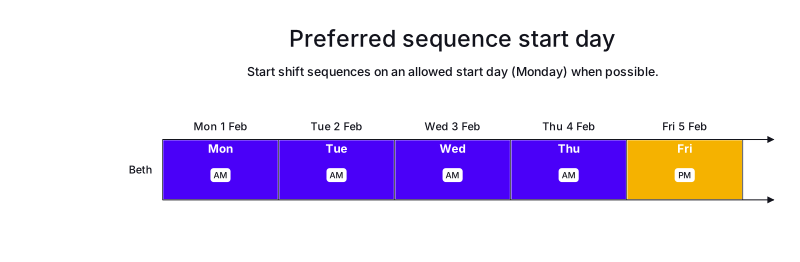
This example uses the same five shifts and one employee as the Required sequence start day example.
A consecutiveDaysWorkedRule sets allowedSequenceStartDays to MONDAY for the AM and PM shift type categories.
The only difference is that satisfiability is PREFERRED instead of REQUIRED.
There are four AM shifts on Monday, Tuesday, Wednesday, and Thursday (2027-02-01 to 2027-02-04), and one PM shift on Friday (2027-02-05).
Because the rule is preferred rather than required, Beth is assigned all five shifts, including the Friday PM shift.
In the required example, the Friday PM shift is left unassigned to avoid violating the hard constraint.
Here, the model assigns it and accepts the preference violation instead.
The AM sequence still starts on Monday, an allowed start day, so the model earns a soft reward.
The resulting score is 0hard/0medium/960soft.
-
Input
-
Output
Try this example in Timefold Platform by saving this JSON into a file called sample.json and make the following API call:
|
curl -X POST -H "Content-type: application/json" -H 'X-API-KEY: <API_KEY>' https://app.timefold.ai/api/models/employee-scheduling/v1/schedules [email protected]{
"config": {
"run": {
"name": "Preferred sequence start day"
}
},
"modelInput": {
"contracts": [
{
"id": "fullTimeContract",
"consecutiveDaysWorkedRules": [
{
"id": "SequencePrefersMonday",
"shiftTypeTagCategories": ["AM", "PM"],
"allowedSequenceStartDays": ["MONDAY"],
"satisfiability": "PREFERRED"
}
]
}
],
"employees": [
{
"id": "Beth",
"contracts": [
"fullTimeContract"
]
}
],
"shifts": [
{
"id": "Mon",
"start": "2027-02-01T00:00:00Z",
"end": "2027-02-01T12:00:00Z",
"tags": ["AM"]
},
{
"id": "Tue",
"start": "2027-02-02T00:00:00Z",
"end": "2027-02-02T12:00:00Z",
"tags": ["AM"]
},
{
"id": "Wed",
"start": "2027-02-03T00:00:00Z",
"end": "2027-02-03T12:00:00Z",
"tags": ["AM"]
},
{
"id": "Thu",
"start": "2027-02-04T00:00:00Z",
"end": "2027-02-04T12:00:00Z",
"tags": ["AM"]
},
{
"id": "Fri",
"start": "2027-02-05T12:00:00Z",
"end": "2027-02-06T00:00:00Z",
"tags": ["PM"]
}
]
}
}
To request the solution, locate the ID from the response to the post operation and append it to the following API call:
|
curl -X GET -H 'X-API-KEY: <API_KEY>' https://app.timefold.ai/api/models/employee-scheduling/v1/schedules/<ID>{
"metadata": {
"id": "ID",
"originId": "ID",
"name": "Preferred sequence start day",
"submitDateTime": "2026-08-11T04:58:47.602272406Z",
"startDateTime": "2026-08-11T04:59:35.571567065Z",
"activeDateTime": "2026-08-11T04:59:35.707530823Z",
"completeDateTime": "2026-08-11T05:00:06.1226764Z",
"shutdownDateTime": "2026-08-11T05:00:06.122680542Z",
"solverStatus": "SOLVING_COMPLETED",
"score": "0hard/0medium/960soft",
"tags": [
"system.type:from-request",
"system.profile:Standard profile"
],
"validationResult": {
"summary": "OK"
}
},
"modelOutput": {
"shifts": [
{
"id": "Mon",
"employee": "Beth"
},
{
"id": "Tue",
"employee": "Beth"
},
{
"id": "Wed",
"employee": "Beth"
},
{
"id": "Thu",
"employee": "Beth"
},
{
"id": "Fri",
"employee": "Beth"
}
],
"employees": [
{
"id": "Beth",
"metrics": {
"assignedShifts": 5,
"durationWorked": "PT60H"
}
}
],
"generatedShifts": []
},
"inputMetrics": {
"employees": 1,
"shifts": 5,
"pinnedShifts": 0,
"mandatoryShifts": 5,
"optionalShifts": 0
},
"kpis": {
"assignedShifts": 5,
"unassignedShifts": 0,
"disruptionPercentage": 0,
"activatedEmployees": 1,
"assignedMandatoryShifts": 5
},
"run": {
"id": "ID",
"originId": "ID",
"name": "Preferred sequence start day",
"submitDateTime": "2026-08-11T04:58:47.602272406Z",
"startDateTime": "2026-08-11T04:59:35.571567065Z",
"activeDateTime": "2026-08-11T04:59:35.707530823Z",
"completeDateTime": "2026-08-11T05:00:06.1226764Z",
"shutdownDateTime": "2026-08-11T05:00:06.122680542Z",
"solverStatus": "SOLVING_COMPLETED",
"score": "0hard/0medium/960soft",
"tags": [
"system.type:from-request",
"system.profile:Standard profile"
],
"validationResult": {
"summary": "OK"
}
}
}Sequence ends on allowed sequence start day
The Sequence ends on allowed sequence start day for employee soft constraint is invoked when allowedSequenceStartDays is configured and a sequence ends on one of the configured allowed start days.
The constraint adds a soft penalty to the dataset score based on a fixed base of 1, multiplied by the employee priority multiplier and the contract’s priority weight. To ensure this constraint is comparable to time-based constraints, the penalty is also multiplied by 480 (an estimated average shift duration in minutes, used for normalization). This normalization helps Timefold balance sequence end preferences against other scheduling preferences.
Shifts will still be assigned even if assigning them breaks this constraint.
|
Every soft constraint has a weight that can be configured to change the relative importance of the constraint compared to other constraints. Learn about constraint weights. |
The constraint is automatically enabled when allowedSequenceStartDays is configured in consecutiveDaysWorkedRules.
{
  "consecutiveDaysWorkedRules": [
    {
      "id": "sequenceExample",
      "shiftTypeTagCategories": ["morning", "afternoon"],
      "allowedSequenceStartDays": ["MONDAY"]
    }
  ]
}
Sequence ends on allowed sequence start day example
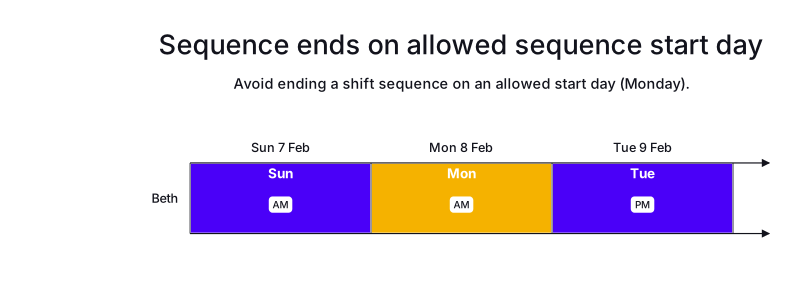
In the following example, there is one employee, Beth, and a consecutiveDaysWorkedRule that sets allowedSequenceStartDays to MONDAY for the AM and PM shift type categories, with satisfiability set to PREFERRED.
Beth works two AM shifts, on Sunday (2027-02-07) and Monday (2027-02-08), which form one sequence that starts on Sunday and ends on Monday, followed by a PM shift on Tuesday (2027-02-09).
Because the AM sequence ends on Monday, which is an allowed sequence start day, the model incurs a soft penalty.
All three shifts are still assigned.
The resulting score is 0hard/0medium/-960soft.
The teaching point is that an allowed start day such as Monday should begin a sequence, not end one.
-
Input
-
Output
Try this example in Timefold Platform by saving this JSON into a file called sample.json and make the following API call:
|
curl -X POST -H "Content-type: application/json" -H 'X-API-KEY: <API_KEY>' https://app.timefold.ai/api/models/employee-scheduling/v1/schedules [email protected]{
"config": {
"run": {
"name": "Sequence ends on allowed sequence start day"
}
},
"modelInput": {
"contracts": [
{
"id": "fullTimeContract",
"consecutiveDaysWorkedRules": [
{
"id": "SequenceStartsMonday",
"shiftTypeTagCategories": ["AM", "PM"],
"allowedSequenceStartDays": ["MONDAY"],
"satisfiability": "PREFERRED"
}
]
}
],
"employees": [
{
"id": "Beth",
"contracts": [
"fullTimeContract"
]
}
],
"shifts": [
{
"id": "Sun",
"start": "2027-02-07T00:00:00Z",
"end": "2027-02-07T12:00:00Z",
"tags": ["AM"]
},
{
"id": "Mon",
"start": "2027-02-08T00:00:00Z",
"end": "2027-02-08T12:00:00Z",
"tags": ["AM"]
},
{
"id": "Tue",
"start": "2027-02-09T12:00:00Z",
"end": "2027-02-10T00:00:00Z",
"tags": ["PM"]
}
]
}
}
To request the solution, locate the ID from the response to the post operation and append it to the following API call:
|
curl -X GET -H 'X-API-KEY: <API_KEY>' https://app.timefold.ai/api/models/employee-scheduling/v1/schedules/<ID>{
"metadata": {
"id": "ID",
"originId": "ID",
"name": "Sequence ends on allowed sequence start day",
"submitDateTime": "2026-08-11T05:20:21.15479285Z",
"startDateTime": "2026-08-11T05:21:09.827455731Z",
"activeDateTime": "2026-08-11T05:21:09.938311822Z",
"completeDateTime": "2026-08-11T05:21:40.391974821Z",
"shutdownDateTime": "2026-08-11T05:21:40.391978585Z",
"solverStatus": "SOLVING_COMPLETED",
"score": "0hard/0medium/-960soft",
"tags": [
"system.type:from-request",
"system.profile:Standard profile"
],
"validationResult": {
"summary": "OK"
}
},
"modelOutput": {
"shifts": [
{
"id": "Sun",
"employee": "Beth"
},
{
"id": "Mon",
"employee": "Beth"
},
{
"id": "Tue",
"employee": "Beth"
}
],
"employees": [
{
"id": "Beth",
"metrics": {
"assignedShifts": 3,
"durationWorked": "PT36H"
}
}
],
"generatedShifts": []
},
"inputMetrics": {
"employees": 1,
"shifts": 3,
"pinnedShifts": 0,
"mandatoryShifts": 3,
"optionalShifts": 0
},
"kpis": {
"assignedShifts": 3,
"unassignedShifts": 0,
"disruptionPercentage": 0,
"activatedEmployees": 1,
"assignedMandatoryShifts": 3
},
"run": {
"id": "ID",
"originId": "ID",
"name": "Sequence ends on allowed sequence start day",
"submitDateTime": "2026-08-11T05:20:21.15479285Z",
"startDateTime": "2026-08-11T05:21:09.827455731Z",
"activeDateTime": "2026-08-11T05:21:09.938311822Z",
"completeDateTime": "2026-08-11T05:21:40.391974821Z",
"shutdownDateTime": "2026-08-11T05:21:40.391978585Z",
"solverStatus": "SOLVING_COMPLETED",
"score": "0hard/0medium/-960soft",
"tags": [
"system.type:from-request",
"system.profile:Standard profile"
],
"validationResult": {
"summary": "OK"
}
}
}Employee works compact sequence
The Employee works compact sequence soft constraint is invoked when rewardCompactSequences is true and two shifts in the same sequence category are assigned to an employee on consecutive days.
The constraint adds a soft reward to the dataset score based on a fixed base of 1, multiplied by the employee priority multiplier and the contract’s priority weight. To ensure this constraint is comparable to time-based constraints, the reward is also multiplied by 480 (an estimated average shift duration in minutes, used for normalization). This normalization helps Timefold balance compact sequence preferences against other scheduling preferences.
Shifts will still be assigned even if assigning them breaks this constraint.
|
Every soft constraint has a weight that can be configured to change the relative importance of the constraint compared to other constraints. Learn about constraint weights. |
The constraint is automatically enabled when rewardCompactSequences is set to true in consecutiveDaysWorkedRules.
{
  "consecutiveDaysWorkedRules": [
    {
      "id": "sequenceExample",
      "maximum": 7,
      "shiftTypeTagCategories": ["morning", "afternoon"],
      "rewardCompactSequences": true
    }
  ]
}
Employee works compact sequence example
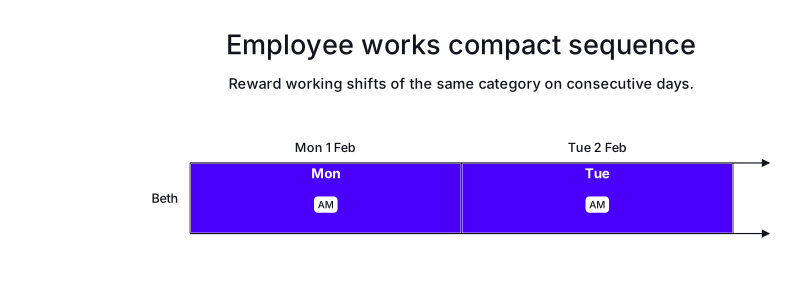
In the following example, there is one employee, Beth, and a consecutiveDaysWorkedRule that sets rewardCompactSequences to true for the AM shift type category.
Beth works two AM shifts on consecutive days, Monday (2027-02-01) and Tuesday (2027-02-02).
Because the two same-category shifts are worked on consecutive days, the model earns a soft reward.
Both shifts are assigned.
The resulting score is 0hard/0medium/960soft.
rewardCompactSequences only takes effect when the same consecutiveDaysWorkedRule also sets a consecutive-days limit with maximum (or minimum). Without a limit, the reward is silently inactive, which is why this example sets maximum to 7. Prefer maximum, because minimum is deprecated in combination with REQUIRED satisfiability.
|
-
Input
-
Output
Try this example in Timefold Platform by saving this JSON into a file called sample.json and make the following API call:
|
curl -X POST -H "Content-type: application/json" -H 'X-API-KEY: <API_KEY>' https://app.timefold.ai/api/models/employee-scheduling/v1/schedules [email protected]{
"config": {
"run": {
"name": "Employee works compact sequence"
}
},
"modelInput": {
"contracts": [
{
"id": "fullTimeContract",
"consecutiveDaysWorkedRules": [
{
"id": "RewardCompactSequences",
"maximum": 7,
"shiftTypeTagCategories": ["AM"],
"rewardCompactSequences": true
}
]
}
],
"employees": [
{
"id": "Beth",
"contracts": [
"fullTimeContract"
]
}
],
"shifts": [
{
"id": "Mon",
"start": "2027-02-01T00:00:00Z",
"end": "2027-02-01T12:00:00Z",
"tags": ["AM"]
},
{
"id": "Tue",
"start": "2027-02-02T00:00:00Z",
"end": "2027-02-02T12:00:00Z",
"tags": ["AM"]
}
]
}
}
To request the solution, locate the ID from the response to the post operation and append it to the following API call:
|
curl -X GET -H 'X-API-KEY: <API_KEY>' https://app.timefold.ai/api/models/employee-scheduling/v1/schedules/<ID>{
"metadata": {
"id": "ID",
"originId": "ID",
"name": "Employee works compact sequence",
"submitDateTime": "2026-08-11T05:58:17.014201907Z",
"startDateTime": "2026-08-11T05:58:27.006108808Z",
"activeDateTime": "2026-08-11T05:58:27.114490126Z",
"completeDateTime": "2026-08-11T05:58:57.664192915Z",
"shutdownDateTime": "2026-08-11T05:58:57.664197847Z",
"solverStatus": "SOLVING_COMPLETED",
"score": "0hard/0medium/960soft",
"tags": [
"system.type:from-request",
"system.profile:Standard profile"
],
"validationResult": {
"summary": "OK"
}
},
"modelOutput": {
"shifts": [
{
"id": "Mon",
"employee": "Beth"
},
{
"id": "Tue",
"employee": "Beth"
}
],
"employees": [
{
"id": "Beth",
"metrics": {
"assignedShifts": 2,
"durationWorked": "PT24H"
}
}
],
"generatedShifts": []
},
"inputMetrics": {
"employees": 1,
"shifts": 2,
"pinnedShifts": 0,
"mandatoryShifts": 2,
"optionalShifts": 0
},
"kpis": {
"assignedShifts": 2,
"unassignedShifts": 0,
"disruptionPercentage": 0,
"activatedEmployees": 1,
"assignedMandatoryShifts": 2
},
"run": {
"id": "ID",
"originId": "ID",
"name": "Employee works compact sequence",
"submitDateTime": "2026-08-11T05:58:17.014201907Z",
"startDateTime": "2026-08-11T05:58:27.006108808Z",
"activeDateTime": "2026-08-11T05:58:27.114490126Z",
"completeDateTime": "2026-08-11T05:58:57.664192915Z",
"shutdownDateTime": "2026-08-11T05:58:57.664197847Z",
"solverStatus": "SOLVING_COMPLETED",
"score": "0hard/0medium/960soft",
"tags": [
"system.type:from-request",
"system.profile:Standard profile"
],
"validationResult": {
"summary": "OK"
}
}
}Next
-
See the full API spec or try the online API.
-
Learn more about employee shift scheduling from our YouTube playlist.
-
See other options for managing employees' work hours: Work limits.