Maps service
This model involves routing. To support real-world routing and optimizing for the shortest travel time or travel distance, the Timefold Platform includes a maps service.
| This model uses the maps service under the hood. Learn more about the maps service and the additional features it provides. |
Available maps
In the Timefold Cloud Platform UI, you can create a configuration profile and choose a maps provider (e.g. OSRM) to see a full list of available maps.
| The maps service can support any region and any transport type (car, bicycle or foot), including maps with historical traffic patterns. The lists below show the maps currently running. If you want to use a map that is currently not available, you can contact us. |
Automatic map selection
Choose "Auto-select" as "Maps location" and the maps service automatically selects the most suitable vehicle map based on the coordinates provided in the dataset input.
All coordinates (for example, vehicle start locations and visit locations) are evaluated and matched against the available map regions (see below). From the regions that fully cover all coordinates, the service selects the smallest possible map.
The selected map is determined once per problem and remains fixed for the entire optimization run.
Automatic map selection provides the following advantages:
-
Reduced configuration overhead: You no longer need to create and maintain multiple configuration profiles for different geographic regions.
-
Improved performance: Smaller maps lead to faster distance matrix calculations and typically shorter solver runtimes.
-
Safer defaults: The maps service always selects the most appropriate map based on the provided coordinates.
| We strongly recommend using automatic map selection as the default setting. |
If no map is found that fully covers all provided locations, the maps service falls back to selecting the map that covers the highest number of locations. The request only fails if none of the available maps cover any of the provided coordinates, in which case the service responds with a clear error message.
Vehicle maps
Vehicle maps currently running
| Map | Description |
|---|---|
Australia |
This is the OSRM map for the country of Australia. |
Belgium |
This is the OSRM map for the country of Belgium. |
Benelux-France |
This is the OSRM map for Belgium, Luxembourg, the Netherlands and France. |
Benelux-Germany |
This is the OSRM map for Belgium, Luxembourg, the Netherlands and Germany. |
Britain and Ireland |
This is the OSRM map for the region of Britain and Ireland. |
Canada |
This is the OSRM map for the country of Canada. |
China |
This is the OSRM map for the country of China. |
DACH |
This is the OSRM map for the DACH region, covering the countries of Germany, Austria and Switzerland. |
France |
This is the OSRM map for the country of France. |
GCC States |
This is the OSRM map for the GCC states, covering the Kingdom of Bahrain, the State of Kuwait, the Sultanate of Oman, the State of Qatar, the Kingdom of Saudi Arabia and the United Arab Emirates. |
Germany |
This is the OSRM map for the country of Germany. |
Italy |
This is the OSRM map for the country of Italy. |
Mexico |
This is the OSRM map for the country of Mexico. |
Netherlands |
This is the OSRM map for the country of Netherlands. |
Ontario |
This is the OSRM map for the region of Ontario in Canada. |
Sweden |
This is the OSRM map for the country of Sweden. |
UK |
This is the OSRM map for the country of the United Kingdom. |
US |
This is the OSRM map for the United States. |
US Alabama |
This is the OSRM map for the state of Alabama in the United States. |
US Alaska |
This is the OSRM map for the state of Alaska in the United States. |
US Arizona |
This is the OSRM map for the state of Arizona in the United States. |
US Arkansas |
This is the OSRM map for the state of Arkansas in the United States. |
US California |
This is the OSRM map for the state of California in the United States. |
US Colorado |
This is the OSRM map for the state of Colorado in the United States. |
US Connecticut |
This is the OSRM map for the state of Connecticut in the United States. |
US Delaware |
This is the OSRM map for the state of Delaware in the United States. |
US District of Columbia |
This is the OSRM map for the District of Columbia of the United States. |
US Florida |
This is the OSRM map for the state of Florida in the United States. |
US Georgia |
This is the OSRM map for the state of Georgia in the United States. |
US Hawaii |
This is the OSRM map for the state of Hawaii in the United States. |
US Idaho |
This is the OSRM map for the state of Idaho in the United States. |
US Illinois |
This is the OSRM map for the state of Illinois in the United States. |
US Indiana |
This is the OSRM map for the state of Indiana in the United States. |
US Iowa |
This is the OSRM map for the state of Iowa in the United States. |
US Kansas |
This is the OSRM map for the state of Kansas in the United States. |
US Kentucky |
This is the OSRM map for the state of Kentucky in the United States. |
US Louisiana |
This is the OSRM map for the state of Louisiana in the United States. |
US Maine |
This is the OSRM map for the state of Maine in the United States. |
US Maryland |
This is the OSRM map for the state of Maryland in the United States. |
US Massachusetts |
This is the OSRM map for the state of Massachusetts in the United States. |
US Michigan |
This is the OSRM map for the state of Michigan in the United States. |
US Minnesota |
This is the OSRM map for the state of Minnesota in the United States. |
US Mississippi |
This is the OSRM map for the state of Mississippi in the United States. |
US Missouri |
This is the OSRM map for the state of Missouri in the United States. |
US Montana |
This is the OSRM map for the state of Montana in the United States. |
US Nebraska |
This is the OSRM map for the state of Nebraska in the United States. |
US New Hampshire |
This is the OSRM map for the state of New Hampshire in the United States. |
US New Jersey |
This is the OSRM map for the state of New Jersey in the United States. |
US New Mexico |
This is the OSRM map for the state of New Mexico in the United States. |
US New York |
This is the OSRM map for the state of New York in the United States. |
US North Carolina |
This is the OSRM map for the state of North Carolina in the United States. |
US North Dakota |
This is the OSRM map for the state of North Dakota in the United States. |
US Northeast |
This is the OSRM map for the North-east region of the United States, covering the states of Pennsylvania, New York, Connecticut, New Jersey, Massachusetts and Maine. |
US Ohio |
This is the OSRM map for the state of Ohio in the United States. |
US Oklahoma |
This is the OSRM map for the state of Oklahoma in the United States. |
US Oregon |
This is the OSRM map for the state of Oregon in the United States. |
US Pennsylvania |
This is the OSRM map for the state of Pennsylvania in the United States. |
US Puerto Rico |
This is the OSRM map for the Puerto Rico region of the United States. |
US Rhode Island |
This is the OSRM map for the state of Rhode Island in the United States. |
US South Carolina |
This is the OSRM map for the state of South Carolina in the United States. |
US South Dakota |
This is the OSRM map for the state of South Dakota in the United States. |
US Tennessee |
This is the OSRM map for the state of Tennessee in the United States. |
US Texas |
This is the OSRM map for the state of Texas in the United States. |
US Utah |
This is the OSRM map for the state of Utah in the United States. |
US Vermont |
This is the OSRM map for the state of Vermont in the United States. |
US Virgin Islands |
This is the OSRM map for the Virgin Islands region of the United States. |
US Virginia |
This is the OSRM map for the state of Virginia in the United States. |
US Washington |
This is the OSRM map for the state of Washington in the United States. |
US West |
This is the OSRM map for the Western region of the United States, covering the states of Washington, Oregon, Idaho, Montana, Wyoming, Colorado, Utah, New Mexico, Arizona, California and Nevada. |
US West Virginia |
This is the OSRM map for the state of West Virginia in the United States. |
US Wisconsin |
This is the OSRM map for the state of Wisconsin in the United States. |
US Wyoming |
This is the OSRM map for the state of Wyoming in the United States. |
Vietnam |
This is the OSRM map for the country of Vietnam. |
Bicycle maps
Bicycle maps currently running
| Map | Description |
|---|---|
US Georgia |
This is the OSRM map with the bicycle transport type for the state of Georgia in the United States. |
Foot maps
Foot maps currently running
| Map | Description |
|---|---|
Switzerland |
This is the OSRM map with the foot transport type for the country of Switzerland. |
| If your region is included in multiple available maps, using the smallest fitting region will speed up the solving process. |
Maps aren’t loaded for every region and transport type by default, since running and maintaining unused maps has a cost. Contact us to have a region or transport type set up.
Traffic-aware routing
|
Traffic-aware routing is currently available in preview. Contact us to enable it for your tenant. |
By default, the maps service calculates travel times using static road network data, without accounting for traffic. Historical traffic improves this by using historical average traffic patterns recorded at specific time slices throughout the day, for example, the typical congestion during morning rush hour, or lighter traffic in the afternoon.
Rather than relying on live traffic feeds, historical traffic uses aggregated data to model how travel times typically vary by time of day and day of week. This means the model can produce route plans that are realistic for when the work actually happens, accounting for the fact that a 2km drive may take 10 minutes during morning rush hour, but only 3 minutes at night.
This is particularly valuable for routing models where departure times and task sequences interact with real-world traffic conditions.
This model buckets historical traffic into three timeframes: morning (6:00-12:00), afternoon (12:00-18:00), and night (18:00-6:00).
Enabling traffic-aware routing
Timefold must first enable traffic-aware routing for your plan. If you’re interested in using it, contact us.
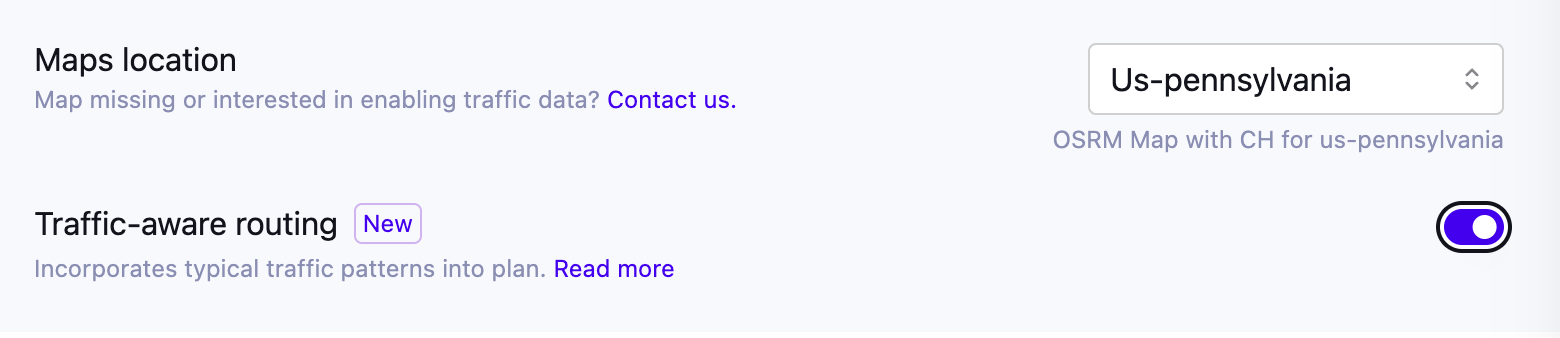
Once it is enabled for your plan, you turn it on per configuration profile. In the Timefold Platform UI, create or edit a configuration profile and enable the "Traffic-aware routing" switch. This switch is only available if historical traffic data is available for your plan and for the selected map. If traffic data isn’t yet available for a map you need, contact us to request it.
Verifying traffic-aware routing usage
To verify whether a dataset used traffic-aware routing, check the dataset’s "Configuration" page after solving and look for "Traffic-aware routing". It shows as enabled if the dataset used historical traffic patterns.
Note: The visualization UI doesn’t currently support rendering traffic-aware routes. The route drawn on the map is based on the shortest-distance path and doesn’t reflect the traffic pattern used during solving. The visit sequence and arrival times shown, however, are based on the traffic-aware travel times used during solving. This is a current limitation of the visualization UI, not a bug.