Real-time planning: pinning stops
Real-time planning allows you to modify an existing solution based on new information or changes in constraints. Real-time planning usually doesn’t require you to start the optimization from scratch, but rather takes an existing plan. However, in some cases, it is important to keep certain jobs and their stops assigned to specific drivers or at certain times and prevent them from being rescheduled.
Pinning stops prevents them from being rescheduled and helps to maintain stability in the schedule.
This guide explains pinning stops with the following:
1. Pinning with freezeTime
Learn how to configure an API Key to run the examples in this guide:
In the examples, replace |
Real-time planning can be disruptive to driver’s schedules depending on the frequency of incoming changes and updates.
To minimize disruption, you can pin all stops before freezeTime, including stops that drivers are already traveling to.
Pinning additional stops gives you greater control over specific stops after the time specified in freezeTime.
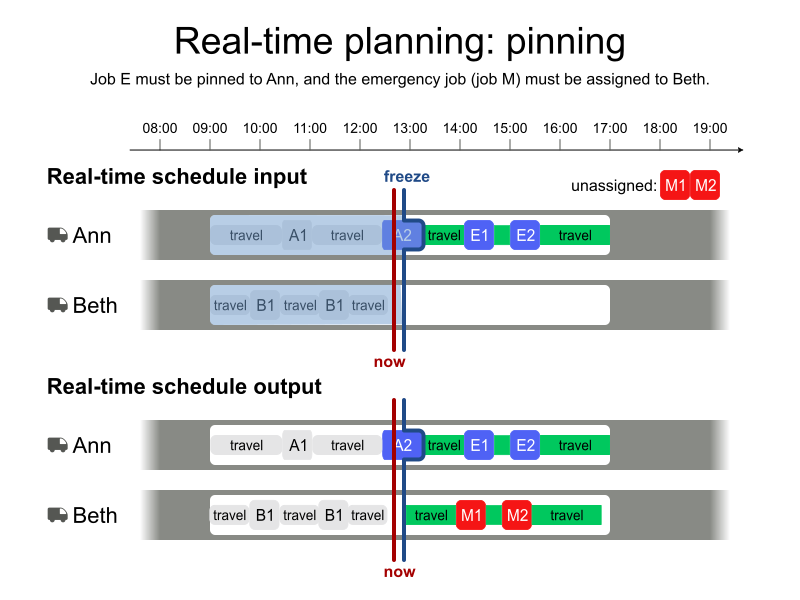
1.1. Batch schedule
The original schedule was generated from the following input dataset during the regular batch scheduling:
-
Input
-
Output
Try this example in Timefold Platform by saving this JSON into a file called sample.json and make the following API call:
|
curl -X POST -H "Content-type: application/json" -H 'X-API-KEY: <API_KEY>' https://app.timefold.ai/api/models/pickup-delivery-routing/v1/route-plans [email protected]{
"config": {
"run": {
"name": "Original shift plan: pinning example"
}
},
"modelInput": {
"drivers": [
{
"id": "Ann",
"shifts": [
{
"id": "Ann Mon",
"startLocation": [33.77284, -84.42989],
"minStartTime": "2027-02-01T09:00:00Z",
"maxEndTime": "2027-02-01T17:00:00Z"
}
]
},
{
"id": "Beth",
"shifts": [
{
"id": "Beth Mon",
"startLocation": [33.70474, -84.06508],
"minStartTime": "2027-02-01T09:00:00Z",
"maxEndTime": "2027-02-01T17:00:00Z"
}
]
}
],
"jobs": [
{
"id": "A",
"stops": [
{
"id": "A1",
"name": "A1",
"location": [33.77911, -84.49644],
"duration": "PT20M"
},
{
"id": "A2",
"name": "A2",
"location": [33.65979, -84.46366],
"duration": "PT20M"
}
]
},
{
"id": "B",
"stops": [
{
"id": "B1",
"name": "B1",
"location": [33.74648, -84.46461],
"duration": "PT20M"
},
{
"id": "B2",
"name": "B2",
"location": [33.65207, -84.46496],
"duration": "PT20M"
}
]
},
{
"id": "C",
"stops": [
{
"id": "C1",
"name": "C1",
"location": [33.72757, -83.96354],
"duration": "PT20M"
},
{
"id": "C2",
"name": "C2",
"location": [33.78592, -84.06508],
"duration": "PT20M"
}
]
}
]
}
}
To request the solution, locate the ID from the response to the post operation and append it to the following API call:
|
curl -X GET -H 'X-API-KEY: <API_KEY>' https://app.timefold.ai/api/models/pickup-delivery-routing/v1/route-plans/<ID>{
"metadata": {
"id": "ID",
"originId": "ID",
"name": "Original shift plan: pinning example",
"submitDateTime": "2026-01-08T15:03:15.968089+01:00",
"startDateTime": "2026-01-08T15:03:16.00922+01:00",
"activeDateTime": "2026-01-08T15:03:16.010266+01:00",
"completeDateTime": "2026-01-08T15:03:46.016915+01:00",
"shutdownDateTime": "2026-01-08T15:03:46.016917+01:00",
"solverStatus": "SOLVING_COMPLETED",
"score": "0hard/0medium/-4705soft",
"validationResult": {
"summary": "OK"
}
},
"modelOutput": {
"drivers": [
{
"id": "Ann",
"shifts": [
{
"id": "Ann Mon",
"startTime": "2027-02-01T09:00:00Z",
"itinerary": [
{
"id": "A1",
"kind": "STOP",
"arrivalTime": "2027-02-01T09:07:26Z",
"startServiceTime": "2027-02-01T09:07:26Z",
"departureTime": "2027-02-01T09:27:26Z",
"effectiveDuration": "PT20M",
"travelTimeFromPreviousStandstill": "PT7M26S",
"travelDistanceMetersFromPreviousStandstill": 6190,
"minStartTravelTime": "2027-02-01T00:00:00Z",
"load": []
},
{
"id": "B1",
"kind": "STOP",
"arrivalTime": "2027-02-01T09:33:02Z",
"startServiceTime": "2027-02-01T09:33:02Z",
"departureTime": "2027-02-01T09:53:02Z",
"effectiveDuration": "PT20M",
"travelTimeFromPreviousStandstill": "PT5M36S",
"travelDistanceMetersFromPreviousStandstill": 4671,
"minStartTravelTime": "2027-02-01T00:00:00Z",
"load": []
},
{
"id": "A2",
"kind": "STOP",
"arrivalTime": "2027-02-01T10:04:36Z",
"startServiceTime": "2027-02-01T10:04:36Z",
"departureTime": "2027-02-01T10:24:36Z",
"effectiveDuration": "PT20M",
"travelTimeFromPreviousStandstill": "PT11M34S",
"travelDistanceMetersFromPreviousStandstill": 9640,
"minStartTravelTime": "2027-02-01T00:00:00Z",
"load": []
},
{
"id": "B2",
"kind": "STOP",
"arrivalTime": "2027-02-01T10:25:38Z",
"startServiceTime": "2027-02-01T10:25:38Z",
"departureTime": "2027-02-01T10:45:38Z",
"effectiveDuration": "PT20M",
"travelTimeFromPreviousStandstill": "PT1M2S",
"travelDistanceMetersFromPreviousStandstill": 867,
"minStartTravelTime": "2027-02-01T00:00:00Z",
"load": []
}
],
"metrics": {
"totalTravelTime": "PT42M13S",
"travelTimeFromStartLocationToFirstStop": "PT7M26S",
"travelTimeBetweenStops": "PT18M12S",
"travelTimeFromLastStopToEndLocation": "PT16M35S",
"totalTravelDistanceMeters": 35183,
"travelDistanceFromStartLocationToFirstStopMeters": 6190,
"travelDistanceBetweenStopsMeters": 15178,
"travelDistanceFromLastStopToEndLocationMeters": 13815,
"endLocationArrivalTime": "2027-02-01T11:02:13Z"
}
}
]
},
{
"id": "Beth",
"shifts": [
{
"id": "Beth Mon",
"startTime": "2027-02-01T09:00:00Z",
"itinerary": [
{
"id": "C1",
"kind": "STOP",
"arrivalTime": "2027-02-01T09:11:40Z",
"startServiceTime": "2027-02-01T09:11:40Z",
"departureTime": "2027-02-01T09:31:40Z",
"effectiveDuration": "PT20M",
"travelTimeFromPreviousStandstill": "PT11M40S",
"travelDistanceMetersFromPreviousStandstill": 9729,
"minStartTravelTime": "2027-02-01T00:00:00Z",
"load": []
},
{
"id": "C2",
"kind": "STOP",
"arrivalTime": "2027-02-01T09:45:22Z",
"startServiceTime": "2027-02-01T09:45:22Z",
"departureTime": "2027-02-01T10:05:22Z",
"effectiveDuration": "PT20M",
"travelTimeFromPreviousStandstill": "PT13M42S",
"travelDistanceMetersFromPreviousStandstill": 11411,
"minStartTravelTime": "2027-02-01T00:00:00Z",
"load": []
}
],
"metrics": {
"totalTravelTime": "PT36M12S",
"travelTimeFromStartLocationToFirstStop": "PT11M40S",
"travelTimeBetweenStops": "PT13M42S",
"travelTimeFromLastStopToEndLocation": "PT10M50S",
"totalTravelDistanceMeters": 30167,
"travelDistanceFromStartLocationToFirstStopMeters": 9729,
"travelDistanceBetweenStopsMeters": 11411,
"travelDistanceFromLastStopToEndLocationMeters": 9027,
"endLocationArrivalTime": "2027-02-01T10:16:12Z"
}
}
]
}
],
"unassignedJobs": []
},
"inputMetrics": {
"jobs": 3,
"mandatoryJobs": 3,
"optionalJobs": 0,
"stops": 6,
"drivers": 2,
"driverShifts": 2
},
"kpis": {
"totalTravelTime": "PT1H18M25S",
"totalTravelDistanceMeters": 65350,
"totalActivatedDrivers": 2,
"totalUnassignedJobs": 0,
"totalAssignedJobs": 3,
"assignedMandatoryJobs": 3,
"totalUnassignedStops": 0,
"totalAssignedStops": 6,
"assignedMandatoryStops": 6,
"travelTimeFromStartLocationToFirstStop": "PT19M6S",
"travelTimeBetweenStops": "PT31M54S",
"travelTimeFromLastStopToEndLocation": "PT27M25S",
"travelDistanceFromStartLocationToFirstStopMeters": 15919,
"travelDistanceBetweenStopsMeters": 26589,
"travelDistanceFromLastStopToEndLocationMeters": 22842
}
}modelOutput contains Ann’s and Beth’s shift itineraries.
1.2. Real-time planning update
Early in the shift, a high priority job ("priority": "1") needs to be included in the plan for the same day.
{
  "id": "D",
  "priority": "1",
  "stops": [
    {
      "id": "D1",
      "location": [33.48594, -84.26560],
      "duration": "PT20M"
    },
    {
      "id": "D2",
      "location": [34.11110, -84.43002],
      "duration": "PT20M"
    }
  ]
}
Update the input dataset with the new job included.
The already planned stops need to be updated with the minStartTravelTime from the most recent planning output dataset (batch or real-time) to each stop.
The stops of the new job have not already been planned and don’t include a minStartTravelTime value.
Add the itinerary to Ann’s and Beth’s shifts from the previous output, including the stop IDs and the stop kind.
{
  "drivers": [
    {
      "id": "Ann",
      "shifts": [
        {
          "id": "Ann Mon",
          "startLocation": [33.77284, -84.42989],
          "minStartTime": "2027-02-01T09:00:00Z",
          "maxEndTime": "2027-02-01T17:00:00Z",
          "itinerary": [
            {
              "id": "A1",
              "kind": "STOP"
            },
            {
              "id": "B1",
              "kind": "STOP"
            },
            {
              "id": "A2",
              "kind": "STOP"
            },
            {
              "id": "B2",
              "kind": "STOP"
            }
          ]
        }
      ]
    },
    {
      "id": "Beth",
      "shifts": [
        {
          "id": "Beth Mon",
          "startLocation": [33.70474, -84.06508],
          "minStartTime": "2027-02-01T09:00:00Z",
          "maxEndTime": "2027-02-01T17:00:00Z",
          "itinerary": [
            {
              "id": "C1",
              "kind": "STOP"
            },
            {
              "id": "C2",
              "kind": "STOP"
            }
          ]
        }
      ]
    }
  ]
}
Freeze stops that have already occurred and that drivers have begun traveling to by adding freezeTime:
{
  "modelInput": {
    "freezeTime": "2027-02-01T10:00:00Z"
  }
}
The call for the high priority job came in a little before 10:00 and the freezeTime is set to 10:00.
Finally, resubmit the updated input dataset:
-
Input
-
Output
Try this example in Timefold Platform by saving this JSON into a file called sample.json and make the following API call:
|
curl -X POST -H "Content-type: application/json" -H 'X-API-KEY: <API_KEY>' https://app.timefold.ai/api/models/pickup-delivery-routing/v1/route-plans [email protected]{
"config": {
"run": {
"name": "Original shift plan: pinning example"
}
},
"modelInput": {
"freezeTime": "2027-02-01T10:00:00Z",
"drivers": [
{
"id": "Ann",
"shifts": [
{
"id": "Ann Mon",
"startLocation": [33.77284, -84.42989],
"minStartTime": "2027-02-01T09:00:00Z",
"maxEndTime": "2027-02-01T17:00:00Z",
"itinerary": [
{
"id": "A1",
"kind": "STOP"
},
{
"id": "B1",
"kind": "STOP"
},
{
"id": "A2",
"kind": "STOP"
},
{
"id": "B2",
"kind": "STOP"
}
]
}
]
},
{
"id": "Beth",
"shifts": [
{
"id": "Beth Mon",
"startLocation": [33.70474, -84.06508],
"minStartTime": "2027-02-01T09:00:00Z",
"maxEndTime": "2027-02-01T17:00:00Z",
"itinerary": [
{
"id": "C1",
"kind": "STOP"
},
{
"id": "C2",
"kind": "STOP"
}
]
}
]
}
],
"jobs": [
{
"id": "A",
"stops": [
{
"id": "A1",
"name": "A1",
"location": [33.77911, -84.49644],
"duration": "PT20M",
"minStartTravelTime": "2027-02-01T00:00:00Z"
},
{
"id": "A2",
"name": "A2",
"location": [33.65979, -84.46366],
"duration": "PT20M",
"minStartTravelTime": "2027-02-01T00:00:00Z"
}
]
},
{
"id": "B",
"stops": [
{
"id": "B1",
"name": "B1",
"location": [33.74648, -84.46461],
"duration": "PT20M",
"minStartTravelTime": "2027-02-01T00:00:00Z"
},
{
"id": "B2",
"name": "B2",
"location": [33.65207, -84.46496],
"duration": "PT20M",
"minStartTravelTime": "2027-02-01T00:00:00Z"
}
]
},
{
"id": "C",
"stops": [
{
"id": "C1",
"name": "C1",
"location": [33.72757, -83.96354],
"duration": "PT20M"
},
{
"id": "C2",
"name": "C2",
"location": [33.78592, -84.06508],
"duration": "PT20M"
}
]
},
{
"id": "D",
"priority": "1",
"stops": [
{
"id": "D1",
"name": "D1",
"location": [33.48594, -84.26560],
"duration": "PT20M"
},
{
"id": "D2",
"name": "D2",
"location": [34.11110, -84.43002],
"duration": "PT20M"
}
]
}
]
}
}
To request the solution, locate the ID from the response to the post operation and append it to the following API call:
|
curl -X GET -H 'X-API-KEY: <API_KEY>' https://app.timefold.ai/api/models/pickup-delivery-routing/v1/route-plans/<ID>{
"metadata": {
"id": "ID",
"originId": "ID",
"name": "Original shift plan: pinning example",
"submitDateTime": "2026-01-21T16:09:11.2355+01:00",
"startDateTime": "2026-01-21T16:09:11.337001+01:00",
"activeDateTime": "2026-01-21T16:09:11.337811+01:00",
"completeDateTime": "2026-01-21T16:09:41.353568+01:00",
"shutdownDateTime": "2026-01-21T16:09:41.35357+01:00",
"solverStatus": "SOLVING_COMPLETED",
"score": "0hard/0medium/-13422soft",
"validationResult": {
"summary": "OK"
}
},
"modelOutput": {
"drivers": [
{
"id": "Ann",
"shifts": [
{
"id": "Ann Mon",
"startTime": "2027-02-01T09:00:00Z",
"itinerary": [
{
"id": "A1",
"kind": "STOP",
"arrivalTime": "2027-02-01T09:07:26Z",
"startServiceTime": "2027-02-01T09:07:26Z",
"departureTime": "2027-02-01T09:27:26Z",
"effectiveDuration": "PT20M",
"travelTimeFromPreviousStandstill": "PT7M26S",
"travelDistanceMetersFromPreviousStandstill": 6190,
"minStartTravelTime": "2027-02-01T00:00:00Z",
"load": [],
"pinned": true
},
{
"id": "B1",
"kind": "STOP",
"arrivalTime": "2027-02-01T09:33:02Z",
"startServiceTime": "2027-02-01T09:33:02Z",
"departureTime": "2027-02-01T09:53:02Z",
"effectiveDuration": "PT20M",
"travelTimeFromPreviousStandstill": "PT5M36S",
"travelDistanceMetersFromPreviousStandstill": 4671,
"minStartTravelTime": "2027-02-01T00:00:00Z",
"load": [],
"pinned": true
},
{
"id": "A2",
"kind": "STOP",
"arrivalTime": "2027-02-01T10:04:36Z",
"startServiceTime": "2027-02-01T10:04:36Z",
"departureTime": "2027-02-01T10:24:36Z",
"effectiveDuration": "PT20M",
"travelTimeFromPreviousStandstill": "PT11M34S",
"travelDistanceMetersFromPreviousStandstill": 9640,
"minStartTravelTime": "2027-02-01T00:00:00Z",
"load": [],
"pinned": true
},
{
"id": "B2",
"kind": "STOP",
"arrivalTime": "2027-02-01T10:25:38Z",
"startServiceTime": "2027-02-01T10:25:38Z",
"departureTime": "2027-02-01T10:45:38Z",
"effectiveDuration": "PT20M",
"travelTimeFromPreviousStandstill": "PT1M2S",
"travelDistanceMetersFromPreviousStandstill": 867,
"minStartTravelTime": "2027-02-01T10:00:00Z",
"load": []
},
{
"id": "D1",
"kind": "STOP",
"arrivalTime": "2027-02-01T11:16:59Z",
"startServiceTime": "2027-02-01T11:16:59Z",
"departureTime": "2027-02-01T11:36:59Z",
"effectiveDuration": "PT20M",
"travelTimeFromPreviousStandstill": "PT31M21S",
"travelDistanceMetersFromPreviousStandstill": 26123,
"minStartTravelTime": "2027-02-01T10:00:00Z",
"load": []
},
{
"id": "D2",
"kind": "STOP",
"arrivalTime": "2027-02-01T13:02:22Z",
"startServiceTime": "2027-02-01T13:02:22Z",
"departureTime": "2027-02-01T13:22:22Z",
"effectiveDuration": "PT20M",
"travelTimeFromPreviousStandstill": "PT1H25M23S",
"travelDistanceMetersFromPreviousStandstill": 71155,
"minStartTravelTime": "2027-02-01T10:00:00Z",
"load": []
}
],
"metrics": {
"totalTravelTime": "PT3H7M30S",
"travelTimeFromStartLocationToFirstStop": "PT7M26S",
"travelTimeBetweenStops": "PT2H14M56S",
"travelTimeFromLastStopToEndLocation": "PT45M8S",
"totalTravelDistanceMeters": 156259,
"travelDistanceFromStartLocationToFirstStopMeters": 6190,
"travelDistanceBetweenStopsMeters": 112456,
"travelDistanceFromLastStopToEndLocationMeters": 37613,
"endLocationArrivalTime": "2027-02-01T14:07:30Z"
}
}
]
},
{
"id": "Beth",
"shifts": [
{
"id": "Beth Mon",
"startTime": "2027-02-01T09:00:00Z",
"itinerary": [
{
"id": "C1",
"kind": "STOP",
"arrivalTime": "2027-02-01T09:11:40Z",
"startServiceTime": "2027-02-01T09:11:40Z",
"departureTime": "2027-02-01T09:31:40Z",
"effectiveDuration": "PT20M",
"travelTimeFromPreviousStandstill": "PT11M40S",
"travelDistanceMetersFromPreviousStandstill": 9729,
"minStartTravelTime": "2027-02-01T00:00:00Z",
"load": [],
"pinned": true
},
{
"id": "C2",
"kind": "STOP",
"arrivalTime": "2027-02-01T09:45:22Z",
"startServiceTime": "2027-02-01T09:45:22Z",
"departureTime": "2027-02-01T10:05:22Z",
"effectiveDuration": "PT20M",
"travelTimeFromPreviousStandstill": "PT13M42S",
"travelDistanceMetersFromPreviousStandstill": 11411,
"minStartTravelTime": "2027-02-01T00:00:00Z",
"load": [],
"pinned": true
}
],
"metrics": {
"totalTravelTime": "PT36M12S",
"travelTimeFromStartLocationToFirstStop": "PT11M40S",
"travelTimeBetweenStops": "PT13M42S",
"travelTimeFromLastStopToEndLocation": "PT10M50S",
"totalTravelDistanceMeters": 30167,
"travelDistanceFromStartLocationToFirstStopMeters": 9729,
"travelDistanceBetweenStopsMeters": 11411,
"travelDistanceFromLastStopToEndLocationMeters": 9027,
"endLocationArrivalTime": "2027-02-01T10:16:12Z"
}
}
]
}
],
"unassignedJobs": []
},
"inputMetrics": {
"jobs": 4,
"mandatoryJobs": 4,
"optionalJobs": 0,
"stops": 8,
"drivers": 2,
"driverShifts": 2
},
"kpis": {
"totalTravelTime": "PT3H43M42S",
"totalTravelDistanceMeters": 186426,
"totalActivatedDrivers": 2,
"totalUnassignedJobs": 0,
"totalAssignedJobs": 4,
"assignedMandatoryJobs": 4,
"totalUnassignedStops": 0,
"totalAssignedStops": 8,
"assignedMandatoryStops": 8,
"travelTimeFromStartLocationToFirstStop": "PT19M6S",
"travelTimeBetweenStops": "PT2H28M38S",
"travelTimeFromLastStopToEndLocation": "PT55M58S",
"travelDistanceFromStartLocationToFirstStopMeters": 15919,
"travelDistanceBetweenStopsMeters": 123867,
"travelDistanceFromLastStopToEndLocationMeters": 46640
}
}modelOutput contains Ann’s and Beth’s updated itineraries.
Due to the freezeTime at 10:00, some of the stops were pinned and couldn’t be rescheduled.
The flag pinned of an output itinerary item indicates whether it was pinned during planning or not.
|
Instead of resubmitting the full updated dataset, you can make this change with the Patch feature, which submits only the change as a JSON Patch document and generates a new revision of the plan. The Patch feature is currently available as a preview feature. If you’d like early access to it, please contact us. The following patch adds the new job and sets the To learn more about the Submit the patch to generate a new revision of the plan.
|
1.3. Finer control over pinning with freezeTime
In the above examples, setting the freezeTime meant that the following stops were pinned:
-
All stops that had already been completed or started.
-
All stops that drivers were already traveling to.
While pinning the stops that drivers were already traveling to is a safe option in terms of not disrupting the drivers' schedules, it may not always be necessary.
Imagine a scenario where Ann just finished Stop A at 09:00 and her next stop (Stop B) starts at 14:00. It will take Ann one hour to travel to Stop B, so she has plenty of time.
If the planning update happens at 11:00 (freezeTime is set to 11:00), Stop B would be pinned because Ann is already traveling to it, even though she might have enough time to handle a high priority stop at 12:00.
To avoid automatic pinning of stops that drivers are already traveling to, set the pinNextStopDuringFreeze property to NEVER.
This property can be set globally in the modelInput section of the route plan input, or for a specific driver shift (if both are set, the setting for the driver shift takes precedence):
{
  "modelInput": {
    "freezeTime": "2027-02-01T11:00:00Z",
    "pinNextStopDuringFreeze": "ALWAYS",
    "drivers": [
      {
        "id": "Ann",
        "shifts": [
          {
            "id": "Ann Mon",
            "pinNextStopDuringFreeze": "NEVER"
          }
        ]
      }
    ]
  }
}
To summarize, the pinNextStopDuringFreeze property values have the following meaning:
-
ALWAYS(default): All stops that are completed, started or that drivers might already be traveling to before thefreezeTimeare pinned. -
NEVER: All stops that are completed or started before thefreezeTimeare pinned.
2. Pinning whole driver shifts
In some cases, it may be useful to pin the whole driver shift itinerary, for instance, if the driver shift already ended (imagine a multi-day schedule).
The Keep a pinned stop’s driver shift hard constraint is invoked when a stop has been pinned to a specific driver shift, but Timefold has currently assigned it to a different driver shift, or left it unassigned.
The constraint adds a hard penalty to the dataset score that is calculated by applying a fixed, flat penalty of 10,000,000,000 (10 billion) per offending stop, incentivizing Timefold to always place a pinned stop on the exact driver shift it was locked to, rather than moving it to a different driver or leaving it unscheduled.
Pick-up and delivery routing will automatically pin all driver shifts that have maxEndTime or maxLastStopDepartureTime before or equal to the freezeTime.
Alternatively, pinning whole individual driver shifts can be used as a convenient shortcut to pin all stops in the driver shift itinerary. Note that pinning the whole driver shift also means that no new stops can be added to the driver shift itinerary (as opposed to pinning just the individual stops).
You can pin the whole driver shift by setting pinned to true for the driver shift:
{
  "modelInput": {
    "drivers": [
      {
        "id": "Ann",
        "shifts": [
          {
            "id": "Ann Mon",
            "pinned": true
          }
        ]
      }
    ]
  }
}
Driver shift pinning can be combined with stop pinning and pinning by freezeTime.
2.1. Pinning whole driver shifts example
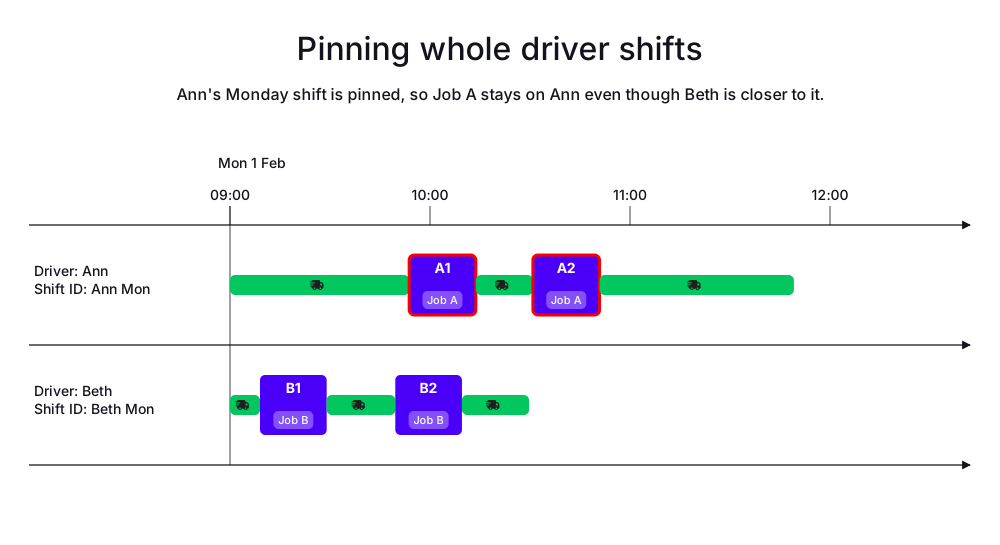
In the following example, Job A is pinned to Ann’s shift even though Beth is much closer to it; the solver keeps Job A on Ann rather than reassigning it to the cheaper driver.
-
Input
-
Output
Try this example in Timefold Platform by saving this JSON into a file called sample.json and make the following API call:
|
curl -X POST -H "Content-type: application/json" -H 'X-API-KEY: <API_KEY>' https://app.timefold.ai/api/models/pickup-delivery-routing/v1/route-plans [email protected]{
"config": {
"run": {
"name": "Keep pinned stop on driver shift"
}
},
"modelInput": {
"drivers": [
{
"id": "Ann",
"shifts": [
{
"id": "Ann Mon",
"startLocation": [33.72757, -83.96354],
"minStartTime": "2027-02-01T09:00:00Z",
"maxEndTime": "2027-02-01T17:00:00Z",
"pinned": true,
"itinerary": [
{
"id": "A1",
"kind": "STOP"
},
{
"id": "A2",
"kind": "STOP"
}
]
}
]
},
{
"id": "Beth",
"shifts": [
{
"id": "Beth Mon",
"startLocation": [33.77284, -84.42989],
"minStartTime": "2027-02-01T09:00:00Z",
"maxEndTime": "2027-02-01T17:00:00Z",
"itinerary": [
{
"id": "B1",
"kind": "STOP"
},
{
"id": "B2",
"kind": "STOP"
}
]
}
]
}
],
"jobs": [
{
"id": "A",
"stops": [
{
"id": "A1",
"name": "A1",
"location": [33.77911, -84.49644],
"duration": "PT20M"
},
{
"id": "A2",
"name": "A2",
"location": [33.65979, -84.46366],
"duration": "PT20M"
}
]
},
{
"id": "B",
"stops": [
{
"id": "B1",
"name": "B1",
"location": [33.74648, -84.46461],
"duration": "PT20M"
},
{
"id": "B2",
"name": "B2",
"location": [33.65207, -84.46496],
"duration": "PT20M"
}
]
}
]
}
}
To request the solution, locate the ID from the response to the post operation and append it to the following API call:
|
curl -X GET -H 'X-API-KEY: <API_KEY>' https://app.timefold.ai/api/models/pickup-delivery-routing/v1/route-plans/<ID>{
"metadata": {
"id": "ID",
"originId": "ID",
"name": "Keep pinned stop on driver shift",
"submitDateTime": "2026-07-14T07:23:49.179106729Z",
"startDateTime": "2026-07-14T07:24:02.071916806Z",
"activeDateTime": "2026-07-14T07:24:02.177400153Z",
"completeDateTime": "2026-07-14T07:24:32.574337138Z",
"shutdownDateTime": "2026-07-14T07:24:32.574340144Z",
"solverStatus": "SOLVING_COMPLETED",
"score": "0hard/0medium/-10733soft",
"tags": [
"system.type:from-request",
"system.profile:Standard profile"
],
"validationResult": {
"summary": "OK"
}
},
"modelOutput": {
"drivers": [
{
"id": "Ann",
"shifts": [
{
"id": "Ann Mon",
"startTime": "2027-02-01T09:00:00Z",
"pinned": true,
"itinerary": [
{
"id": "A1",
"arrivalTime": "2027-02-01T09:53:45Z",
"startServiceTime": "2027-02-01T09:53:45Z",
"departureTime": "2027-02-01T10:13:45Z",
"effectiveDuration": "PT20M",
"travelTimeFromPreviousStandstill": "PT53M45S",
"travelDistanceMetersFromPreviousStandstill": 65596,
"minStartTravelTime": "2027-02-01T00:00:00Z",
"load": [],
"pinned": true,
"kind": "STOP"
},
{
"id": "A2",
"arrivalTime": "2027-02-01T10:30:52Z",
"startServiceTime": "2027-02-01T10:30:52Z",
"departureTime": "2027-02-01T10:50:52Z",
"effectiveDuration": "PT20M",
"travelTimeFromPreviousStandstill": "PT17M7S",
"travelDistanceMetersFromPreviousStandstill": 18057,
"minStartTravelTime": "2027-02-01T00:00:00Z",
"load": [],
"pinned": true,
"kind": "STOP"
}
],
"metrics": {
"totalTravelTime": "PT2H9M10S",
"travelTimeFromStartLocationToFirstStop": "PT53M45S",
"travelTimeBetweenStops": "PT17M7S",
"travelTimeFromLastStopToEndLocation": "PT58M18S",
"totalTravelDistanceMeters": 149304,
"travelDistanceFromStartLocationToFirstStopMeters": 65596,
"travelDistanceBetweenStopsMeters": 18057,
"travelDistanceFromLastStopToEndLocationMeters": 65651,
"endLocationArrivalTime": "2027-02-01T11:49:10Z",
"overtime": "PT0S"
}
}
]
},
{
"id": "Beth",
"shifts": [
{
"id": "Beth Mon",
"startTime": "2027-02-01T09:00:00Z",
"itinerary": [
{
"id": "B1",
"arrivalTime": "2027-02-01T09:09:00Z",
"startServiceTime": "2027-02-01T09:09:00Z",
"departureTime": "2027-02-01T09:29:00Z",
"effectiveDuration": "PT20M",
"travelTimeFromPreviousStandstill": "PT9M",
"travelDistanceMetersFromPreviousStandstill": 5858,
"minStartTravelTime": "2027-02-01T00:00:00Z",
"load": [],
"kind": "STOP"
},
{
"id": "B2",
"arrivalTime": "2027-02-01T09:49:35Z",
"startServiceTime": "2027-02-01T09:49:35Z",
"departureTime": "2027-02-01T10:09:35Z",
"effectiveDuration": "PT20M",
"travelTimeFromPreviousStandstill": "PT20M35S",
"travelDistanceMetersFromPreviousStandstill": 17250,
"minStartTravelTime": "2027-02-01T00:00:00Z",
"load": [],
"kind": "STOP"
}
],
"metrics": {
"totalTravelTime": "PT49M43S",
"travelTimeFromStartLocationToFirstStop": "PT9M",
"travelTimeBetweenStops": "PT20M35S",
"travelTimeFromLastStopToEndLocation": "PT20M8S",
"totalTravelDistanceMeters": 40186,
"travelDistanceFromStartLocationToFirstStopMeters": 5858,
"travelDistanceBetweenStopsMeters": 17250,
"travelDistanceFromLastStopToEndLocationMeters": 17078,
"endLocationArrivalTime": "2027-02-01T10:29:43Z",
"overtime": "PT0S"
}
}
]
}
],
"unassignedJobs": []
},
"inputMetrics": {
"jobs": 2,
"mandatoryJobs": 2,
"optionalJobs": 0,
"stops": 4,
"drivers": 2,
"driverShifts": 2,
"pinnedStops": 2
},
"kpis": {
"totalTravelTime": "PT2H58M53S",
"travelTimeFromStartLocationToFirstStop": "PT1H2M45S",
"travelTimeBetweenStops": "PT37M42S",
"travelTimeFromLastStopToEndLocation": "PT1H18M26S",
"totalTravelDistanceMeters": 189490,
"travelDistanceFromStartLocationToFirstStopMeters": 71454,
"travelDistanceBetweenStopsMeters": 35307,
"travelDistanceFromLastStopToEndLocationMeters": 82729,
"totalUnassignedJobs": 0,
"totalAssignedJobs": 2,
"assignedMandatoryJobs": 2,
"totalUnassignedStops": 0,
"totalAssignedStops": 4,
"assignedMandatoryStops": 4,
"totalActivatedDrivers": 2,
"totalOvertime": "PT0S"
},
"run": {
"id": "ID",
"originId": "ID",
"name": "Keep pinned stop on driver shift",
"submitDateTime": "2026-07-14T07:23:49.179106729Z",
"startDateTime": "2026-07-14T07:24:02.071916806Z",
"activeDateTime": "2026-07-14T07:24:02.177400153Z",
"completeDateTime": "2026-07-14T07:24:32.574337138Z",
"shutdownDateTime": "2026-07-14T07:24:32.574340144Z",
"solverStatus": "SOLVING_COMPLETED",
"score": "0hard/0medium/-10733soft",
"tags": [
"system.type:from-request",
"system.profile:Standard profile"
],
"validationResult": {
"summary": "OK"
}
}
}3. Pinning individual stops
Sometimes it is necessary to pin specific stops in the schedule and their shift. Maybe the timing of a stop has already been finalized and communicated with a client or a driver has already loaded specific equipment onto their vehicle, which is needed for a specific client. In that case, the relevant stops should be pinned to the time and shift they were originally scheduled for.
The Keep a pinned stops’s start service time hard constraint is invoked when a pinned stop has a required start service time, but the planned start service time is different from that required time.
The constraint adds a hard penalty to the dataset score that is calculated by taking the absolute time difference (in seconds) between the required and planned start service times and multiplying it by 100,000, incentivizing Timefold to keep pinned stops starting as close as possible to their fixed start service times.
Pinning stops is configured in the input itinerary of the updated dataset.
This can be achieved by setting startServiceTime as well as setting pin to true for an item on a driver shift itinerary.
As a result, Timefold will not modify the start service time for a stop pinned that way. It might, however, modify the itinerary before and after the stop.
|
Setting |
Take the batch schedule from above as an example. Assume the delivery of Job A (i.e. Stop A2) has been communicated according to the original schedule and shouldn’t be changed during real-time planning. For that, we add the relevant information to the input itinerary of Ann:
{
  "modelInput": {
    "drivers": [
      {
        "id": "Ann",
        "shifts": [
          {
            "id": "Ann Mon",
            "itinerary": [
              {
                "id": "A1",
                "kind": "STOP"
              },
              {
                "id": "B1",
                "kind": "STOP"
              },
              {
                "id": "A2",
                "kind": "STOP",
                "pin": true,
                "startServiceTime": "2027-02-01T10:04:36Z"
              },
              {
                "id": "B2",
                "kind": "STOP"
              }
            ]
          }
        ]
      }
    ]
  }
}|
Instead of resubmitting the full updated dataset, you can make this change with the Patch feature, which submits only the change as a JSON Patch document and generates a new revision of the plan. The Patch feature is currently available as a preview feature. If you’d like early access to it, please contact us. To learn more about the Submit this patch to the |
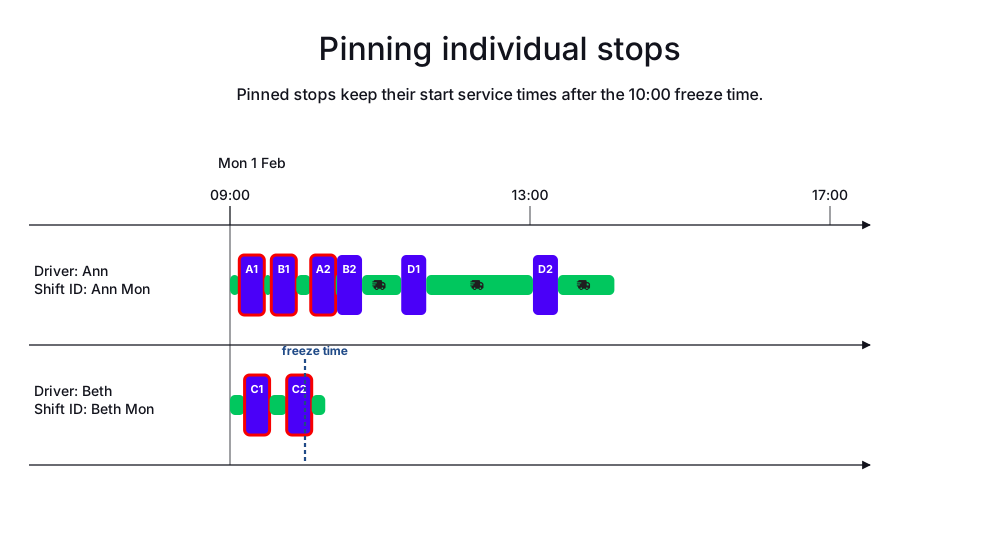
Ignoring the stops that occurred before the freezeTime setting, the only pinned stop in this case will be A2.
The rest of the stops aren’t pinned and can be moved around as needed during real-time planning.
-
Input
-
Output
Try this example in Timefold Platform by saving this JSON into a file called sample.json and make the following API call:
|
curl -X POST -H "Content-type: application/json" -H 'X-API-KEY: <API_KEY>' https://app.timefold.ai/api/models/pickup-delivery-routing/v1/route-plans [email protected]{
"config": {
"run": {
"name": "Original shift plan: pinning example"
}
},
"modelInput": {
"freezeTime": "2027-02-01T10:00:00Z",
"drivers": [
{
"id": "Ann",
"shifts": [
{
"id": "Ann Mon",
"startLocation": [33.77284, -84.42989],
"minStartTime": "2027-02-01T09:00:00Z",
"maxEndTime": "2027-02-01T17:00:00Z",
"itinerary": [
{
"id": "A1",
"kind": "STOP"
},
{
"id": "B1",
"kind": "STOP"
},
{
"id": "A2",
"kind": "STOP"
},
{
"id": "B2",
"kind": "STOP"
}
]
}
]
},
{
"id": "Beth",
"shifts": [
{
"id": "Beth Mon",
"startLocation": [33.70474, -84.06508],
"minStartTime": "2027-02-01T09:00:00Z",
"maxEndTime": "2027-02-01T17:00:00Z",
"itinerary": [
{
"id": "C1",
"kind": "STOP"
},
{
"id": "C2",
"kind": "STOP"
}
]
}
]
}
],
"jobs": [
{
"id": "A",
"stops": [
{
"id": "A1",
"name": "A1",
"location": [33.77911, -84.49644],
"duration": "PT20M",
"minStartTravelTime": "2027-02-01T00:00:00Z"
},
{
"id": "A2",
"name": "A2",
"location": [33.65979, -84.46366],
"duration": "PT20M",
"minStartTravelTime": "2027-02-01T00:00:00Z"
}
]
},
{
"id": "B",
"stops": [
{
"id": "B1",
"name": "B1",
"location": [33.74648, -84.46461],
"duration": "PT20M",
"minStartTravelTime": "2027-02-01T00:00:00Z"
},
{
"id": "B2",
"name": "B2",
"location": [33.65207, -84.46496],
"duration": "PT20M",
"minStartTravelTime": "2027-02-01T00:00:00Z"
}
]
},
{
"id": "C",
"stops": [
{
"id": "C1",
"name": "C1",
"location": [33.72757, -83.96354],
"duration": "PT20M"
},
{
"id": "C2",
"name": "C2",
"location": [33.78592, -84.06508],
"duration": "PT20M"
}
]
},
{
"id": "D",
"priority": "1",
"stops": [
{
"id": "D1",
"name": "D1",
"location": [33.48594, -84.26560],
"duration": "PT20M"
},
{
"id": "D2",
"name": "D2",
"location": [34.11110, -84.43002],
"duration": "PT20M"
}
]
}
]
}
}
To request the solution, locate the ID from the response to the post operation and append it to the following API call:
|
curl -X GET -H 'X-API-KEY: <API_KEY>' https://app.timefold.ai/api/models/pickup-delivery-routing/v1/route-plans/<ID>{
"metadata": {
"id": "ID",
"originId": "ID",
"name": "Original shift plan: pinning example",
"submitDateTime": "2026-01-21T16:20:29.255753+01:00",
"startDateTime": "2026-01-21T16:20:29.38026+01:00",
"activeDateTime": "2026-01-21T16:20:29.380938+01:00",
"completeDateTime": "2026-01-21T16:20:59.394126+01:00",
"shutdownDateTime": "2026-01-21T16:20:59.394128+01:00",
"solverStatus": "SOLVING_COMPLETED",
"score": "0hard/0medium/-13422soft",
"validationResult": {
"summary": "OK"
}
},
"modelOutput": {
"drivers": [
{
"id": "Ann",
"shifts": [
{
"id": "Ann Mon",
"startTime": "2027-02-01T09:00:00Z",
"itinerary": [
{
"id": "A1",
"kind": "STOP",
"arrivalTime": "2027-02-01T09:07:26Z",
"startServiceTime": "2027-02-01T09:07:26Z",
"departureTime": "2027-02-01T09:27:26Z",
"effectiveDuration": "PT20M",
"travelTimeFromPreviousStandstill": "PT7M26S",
"travelDistanceMetersFromPreviousStandstill": 6190,
"minStartTravelTime": "2027-02-01T00:00:00Z",
"load": [],
"pinned": true
},
{
"id": "B1",
"kind": "STOP",
"arrivalTime": "2027-02-01T09:33:02Z",
"startServiceTime": "2027-02-01T09:33:02Z",
"departureTime": "2027-02-01T09:53:02Z",
"effectiveDuration": "PT20M",
"travelTimeFromPreviousStandstill": "PT5M36S",
"travelDistanceMetersFromPreviousStandstill": 4671,
"minStartTravelTime": "2027-02-01T00:00:00Z",
"load": [],
"pinned": true
},
{
"id": "A2",
"kind": "STOP",
"arrivalTime": "2027-02-01T10:04:36Z",
"startServiceTime": "2027-02-01T10:04:36Z",
"departureTime": "2027-02-01T10:24:36Z",
"effectiveDuration": "PT20M",
"travelTimeFromPreviousStandstill": "PT11M34S",
"travelDistanceMetersFromPreviousStandstill": 9640,
"minStartTravelTime": "2027-02-01T00:00:00Z",
"load": [],
"pinned": true
},
{
"id": "B2",
"kind": "STOP",
"arrivalTime": "2027-02-01T10:25:38Z",
"startServiceTime": "2027-02-01T10:25:38Z",
"departureTime": "2027-02-01T10:45:38Z",
"effectiveDuration": "PT20M",
"travelTimeFromPreviousStandstill": "PT1M2S",
"travelDistanceMetersFromPreviousStandstill": 867,
"minStartTravelTime": "2027-02-01T10:00:00Z",
"load": []
},
{
"id": "D1",
"kind": "STOP",
"arrivalTime": "2027-02-01T11:16:59Z",
"startServiceTime": "2027-02-01T11:16:59Z",
"departureTime": "2027-02-01T11:36:59Z",
"effectiveDuration": "PT20M",
"travelTimeFromPreviousStandstill": "PT31M21S",
"travelDistanceMetersFromPreviousStandstill": 26123,
"minStartTravelTime": "2027-02-01T10:00:00Z",
"load": []
},
{
"id": "D2",
"kind": "STOP",
"arrivalTime": "2027-02-01T13:02:22Z",
"startServiceTime": "2027-02-01T13:02:22Z",
"departureTime": "2027-02-01T13:22:22Z",
"effectiveDuration": "PT20M",
"travelTimeFromPreviousStandstill": "PT1H25M23S",
"travelDistanceMetersFromPreviousStandstill": 71155,
"minStartTravelTime": "2027-02-01T10:00:00Z",
"load": []
}
],
"metrics": {
"totalTravelTime": "PT3H7M30S",
"travelTimeFromStartLocationToFirstStop": "PT7M26S",
"travelTimeBetweenStops": "PT2H14M56S",
"travelTimeFromLastStopToEndLocation": "PT45M8S",
"totalTravelDistanceMeters": 156259,
"travelDistanceFromStartLocationToFirstStopMeters": 6190,
"travelDistanceBetweenStopsMeters": 112456,
"travelDistanceFromLastStopToEndLocationMeters": 37613,
"endLocationArrivalTime": "2027-02-01T14:07:30Z"
}
}
]
},
{
"id": "Beth",
"shifts": [
{
"id": "Beth Mon",
"startTime": "2027-02-01T09:00:00Z",
"itinerary": [
{
"id": "C1",
"kind": "STOP",
"arrivalTime": "2027-02-01T09:11:40Z",
"startServiceTime": "2027-02-01T09:11:40Z",
"departureTime": "2027-02-01T09:31:40Z",
"effectiveDuration": "PT20M",
"travelTimeFromPreviousStandstill": "PT11M40S",
"travelDistanceMetersFromPreviousStandstill": 9729,
"minStartTravelTime": "2027-02-01T00:00:00Z",
"load": [],
"pinned": true
},
{
"id": "C2",
"kind": "STOP",
"arrivalTime": "2027-02-01T09:45:22Z",
"startServiceTime": "2027-02-01T09:45:22Z",
"departureTime": "2027-02-01T10:05:22Z",
"effectiveDuration": "PT20M",
"travelTimeFromPreviousStandstill": "PT13M42S",
"travelDistanceMetersFromPreviousStandstill": 11411,
"minStartTravelTime": "2027-02-01T00:00:00Z",
"load": [],
"pinned": true
}
],
"metrics": {
"totalTravelTime": "PT36M12S",
"travelTimeFromStartLocationToFirstStop": "PT11M40S",
"travelTimeBetweenStops": "PT13M42S",
"travelTimeFromLastStopToEndLocation": "PT10M50S",
"totalTravelDistanceMeters": 30167,
"travelDistanceFromStartLocationToFirstStopMeters": 9729,
"travelDistanceBetweenStopsMeters": 11411,
"travelDistanceFromLastStopToEndLocationMeters": 9027,
"endLocationArrivalTime": "2027-02-01T10:16:12Z"
}
}
]
}
],
"unassignedJobs": []
},
"inputMetrics": {
"jobs": 4,
"mandatoryJobs": 4,
"optionalJobs": 0,
"stops": 8,
"drivers": 2,
"driverShifts": 2
},
"kpis": {
"totalTravelTime": "PT3H43M42S",
"totalTravelDistanceMeters": 186426,
"totalActivatedDrivers": 2,
"totalUnassignedJobs": 0,
"totalAssignedJobs": 4,
"assignedMandatoryJobs": 4,
"totalUnassignedStops": 0,
"totalAssignedStops": 8,
"assignedMandatoryStops": 8,
"travelTimeFromStartLocationToFirstStop": "PT19M6S",
"travelTimeBetweenStops": "PT2H28M38S",
"travelTimeFromLastStopToEndLocation": "PT55M58S",
"travelDistanceFromStartLocationToFirstStopMeters": 15919,
"travelDistanceBetweenStopsMeters": 123867,
"travelDistanceFromLastStopToEndLocationMeters": 46640
}
}modelOutput contains Ann’s and Beth’s updated itineraries.
As Stop A2 was pinned, it remains scheduled at the same time and in the same shift as before.
Next
-
See the full API spec, try the online API, or start a free trial.
-
Use Time windows to specify stop availability and limit when stops can be scheduled.
-
Learn about real-time planning.