Score analysis
Score analysis provides a detailed breakdown of your route plan’s score: which constraints are satisfied or violated, by how much, and which jobs and drivers are responsible. It is a versatile tool for a range of use cases:
-
Understanding why Timefold made specific scheduling decisions.
-
Explaining why a particular assignment wasn’t made.
-
Validating manual changes to a solved route plan.
-
Assessing the quality of externally built route plans.
Using the Timefold API
Score analysis can be retrieved for a route plan that Timefold has already solved, or calculated on demand for any route plan you provide directly.
Score analysis of a solved route plan
After Timefold solves a route plan, the score analysis is automatically calculated and stored. Use the score analysis endpoint to retrieve it.
Without justifications
Without justifications, the response contains only the constraint names and their scores. This is useful when you need a lightweight feasibility check or a top-level score breakdown without the overhead of full justification data.
GET /v1/route-plans/{id}/score-analysis
{
  "score": "0hard/-360000medium/-1912205soft",
  "constraints": [
    {
      "name": "Assign mandatory stops",
      "weight": 1,
      "score": "0hard/-360000medium/0soft",
      "matches": [],
      "matchCount": 36,
      "scoreObject": { "hard": 0, "medium": -360000, "soft": 0 },
      "type": "medium",
      "scoreImpact": -360000
    },
    {
      "name": "Assign drivers with the required skills",
      "weight": 1,
      "score": "0hard/0medium/0soft",
      "matches": [],
      "matchCount": 0,
      "scoreObject": { "hard": 0, "medium": 0, "soft": 0 },
      "type": "hard",
      "scoreImpact": 0
    },
    ...
  ]
}
With justifications
With justifications, the response includes the specific objects that caused each constraint match or violation. This is useful when you want to highlight violations in your user interface or explain the score to end users.
GET /v1/route-plans/{id}/score-analysis?includeJustifications=true
{
  "score": "0hard/-360000medium/-1912205soft",
  "constraints": [
    {
      "name": "Assign mandatory stops",
      "weight": 1,
      "score": "0hard/-360000medium/0soft",
      "matches": [
        {
          "score": "0hard/-10000medium/0soft",
          "justification": {
            "stopId": "91e5e5eb-pickup",
            "description": "Mandatory stop (91e5e5eb-pickup) has been left unassigned."
          },
          "type": "medium",
          "scoreImpact": -10000
        },
        ...
      ],
      "matchCount": 36,
      "scoreObject": { "hard": 0, "medium": -360000, "soft": 0 },
      "type": "medium",
      "scoreImpact": -360000
    },
    {
      "name": "Assign drivers with the required skills",
      "weight": 1,
      "score": "0hard/0medium/0soft",
      "matches": [],
      "matchCount": 0,
      "scoreObject": { "hard": 0, "medium": 0, "soft": 0 },
      "type": "hard",
      "scoreImpact": 0
    },
    ...
  ]
}
Score analysis of a provided route plan
Use this endpoint to calculate the score analysis for a route plan you provide directly in the request body. The route plan doesn’t need to have been solved by Timefold. This is useful when you want to validate quick in-memory changes to a route plan before committing them.
For example, assign a job to a different driver. Use the score analysis to understand the impact of the change on the score and to validate that the new route plan is feasible.
The endpoint accepts a route plan object in the request body.
POST /v1/route-plans/score-analysis?includeJustifications=true
The response format is identical to the score analysis with justifications shown above.
Using the Timefold Platform UI
The Timefold platform provides a built-in UI for inspecting the score analysis of a solved route plan without writing any code. After a run completes, open the run results page to see the score breakdown per constraint and explore the justifications interactively. See Interpreting model run results: score analysis for more details.
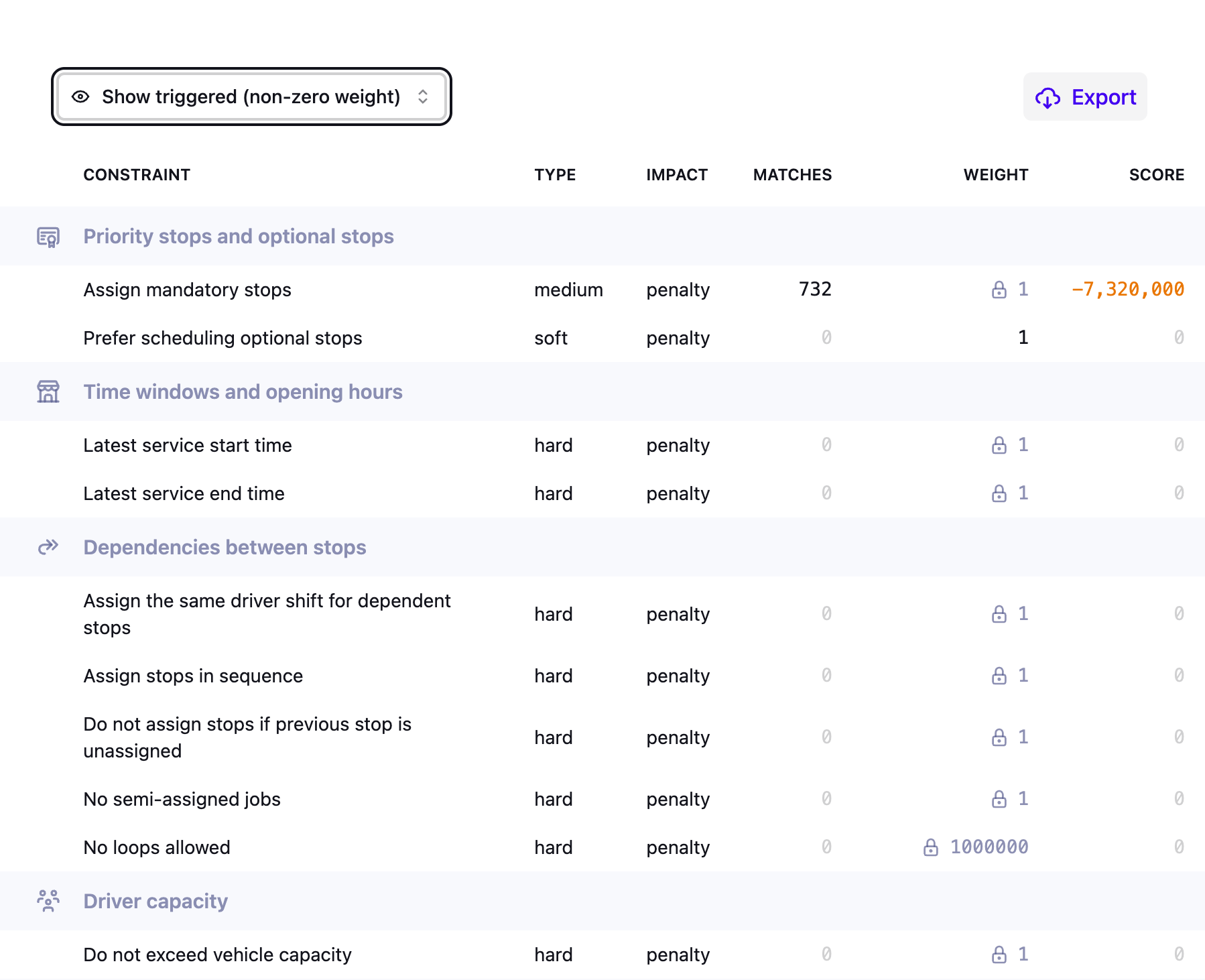
The constraint table can be sorted by score (default), number of matches, weight, or name. Each sort option orders constraints within their group first, then orders the groups by the same criterion.
Use cases
Understanding solver decisions
Score analysis exposes the constraint scores that drove Timefold’s decisions, making it possible to explain why Timefold produced a particular route plan. For each constraint, the breakdown shows how much it contributed to the final score and which jobs and drivers it affected.
This is useful for explaining the outcome to end users and for identifying whether Timefold’s behavior reflects real-world priorities. If the breakdown reveals that a constraint is weighted too heavily or too lightly relative to business needs, you can adjust the configuration profile and re-solve to bring the results closer to what planners expect. See Metrics and optimization goals and Balancing different optimization goals for more details.
Explaining why a specific assignment was not made
Score analysis can help answer questions such as "why wasn’t this driver assigned to this job?". To investigate, construct a route plan where you force that assignment and submit it to the score analysis endpoint.
Comparing the score of that hypothetical route plan against the best-found solution typically reveals the constraint that makes the assignment undesirable or infeasible. For example, the forced assignment may trigger a hard constraint violation such as a missing required skill, or it may incur a significant soft score penalty such as exceeding the driver’s job’s sla requirements. The justification data in the response identifies the exact constraint and the objects involved, giving a clear answer to why Timefold chose a different assignment. See Validating an optimized plan with explainable AI for more details.
Validating manual changes
When a planner manually modifies a solved route plan, score analysis lets them check the impact of the change immediately by submitting the modified route plan to the score analysis endpoint.
Three outcomes are common:
-
The change worsened the route plan, typically because a constraint the planner didn’t consider was affected.
-
The change genuinely improved the route plan. This can happen because Timefold returned a local optimum: a solution that is better than all its immediate neighbors, but not necessarily the global best. To reduce the chance of this in future runs, consider extending the termination time to give the solver more time to escape local optima, or increasing the number of solver threads to explore more of the solution space in parallel. See Configuration for more details.
-
The planner applies domain knowledge Timefold doesn’t have (for example, keeping two specific drivers off the same job) and intentionally accepts a lower score. In that situation, score analysis lets them confirm exactly how much the score changed and verify that no hard constraint was accidentally broken in the process.
Assessing the quality of an externally built route plan
Score analysis can evaluate any route plan, not just ones produced by Timefold. Submit a route plan to the endpoint and get a precise constraint breakdown: which rules are violated, by how much, and which jobs and drivers it affects. This is useful in several scenarios where the route plan originates outside Timefold.
Comparing with a third-party route plan
If another system produces a route plan (for example, a manual planning tool or a third-party optimizer), you can submit it to the score analysis endpoint to evaluate it against Timefold’s constraint model. The response uses the same score format as a Timefold-solved route plan, which makes it straightforward to compare the two on equal terms.
This is helpful when evaluating whether to adopt Timefold, when benchmarking route plan quality over time, or when auditing a route plan that was built outside the platform before it is published. The breakdown also identifies which specific constraints the external route plan violates, giving planners actionable information about where it falls short.