Coverage area
Customer sites are in locations that require travel to reach in order to perform the required work.
Geofencing can be used to define areas that technicians can cover during their shifts, and areas that they prefer to work in.
For instance, one technician might only be able to cover a specific city or region, while another technician prefers to work locations close to where their children go to school but will work in other areas as required.
A covered (or required) area is enforced as a hard constraint, while the preferred area is a soft constraint. Both required and preferred areas can be defined independently of each other, however, when both are defined the required area and preferred area need to overlap (at least partly) for the preferred area to be considered.
In Timefold, a technician’s required or preferred area can be defined using either a single polygon or multiple polygons.
The area definition uses a subset of the GeoJSON format, namely Polygon and MultiPolygon geometry types.
This guide explains how to define technician coverage areas with the following examples:
1. Required area coverage with a single polygon
Learn how to configure an API Key to run the examples in this guide:
In the examples, replace |
A vehicle’s requiredArea property can be used to define the area that a technician can cover during their shift.
If the property is not set, the technician can cover any visit location.
The following example shows a technician with a coverage area defined by a single polygon:
{
  "requiredArea": {
    "type": "Polygon",
    "coordinates": [
        [
          [ -85.0, 34.0 ],
          [ -84.2, 34.0 ],
          [ -84.2, 33.0 ],
          [ -85.0, 33.0 ],
          [ -85.0, 34.0 ]
        ]
      ]
    }
}-
The
coordinatesarray must contain at least one array of coordinates describing the polygon’s outer boundary. -
Any additional arrays of coordinates would describe holes in the polygon (not used in this example).
-
Coordinates are expressed as
[longitude, latitude]pairs.Compatibility with the GeoJSON specification means that the order of coordinates is different from the common [latitude, longitude]format used when defining locations throughout the rest of the model input. -
Each array of coordinates must contain at least four coordinate pairs.
-
The first and the last points in the
coordinatesarray must be the same to close the polygon.
See the GeoJSON specification for more details about the Polygon type.
The No visits outside coverage area hard constraint is invoked when a visit is assigned to a technician whose shift has a requiredArea defined, but the visit’s location falls outside that area.
The constraint adds a hard penalty of 1,000 to the dataset score for each visit assigned outside the required area.
1.1. Required area coverage with a single polygon example
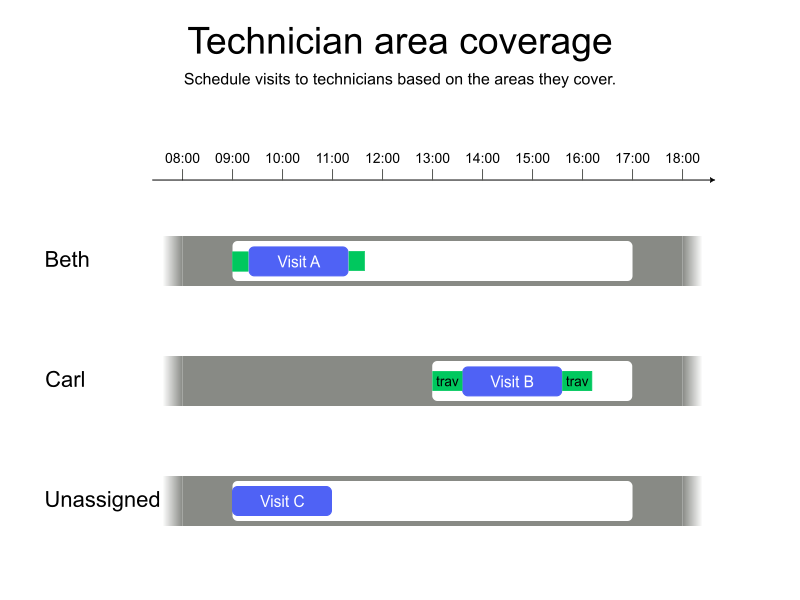
In the following example, Carl and Beth have shifts. Both Beth and Carl have their coverage area defined which covers visits A and B, but not visit C.
Timefold assigns the visits A and B and leaves C unassigned.
-
Input
-
Output
Try this example in Timefold Platform by saving this JSON into a file called sample.json and make the following API call:
|
curl -X POST -H "Content-type: application/json" -H 'X-API-KEY: <API_KEY>' https://app.timefold.ai/api/models/field-service-routing/v1/route-plans [email protected]{
"config": {
"run": {
"name": "Technician area coverage - Polygon example"
}
},
"modelInput": {
"vehicles": [
{
"id": "Beth",
"requiredArea": {
"type": "Polygon",
"coordinates": [
[
[ -85.0, 34.0 ],
[ -84.2, 34.0 ],
[ -84.2, 33.0 ],
[ -85.0, 33.0 ],
[ -85.0, 34.0 ]
]
]
},
"shifts": [
{
"id": "Beth-2027-02-01",
"startLocation": [33.72470, -84.37847],
"minStartTime": "2027-02-01T09:00:00Z",
"maxEndTime": "2027-02-01T17:00:00Z"
}
]
},
{
"id": "Carl",
"requiredArea": {
"type": "Polygon",
"coordinates": [
[
[ -84.2, 34.0 ],
[ -83.0, 34.0 ],
[ -83.0, 33.0 ],
[ -84.2, 33.0 ],
[ -84.2, 34.0 ]
]
]
},
"shifts": [
{
"id": "Carl-2027-02-01",
"startLocation": [33.68786, -84.18487],
"minStartTime": "2027-02-01T13:00:00Z",
"maxEndTime": "2027-02-01T17:00:00Z"
}
]
}
],
"visits": [
{
"id": "Visit A",
"location": [33.77301, -84.43838],
"serviceDuration": "PT2H"
},
{
"id": "Visit B",
"location": [33.74699, -84.02504],
"serviceDuration": "PT2H"
},
{
"id": "Visit C",
"location": [34.11155, -84.57443],
"serviceDuration": "PT1H"
}
]
}
}
To request the solution, locate the ID from the response to the post operation and append it to the following API call:
|
curl -X GET -H 'X-API-KEY: <API_KEY>' https://app.timefold.ai/api/models/field-service-routing/v1/route-plans/<ID>{
"metadata": {
"id": "ID",
"originId": "ID",
"name": "Technician area coverage - Polygon example",
"submitDateTime": "2025-11-21T06:14:07.446286553Z",
"startDateTime": "2025-11-21T06:14:26.865763195Z",
"activeDateTime": "2025-11-21T06:14:26.905084455Z",
"completeDateTime": "2025-11-21T06:14:57.41871743Z",
"shutdownDateTime": "2025-11-21T06:14:57.418727721Z",
"solverStatus": "SOLVING_COMPLETED",
"score": "0hard/-10000medium/-4562soft",
"tags": [
"system.type:from-request",
"system.profile:default"
],
"validationResult": {
"summary": "OK"
}
},
"modelOutput": {
"vehicles": [
{
"id": "Beth",
"shifts": [
{
"id": "Beth-2027-02-01",
"startTime": "2027-02-01T09:00:00Z",
"itinerary": [
{
"id": "Visit A",
"kind": "VISIT",
"arrivalTime": "2027-02-01T09:14:38Z",
"startServiceTime": "2027-02-01T09:14:38Z",
"departureTime": "2027-02-01T11:14:38Z",
"effectiveServiceDuration": "PT2H",
"travelTimeFromPreviousStandstill": "PT14M38S",
"travelDistanceMetersFromPreviousStandstill": 11045,
"minStartTravelTime": "2027-02-01T00:00:00Z"
}
],
"metrics": {
"totalTravelTime": "PT28M23S",
"travelTimeFromStartLocationToFirstVisit": "PT14M38S",
"travelTimeBetweenVisits": "PT0S",
"travelTimeFromLastVisitToEndLocation": "PT13M45S",
"totalTravelDistanceMeters": 21824,
"travelDistanceFromStartLocationToFirstVisitMeters": 11045,
"travelDistanceBetweenVisitsMeters": 0,
"travelDistanceFromLastVisitToEndLocationMeters": 10779,
"endLocationArrivalTime": "2027-02-01T11:28:23Z"
}
}
]
},
{
"id": "Carl",
"shifts": [
{
"id": "Carl-2027-02-01",
"startTime": "2027-02-01T13:00:00Z",
"itinerary": [
{
"id": "Visit B",
"kind": "VISIT",
"arrivalTime": "2027-02-01T13:21:37Z",
"startServiceTime": "2027-02-01T13:21:37Z",
"departureTime": "2027-02-01T15:21:37Z",
"effectiveServiceDuration": "PT2H",
"travelTimeFromPreviousStandstill": "PT21M37S",
"travelDistanceMetersFromPreviousStandstill": 21413,
"minStartTravelTime": "2027-02-01T00:00:00Z"
}
],
"metrics": {
"totalTravelTime": "PT43M17S",
"travelTimeFromStartLocationToFirstVisit": "PT21M37S",
"travelTimeBetweenVisits": "PT0S",
"travelTimeFromLastVisitToEndLocation": "PT21M40S",
"totalTravelDistanceMeters": 42635,
"travelDistanceFromStartLocationToFirstVisitMeters": 21413,
"travelDistanceBetweenVisitsMeters": 0,
"travelDistanceFromLastVisitToEndLocationMeters": 21222,
"endLocationArrivalTime": "2027-02-01T15:43:17Z"
}
}
]
}
],
"unassignedVisits": [
"Visit C"
]
},
"inputMetrics": {
"visits": 3,
"visitGroups": 0,
"visitDependencies": 0,
"mandatoryVisits": 3,
"optionalVisits": 0,
"vehicles": 2,
"vehicleShifts": 2,
"visitsWithSla": 0,
"movableVisits": 0,
"pinnedVisits": 0
},
"kpis": {
"totalTravelTime": "PT1H11M40S",
"travelTimeFromStartLocationToFirstVisit": "PT36M15S",
"travelTimeBetweenVisits": "PT0S",
"travelTimeFromLastVisitToEndLocation": "PT35M25S",
"totalTravelDistanceMeters": 64459,
"travelDistanceFromStartLocationToFirstVisitMeters": 32458,
"travelDistanceBetweenVisitsMeters": 0,
"travelDistanceFromLastVisitToEndLocationMeters": 32001,
"totalUnassignedVisits": 1,
"totalAssignedVisits": 2,
"assignedMandatoryVisits": 2,
"assignedOptionalVisits": 0,
"totalActivatedVehicles": 2,
"workingTimeFairnessPercentage": 62.48
},
"run": {
"id": "e5b058fa-bef0-4fd8-b9ef-5e6bf477282e",
"originId": "e5b058fa-bef0-4fd8-b9ef-5e6bf477282e",
"name": "Technician area coverage - Polygon example",
"submitDateTime": "2025-11-21T06:14:07.446286553Z",
"startDateTime": "2025-11-21T06:14:26.865763195Z",
"activeDateTime": "2025-11-21T06:14:26.905084455Z",
"completeDateTime": "2025-11-21T06:14:57.41871743Z",
"shutdownDateTime": "2025-11-21T06:14:57.418727721Z",
"solverStatus": "SOLVING_COMPLETED",
"score": "0hard/-10000medium/-4562soft",
"tags": [
"system.type:from-request",
"system.profile:default"
],
"validationResult": {
"summary": "OK"
}
}
}2. Required area coverage defined by multiple polygons
The following shows a technician with a coverage area defined by multiple polygons, or a MultiPolygon:
{
  "requiredArea": {
    "type": "MultiPolygon",
    "coordinates": [
        [
          [
            [ -85.0, 34.0 ],
            [ -84.2, 34.0 ],
            [ -84.2, 33.0 ],
            [ -85.0, 33.0 ],
            [ -85.0, 34.0 ]
          ]
        ],
        [
          [
            [ -85.1, 35.0 ],
            [ -84.3, 35.0 ],
            [ -84.3, 34.0 ],
            [ -85.1, 34.0 ],
            [ -85.1, 35.0 ]
          ]
        ]
      ]
    }
}-
The
coordinatesarray contains multiple arrays, each representing a polygon. -
Each of the polygon arrays must follow the same rules as described in the Required area coverage with a single polygon section above.
-
Coordinates are expressed as
[longitude, latitude]pairs.Compatibility with the GeoJSON specification means that the order of coordinates is different from the common [latitude, longitude]format used when defining locations throughout the rest of the model input.
See the GeoJSON specification for more details about the MultiPolygon type.
2.1. Required area coverage defined by multiple polygons example
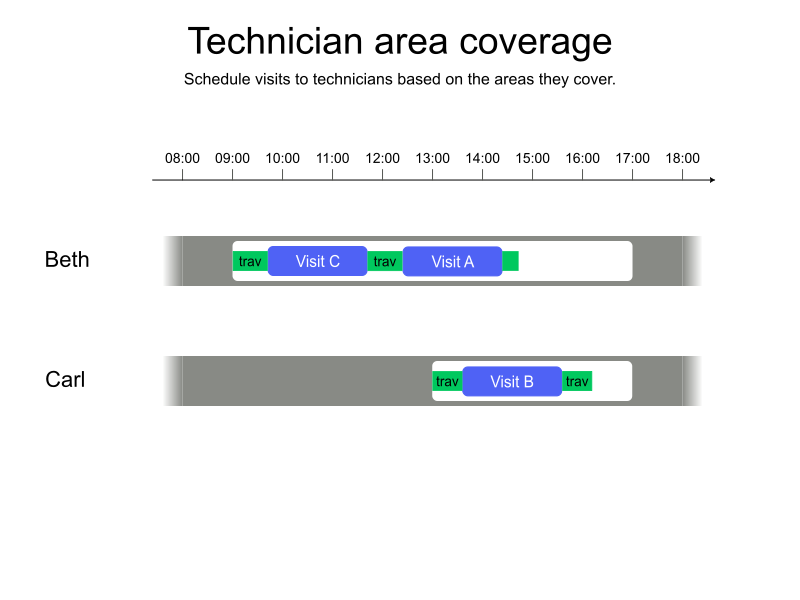
In the following example, Carl and Beth have shifts. Carl’s area covers visit B. Beth’s area is defined using multiple polygons, the first of them covering visit A and the second polygon covering visit C.
Timefold assigns all visits A, B and C because they are located within a technician’s coverage area.
-
Input
-
Output
Try this example in Timefold Platform by saving this JSON into a file called sample.json and make the following API call:
|
curl -X POST -H "Content-type: application/json" -H 'X-API-KEY: <API_KEY>' https://app.timefold.ai/api/models/field-service-routing/v1/route-plans [email protected]{
"config": {
"run": {
"name": "Technician area coverage - MultiPolygon example"
}
},
"modelInput": {
"vehicles": [
{
"id": "Beth",
"requiredArea": {
"type": "MultiPolygon",
"coordinates": [
[
[
[ -85.0, 34.0 ],
[ -84.2, 34.0 ],
[ -84.2, 33.0 ],
[ -85.0, 33.0 ],
[ -85.0, 34.0 ]
]
],
[
[
[ -85.1, 35.0 ],
[ -84.3, 35.0 ],
[ -84.3, 34.0 ],
[ -85.1, 34.0 ],
[ -85.1, 35.0 ]
]
]
]
},
"shifts": [
{
"id": "Beth-2027-02-01",
"startLocation": [33.72470, -84.37847],
"minStartTime": "2027-02-01T09:00:00Z",
"maxEndTime": "2027-02-01T17:00:00Z"
}
]
},
{
"id": "Carl",
"requiredArea": {
"type": "Polygon",
"coordinates": [
[
[ -84.2, 34.0 ],
[ -83.0, 34.0 ],
[ -83.0, 33.0 ],
[ -84.2, 33.0 ],
[ -84.2, 34.0 ]
]
]
},
"shifts": [
{
"id": "Carl-2027-02-01",
"startLocation": [33.68786, -84.18487],
"minStartTime": "2027-02-01T13:00:00Z",
"maxEndTime": "2027-02-01T17:00:00Z"
}
]
}
],
"visits": [
{
"id": "Visit A",
"location": [33.77301, -84.43838],
"serviceDuration": "PT2H"
},
{
"id": "Visit B",
"location": [33.74699, -84.02504],
"serviceDuration": "PT2H"
},
{
"id": "Visit C",
"location": [34.11155, -84.57443],
"serviceDuration": "PT2H"
}
]
}
}
To request the solution, locate the ID from the response to the post operation and append it to the following API call:
|
curl -X GET -H 'X-API-KEY: <API_KEY>' https://app.timefold.ai/api/models/field-service-routing/v1/route-plans/<ID>{
"metadata": {
"id": "ID",
"originId": "ID",
"name": "Technician area coverage - MultiPolygon example",
"submitDateTime": "2025-11-21T06:42:06.087613129Z",
"startDateTime": "2025-11-21T06:42:18.856904447Z",
"activeDateTime": "2025-11-21T06:42:18.930121181Z",
"completeDateTime": "2025-11-21T06:42:49.519119395Z",
"shutdownDateTime": "2025-11-21T06:42:49.519129695Z",
"solverStatus": "SOLVING_COMPLETED",
"score": "0hard/0medium/-8717soft",
"tags": [
"system.type:from-request",
"system.profile:default"
],
"validationResult": {
"summary": "OK"
}
},
"modelOutput": {
"vehicles": [
{
"id": "Beth",
"shifts": [
{
"id": "Beth-2027-02-01",
"startTime": "2027-02-01T09:00:00Z",
"itinerary": [
{
"id": "Visit C",
"kind": "VISIT",
"arrivalTime": "2027-02-01T09:45:47Z",
"startServiceTime": "2027-02-01T09:45:47Z",
"departureTime": "2027-02-01T11:45:47Z",
"effectiveServiceDuration": "PT2H",
"travelTimeFromPreviousStandstill": "PT45M47S",
"travelDistanceMetersFromPreviousStandstill": 53061,
"minStartTravelTime": "2027-02-01T00:00:00Z"
},
{
"id": "Visit A",
"kind": "VISIT",
"arrivalTime": "2027-02-01T12:27:53Z",
"startServiceTime": "2027-02-01T12:27:53Z",
"departureTime": "2027-02-01T14:27:53Z",
"effectiveServiceDuration": "PT2H",
"travelTimeFromPreviousStandstill": "PT42M6S",
"travelDistanceMetersFromPreviousStandstill": 49213,
"minStartTravelTime": "2027-02-01T00:00:00Z"
}
],
"metrics": {
"totalTravelTime": "PT1H41M38S",
"travelTimeFromStartLocationToFirstVisit": "PT45M47S",
"travelTimeBetweenVisits": "PT42M6S",
"travelTimeFromLastVisitToEndLocation": "PT13M45S",
"totalTravelDistanceMeters": 113053,
"travelDistanceFromStartLocationToFirstVisitMeters": 53061,
"travelDistanceBetweenVisitsMeters": 49213,
"travelDistanceFromLastVisitToEndLocationMeters": 10779,
"endLocationArrivalTime": "2027-02-01T14:41:38Z"
}
}
]
},
{
"id": "Carl",
"shifts": [
{
"id": "Carl-2027-02-01",
"startTime": "2027-02-01T13:00:00Z",
"itinerary": [
{
"id": "Visit B",
"kind": "VISIT",
"arrivalTime": "2027-02-01T13:21:37Z",
"startServiceTime": "2027-02-01T13:21:37Z",
"departureTime": "2027-02-01T15:21:37Z",
"effectiveServiceDuration": "PT2H",
"travelTimeFromPreviousStandstill": "PT21M37S",
"travelDistanceMetersFromPreviousStandstill": 21413,
"minStartTravelTime": "2027-02-01T00:00:00Z"
}
],
"metrics": {
"totalTravelTime": "PT43M17S",
"travelTimeFromStartLocationToFirstVisit": "PT21M37S",
"travelTimeBetweenVisits": "PT0S",
"travelTimeFromLastVisitToEndLocation": "PT21M40S",
"totalTravelDistanceMeters": 42635,
"travelDistanceFromStartLocationToFirstVisitMeters": 21413,
"travelDistanceBetweenVisitsMeters": 0,
"travelDistanceFromLastVisitToEndLocationMeters": 21222,
"endLocationArrivalTime": "2027-02-01T15:43:17Z"
}
}
]
}
],
"unassignedVisits": []
},
"inputMetrics": {
"visits": 3,
"visitGroups": 0,
"visitDependencies": 0,
"mandatoryVisits": 3,
"optionalVisits": 0,
"vehicles": 2,
"vehicleShifts": 2,
"visitsWithSla": 0,
"movableVisits": 0,
"pinnedVisits": 0
},
"kpis": {
"totalTravelTime": "PT2H24M55S",
"travelTimeFromStartLocationToFirstVisit": "PT1H7M24S",
"travelTimeBetweenVisits": "PT42M6S",
"travelTimeFromLastVisitToEndLocation": "PT35M25S",
"totalTravelDistanceMeters": 155688,
"travelDistanceFromStartLocationToFirstVisitMeters": 74474,
"travelDistanceBetweenVisitsMeters": 49213,
"travelDistanceFromLastVisitToEndLocationMeters": 32001,
"totalUnassignedVisits": 0,
"totalAssignedVisits": 3,
"assignedMandatoryVisits": 3,
"assignedOptionalVisits": 0,
"totalActivatedVehicles": 2,
"workingTimeFairnessPercentage": 97.74
},
"run": {
"id": "ID",
"originId": "ID",
"name": "Technician area coverage - MultiPolygon example",
"submitDateTime": "2025-11-21T06:42:06.087613129Z",
"startDateTime": "2025-11-21T06:42:18.856904447Z",
"activeDateTime": "2025-11-21T06:42:18.930121181Z",
"completeDateTime": "2025-11-21T06:42:49.519119395Z",
"shutdownDateTime": "2025-11-21T06:42:49.519129695Z",
"solverStatus": "SOLVING_COMPLETED",
"score": "0hard/0medium/-8717soft",
"tags": [
"system.type:from-request",
"system.profile:default"
],
"validationResult": {
"summary": "OK"
}
}
}3. Area preference defined by a polygon
The following example shows a preferred area for a technician defined by a polygon:
{
  "preferredArea": {
    "type": "Polygon",
    "coordinates": [
        [
          [ -85.0, 34.0 ],
          [ -84.2, 34.0 ],
          [ -84.2, 33.0 ],
          [ -85.0, 33.0 ],
          [ -85.0, 34.0 ]
        ]
      ]
    }
}-
The
coordinatesarray must contain at least one array of coordinates describing the polygon’s outer boundary. -
Any additional arrays of coordinates would describe holes in the polygon (not used in this example).
-
Coordinates are expressed as
[longitude, latitude]pairs.Compatibility with the GeoJSON specification means that the order of coordinates is different from the common [latitude, longitude]format used when defining locations throughout the rest of the model input. -
Each array of coordinates must contain at least four coordinate pairs.
-
The first and the last points in the
coordinatesarray must be the same to close the polygon.
See the GeoJSON specification for more details about the Polygon type.
The Minimize scheduling visits outside the preferred area soft constraint is invoked when a visit is assigned outside a technician’s preferred area.
Visits will still be assigned if they break this constraint.
The constraint adds a soft score penalty equivalent to the travel time (in seconds) from the visit’s location to the preferred area, incentivizing Timefold to find the best solution.
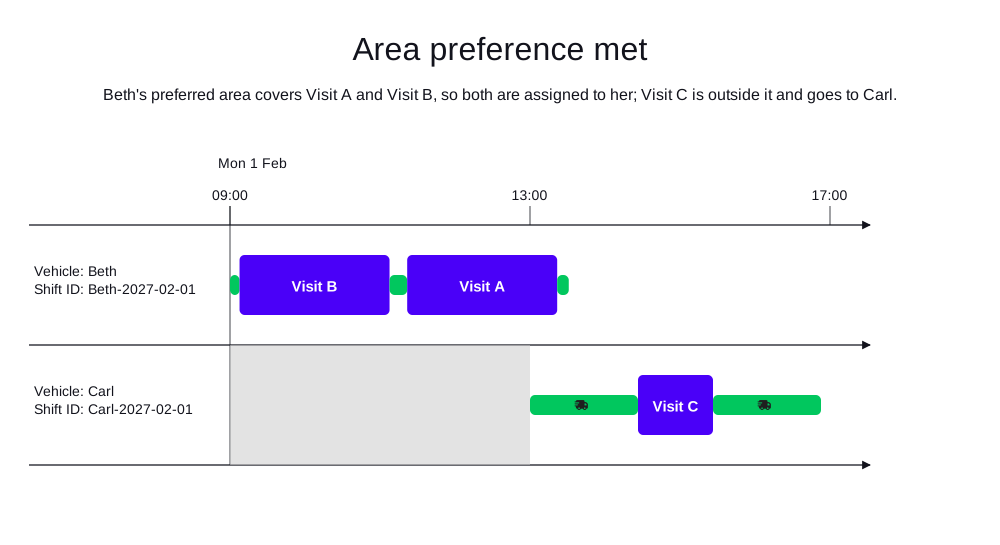
In the following example, Beth has a preferred area covering visits A and B, but not visit C. Timefold assigns A and B to Beth, keeping them within her preferred area, and assigns C to Carl.
-
Input
-
Output
Try this example in Timefold Platform by saving this JSON into a file called sample.json and make the following API call:
|
curl -X POST -H "Content-type: application/json" -H 'X-API-KEY: <API_KEY>' https://app.timefold.ai/api/models/field-service-routing/v1/route-plans [email protected]{
"config": {
"run": {
"name": "Technician preferred area - Polygon example"
}
},
"modelInput": {
"vehicles": [
{
"id": "Beth",
"preferredArea": {
"type": "Polygon",
"coordinates": [
[
[ -85.0, 34.0 ],
[ -84.2, 34.0 ],
[ -84.2, 33.0 ],
[ -85.0, 33.0 ],
[ -85.0, 34.0 ]
]
]
},
"shifts": [
{
"id": "Beth-2027-02-01",
"startLocation": [33.72470, -84.37847],
"minStartTime": "2027-02-01T09:00:00Z",
"maxEndTime": "2027-02-01T17:00:00Z"
}
]
},
{
"id": "Carl",
"shifts": [
{
"id": "Carl-2027-02-01",
"startLocation": [33.7247, -84.37847],
"minStartTime": "2027-02-01T13:00:00Z",
"maxEndTime": "2027-02-01T17:00:00Z"
}
]
}
],
"visits": [
{
"id": "Visit A",
"location": [33.77301, -84.43838],
"serviceDuration": "PT2H"
},
{
"id": "Visit B",
"location": [33.74699, -84.31504],
"serviceDuration": "PT2H"
},
{
"id": "Visit C",
"location": [34.35155, -84.57443],
"serviceDuration": "PT1H"
}
]
}
}
To request the solution, locate the ID from the response to the post operation and append it to the following API call:
|
curl -X GET -H 'X-API-KEY: <API_KEY>' https://app.timefold.ai/api/models/field-service-routing/v1/route-plans/<ID>{
"metadata": {
"id": "448cf359-2332-4f69-82e4-9f6dcd432a7c",
"originId": "448cf359-2332-4f69-82e4-9f6dcd432a7c",
"name": "Technician preferred area - Polygon example",
"submitDateTime": "2025-12-15T14:44:48.085102+01:00",
"startDateTime": "2025-12-15T14:44:48.116039+01:00",
"activeDateTime": "2025-12-15T14:44:48.117089+01:00",
"solverStatus": "SOLVING_ACTIVE",
"score": "0hard/0medium/-12516soft",
"validationResult": {
"summary": "OK"
}
},
"modelOutput": {
"vehicles": [
{
"id": "Beth",
"shifts": [
{
"id": "Beth-2027-02-01",
"startTime": "2027-02-01T09:00:00Z",
"itinerary": [
{
"id": "Visit B",
"kind": "VISIT",
"arrivalTime": "2027-02-01T09:07:38Z",
"startServiceTime": "2027-02-01T09:07:38Z",
"departureTime": "2027-02-01T11:07:38Z",
"effectiveServiceDuration": "PT2H",
"travelTimeFromPreviousStandstill": "PT7M38S",
"travelDistanceMetersFromPreviousStandstill": 6368,
"minStartTravelTime": "2027-02-01T00:00:00Z"
},
{
"id": "Visit A",
"kind": "VISIT",
"arrivalTime": "2027-02-01T11:21:45Z",
"startServiceTime": "2027-02-01T11:21:45Z",
"departureTime": "2027-02-01T13:21:45Z",
"effectiveServiceDuration": "PT2H",
"travelTimeFromPreviousStandstill": "PT14M7S",
"travelDistanceMetersFromPreviousStandstill": 11763,
"minStartTravelTime": "2027-02-01T00:00:00Z"
}
],
"metrics": {
"totalTravelTime": "PT31M1S",
"travelTimeFromStartLocationToFirstVisit": "PT7M38S",
"travelTimeBetweenVisits": "PT14M7S",
"travelTimeFromLastVisitToEndLocation": "PT9M16S",
"totalTravelDistanceMeters": 25847,
"travelDistanceFromStartLocationToFirstVisitMeters": 6368,
"travelDistanceBetweenVisitsMeters": 11763,
"travelDistanceFromLastVisitToEndLocationMeters": 7716,
"endLocationArrivalTime": "2027-02-01T13:31:01Z",
"visitsOutsidePreferredArea": 0
}
}
]
},
{
"id": "Carl",
"shifts": [
{
"id": "Carl-2027-02-01",
"startTime": "2027-02-01T13:00:00Z",
"itinerary": [
{
"id": "Visit C",
"kind": "VISIT",
"arrivalTime": "2027-02-01T14:26:24Z",
"startServiceTime": "2027-02-01T14:26:24Z",
"departureTime": "2027-02-01T15:26:24Z",
"effectiveServiceDuration": "PT1H",
"travelTimeFromPreviousStandstill": "PT1H26M24S",
"travelDistanceMetersFromPreviousStandstill": 72003,
"minStartTravelTime": "2027-02-01T00:00:00Z"
}
],
"metrics": {
"totalTravelTime": "PT2H52M48S",
"travelTimeFromStartLocationToFirstVisit": "PT1H26M24S",
"travelTimeBetweenVisits": "PT0S",
"travelTimeFromLastVisitToEndLocation": "PT1H26M24S",
"totalTravelDistanceMeters": 144006,
"travelDistanceFromStartLocationToFirstVisitMeters": 72003,
"travelDistanceBetweenVisitsMeters": 0,
"travelDistanceFromLastVisitToEndLocationMeters": 72003,
"endLocationArrivalTime": "2027-02-01T16:52:48Z"
}
}
]
}
],
"unassignedVisits": []
},
"inputMetrics": {
"visits": 3,
"visitGroups": 0,
"visitDependencies": 0,
"mandatoryVisits": 3,
"optionalVisits": 0,
"vehicles": 2,
"vehicleShifts": 2,
"visitsWithSla": 0,
"movableVisits": 0,
"pinnedVisits": 0
},
"kpis": {
"averageTravelTimePerVisit": "PT1H7M56S",
"totalTravelTime": "PT3H23M49S",
"travelTimeFromStartLocationToFirstVisit": "PT1H34M2S",
"travelTimeBetweenVisits": "PT14M7S",
"travelTimeFromLastVisitToEndLocation": "PT1H35M40S",
"averageTravelDistanceMetersPerVisit": 56618,
"totalTravelDistanceMeters": 169853,
"travelDistanceFromStartLocationToFirstVisitMeters": 78371,
"travelDistanceBetweenVisitsMeters": 11763,
"travelDistanceFromLastVisitToEndLocationMeters": 79719,
"totalUnassignedVisits": 0,
"totalAssignedVisits": 3,
"assignedMandatoryVisits": 3,
"unassignedMandatoryVisits": 0,
"totalActivatedVehicles": 2,
"workingTimeFairnessPercentage": 73.58,
"percentageVisitsOutsidePreferredArea": 0.0,
"absoluteVisitsOutsidePreferredArea": 0
},
"run": {
"id": "448cf359-2332-4f69-82e4-9f6dcd432a7c",
"originId": "448cf359-2332-4f69-82e4-9f6dcd432a7c",
"name": "Technician preferred area - Polygon example",
"submitDateTime": "2025-12-15T14:44:48.085102+01:00",
"startDateTime": "2025-12-15T14:44:48.116039+01:00",
"activeDateTime": "2025-12-15T14:44:48.117089+01:00",
"solverStatus": "SOLVING_ACTIVE",
"score": "0hard/0medium/-12516soft",
"validationResult": {
"summary": "OK"
}
}
}4. Overriding the coverage area per vehicle shift
Both requiredArea and preferredArea can also be defined on an individual vehicle shift, in addition to the vehicle level.
When a vehicle shift defines its own requiredArea or preferredArea, that value fully replaces the vehicle-level value for that shift only.
Other shifts of the same vehicle that do not define their own area keep using the vehicle-level value.
The two fields are overridden independently: a shift can override requiredArea while still inheriting the vehicle’s preferredArea, and vice versa.
If both the vehicle and one of its shifts define an area for the same field, Timefold uses the shift-level value and ignores the vehicle-level value. Timefold flags this scenario with a validation warning so the override is not applied silently, however, the request is not blocked.
The following example shows a vehicle shift overriding the vehicle’s requiredArea:
{
  "id": "Beth",
  "requiredArea": {
    "type": "Polygon",
    "coordinates": [
      [
        [ -85.0, 34.0 ],
        [ -84.2, 34.0 ],
        [ -84.2, 33.0 ],
        [ -85.0, 33.0 ],
        [ -85.0, 34.0 ]
      ]
    ]
  },
  "shifts": [
    {
      "id": "Beth-2027-02-01",
      "requiredArea": {
        "type": "Polygon",
        "coordinates": [
          [
            [ -84.2, 34.0 ],
            [ -83.0, 34.0 ],
            [ -83.0, 33.0 ],
            [ -84.2, 33.0 ],
            [ -84.2, 34.0 ]
          ]
        ]
      },
      "startLocation": [ 33.72470, -84.37847 ],
      "minStartTime": "2027-02-01T09:00:00Z",
      "maxEndTime": "2027-02-01T17:00:00Z"
    },
    {
      "id": "Beth-2027-02-02",
      "startLocation": [ 33.72470, -84.37847 ],
      "minStartTime": "2027-02-02T09:00:00Z",
      "maxEndTime": "2027-02-02T17:00:00Z"
    }
  ]
}-
The vehicle-level
requiredAreais the fallback for any shift that does not define its own area. -
Shift
Beth-2027-02-01overrides it with its ownrequiredArea. -
Shift
Beth-2027-02-02has no override, so it keeps the vehicle-level area.
Next
-
See the full API spec, try the online API, or start a free trial.
-
Learn more about field service routing from our YouTube playlist.
-
Read Skills to learn how to avoid scheduling overqualified technicians for a job.