Docs
  • Solver
  • Models
    • Field Service Routing
    • Employee Shift Scheduling
    • Pick-up and Delivery Routing
  • Platform
Try models
  • Field Service Routing
  • User guide
  • Using the API
  • Using the OpenAPI spec

Field Service Routing

    • Introduction
    • Getting started: Hello world
    • User guide
      • Terminology
      • Use case guide
      • Scheduling API concepts
      • Integration
      • Constraints
      • Using the API
        • Using the OpenAPI spec
        • API tooling
      • Demo datasets
      • Input datasets
        • Model configuration
        • Model input
        • Planning window
        • Time zones and daylight-saving time (DST)
      • Routing with Timefold’s maps service
      • Input validation
      • Model response
      • Output datasets
        • Metadata
        • Model output
        • Input metrics
        • Key performance indicators (KPIs)
      • Key performance indicators (KPIs)
      • Metrics and optimization goals
      • Score analysis
      • Visualizations
    • Vehicle resource constraints
      • Shift hours and overtime
      • Lunch breaks and personal appointments
      • Fairness
      • Route optimization
      • Technician costs
      • Technician ratings
      • Coverage area
    • Visit service constraints
      • Time windows and opening hours
      • Skills
      • Visit dependencies
      • Multi-vehicle visits
      • Multi-day schedules and movable visits
      • Priority visits and optional visits
      • Visit service level agreement (SLA)
      • Duration added for first visit on location
      • Visit profit
      • Visit requirements and tags
        • Visit requirements
        • Tags
    • Manual intervention
    • Recommendations
      • Visit time window recommendations
      • Visit group time window recommendations
      • Bulk time window recommendations
    • Real-time planning
      • Real-time planning: extended visit
      • Real-time planning: reassignment
      • Real-time planning: emergency visit
      • Real-time planning: no show
      • Real-time planning: technician ill
      • Real-time planning: pinning visits
      • Real-time planning: actual arrival and departure times
    • Real-time planning with patches
      • Real-time planning: extended visit (using patches)
      • Real-time planning: reassignment (using patches)
      • Real-time planning: emergency visit (using patches)
      • Real-time planning: no show (using patches)
      • Real-time planning: technician ill (using patches)
      • Real-time planning: pinning visits (using patches)
    • Scenarios
      • Configuring labor law compliance
      • Ferry Connections
      • Long-running visits
    • Changelog
    • Upgrade to the latest version
    • Feature requests

Using the OpenAPI spec

The Field Service Routing API conforms with the OpenAPI standard.

Accessing the spec

The Field Service Routing OpenAPI spec is available in two forms:

  • Interactive API reference: explore and try out endpoints directly in the browser.

  • Raw OpenAPI specification: the machine-readable spec for use with code generators or API clients.

Explore the Field Service Routing API in the Timefold Platform UI

You can explore the Field Service Routing API in Timefold Platform.

  1. Log in to app.timefold.ai.

  2. Select the Field Service Routing tile.

  3. Select OpenAPI Spec.

API endpoints

To understand the API endpoints, select an endpoint to expand it. You will see:

  • Parameters: The parameters required by the API endpoint.

  • Request body: For POST endpoints, you can view example values that are accepted as part of the JSON input and the model schema.

  • Response: The responses the API endpoints will return, example values, and the schema.

The Example Value tab for each endpoint show an example of the JSON for that endpoint:
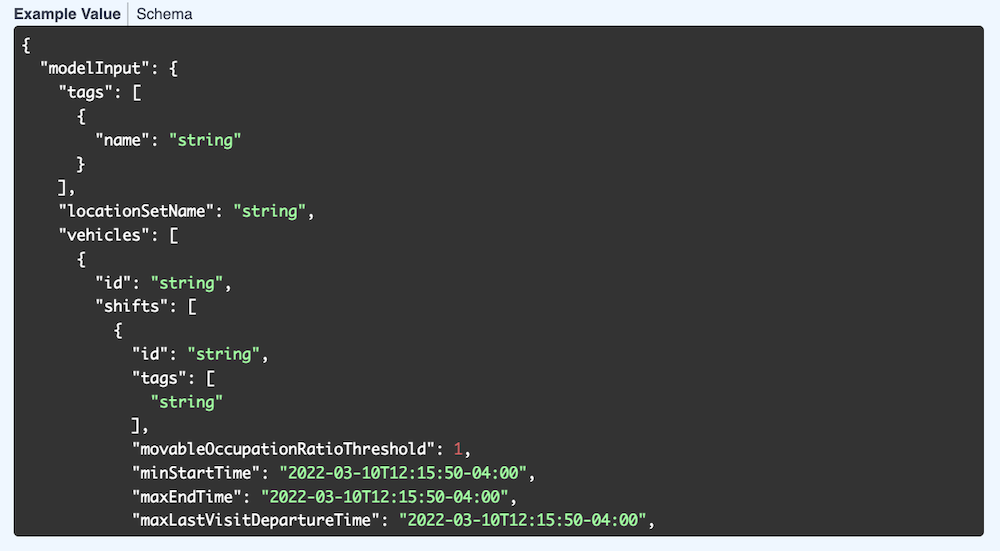
example values

The Schema tab shows the values, their types, and a description. Each field can be expanded to view related information.
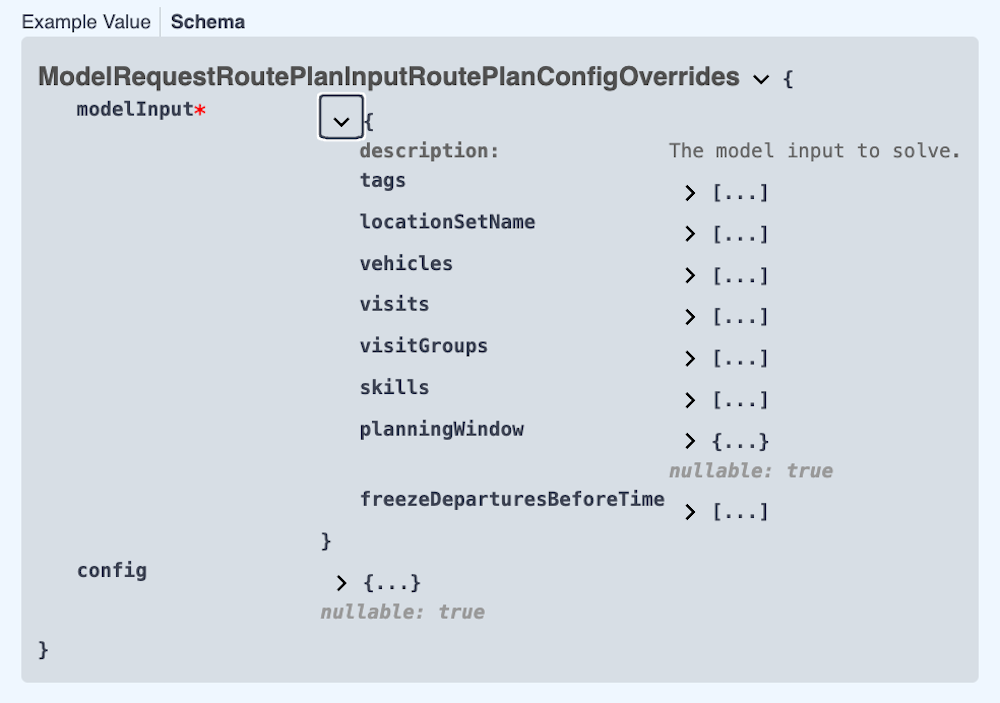
schema

Testing the Field Service Routing API

To test the Field Service Routing API in the platform, you first need to authorize.

  1. Via the Tenant drop-down in the top right, select Manage tenant.

  2. Navigate to the API Keys section.

  3. Create or copy an API key with Field Service Routing permissions.

  4. Navigate back to the Field Service Routing tile and select OpenAPI Spec.

  5. Click Authorize and paste the API key you just copied.

Learn more about using the Timefold API’s.

Demo datasets

Demo datasets that demonstrate the functionality are available. To view the list of demo datasets:

  1. Expand the POST /v1/demo-data endpoint.

  2. Click Try it out, then click Execute.

You will see the Curl instructions to request the dataset and the request URL.

You will also see the response to the request with the list of available datasets.

To download one of the listed datasets:

  1. Expand the POST /v1/demo-data/{demoDataId} endpoint.

  2. Click Try it out, enter the name of the dataset, for instance, "BASIC", and click Execute.

In the response body, you will see the dataset. Copy the dataset to use with subsequent endpoints.

You can also use your own dataset to test the functionality.

  • © 2026 Timefold BV
  • Timefold.ai
  • Documentation
  • Changelog
  • Send feedback
  • Privacy
  • Legal
    • Light mode
    • Dark mode
    • System default