Priority jobs
Different jobs have different priorities. For example, a job that is urgent and must be completed as soon as possible has a higher priority than a job that can be completed at any time.
In Timefold’s Task Scheduling model, you can assign a priority to each job, which helps determine the order in which jobs should be processed. This is especially important when there are limited resources and multiple jobs competing for those resources. By assigning priorities, you can ensure that the most important jobs are completed first, which can improve overall efficiency and customer satisfaction.
This guide explains prioritizing jobs with the following:
Defining priority
Learn how to configure an API Key to run the examples in this guide:
In the examples, replace |
Priority is defined as an integer value in the priority field of a job:
{
  "jobs": [
    {
      "id": "Standard job",
      "duration": "PT2H",
      "priority": 1
    },
    {
      "id": "Important job",
      "duration": "PT2H",
      "priority": 5
    },
    {
      "id": "Critical job",
      "duration": "PT2H",
      "priority": 10
    }
  ]
}
In this example:
-
The
Critical jobhas priority10(most important). -
The
Important jobhas priority5. -
The
Standard jobhas priority1(default, least important).
Priority values must be at least 1.
There is no maximum value, but practical values typically range from 1 to 100.
Minimize number of unassigned jobs
The Minimize number of unassigned jobs medium constraint is invoked for every unassigned job.
The constraint adds a medium penalty to the dataset score equivalent to 1 multiplied by the job’s priority value, incentivizing Timefold to assign higher-priority jobs over lower-priority jobs when resources are limited.
Minimize number of unassigned jobs example
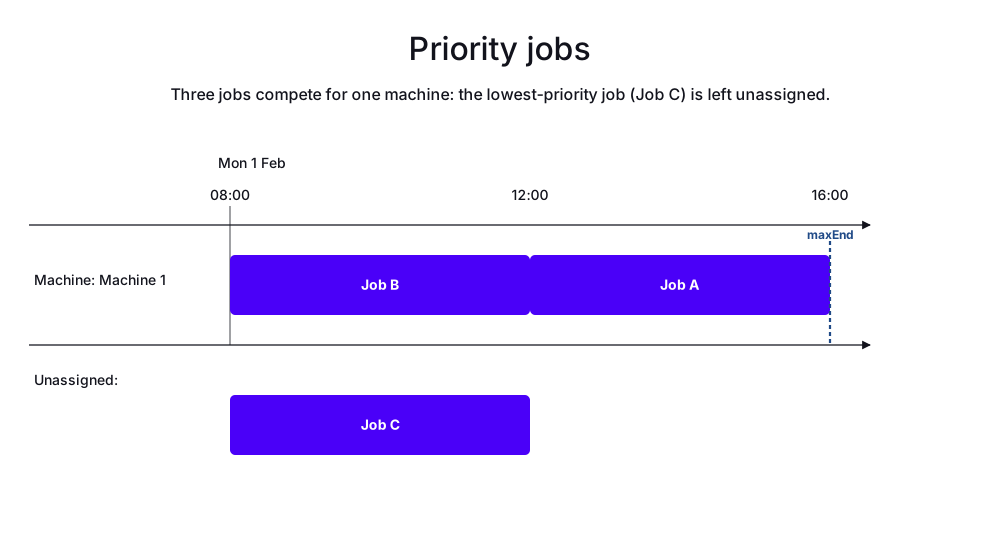
In the following example, there is one machine and three jobs.
The machine is available for eight hours, and each job has a duration of four hours.
Job A has a priority of 100, Job B has a priority of 50, and Job C has a priority of 1.
Job A and Job B are assigned to the machine because they have higher priorities. Job C is left unassigned because it has the lowest priority and there is not enough time to schedule all three jobs.
-
Input
-
Output
Try this example in Timefold Platform by saving this JSON into a file called sample.json and make the following API call:
|
curl -X POST -H "Content-type: application/json" -H 'X-API-KEY: <API_KEY>' https://app.timefold.ai/api/models/job-scheduling/v1/schedules [email protected]{
"config": {
"run": {
"name": "Job priority example"
}
},
"modelInput": {
"machines": [
{
"id": "Machine 1",
"start": "2027-02-01T08:00:00+00:00"
}
],
"jobs": [
{
"id": "Job A",
"duration": "PT4H",
"priority": 100,
"maxEnd": "2027-02-01T16:00:00+00:00"
},
{
"id": "Job B",
"duration": "PT4H",
"priority": 50,
"maxEnd": "2027-02-01T16:00:00+00:00"
},
{
"id": "Job C",
"duration": "PT4H",
"priority": 1,
"maxEnd": "2027-02-01T16:00:00+00:00"
}
]
}
}
To request the solution, locate the ID from the response to the post operation and append it to the following API call:
|
curl -X GET -H 'X-API-KEY: <API_KEY>' https://app.timefold.ai/api/models/job-scheduling/v1/schedules/<ID>
{
  "metadata": {
    "id": "ID",
    "originId": "ID",
    "name": "Job priority example",
    "submitDateTime": "2026-05-28T08:51:21.760496837Z",
    "startDateTime": "2026-05-28T08:52:07.256904056Z",
    "activeDateTime": "2026-05-28T08:52:07.453169938Z",
    "completeDateTime": "2026-05-28T08:52:37.669496525Z",
    "shutdownDateTime": "2026-05-28T08:52:38.062735808Z",
    "solverStatus": "SOLVING_COMPLETED",
    "score": "0hard/-1medium/-480soft",
    "tags": [
      "system.type:from-request",
      "system.profile:default"
    ],
    "validationResult": {
      "summary": "OK"
    }
  },
  "modelOutput": {
    "machines": [
      {
        "id": "Machine 1",
        "schedule": [
          {
            "id": "Job B",
            "start": "2027-02-01T08:00:00Z",
            "end": "2027-02-01T12:00:00Z"
          },
          {
            "id": "Job A",
            "start": "2027-02-01T12:00:00Z",
            "end": "2027-02-01T16:00:00Z"
          }
        ]
      }
    ],
    "unassignedJobs": [
      {
        "id": "Job C"
      }
    ]
  },
  "inputMetrics": {
    "jobs": 3,
    "machines": 1,
    "employees": 0
  },
  "kpis": {
    "makespan": "PT8H",
    "unassignedJobs": 1,
    "assignedJobs": 2,
    "activatedMachines": 1,
    "activatedEmployees": 0,
    "idealEndTimeDeviation": "PT0S"
  },
  "run": {
    "id": "ID",
    "originId": "ID",
    "name": "Job priority example",
    "submitDateTime": "2026-05-28T08:51:21.760496837Z",
    "startDateTime": "2026-05-28T08:52:07.256904056Z",
    "activeDateTime": "2026-05-28T08:52:07.453169938Z",
    "completeDateTime": "2026-05-28T08:52:37.669496525Z",
    "shutdownDateTime": "2026-05-28T08:52:38.062735808Z",
    "solverStatus": "SOLVING_COMPLETED",
    "score": "0hard/-1medium/-480soft",
    "tags": [
      "system.type:from-request",
      "system.profile:default"
    ],
    "validationResult": {
      "summary": "OK"
    }
  }
}
Best practices
-
Use consistent scales: Establish a priority scale (e.g., 1-10, 1-100) and use it consistently across all jobs.
-
Reserve high values for exceptions: Don’t set everything to maximum priority; reserve high values for truly critical jobs.
-
Consider relative differences: The difference between priorities matters more than absolute values. Priority 10 vs 5 has the same effect as 100 vs 50.
-
Document your system: Create guidelines for which jobs get which priority levels.
-
Review regularly: Job priorities may change over time based on business needs.
-
Combine with other features: Use priority with time windows and dependencies to model complex requirements.
Constraints affected by priority
Priority affects these constraints:
-
Minimize number of unassigned jobs (medium): Penalty = job priority.
-
Minimize ideal end difference (soft): Penalty = minutes of deviation × job priority.
-
Required resources do not match (hard): Penalty = job priority.
Next
-
See the full API spec, try the online API, or start a free trial.