Score analysis
Score analysis provides a detailed breakdown of your schedule’s score: which constraints are satisfied or violated, by how much, and which jobs and machines and employees are responsible. It is a versatile tool for a range of use cases:
-
Understanding why Timefold made specific scheduling decisions.
-
Explaining why a particular assignment wasn’t made.
-
Validating manual changes to a solved schedule.
-
Assessing the quality of externally built schedules.
Using the Timefold API
Score analysis can be retrieved for a schedule that Timefold has already solved, or calculated on demand for any schedule you provide directly.
Score analysis of a solved schedule
After Timefold solves a schedule, the score analysis is automatically calculated and stored. Use the score analysis endpoint to retrieve it.
Without justifications
Without justifications, the response contains only the constraint names and their scores. This is useful when you need a lightweight feasibility check or a top-level score breakdown without the overhead of full justification data.
GET /v1/schedules/{id}/score-analysis
{
  "score": "0hard/0medium/-480soft",
  "constraints": [
    {
      "name": "Minimize ideal end difference",
      "weight": "0hard/0medium/-1soft",
      "score": "0hard/0medium/0soft",
      "matches": [],
      "matchCount": 0
    },
    {
      "name": "Minimize makespan",
      "weight": "0hard/0medium/-1soft",
      "score": "0hard/0medium/-480soft",
      "matches": [],
      "matchCount": 1
    },
    ...
  ]
}
With justifications
With justifications, the response includes the specific objects that caused each constraint match or violation. This is useful when you want to highlight violations in your user interface or explain the score to end users.
GET /v1/schedules/{id}/score-analysis?includeJustifications=true
{
  "score": "0hard/0medium/-480soft",
  "constraints": [
    {
      "name": "Minimize ideal end difference",
      "weight": "0hard/0medium/-1soft",
      "score": "0hard/0medium/0soft",
      "matches": [],
      "matchCount": 0
    },
    {
      "name": "Minimize makespan",
      "weight": "0hard/0medium/-1soft",
      "score": "0hard/0medium/-480soft",
      "matches": [
        {
          "score": "0hard/0medium/-480soft",
          "justification": {
            "resourceId": "Machine 1",
            "duration": "PT8H",
            "description": ""
          }
        }
      ],
      "matchCount": 1
    },
    {
      "name": "Minimize number of unassigned jobs",
      "weight": "0hard/-1medium/0soft",
      "score": "0hard/0medium/0soft",
      "matches": [],
      "matchCount": 0
    },
    {
      "name": "Job assignment is invalid",
      "weight": "-1hard/0medium/0soft",
      "score": "0hard/0medium/0soft",
      "matches": [],
      "matchCount": 0
    },
    {
      "name": "Job dependency not assigned violation",
      "weight": "-1hard/0medium/0soft",
      "score": "0hard/0medium/0soft",
      "matches": [],
      "matchCount": 0
    },
    {
      "name": "Job dependency timing violation",
      "weight": "-1hard/0medium/0soft",
      "score": "0hard/0medium/0soft",
      "matches": [],
      "matchCount": 0
    }
  ]
}
Score analysis of a provided schedule
Use this endpoint to calculate the score analysis for a schedule you provide directly in the request body. The schedule doesn’t need to have been solved by Timefold. This is useful when you want to validate quick in-memory changes to a schedule before committing them.
For example, assign a job to a different machine or employee. Use the score analysis to understand the impact of the change on the score and to validate that the new schedule is feasible.
The endpoint accepts a schedule object in the request body.
POST /v1/schedules/score-analysis?includeJustifications=true
The response format is identical to the score analysis with justifications shown above.
Using the Timefold Platform UI
The Timefold platform provides a built-in UI for inspecting the score analysis of a solved schedule without writing any code. After a run completes, open the run results page to see the score breakdown per constraint and explore the justifications interactively. See Interpreting model run results: score analysis for more details.
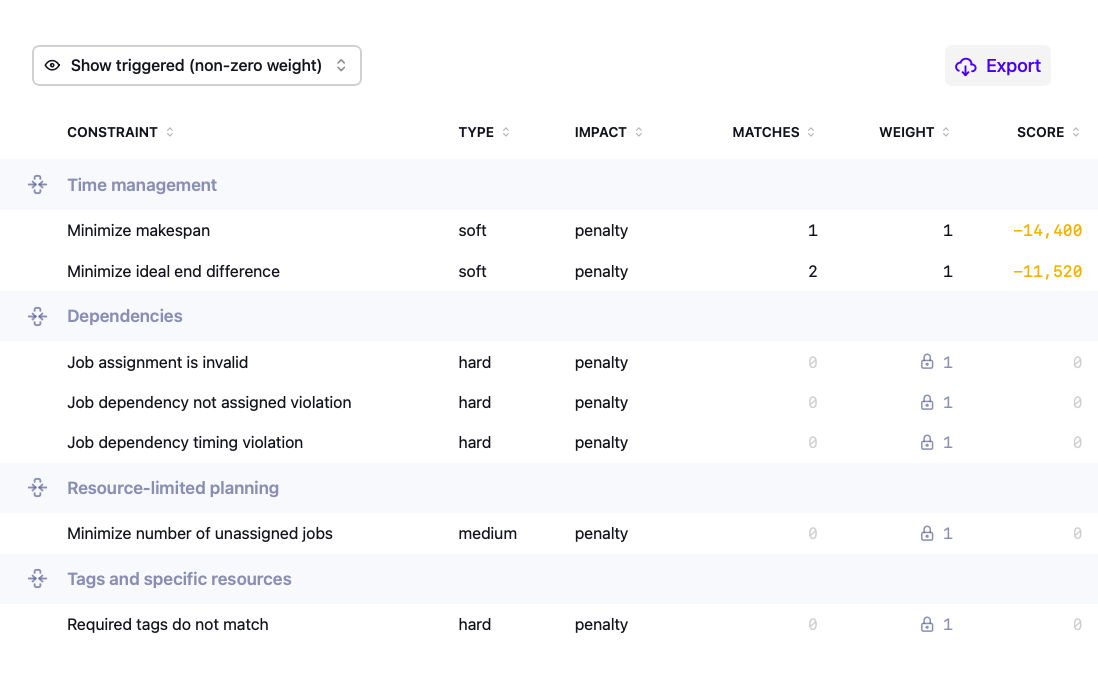
The constraint table can be sorted by score (default), number of matches, weight, or name. Each sort option orders constraints within their group first, then orders the groups by the same criterion.
Use cases
Understanding solver decisions
Score analysis exposes the constraint scores that drove Timefold’s decisions, making it possible to explain why Timefold produced a particular schedule. For each constraint, the breakdown shows how much it contributed to the final score and which jobs and machines and employees it affected.
This is useful for explaining the outcome to end users and for identifying whether Timefold’s behavior reflects real-world priorities. If the breakdown reveals that a constraint is weighted too heavily or too lightly relative to business needs, you can adjust the configuration profile and re-solve to bring the results closer to what planners expect. See Metrics and optimization goals and Balancing different optimization goals for more details.
Explaining why a specific assignment was not made
Score analysis can help answer questions such as "why wasn’t this machine or employee assigned to this job?". To investigate, construct a schedule where you force that assignment and submit it to the score analysis endpoint.
Comparing the score of that hypothetical schedule against the best-found solution typically reveals the constraint that makes the assignment undesirable or infeasible. For example, the forced assignment may trigger a hard constraint violation such as a missing required skill, or it may incur a significant soft score penalty such as exceeding the machine or employee’s Minimize makespan. The justification data in the response identifies the exact constraint and the objects involved, giving a clear answer to why Timefold chose a different assignment. See Validating an optimized plan with explainable AI for more details.
Validating manual changes
When a planner manually modifies a solved schedule, score analysis lets them check the impact of the change immediately by submitting the modified schedule to the score analysis endpoint.
Three outcomes are common:
-
The change worsened the schedule, typically because a constraint the planner didn’t consider was affected.
-
The change genuinely improved the schedule. This can happen because Timefold returned a local optimum: a solution that is better than all its immediate neighbors, but not necessarily the global best. To reduce the chance of this in future runs, consider extending the termination time to give the solver more time to escape local optima, or increasing the number of solver threads to explore more of the solution space in parallel. See Configuration for more details.
-
The planner applies domain knowledge Timefold doesn’t have (for example, keeping two specific machines and employees off the same job) and intentionally accepts a lower score. In that situation, score analysis lets them confirm exactly how much the score changed and verify that no hard constraint was accidentally broken in the process.
Assessing the quality of an externally built schedule
Score analysis can evaluate any schedule, not just ones produced by Timefold. Submit a schedule to the endpoint and get a precise constraint breakdown: which rules are violated, by how much, and which jobs and machines and employees it affects. This is useful in several scenarios where the schedule originates outside Timefold.
Comparing with a third-party schedule
If another system produces a schedule (for example, a manual planning tool or a third-party optimizer), you can submit it to the score analysis endpoint to evaluate it against Timefold’s constraint model. The response uses the same score format as a Timefold-solved schedule, which makes it straightforward to compare the two on equal terms.
This is helpful when evaluating whether to adopt Timefold, when benchmarking schedule quality over time, or when auditing a schedule that was built outside the platform before it is published. The breakdown also identifies which specific constraints the external schedule violates, giving planners actionable information about where it falls short.