Time windows
Time windows define when a job can be processed. In task scheduling, time windows let you control the earliest time a job can start and the latest time it can start or end.
These constraints are useful when work depends on upstream availability, operating hours, handoff deadlines, or delivery commitments. For example, a job may not be able to start before materials arrive, and it may need to complete before a shipping cutoff.
Choosing the right time windows is a balance. If windows are too narrow, the schedule has less flexibility and more jobs may remain unassigned. If windows are too broad, operational commitments are less precise and jobs may be planned much earlier or later than preferred.
This guide explains how to model job time windows and how each time-window constraint affects the resulting schedule.
Defining time windows
Learn how to configure an API Key to run the examples in this guide:
In the examples, replace |
Each job can define one or more time-window fields that control when it may be scheduled.
{
  "jobs": [
    {
      "id": "Job A",
      "duration": "PT2H",
      "minStart": "2027-02-01T10:00:00Z",
      "maxEnd": "2027-02-01T17:00:00Z"
    }
  ]
}-
idis the job’s unique identifier. -
durationis the amount of time it takes to complete the job. Duration uses ISO 8601 duration format. -
minStartis the earliest time a job can start. -
maxEndis the latest time a job can end.
minStart and maxEnd use
ISO 8601 date and time format with offset to UTC format.
Time windows are optional and can be combined:
-
If no time-window fields are provided, the job can be scheduled at any valid time.
-
If only
minStartis provided, the job can start at or after that time. -
If only
maxEndis provided, the job must finish at or before that time. -
If multiple fields are provided, all defined limits apply together.
Required earliest start time
The Job started before minimum start hard constraint is invoked when a job includes a minStart time window field and the job is scheduled to start before that time.
The constraint adds a hard penalty to the dataset score relative to how many minutes before minStart the job was scheduled to start.
Jobs will be left unassigned if assigning them breaks this constraint.
Required earliest start time example
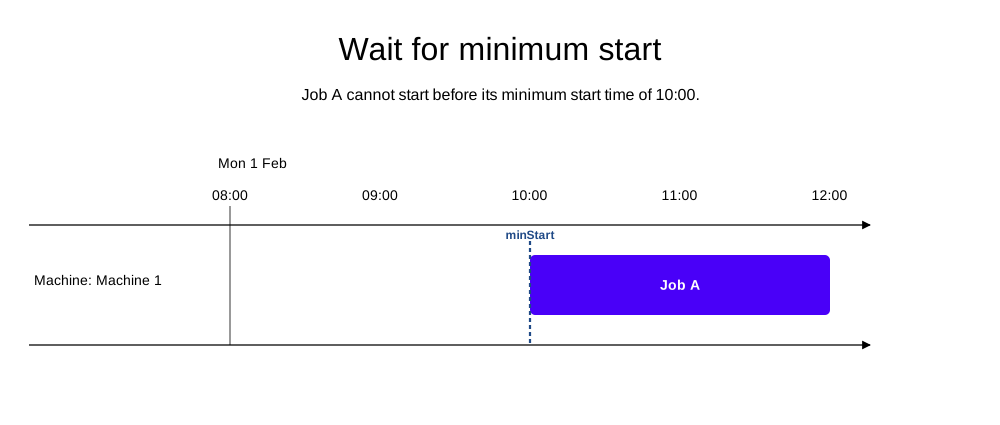
In the following example, there is one machine and one job with a required earliest start time of 10:00. The job has a duration of two hours, and the machine is available starting at 8:00.
The job is scheduled to start at 10:00, which is the earliest time it can start without breaking the Job started before minimum start constraint.
-
Input
-
Output
Try this example in Timefold Platform by saving this JSON into a file called sample.json and make the following API call:
|
curl -X POST -H "Content-type: application/json" -H 'X-API-KEY: <API_KEY>' https://app.timefold.ai/api/models/job-scheduling/v1/schedules [email protected]{
"config": {
"run": {
"name": "Wait for minimum start"
}
},
"modelInput": {
"machines": [
{
"id": "Machine 1",
"start": "2027-02-01T08:00:00Z"
}
],
"jobs": [
{
"id": "Job A",
"duration": "PT2H",
"minStart": "2027-02-01T10:00:00Z"
}
]
}
}
To request the solution, locate the ID from the response to the post operation and append it to the following API call:
|
curl -X GET -H 'X-API-KEY: <API_KEY>' https://app.timefold.ai/api/models/job-scheduling/v1/schedules/<ID>
{
  "metadata": {
    "id": "ID",
    "originId": "ID",
    "name": "Wait for minimum start",
    "submitDateTime": "2026-05-01T04:52:35.645318732Z",
    "startDateTime": "2026-05-01T04:53:25.499358964Z",
    "activeDateTime": "2026-05-01T04:53:25.711586394Z",
    "completeDateTime": "2026-05-01T04:53:27.25908694Z",
    "shutdownDateTime": "2026-05-01T04:53:27.567065041Z",
    "solverStatus": "SOLVING_COMPLETED",
    "score": "0hard/0medium/-240soft",
    "tags": [
      "system.type:from-request",
      "system.profile:default"
    ],
    "validationResult": {
      "summary": "OK"
    }
  },
  "modelOutput": {
    "machines": [
      {
        "id": "Machine 1",
        "schedule": [
          {
            "id": "Job A",
            "start": "2027-02-01T10:00:00Z",
            "end": "2027-02-01T12:00:00Z"
          }
        ]
      }
    ]
  },
  "inputMetrics": {
    "jobs": 1,
    "machines": 1,
    "employees": 0
  },
  "kpis": {
    "makespan": "PT4H",
    "unassignedJobs": 0,
    "assignedJobs": 1,
    "activatedMachines": 1,
    "activatedEmployees": 0,
    "idealEndTimeDeviation": "PT0S"
  },
  "run": {
    "id": "ID",
    "originId": "ID",
    "name": "Wait for minimum start",
    "submitDateTime": "2026-05-01T04:52:35.645318732Z",
    "startDateTime": "2026-05-01T04:53:25.499358964Z",
    "activeDateTime": "2026-05-01T04:53:25.711586394Z",
    "completeDateTime": "2026-05-01T04:53:27.25908694Z",
    "shutdownDateTime": "2026-05-01T04:53:27.567065041Z",
    "solverStatus": "SOLVING_COMPLETED",
    "score": "0hard/0medium/-240soft",
    "tags": [
      "system.type:from-request",
      "system.profile:default"
    ],
    "validationResult": {
      "summary": "OK"
    }
  }
}
Required latest end time
The Job finished after maximum end hard constraint is invoked when a job includes a maxEnd time window field and the job is scheduled to end after that time.
The constraint adds a hard penalty to the dataset score relative to how many minutes after maxEnd the job was scheduled to end.
Jobs will be left unassigned if assigning them breaks this constraint.
Required latest end time example
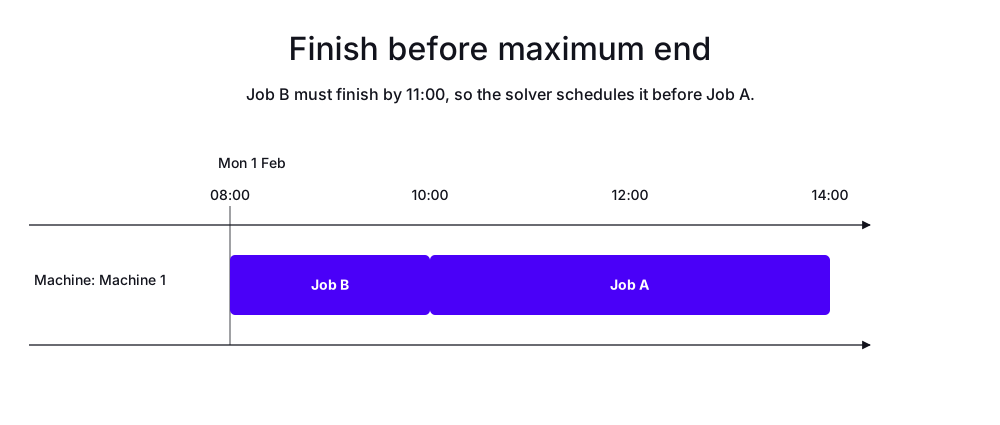
In the following example, there is one machine and two jobs, Job A and Job B.
Job A has a duration of four hours and no time windows, so it can be scheduled at any time.
Job B has a duration of two hours and a maxEnd time window of 11:00.
-
Input
-
Output
Try this example in Timefold Platform by saving this JSON into a file called sample.json and make the following API call:
|
curl -X POST -H "Content-type: application/json" -H 'X-API-KEY: <API_KEY>' https://app.timefold.ai/api/models/job-scheduling/v1/schedules [email protected]{
"config": {
"run": {
"name": "Finish before maximum end"
}
},
"modelInput": {
"machines": [
{
"id": "Machine 1",
"start": "2027-02-01T08:00:00Z"
}
],
"jobs": [
{
"id": "Job A",
"duration": "PT4H"
},
{
"id": "Job B",
"duration": "PT2H",
"maxEnd": "2027-02-01T11:00:00Z"
}
]
}
}
To request the solution, locate the ID from the response to the post operation and append it to the following API call:
|
curl -X GET -H 'X-API-KEY: <API_KEY>' https://app.timefold.ai/api/models/job-scheduling/v1/schedules/<ID>
{
  "metadata": {
    "id": "ID",
    "originId": "ID",
    "name": "Finish before maximum end",
    "submitDateTime": "2026-05-12T05:15:51.115920296Z",
    "startDateTime": "2026-05-12T05:16:05.800614739Z",
    "activeDateTime": "2026-05-12T05:16:05.937842996Z",
    "completeDateTime": "2026-05-12T05:16:36.328362105Z",
    "shutdownDateTime": "2026-05-12T05:16:36.328368195Z",
    "solverStatus": "SOLVING_COMPLETED",
    "score": "0hard/0medium/-360soft",
    "tags": [
      "system.type:from-request",
      "system.profile:Standard profile"
    ],
    "validationResult": {
      "summary": "OK"
    }
  },
  "modelOutput": {
    "machines": [
      {
        "id": "Machine 1",
        "schedule": [
          {
            "id": "Job B",
            "start": "2027-02-01T08:00:00Z",
            "end": "2027-02-01T10:00:00Z"
          },
          {
            "id": "Job A",
            "start": "2027-02-01T10:00:00Z",
            "end": "2027-02-01T14:00:00Z"
          }
        ]
      }
    ]
  },
  "inputMetrics": {
    "jobs": 2,
    "machines": 1,
    "employees": 0
  },
  "kpis": {
    "makespan": "PT6H",
    "unassignedJobs": 0,
    "assignedJobs": 2,
    "activatedMachines": 1,
    "activatedEmployees": 0,
    "idealEndTimeDeviation": "PT0S"
  },
  "run": {
    "id": "ID",
    "originId": "ID",
    "name": "Finish before maximum end",
    "submitDateTime": "2026-05-12T05:15:51.115920296Z",
    "startDateTime": "2026-05-12T05:16:05.800614739Z",
    "activeDateTime": "2026-05-12T05:16:05.937842996Z",
    "completeDateTime": "2026-05-12T05:16:36.328362105Z",
    "shutdownDateTime": "2026-05-12T05:16:36.328368195Z",
    "solverStatus": "SOLVING_COMPLETED",
    "score": "0hard/0medium/-360soft",
    "tags": [
      "system.type:from-request",
      "system.profile:Standard profile"
    ],
    "validationResult": {
      "summary": "OK"
    }
  }
}
Next
-
See the full API spec, try the online API, or start a free trial.