Resource transitions
Resource and job transitions allow you to model setup times, changeover costs, and preferences for scheduling dependent jobs on specific machines or to be performed by specific employees.
Job transitions are useful in the following scenarios:
-
When certain sequences of job types on the same machine require setup or cleanup time.
-
When switching between different job types and materials on the same machine requires reconfiguration.
Resource transitions are useful in the following scenarios:
-
When certain machine or employee combinations are preferred or should be avoided for dependent jobs.
-
When modeling complex scheduling scenarios that involve both machine and employee resources.
-
When you want to encourage or discourage specific sequences of jobs based on the resources they use.
This guide explains job and resource transitions with the following:
Defining job transitions
Job transitions are defined in the jobTransitions array at the root level of the JSON input for specific machine types and job type combinations. Each transition specifies the machine type, the job types involved, and the duration of the transition:
{
  "machineTypes": [
    { "id": "Mill" }
  ],
  "jobTypes": [
    { "id": "Aluminum" },
    { "id": "Steel" }
  ],
  "machines": [
    {
      "id": "Machine A",
      "machineType": "Mill",
      "start": "2024-12-01T00:00:00+00:00"
    }
  ],
  "jobs": [
    {
      "id": "Job 1",
      "jobType": "Aluminum",
      "duration": "PT2H"
    },
    {
      "id": "Job 2",
      "jobType": "Steel",
      "duration": "PT3H",
      "dependencies": [
        { "id": "Job 1" }
      ]
    }
  ],
  "jobTransitions": [
    {
      "machineType": "Mill",
      "fromJobType": "Aluminum",
      "toJobType": "Steel",
      "duration": "PT30M"
    }
  ]
}
In this example:
-
Job 1processesAluminumand takes two hours. -
Job 2processesSteeland takes three hours, and depends onJob 1 -
When a mill machine switches from aluminum to steel work, it requires 30 minutes of transition time.
-
If both jobs are assigned to
Machine A, there will be a 30-minute gap between them for the transition.
Multiple transitions
You can define different transition durations for different combinations:
{
  "jobTransitions": [
    {
      "machineType": "Mill",
      "fromJobType": "Aluminum",
      "toJobType": "Steel",
      "duration": "PT30M"
    },
    {
      "machineType": "Mill",
      "fromJobType": "Steel",
      "toJobType": "Aluminum",
      "duration": "PT45M"
    },
    {
      "machineType": "Mill",
      "fromJobType": "Aluminum",
      "toJobType": "Aluminum",
      "duration": "PT5M"
    },
    {
      "machineType": "Mill",
      "fromJobType": "Steel",
      "toJobType": "Steel",
      "duration": "PT10M"
    }
  ]
}
This models:
-
Switching from aluminum to steel takes 30 minutes.
-
Switching from steel to aluminum takes 45 minutes (longer cleanup required).
-
Processing multiple aluminum jobs in sequence takes only 5 minutes between them.
-
Processing multiple steel jobs in sequence takes 10 minutes between them.
How job transitions work
Job transitions only apply when:
-
Both jobs are assigned to the same machine.
-
The jobs have a dependency relationship.
-
Both jobs have job types.
-
The machine has a machine type.
-
A matching job transition is defined for that machine type and job type combination.
The transition duration extends the time between the dependent jobs beyond what the dependency’s minOffset might specify.
Defining resource transitions
Resource transitions for employees and machines are defined in the resourceTransitions array at the root level of the JSON input:
{
  "employees": [
    {
      "id": "Senior tech",
      "start": "2024-12-01T08:00:00+00:00"
    },
    {
      "id": "Junior tech",
      "start": "2024-12-01T08:00:00+00:00"
    }
  ],
  "jobs": [
    {
      "id": "Training",
      "duration": "PT2H"
    },
    {
      "id": "Supervised work",
      "duration": "PT4H",
      "dependencies": [
        { "id": "Training" }
      ]
    }
  ],
  "resourceTransitions": [
    {
      "fromResourceId": "Senior tech",
      "toResourceId": "Junior tech",
      "reward": 50
    }
  ]
}
resourceTransitions can specify either a reward or a forbidden flag. In this example, the transition from Senior tech to Junior tech has a reward of 50, which encourages the solver to assign the training job to the senior tech and the supervised work to the junior tech.
Preferred machine transition
The Machine transition reward soft constraint adds the reward value to the score when dependent jobs follow a defined transition path, incentivizing the solver to create schedules that reward preferred resource combinations.
Preferred machine transition example
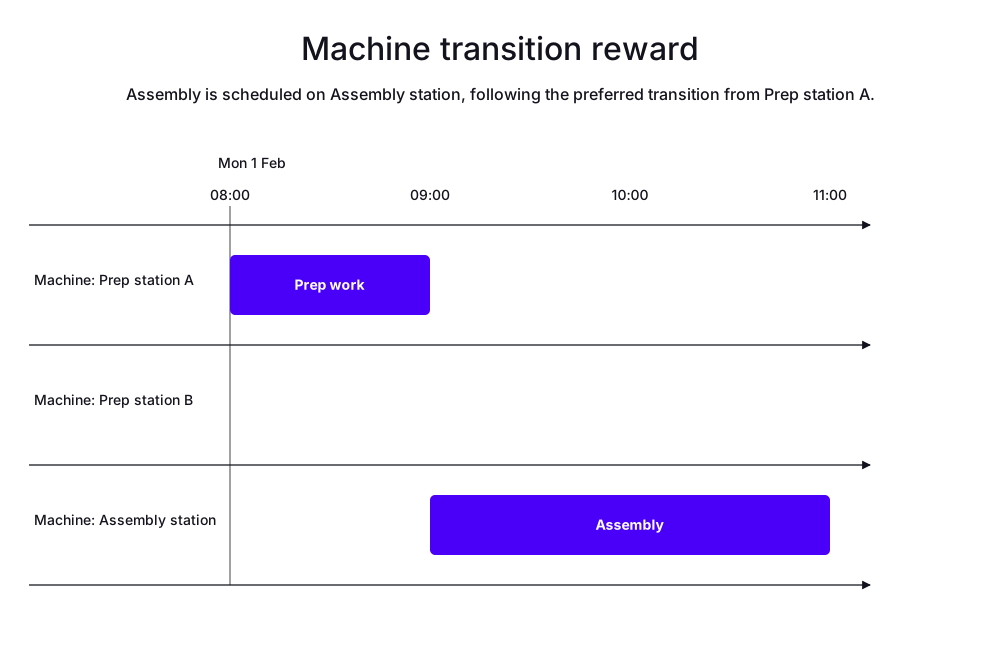
In the following example, there are three machines and two jobs.
The jobs are Prep work and Assemble tasks.
Assemble depends on Prep work.
Two of the machines are prep station machines, and one is an assembly machine.
Prep station A is closer to the Assemble machine, so there is a reward for transitioning from Prep station A to Assembly station, while there is no reward for transitioning from Prep station B to Assembly station.
-
Input
-
Output
Try this example in Timefold Platform by saving this JSON into a file called sample.json and make the following API call:
|
curl -X POST -H "Content-type: application/json" -H 'X-API-KEY: <API_KEY>' https://app.timefold.ai/api/models/job-scheduling/v1/schedules [email protected]{
"config": {
"run": {
"name": ""
}
},
"modelInput": {
,
"machines": [
{
"id": "Prep station A",
"start": "2027-02-01T08:00:00+00:00"
},
{
"id": "Prep station B",
"start": "2027-02-01T08:00:00+00:00"
},
{
"id": "Assembly station",
"start": "2027-02-01T08:00:00+00:00"
}
],
"jobs": [
{
"id": "Prep work",
"duration": "PT1H"
},
{
"id": "Assembly",
"duration": "PT2H",
"dependencies": [
{
"id": "Prep work"
}
]
}
],
"resourceTransitions": [
{
"fromResourceId": "Prep station A",
"toResourceId": "Assembly station",
"reward": 100
}
]
}
}
To request the solution, locate the ID from the response to the post operation and append it to the following API call:
|
curl -X GET -H 'X-API-KEY: <API_KEY>' https://app.timefold.ai/api/models/job-scheduling/v1/schedules/<ID>
{
  "metadata": {
    "id": "ID",
    "originId": "ID",
    "name": "Machine transition reward example",
    "submitDateTime": "2026-06-18T05:01:47.557000734Z",
    "startDateTime": "2026-06-18T05:02:52.187537624Z",
    "activeDateTime": "2026-06-18T05:02:52.354168056Z",
    "completeDateTime": "2026-06-18T05:03:22.525632976Z",
    "shutdownDateTime": "2026-06-18T05:03:22.909682281Z",
    "solverStatus": "SOLVING_COMPLETED",
    "score": "0hard/0medium/-80soft",
    "tags": [
      "system.type:from-request",
      "system.profile:default"
    ],
    "validationResult": {
      "summary": "OK"
    }
  },
  "modelOutput": {
    "machines": [
      {
        "id": "Prep station A",
        "schedule": [
          {
            "id": "Prep work",
            "start": "2027-02-01T08:00:00Z",
            "end": "2027-02-01T09:00:00Z"
          }
        ]
      },
      {
        "id": "Prep station B"
      },
      {
        "id": "Assembly station",
        "schedule": [
          {
            "id": "Assembly",
            "start": "2027-02-01T09:00:00Z",
            "end": "2027-02-01T11:00:00Z"
          }
        ]
      }
    ]
  },
  "inputMetrics": {
    "jobs": 2,
    "machines": 3,
    "employees": 0
  },
  "kpis": {
    "makespan": "PT3H",
    "unassignedJobs": 0,
    "assignedJobs": 2,
    "activatedMachines": 2,
    "activatedEmployees": 0,
    "idealEndTimeDeviation": "PT0S"
  },
  "run": {
    "id": "ID",
    "originId": "ID",
    "name": "Machine transition reward example",
    "submitDateTime": "2026-06-18T05:01:47.557000734Z",
    "startDateTime": "2026-06-18T05:02:52.187537624Z",
    "activeDateTime": "2026-06-18T05:02:52.354168056Z",
    "completeDateTime": "2026-06-18T05:03:22.525632976Z",
    "shutdownDateTime": "2026-06-18T05:03:22.909682281Z",
    "solverStatus": "SOLVING_COMPLETED",
    "score": "0hard/0medium/-80soft",
    "tags": [
      "system.type:from-request",
      "system.profile:default"
    ],
    "validationResult": {
      "summary": "OK"
    }
  }
}
Forbidden machine transitions
Transitions between specific machines can be forbidden by setting the forbidden flag to true in a resourceTransition.
{
  "resourceTransitions": [
    {
      "fromResourceId": "Machine A",
      "toResourceId": "Machine A",
      "forbidden": true
    }
  ]
}
The Machine transition forbidden hard constraint penalizes any schedule that assigns dependent jobs to the specified forbidden machine transition.
Jobs won’t be assigned if assigning them breaks this constraint.
Forbidden machine transitions example
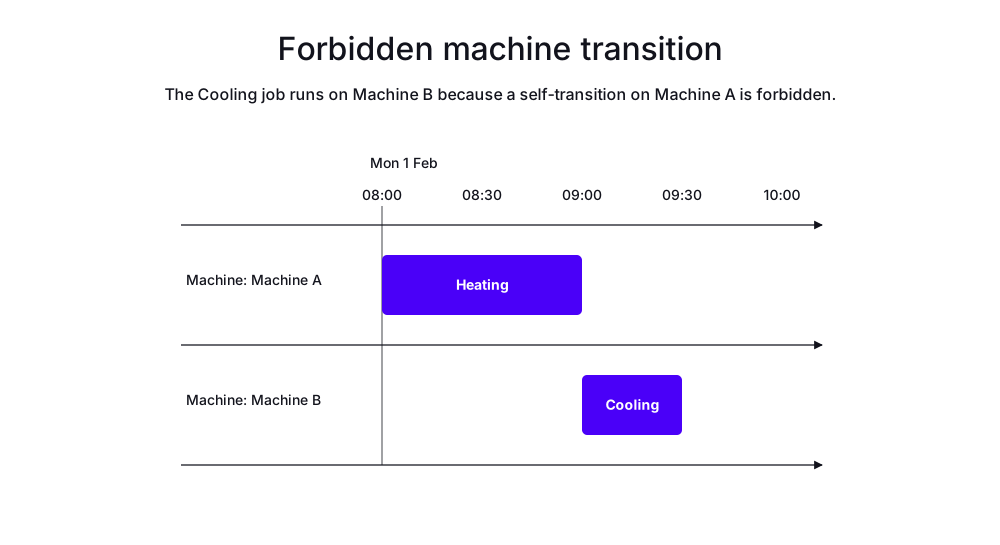
In the following example, there are two machines and two jobs.
The Cooling job depends on the Heating job, and there is a forbidden transition from Machine A to Machine B.
The Heating job is assigned to Machine A, and the Cooling job is assigned to Machine B.
-
Input
-
Output
Try this example in Timefold Platform by saving this JSON into a file called sample.json and make the following API call:
|
curl -X POST -H "Content-type: application/json" -H 'X-API-KEY: <API_KEY>' https://app.timefold.ai/api/models/job-scheduling/v1/schedules [email protected]{
"config": {
"run": {
"name": "Machine transition forbidden example"
}
},
"modelInput": {
"machines": [
{
"id": "Machine A",
"start": "2027-02-01T08:00:00+00:00"
},
{
"id": "Machine B",
"start": "2027-02-01T08:00:00+00:00"
}
],
"jobs": [
{
"id": "Heating",
"duration": "PT1H"
},
{
"id": "Cooling",
"duration": "PT30M",
"dependencies": [
{
"id": "Heating"
}
]
}
],
"resourceTransitions": [
{
"fromResourceId": "Machine A",
"toResourceId": "Machine A",
"forbidden": true
}
]
}
}
To request the solution, locate the ID from the response to the post operation and append it to the following API call:
|
curl -X GET -H 'X-API-KEY: <API_KEY>' https://app.timefold.ai/api/models/job-scheduling/v1/schedules/<ID>
{
  "metadata": {
    "id": "ID",
    "originId": "ID",
    "name": "Machine transition forbidden example",
    "submitDateTime": "2026-06-16T06:07:09.820919663Z",
    "startDateTime": "2026-06-16T06:08:15.069979453Z",
    "activeDateTime": "2026-06-16T06:08:15.255881032Z",
    "completeDateTime": "2026-06-16T06:08:45.456506061Z",
    "shutdownDateTime": "2026-06-16T06:08:45.836615008Z",
    "solverStatus": "SOLVING_COMPLETED",
    "score": "0hard/0medium/-90soft",
    "tags": [
      "system.type:from-request",
      "system.profile:default"
    ],
    "validationResult": {
      "summary": "OK"
    }
  },
  "modelOutput": {
    "machines": [
      {
        "id": "Machine A",
        "schedule": [
          {
            "id": "Heating",
            "start": "2027-02-01T08:00:00Z",
            "end": "2027-02-01T09:00:00Z"
          }
        ]
      },
      {
        "id": "Machine B",
        "schedule": [
          {
            "id": "Cooling",
            "start": "2027-02-01T09:00:00Z",
            "end": "2027-02-01T09:30:00Z"
          }
        ]
      }
    ]
  },
  "inputMetrics": {
    "jobs": 2,
    "machines": 2,
    "employees": 0
  },
  "kpis": {
    "makespan": "PT1H30M",
    "unassignedJobs": 0,
    "assignedJobs": 2,
    "activatedMachines": 2,
    "activatedEmployees": 0,
    "idealEndTimeDeviation": "PT0S"
  },
  "run": {
    "id": "ID",
    "originId": "ID",
    "name": "Machine transition forbidden example",
    "submitDateTime": "2026-06-16T06:07:09.820919663Z",
    "startDateTime": "2026-06-16T06:08:15.069979453Z",
    "activeDateTime": "2026-06-16T06:08:15.255881032Z",
    "completeDateTime": "2026-06-16T06:08:45.456506061Z",
    "shutdownDateTime": "2026-06-16T06:08:45.836615008Z",
    "solverStatus": "SOLVING_COMPLETED",
    "score": "0hard/0medium/-90soft",
    "tags": [
      "system.type:from-request",
      "system.profile:default"
    ],
    "validationResult": {
      "summary": "OK"
    }
  }
}
Combining rewards and forbidden transitions
You can use both rewards and forbidden flags together:
{
  "resourceTransitions": [
    {
      "fromResourceId": "Machine A",
      "toResourceId": "Machine B",
      "reward": 50
    },
    {
      "fromResourceId": "Machine A",
      "toResourceId": "Machine C",
      "reward": 100
    },
    {
      "fromResourceId": "Machine A",
      "toResourceId": "Machine D",
      "forbidden": true
    }
  ]
}
This creates a preference hierarchy:
-
A → C transition is most preferred (reward 100).
-
A → B transition is moderately preferred (reward 50).
-
A → D transition is forbidden (hard constraint violation).
-
Other transitions have no reward or penalty.
Use cases for resource transitions
Rewards:
-
Physical proximity: Encourage jobs on nearby machines to reduce transport time.
-
Skill specialization: Prefer certain employees for follow-up work.
-
Quality control: Certain machine pairs produce better results.
-
Efficiency: Some combinations have lower overhead.
Forbidden:
-
Contamination: Prevent cross-contamination between certain machines.
-
Incompatible processes: Some machines cannot work together in sequence.
-
Safety regulations: Regulatory restrictions on certain combinations.
-
Quality issues: Known problems with certain machine pairs.
Interaction with other features
With dependency constraints
Resource transitions only apply to jobs that have a dependency relationship. They work together with:
-
Same resource requirement: When
requiresSameResource: true, both jobs must be on the same resource, and transition rewards/penalties still apply. -
No intermediate jobs: When
noIntermediateJobs: true, jobs are adjacent, and transitions are particularly relevant.
Best practices
-
Use job transitions for setup times: When physical changes are needed between job types.
-
Use resource transitions for preferences: When certain resource combinations are better or worse.
-
Balance rewards carefully: Make sure reward values are proportional to their importance.
-
Test forbidden transitions: Ensure forbidden transitions don’t make your problem infeasible.
-
Document your transition model: Explain why certain transitions have specific durations or rewards.
-
Start simple: Add transitions incrementally and verify they improve your schedules.
Next
-
See the full API spec, try the online API, or start a free trial.
-
Learn about job dependencies.
-
Learn about job types and machine types.