Tags and specific resources
Jobs often require specific capabilities from machines or employees. The Task Scheduling model supports two ways to specify these requirements: tags and required resources.
Tags can be used to represent capabilities or characteristics of machines and employees. For instance:
-
Job A requires the
Weldingtag, so it can only be assigned to machines that have theWeldingtag. -
Job B requires an employee with the
Certifiedtag.
In addition to specifying capabilities with tags, you can directly specify which resources are allowed to perform a job. For instance:
-
Job C can only be performed by
Machine AorMachine C, regardless of their tags.
This guide explains how to use tags and specific resources with the following:
Defining tags
Tags must be defined in the dataset before they can be used on machines, employees, or jobs.
This is done by including a machineTags or employeeTags section in the dataset:
{
  "machineTags": [
    {
      "id": "Welding"
    },
    {
      "id": "CNC"
    },
    {
      "id": "Painting"
    }
  ],
  "employeeTags": [
    {
      "id": "Forklift certified"
    },
    {
      "id": "Senior technician"
    },
    {
      "id": "Safety trained"
    }
  ]
}
Machine tags
Machines must include their tags in their tags section, referencing the tag IDs defined in machineTags, and jobs that require certain tags must list those tag IDs in their requiredTags section.
{
  "machineTags": [
    {
      "id": "Welding"
    },
    {
      "id": "CNC"
    },
    {
      "id": "Painting"
    }
  ],
  "machines": [
    {
      "id": "Machine A",
      "start": "2024-12-01T00:00:00+00:00",
      "tags": [
        {
          "tagId": "Welding"
        },
        {
          "tagId": "Painting"
        }
      ]
    },
    {
      "id": "Machine B",
      "start": "2024-12-01T00:00:00+00:00",
      "tags": [
        {
          "tagId": "CNC"
        }
      ]
    }
  ],
  "jobs": [
    {
      "id": "Job 1",
      "duration": "PT2H",
      "requiredTags": [
        "Welding"
      ]
    },
    {
      "id": "Job 2",
      "duration": "PT3H",
      "requiredTags": [
        "CNC",
        "Painting"
      ]
    }
  ]
}
In this example:
-
Job 1requires theWeldingtag, so it can only be assigned toMachine A. -
Job 2requires bothCNCandPaintingtags, so it cannot be assigned to any machine (Machine BlacksPainting,Machine AlacksCNC).
Employee tags
Employees can also have tags. This is useful for modeling employee skills, certifications, and qualifications:
{
  "employeeTags": [
    {
      "id": "Forklift certified"
    },
    {
      "id": "Senior technician"
    },
    {
      "id": "Safety trained"
    }
  ],
  "employees": [
    {
      "id": "Ann",
      "start": "2024-12-01T08:00:00+00:00",
      "tags": [
        {
          "tagId": "Forklift certified"
        }
      ]
    },
    {
      "id": "Beth",
      "start": "2024-12-01T08:00:00+00:00",
      "tags": [
        {
          "tagId": "Senior technician"
        },
        {
          "tagId": "Safety trained"
        }
      ]
    }
  ],
  "jobs": [
    {
      "id": "Warehouse job",
      "duration": "PT1H",
      "requiredTags": [
        "Forklift certified"
      ]
    }
  ]
}
In this example, the warehouse job can only be assigned to Ann, who has the forklift certification.
Jobs can require multiple tags
When a job specifies multiple required tags, the assigned resource must have ALL of those tags:
{
  "jobs": [
    {
      "id": "Precision welding",
      "duration": "PT4H",
      "requiredTags": ["Welding", "Certified", "Precision"]
    }
  ]
}
This job can only be assigned to resources that have all three tags: Welding, Certified, and Precision.
Tag availability with time spans
Tags can be available only during specific time periods. This is useful for modeling:
-
Certifications that expire or must be renewed.
-
Equipment rentals with limited time.
-
Employee skills available only during certain shifts.
-
Seasonal capabilities.
{
  "machines": [
    {
      "id": "Machine A",
      "start": "2024-12-01T00:00:00+00:00",
      "tags": [
        {
          "tagId": "Welding"
        },
        {
          "tagId": "Certified",
          "timeSpans": [
            {
              "start": "2027-02-01T00:00:00+00:00",
              "end": "2027-02-28T23:59:59+00:00"
            }
          ]
        }
      ]
    }
  ],
  "jobs": [
    {
      "id": "Certified job",
      "duration": "PT2H",
      "requiredTags": ["Welding", "Certified"]
    }
  ]
}
In this example, the Certified tag is only available from February 1st to February 28th, 2027.
Jobs requiring the Certified tag can only be scheduled on Machine A during this time period.
If a job’s processing time overlaps with a period when a required tag is not available, the solver will penalize or prevent the assignment based on the duration of the unavailable period.
| Currently, only a single time span is supported per tag. If you need multiple availability periods, you can model this with multiple tags. |
Required tags
Learn how to configure an API Key to run the examples in this guide:
In the examples, replace |
The Required tags do not match hard constraint is invoked when a job is assigned to a resource that does not have all the tags required by that job.
The constraint adds a hard penalty to the dataset score derived from the total unsatisfied duration (in minutes) for required tags on each violating job assignment.
Jobs will be left unassigned if assigning them breaks this constraint.
Required tags example
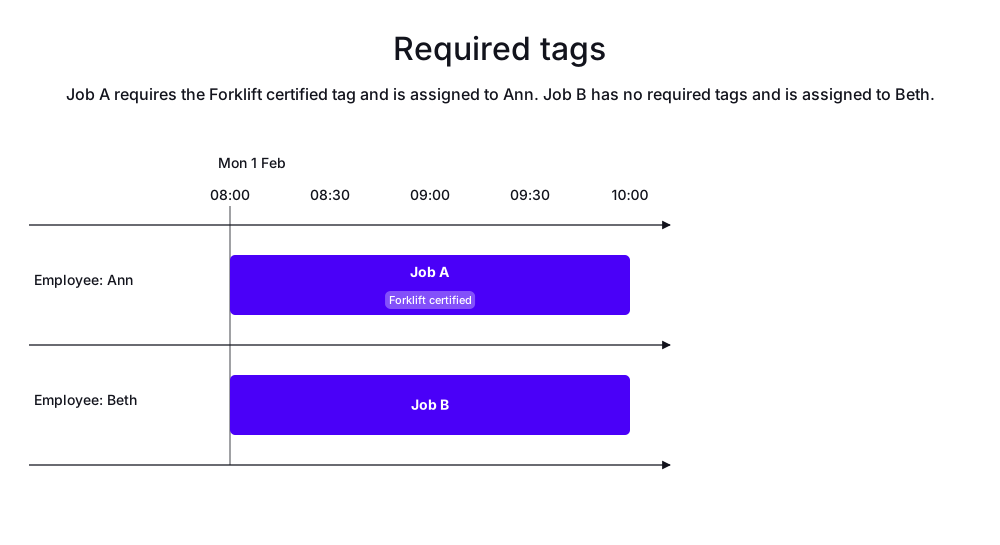
In the following example, there are two jobs and two employees.
Job A has the required tag Forklift certified.
Job B has no required tags.
Ann has the Forklift certified tag.
Beth does not.
Job A is assigned to Ann, who has the required tag. Job B is assigned to Beth.
-
Input
-
Output
Try this example in Timefold Platform by saving this JSON into a file called sample.json and make the following API call:
|
curl -X POST -H "Content-type: application/json" -H 'X-API-KEY: <API_KEY>' https://app.timefold.ai/api/models/job-scheduling/v1/schedules [email protected]{
"config": {
"run": {
"name": "Required tags"
}
},
"modelInput": {
"employeeTags": [
{
"id": "Forklift certified"
}
],
"employees": [
{
"id": "Ann",
"start": "2027-02-01T08:00:00Z",
"tags": [
{
"tagId": "Forklift certified"
}
]
},
{
"id": "Beth",
"start": "2027-02-01T08:00:00Z"
}
],
"jobs": [
{
"id": "Job A",
"duration": "PT2H",
"requiredTags": [
"Forklift certified"
]
},
{
"id": "Job B",
"duration": "PT2H"
}
]
}
}
To request the solution, locate the ID from the response to the post operation and append it to the following API call:
|
curl -X GET -H 'X-API-KEY: <API_KEY>' https://app.timefold.ai/api/models/job-scheduling/v1/schedules/<ID>
{
  "metadata": {
    "id": "ID",
    "originId": "ID",
    "name": "Required tags",
    "submitDateTime": "2026-06-08T08:22:49.331812323Z",
    "startDateTime": "2026-06-08T08:23:48.215075872Z",
    "activeDateTime": "2026-06-08T08:23:48.40852962Z",
    "completeDateTime": "2026-06-08T08:24:18.593342202Z",
    "shutdownDateTime": "2026-06-08T08:24:18.952364952Z",
    "solverStatus": "SOLVING_COMPLETED",
    "score": "0hard/0medium/-120soft",
    "tags": [
      "system.type:from-request",
      "system.profile:default"
    ],
    "validationResult": {
      "summary": "OK"
    }
  },
  "modelOutput": {
    "employees": [
      {
        "id": "Ann",
        "schedule": [
          {
            "id": "Job A",
            "start": "2027-02-01T08:00:00Z",
            "end": "2027-02-01T10:00:00Z"
          }
        ]
      },
      {
        "id": "Beth",
        "schedule": [
          {
            "id": "Job B",
            "start": "2027-02-01T08:00:00Z",
            "end": "2027-02-01T10:00:00Z"
          }
        ]
      }
    ]
  },
  "inputMetrics": {
    "jobs": 2,
    "machines": 0,
    "employees": 2
  },
  "kpis": {
    "makespan": "PT2H",
    "unassignedJobs": 0,
    "assignedJobs": 2,
    "activatedMachines": 0,
    "activatedEmployees": 2,
    "idealEndTimeDeviation": "PT0S"
  },
  "run": {
    "id": "ID",
    "originId": "ID",
    "name": "Required tags",
    "submitDateTime": "2026-06-08T08:22:49.331812323Z",
    "startDateTime": "2026-06-08T08:23:48.215075872Z",
    "activeDateTime": "2026-06-08T08:23:48.40852962Z",
    "completeDateTime": "2026-06-08T08:24:18.593342202Z",
    "shutdownDateTime": "2026-06-08T08:24:18.952364952Z",
    "solverStatus": "SOLVING_COMPLETED",
    "score": "0hard/0medium/-120soft",
    "tags": [
      "system.type:from-request",
      "system.profile:default"
    ],
    "validationResult": {
      "summary": "OK"
    }
  }
}
Required resources
Instead of specifying capabilities via tags, you can directly specify which resources are allowed to perform a job:
{
  "employees": [
    {
      "id": "Ann",
      "start": "2027-02-01T08:00:00Z"
    },
    {
      "id": "Beth",
      "start": "2027-02-01T08:00:00Z"
    }
  ],
  "jobs": [
    {
      "id": "Job A",
      "duration": "PT2H",
      "requiredResources": [
        "Ann"
      ]
    },
    {
      "id": "Job B",
      "duration": "PT2H"
    }
  ]
}
In this example, Job A can only be assigned to Ann.
Beth is not an option for this job.
This is useful when:
-
A job requires a specific machine (e.g., for testing or calibration).
-
A customer requests a specific employee.
-
Equipment or tooling is only available on certain machines.
-
Prior context makes only certain resources suitable.
The Required resources do not match hard constraint is invoked when a job has a non-empty requiredResources list and is assigned to a resource that is not included in it.
The constraint adds a hard penalty to the dataset score derived from the job’s priority.
Required resources example
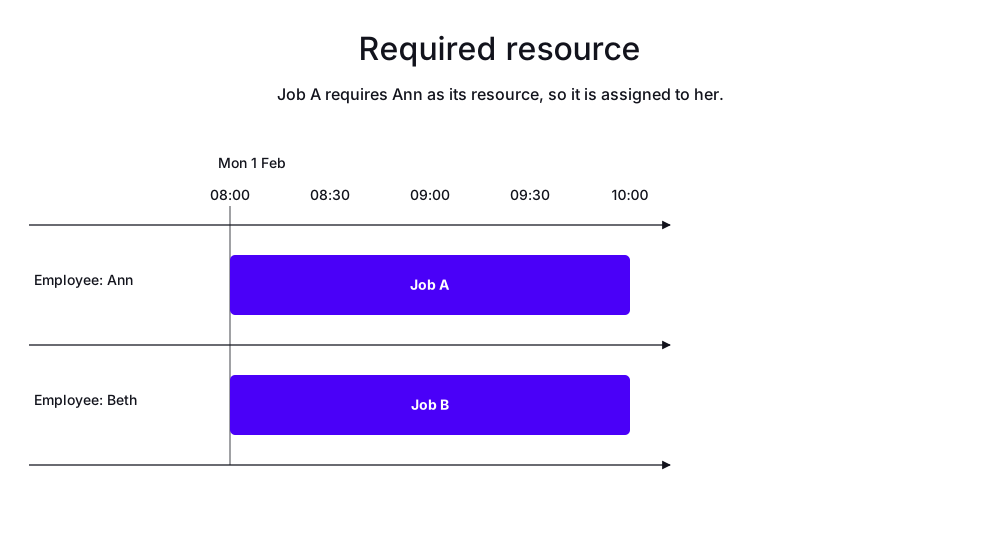
In the following example, there are two jobs and two employees. Job A can only be performed by Ann, while Job B can be performed by either Ann or Beth.
Job A is assigned to Ann. Job B is assigned to Beth.
-
Input
-
Output
Try this example in Timefold Platform by saving this JSON into a file called sample.json and make the following API call:
|
curl -X POST -H "Content-type: application/json" -H 'X-API-KEY: <API_KEY>' https://app.timefold.ai/api/models/job-scheduling/v1/schedules [email protected]{
"config": {
"run": {
"name": "Required employee"
}
},
"modelInput": {
"employees": [
{
"id": "Ann",
"start": "2027-02-01T08:00:00Z"
},
{
"id": "Beth",
"start": "2027-02-01T08:00:00Z"
}
],
"jobs": [
{
"id": "Job A",
"duration": "PT2H",
"requiredResources": [
"Ann"
]
},
{
"id": "Job B",
"duration": "PT2H"
}
]
}
}
To request the solution, locate the ID from the response to the post operation and append it to the following API call:
|
curl -X GET -H 'X-API-KEY: <API_KEY>' https://app.timefold.ai/api/models/job-scheduling/v1/schedules/<ID>
{
  "metadata": {
    "id": "ID",
    "originId": "ID",
    "name": "Required employee",
    "submitDateTime": "2026-06-08T09:14:25.908686706Z",
    "startDateTime": "2026-06-08T09:15:09.704305237Z",
    "activeDateTime": "2026-06-08T09:15:09.938803543Z",
    "completeDateTime": "2026-06-08T09:15:40.108074456Z",
    "shutdownDateTime": "2026-06-08T09:15:40.488037236Z",
    "solverStatus": "SOLVING_COMPLETED",
    "score": "0hard/0medium/-120soft",
    "tags": [
      "system.type:from-request",
      "system.profile:default"
    ],
    "validationResult": {
      "summary": "OK"
    }
  },
  "modelOutput": {
    "employees": [
      {
        "id": "Ann",
        "schedule": [
          {
            "id": "Job A",
            "start": "2027-02-01T08:00:00Z",
            "end": "2027-02-01T10:00:00Z"
          }
        ]
      },
      {
        "id": "Beth",
        "schedule": [
          {
            "id": "Job B",
            "start": "2027-02-01T08:00:00Z",
            "end": "2027-02-01T10:00:00Z"
          }
        ]
      }
    ]
  },
  "inputMetrics": {
    "jobs": 2,
    "machines": 0,
    "employees": 2
  },
  "kpis": {
    "makespan": "PT2H",
    "unassignedJobs": 0,
    "assignedJobs": 2,
    "activatedMachines": 0,
    "activatedEmployees": 2,
    "idealEndTimeDeviation": "PT0S"
  },
  "run": {
    "id": "ID",
    "originId": "ID",
    "name": "Required employee",
    "submitDateTime": "2026-06-08T09:14:25.908686706Z",
    "startDateTime": "2026-06-08T09:15:09.704305237Z",
    "activeDateTime": "2026-06-08T09:15:09.938803543Z",
    "completeDateTime": "2026-06-08T09:15:40.108074456Z",
    "shutdownDateTime": "2026-06-08T09:15:40.488037236Z",
    "solverStatus": "SOLVING_COMPLETED",
    "score": "0hard/0medium/-120soft",
    "tags": [
      "system.type:from-request",
      "system.profile:default"
    ],
    "validationResult": {
      "summary": "OK"
    }
  }
}
Combining required resources and required tags
You can combine both requiredResources and requiredTags on the same job:
{
  "jobs": [
    {
      "id": "special job",
      "duration": "PT3H",
      "requiredResources": ["machine A", "machine B"],
      "requiredTags": ["certified"]
    }
  ]
}
In this example, the job can only be assigned to Machine A or Machine B, AND the chosen machine must have the Certified tag.
Next
-
See the full API spec, try the online API, or start a free trial.
-
Learn about job dependencies.