Time management
Time management constraints in Timefold’s Task Scheduling model coordinate when jobs are scheduled by considering end times and limiting the overall makespan of the schedule.
Including ideal end times allows you to express preferences for when jobs should finish, even if it’s not a hard requirement. This is helpful for:
-
Customer preferences: Customer would prefer a certain completion time but they are flexible.
-
Just-in-time delivery: Finishing too early or too late both have costs (storage or delays).
-
Load balancing: Spreading work throughout the day or week.
-
Resource optimization: Prefer to complete jobs during optimal resource availability.
-
Scheduling goals: Align multiple jobs to similar completion times.
Limiting the makespan for a schedule can help ensure all jobs are completed within a certain timeframe, which is important for meeting deadlines and managing resources effectively. This is helpful for:
-
Deadline management: Ensure all jobs are completed by a specific time.
-
Resource planning: Avoid scheduling jobs too far into the future.
-
Operational efficiency: Keep the schedule compact and manageable.
This guide explains time management with the following:
End at ideal time
Learn how to configure an API Key to run the examples in this guide:
In the examples, replace |
The Minimize ideal end difference soft constraint applies to jobs that have an idealEnd time specified once they are scheduled and therefore have a computed end time.
Jobs that are not yet assigned or scheduled are not penalized by this constraint until their end time is known.
{
  "jobs": [
    {
      "id": "Job A",
      "duration": "PT4H",
      "idealEnd": "2027-02-01T16:00:00+00:00"
    }
  ]
}
idealEnd is the ideal time for a job to finish in ISO 8601 date and time format.
The constraint adds a soft penalty to the dataset score derived from the difference between the actual end time of the job and its ideal end time in minutes, weighted by the job’s priority (if specified). The penalty applies whether the job finishes early or late relative to the ideal.
End at ideal time example
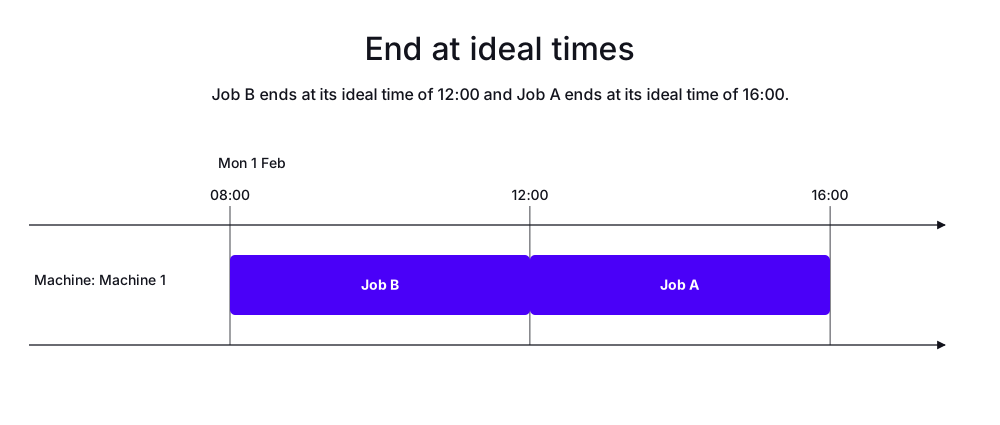
In the following example, there is one machine and two jobs. Job A has an ideal end time of 16:00 and Job B has an ideal end time of 12:00. Both jobs have a duration of four hours and the same priority.
Job B is scheduled first, starting at 08:00 and finishing at its ideal end time of 12:00. Job A starts immediately after Job B at 12:00 and finishes at 16:00, which is also its ideal end time.
-
Input
-
Output
Try this example in Timefold Platform by saving this JSON into a file called sample.json and make the following API call:
|
curl -X POST -H "Content-type: application/json" -H 'X-API-KEY: <API_KEY>' https://app.timefold.ai/api/models/job-scheduling/v1/schedules [email protected]{
"config": {
"run": {
"name": "End at ideal times"
}
},
"modelInput": {
"machines": [
{
"id": "Machine 1",
"start": "2027-02-01T08:00:00+00:00"
}
],
"jobs": [
{
"id": "Job A",
"duration": "PT4H",
"idealEnd": "2027-02-01T16:00:00+00:00"
},
{
"id": "Job B",
"duration": "PT4H",
"idealEnd": "2027-02-01T12:00:00+00:00"
}
]
}
}
To request the solution, locate the ID from the response to the post operation and append it to the following API call:
|
curl -X GET -H 'X-API-KEY: <API_KEY>' https://app.timefold.ai/api/models/job-scheduling/v1/schedules/<ID>
{
  "metadata": {
    "id": "ID",
    "originId": "ID",
    "name": "End at ideal times",
    "submitDateTime": "2026-05-28T06:28:26.896627635Z",
    "startDateTime": "2026-05-28T06:28:40.407151725Z",
    "activeDateTime": "2026-05-28T06:28:40.599929527Z",
    "completeDateTime": "2026-05-28T06:29:10.75751526Z",
    "shutdownDateTime": "2026-05-28T06:29:11.14248266Z",
    "solverStatus": "SOLVING_COMPLETED",
    "score": "0hard/0medium/-480soft",
    "tags": [
      "system.type:from-request",
      "system.profile:default"
    ],
    "validationResult": {
      "summary": "OK"
    }
  },
  "modelOutput": {
    "machines": [
      {
        "id": "Machine 1",
        "schedule": [
          {
            "id": "Job B",
            "start": "2027-02-01T08:00:00Z",
            "end": "2027-02-01T12:00:00Z"
          },
          {
            "id": "Job A",
            "start": "2027-02-01T12:00:00Z",
            "end": "2027-02-01T16:00:00Z"
          }
        ]
      }
    ]
  },
  "inputMetrics": {
    "jobs": 2,
    "machines": 1,
    "employees": 0
  },
  "kpis": {
    "makespan": "PT8H",
    "unassignedJobs": 0,
    "assignedJobs": 2,
    "activatedMachines": 1,
    "activatedEmployees": 0,
    "idealEndTimeDeviation": "PT0S"
  },
  "run": {
    "id": "ID",
    "originId": "ID",
    "name": "End at ideal times",
    "submitDateTime": "2026-05-28T06:28:26.896627635Z",
    "startDateTime": "2026-05-28T06:28:40.407151725Z",
    "activeDateTime": "2026-05-28T06:28:40.599929527Z",
    "completeDateTime": "2026-05-28T06:29:10.75751526Z",
    "shutdownDateTime": "2026-05-28T06:29:11.14248266Z",
    "solverStatus": "SOLVING_COMPLETED",
    "score": "0hard/0medium/-480soft",
    "tags": [
      "system.type:from-request",
      "system.profile:default"
    ],
    "validationResult": {
      "summary": "OK"
    }
  }
}
Balance jobs across machines
The Minimize makespan soft constraint is invoked when at least one job is assigned to a machine.
The constraint adds a soft penalty to the dataset score that is calculated by taking the maximum makespan across all used resources and penalizing by that makespan in minutes, incentivizing Timefold to shorten the overall makespan.
Balance jobs across machines example
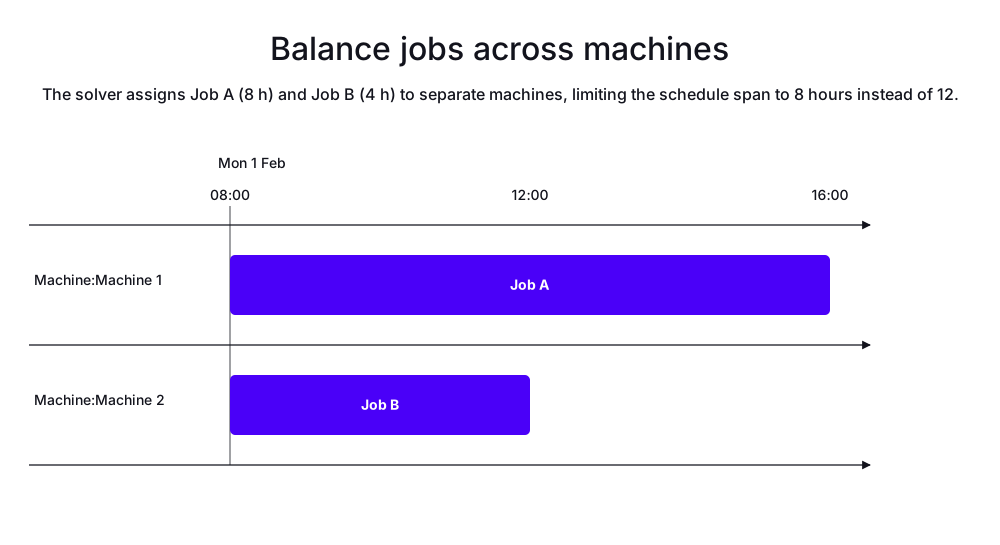
In the following example, there are two machines and two jobs. Job A has a duration of eight hours and Job B has a duration of four hours. Job A is scheduled on Machine 1 and Job B is scheduled on Machine 2. Both jobs start at 08:00. Job A finishes at 16:00 and Job B finishes at 12:00, so the makespan of the schedule is 8 hours, which is the duration of Job A.
-
Input
-
Output
Try this example in Timefold Platform by saving this JSON into a file called sample.json and make the following API call:
|
curl -X POST -H "Content-type: application/json" -H 'X-API-KEY: <API_KEY>' https://app.timefold.ai/api/models/job-scheduling/v1/schedules [email protected]{
"config": {
"run": {
"name": "Balance jobs across machines"
}
},
"modelInput": {
"machines": [
{
"id": "Machine 1",
"start": "2027-02-01T08:00:00+00:00"
},
{
"id": "Machine 2",
"start": "2027-02-01T08:00:00+00:00"
}
],
"jobs": [
{
"id": "Job A",
"duration": "PT8H"
},
{
"id": "Job B",
"duration": "PT4H"
}
]
}
}
To request the solution, locate the ID from the response to the post operation and append it to the following API call:
|
curl -X GET -H 'X-API-KEY: <API_KEY>' https://app.timefold.ai/api/models/job-scheduling/v1/schedules/<ID>
{
  "metadata": {
    "id": "ID",
    "originId": "ID",
    "name": "Balance jobs across machines",
    "submitDateTime": "2026-05-26T08:40:09.122594773Z",
    "startDateTime": "2026-05-26T08:40:55.026732596Z",
    "activeDateTime": "2026-05-26T08:40:55.221720689Z",
    "completeDateTime": "2026-05-26T08:41:25.379483349Z",
    "shutdownDateTime": "2026-05-26T08:41:25.808997838Z",
    "solverStatus": "SOLVING_COMPLETED",
    "score": "0hard/0medium/-480soft",
    "tags": [
      "system.type:from-request",
      "system.profile:default"
    ],
    "validationResult": {
      "summary": "OK"
    }
  },
  "modelOutput": {
    "machines": [
      {
        "id": "Machine 1",
        "schedule": [
          {
            "id": "Job A",
            "start": "2027-02-01T08:00:00Z",
            "end": "2027-02-01T16:00:00Z"
          }
        ]
      },
      {
        "id": "Machine 2",
        "schedule": [
          {
            "id": "Job B",
            "start": "2027-02-01T08:00:00Z",
            "end": "2027-02-01T12:00:00Z"
          }
        ]
      }
    ]
  },
  "inputMetrics": {
    "jobs": 2,
    "machines": 2,
    "employees": 0
  },
  "kpis": {
    "makespan": "PT8H",
    "unassignedJobs": 0,
    "assignedJobs": 2,
    "activatedMachines": 2,
    "activatedEmployees": 0,
    "idealEndTimeDeviation": "PT0S"
  },
  "run": {
    "id": "ID",
    "originId": "ID",
    "name": "Balance jobs across machines",
    "submitDateTime": "2026-05-26T08:40:09.122594773Z",
    "startDateTime": "2026-05-26T08:40:55.026732596Z",
    "activeDateTime": "2026-05-26T08:40:55.221720689Z",
    "completeDateTime": "2026-05-26T08:41:25.379483349Z",
    "shutdownDateTime": "2026-05-26T08:41:25.808997838Z",
    "solverStatus": "SOLVING_COMPLETED",
    "score": "0hard/0medium/-480soft",
    "tags": [
      "system.type:from-request",
      "system.profile:default"
    ],
    "validationResult": {
      "summary": "OK"
    }
  }
}
Next
-
See the full API spec, try the online API, or start a free trial.
-
Learn about Time windows.