Demand-based scheduling
By default in employee shift scheduling, shifts are assigned with shift slot scheduling.
In shift slot scheduling, the number of shifts that are required to cover the workload is known, and only that number of shifts are created. Timefold uses the constraints of the scheduling problem: availability, cost management, employee preferences, shift patterns, and contractual obligations, etc, to determine which employees are assigned to which shifts.
Shifts can also be assigned with hourly demand scheduling.
In hourly demand scheduling, the hourly demand (how many employees are needed) is known. There is a pool of shifts that can be chosen from to meet the demand.
The pool of shifts may have different start times and durations.
Timefold uses the constraints of the scheduling problem: availability, cost management, employee preferences, shift patterns, and contractual obligations, etc, to determine which shifts to schedule to meet the demand curve and which employees to assign to those shifts.
Shifts that are not required to meet the demand can be left unassigned or distributed evenly across the demand curve.
The demand curve in hourly demand scheduling can be defined with the maximum or minimum number of required employees at specific times, leading to assigning fewer employees during quiet periods when the full complement of employees are not required, and alternatively, assigning more employees during busy periods.
If there is an hourly demand for a maximum of one employee between 08:00 and 09:00, and an hourly demand for a maximum of three employees between 09:00 and 10:00 and there are sufficient shifts that start at 08:00 and 09:00 with a duration longer than 2 hours, one employee will be assigned a shift that starts at 08:00 and two more employees will be assigned shifts that start at 09:00.
The one employee who starts at 08:00 meets the demand for a maximum of one employee between 08:00 and 09:00.
The one employee who starts at 08:00 and the two employees who start at 09:00 meet the demand for a maximum of three employees between 09:00 and 10:00.
The minimumMaximumShiftsPerHourlyDemand global rules define the hourly demand for shifts.
| Shifts can be auto-generated from demand curves and shift templates using Shift generation (preview). |
This guide explains demand-based scheduling with the following examples:
Define hourly shift demand
Learn how to configure an API Key to run the examples in this guide:
In the examples, replace |
minimumMaximumShiftsPerHourlyDemand is defined in globalRules:
{
  "globalRules": {
    "minimumMaximumShiftsPerHourlyDemand": [
      {
        "id": "HourlyDemand",
        "demandDetails": [
          {
            "startDateTime": "2027-02-01T07:00:00Z",
            "endDateTime": "2027-02-01T08:00:00Z",
            "maxDemand": 1
          },
          {
            "startDateTime": "2027-02-01T08:00:00Z",
            "endDateTime": "2027-02-01T09:00:00Z",
            "maxDemand": 2
          },
          {
            "startDateTime": "2027-02-01T16:00:00Z",
            "endDateTime": "2027-02-01T17:00:00Z",
            "maxDemand": 2
          },
          {
            "startDateTime": "2027-02-01T17:00:00Z",
            "endDateTime": "2027-02-01T18:00:00Z",
            "maxDemand": 1
          }
        ],
        "satisfiability": "REQUIRED"
      }
    ]
  }
}
The hourly demand in this example, states the following:
-
Between 07:00 and 08:00 there must be a maximum of one employee.
-
Between 08:00 and 09:00 there must be a maximum of two employees.
-
Between 16:00 and 17:00 there must be a maximum of two employees.
-
Between 17:00 and 18:00 there must be a maximum of one employee.
minimumMaximumShiftsPerHourlyDemand must include an id.
demandDetails must include startDateTime and the maxDemand for the specified time for each time period when the hourly demand is defined.
endDateTime is optional and defaults to one hour after startDateTime if not provided. The interval between startDateTime and endDateTime must be at least 30 minutes.
startDateTime and endDateTime must be a valid ISO 8601 date-time.
Define multi-hour demand intervals
Instead of defining individual one-hour intervals, a single demand detail can cover a longer period such as 9:00–17:00. This is useful for cases where the demand remains constant throughout a longer period.
{
  "demandDetails": [
    {
      "startDateTime": "2027-02-01T09:00:00Z",
      "endDateTime": "2027-02-01T17:00:00Z",
      "maxDemand": 3
    }
  ]
}
Filter shifts with tags
minimumMaximumShiftsPerHourlyDemand can include or exclude shifts based on shift tags:
{
  "minimumMaximumShiftsPerHourlyDemand": [
    {
      "id": "HourlyDemand",
      "includeShiftTags": [
        "Part-time"
      ],
      "demandDetails": [
        {
          "startDateTime": "2027-02-01T09:00:00Z",
          "endDateTime": "2027-02-01T10:00:00Z",
          "maxDemand": 1
        }
      ],
      "satisfiability": "REQUIRED"
    }
  ]
}
Further information about including or excluding shifts with shift tags:
Shifts with specific tags can be included or excluded by the rule. Tags are defined in shifts:
{
  "shifts": [
    {
      "id": "2027-02-01",
      "start": "2027-02-01T09:00:00Z",
      "end": "2027-02-01T17:00:00Z",
      "tags": ["Part-time"]
    }
  ]
}
Use includeShiftTags to include shifts with specific tags or excludeShiftTags to exclude shifts with specific tags.
shiftTagMatches can be set to ALL or ANY.
The default behavior for shiftTagMatches is ALL, and if omitted, the default ALL will be used.
The rule can define either includeShiftTags or excludeShiftTags, but not both.
{
  "includeShiftTags": ["Part-time", "Weekend"],
  "shiftTagMatches": "ALL"
}
With shiftTagMatches set to ALL, all tags defined by the rule’s includeShiftTags attribute must be present in the shift. With shiftTagMatches set to ANY, at least one tag defined by the rule’s includeShiftTags attribute must be present in the shift.
{
  "excludeShiftTags": ["Part-time", "Weekend"],
  "shiftTagMatches": "ALL"
}
With shiftTagMatches set to ALL, all tags defined by the rule’s excludeShiftTags attribute cannot be present in the shift.
This is useful when you want to exclude things in combination with each other.
For instance, excluding the shift tags Part-time and Weekend with shiftTagMatches set to All, will exclude shifts that include the tags Part-time and Weekend from the rule.
Shifts tagged only Part-time or only Weekend will not be excluded.
With shiftTagMatches set to ANY, any of the tags defined by the rule’s excludeShiftTags attribute cannot be present in the shift.
This is useful when you need to exclude tags regardless of their relationship to other tags.
For instance, excluding the shift tags Part-time and Weekend with shiftTagMatches set to ANY, will exclude any shift that includes the tags Part-time or Weekend, whether they occur together or not.
Filter employees with tags
minimumMaximumShiftsPerHourlyDemand can include or exclude employees based on employee tags:
{
  "minimumMaximumShiftsPerHourlyDemand": [
    {
      "id": "HourlyDemand",
      "includeEmployeeTags": [
        "Part-time"
      ],
      "demandDetails": [
        {
          "startDateTime": "2027-02-01T09:00:00Z",
          "endDateTime": "2027-02-01T10:00:00Z",
          "maxDemand": 1
        }
      ],
      "satisfiability": "REQUIRED"
    }
  ]
}
Further information about including or excluding employees with employee tags:
Employees with specific tags can be included or excluded by the rule. Tags are defined in employees:
{
  "employees": [
    {
      "id": "Ann",
      "tags": "Part-time"
    }
}
Use includeEmployeeTags to include employees with specific tags or excludeEmployeeTags to exclude employees with specific tags.
employeeTagMatches can be set to ALL or ANY.
The default behavior for employeeTagMatches is ALL, and if omitted, the default ALL will be used.
The rule can define either includeEmployeeTags or excludeEmployeeTags, but not both.
{
  "includeemployeeTags": ["Part-time", "Relief"],
  "employeeTagMatches": "ALL"
}
With employeeTagMatches set to ALL, all tags defined by the rule’s includeEmployeeTags attribute must be present in the employee. With employeeTagMatches set to ANY, at least one tag defined by the rule’s includeEmployeeTags attribute must be present in the employee.
{
  "excludeEmployeeTags": ["Part-time", "Weekend"],
  "employeeTagMatches": "ALL"
}
With employeeTagMatches set to ALL, all tags defined by the rule’s excludeEmployeeTags attribute cannot be present in the employee.
This is useful when you want to exclude things in combination with each other.
For instance, excluding the employee tags Part-time and Relief with employeeTagMatches set to All, would exclude employees that include the tags Part-time and Relief from the rule.
Employees tagged only Part-time or only Relief will not be excluded.
With employeeTagMatches set to ANY, any of the tags defined by the rule’s excludeEmployeeTags attribute cannot be present in the employee.
This is useful when you need to exclude tags regardless of their relationship to other tags.
For instance, excluding the employee tags Part-time and Weekend with employeeTagMatches set to ANY, would exclude any employee that includes the tags Part-time or Relief, whether they occur together or not.
Required hourly shift demand
When the satisfiability of the rule is REQUIRED, the Shifts worked not in required hourly demand range hard constraint is invoked, making sure the number of shifts assigned for a demand detail are above minDemand or below maxDemand.
Shifts will be left unassigned if assigning the shifts breaks the constraint. Similarly, in case there are not enough shifts to meet the demand, Timefold will assign as many shifts as possible.
Required hourly shift demand example
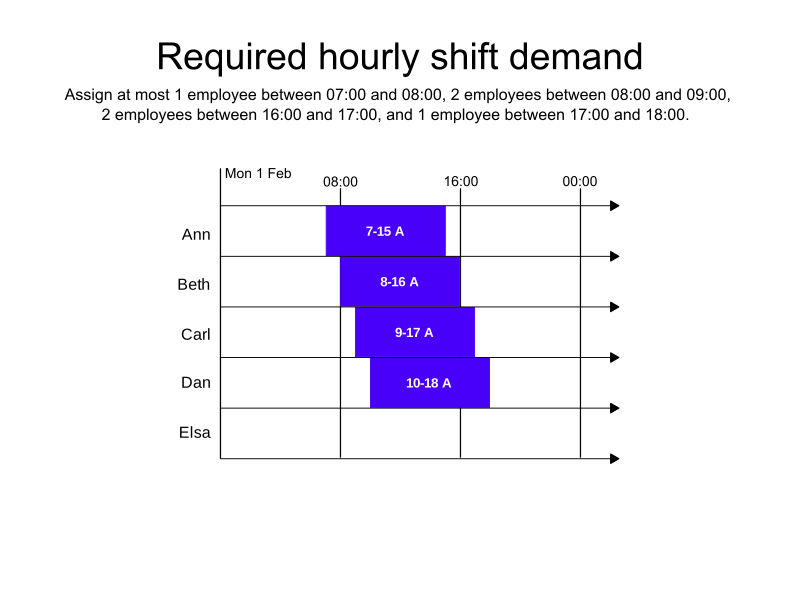
In the following example, the following hourly demand has been specified:
-
Between 07:00 and 08:00 there must be a maximum of one employee.
-
Between 08:00 and 09:00 there must be a maximum of two employees.
-
Between 16:00 and 17:00 there must be a maximum of two employees.
-
Between 17:00 and 18:00 there must be a maximum of one employee.
There are five available employees, and twelve possible shifts.
The satisfiability of the rule is required.
Four employees are assigned shifts.
One employee is not assigned a shift to avoid breaking the Shifts worked not in required hourly demand range hard constraint by exceeding the demand curve.
Eight shifts are left unassigned.
-
Input
-
Output
Try this example in Timefold Platform by saving this JSON into a file called sample.json and make the following API call:
|
curl -X POST -H "Content-type: application/json" -H 'X-API-KEY: <API_KEY>' https://app.timefold.ai/api/models/employee-scheduling/v1/schedules [email protected]{
"config": {
"run": {
"name": "Required hourly shift demand example"
}
},
"modelInput": {
"globalRules": {
"minimumMaximumShiftsPerHourlyDemand": [
{
"id": "HourlyDemand",
"demandDetails": [
{
"startDateTime": "2027-02-01T07:00:00Z",
"endDateTime": "2027-02-01T08:00:00Z",
"maxDemand": 1
},
{
"startDateTime": "2027-02-01T08:00:00Z",
"endDateTime": "2027-02-01T09:00:00Z",
"maxDemand": 2
},
{
"startDateTime": "2027-02-01T16:00:00Z",
"endDateTime": "2027-02-01T17:00:00Z",
"maxDemand": 2
},
{
"startDateTime": "2027-02-01T17:00:00Z",
"endDateTime": "2027-02-01T18:00:00Z",
"maxDemand": 1
}
],
"satisfiability": "REQUIRED"
}
]
},
"employees": [
{
"id": "Ann"
},
{
"id": "Beth"
},
{
"id": "Carl"
},
{
"id": "Dan"
},
{
"id": "Elsa"
}
],
"shifts": [
{
"id": "7-15 A",
"start": "2027-02-01T07:00:00Z",
"end": "2027-02-01T15:00:00Z"
},
{
"id": "7-15 B",
"start": "2027-02-01T07:00:00Z",
"end": "2027-02-01T15:00:00Z"
},
{
"id": "7-15 C",
"start": "2027-02-01T07:00:00Z",
"end": "2027-02-01T15:00:00Z"
},
{
"id": "8-16 A",
"start": "2027-02-01T08:00:00Z",
"end": "2027-02-01T16:00:00Z"
},
{
"id": "8-16 B",
"start": "2027-02-01T08:00:00Z",
"end": "2027-02-01T16:00:00Z"
},
{
"id": "8-16 C",
"start": "2027-02-01T08:00:00Z",
"end": "2027-02-01T16:00:00Z"
},
{
"id": "9-17 A",
"start": "2027-02-01T09:00:00Z",
"end": "2027-02-01T17:00:00Z"
},
{
"id": "9-17 B",
"start": "2027-02-01T09:00:00Z",
"end": "2027-02-01T17:00:00Z"
},
{
"id": "9-17 C",
"start": "2027-02-01T09:00:00Z",
"end": "2027-02-01T17:00:00Z"
},
{
"id": "10-18 A",
"start": "2027-02-01T10:00:00Z",
"end": "2027-02-01T18:00:00Z"
},
{
"id": "10-18 B",
"start": "2027-02-01T10:00:00Z",
"end": "2027-02-01T18:00:00Z"
},
{
"id": "10-18 C",
"start": "2027-02-01T10:00:00Z",
"end": "2027-02-01T18:00:00Z"
}
]
}
}
To request the solution, locate the ID from the response to the post operation and append it to the following API call:
|
curl -X GET -H 'X-API-KEY: <API_KEY>' https://app.timefold.ai/api/models/employee-scheduling/v1/schedules/<ID>{
"metadata": {
"id": "ID",
"parentId": null,
"originId": "ID",
"name": "Required hourly shift demand example",
"submitDateTime": "2025-06-26T04:33:10.966491445Z",
"startDateTime": "2025-06-26T04:33:23.425140272Z",
"activeDateTime": "2025-06-26T04:33:23.617726513Z",
"completeDateTime": "2025-06-26T04:33:54.668159337Z",
"shutdownDateTime": "2025-06-26T04:33:54.855922554Z",
"solverStatus": "SOLVING_COMPLETED",
"score": "0hard/-8medium/0soft",
"tags": [
"system.type:from-request",
"system.profile:default"
],
"validationResult": {
"summary": "OK"
}
},
"modelOutput": {
"shifts": [
{
"id": "7-15 A",
"employee": "Ann"
},
{
"id": "7-15 B"
},
{
"id": "7-15 C"
},
{
"id": "8-16 A",
"employee": "Beth"
},
{
"id": "8-16 B"
},
{
"id": "8-16 C"
},
{
"id": "9-17 A",
"employee": "Carl"
},
{
"id": "9-17 B",
"employee": "Dan"
},
{
"id": "9-17 C"
},
{
"id": "10-18 A"
},
{
"id": "10-18 B"
},
{
"id": "10-18 C"
}
]
},
"inputMetrics": {
"employees": 5,
"shifts": 12,
"pinnedShifts": 0
},
"kpis": {
"assignedShifts": 4,
"unassignedShifts": 8,
"disruptionPercentage": 0.0,
"activatedEmployees": 4,
"assignedMandatoryShifts": 4,
"assignedOptionalShifts": 0,
"travelDistance": 0
}
}modelOutput contains the schedule with the hourly demand satisfied.
inputMetrics provides a breakdown of the inputs in the input dataset.
KPIs provides the KPIs for the output including:
{
  "assignedShifts": 4,
  "unassignedShifts": 8,
  "activatedEmployees": 4,
  "assignedMandatoryShifts": 4
}
Preferred hourly shift demand
When the satisfiability of the rule is PREFERRED, the Shifts worked not in preferred hourly demand range soft constraint is invoked.
With preferred satisfiability, you can define minDemand for the minimum hourly demand in combination with maxDemand or separately.
{
  "globalRules": {
    "minimumMaximumShiftsPerHourlyDemand": [
      {
        "id": "HourlyDemand",
        "demandDetails": [
          {
            "startDateTime": "2027-02-01T07:00:00Z",
            "endDateTime": "2027-02-01T08:00:00Z",
            "minDemand": 1
          },
          {
            "startDateTime": "2027-02-01T08:00:00Z",
            "endDateTime": "2027-02-01T09:00:00Z",
            "minDemand": 2
          },
          {
            "startDateTime": "2027-02-01T16:00:00Z",
            "endDateTime": "2027-02-01T17:00:00Z",
            "minDemand": 2
          },
          {
            "startDateTime": "2027-02-01T17:00:00Z",
            "endDateTime": "2027-02-01T18:00:00Z",
            "minDemand": 1
          }
        ],
        "satisfiability": "PREFERRED"
      }
    ]
  }
}
The Shifts worked not in preferred hourly demand range soft constraint is invoked when satisfiability is PREFERRED and the assigned shifts for a demand detail are below minDemand or above maxDemand.
The constraint adds a soft penalty to the dataset score that is calculated by taking the number of shifts outside the preferred hourly demand range and normalizing it to minutes, incentivizing Timefold to keep assigned shifts within preferred demand bounds.
Shifts will still be assigned even if assigning them breaks this constraint.
Preferred hourly shift demand example
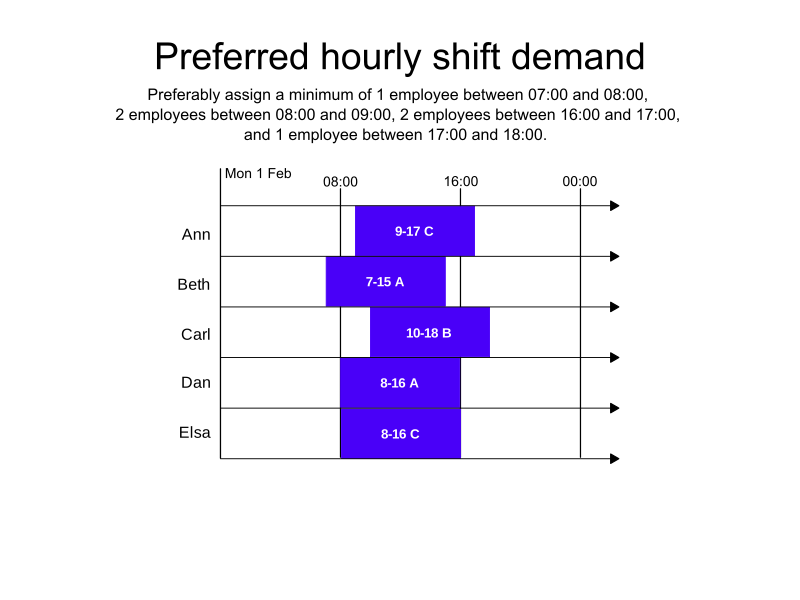
In the following example, the following hourly demand has been specified:
-
Between 07:00 and 08:00 there must be a minimum of one employee.
-
Between 08:00 and 09:00 there must be a minimum of two employees.
-
Between 16:00 and 17:00 there must be a minimum of two employees.
-
Between 17:00 and 18:00 there must be a minimum of one employee.
There are 5 available employees, and 12 possible shifts.
The satisfiability of the rule is preferred.
All five employees are assigned shifts.
Seven shifts are left unassigned.
-
Input
-
Output
Try this example in Timefold Platform by saving this JSON into a file called sample.json and make the following API call:
|
curl -X POST -H "Content-type: application/json" -H 'X-API-KEY: <API_KEY>' https://app.timefold.ai/api/models/employee-scheduling/v1/schedules [email protected]{
"config": {
"run": {
"name": "Preferred hourly shift demand example"
}
},
"modelInput": {
"globalRules": {
"minimumMaximumShiftsPerHourlyDemand": [
{
"id": "HourlyDemand",
"demandDetails": [
{
"startDateTime": "2027-02-01T07:00:00Z",
"endDateTime": "2027-02-01T08:00:00Z",
"minDemand": 1
},
{
"startDateTime": "2027-02-01T08:00:00Z",
"endDateTime": "2027-02-01T09:00:00Z",
"minDemand": 2
},
{
"startDateTime": "2027-02-01T16:00:00Z",
"endDateTime": "2027-02-01T17:00:00Z",
"minDemand": 2
},
{
"startDateTime": "2027-02-01T17:00:00Z",
"endDateTime": "2027-02-01T18:00:00Z",
"minDemand": 1
}
],
"satisfiability": "PREFERRED"
}
]
},
"employees": [
{
"id": "Ann"
},
{
"id": "Beth"
},
{
"id": "Carl"
},
{
"id": "Dan"
},
{
"id": "Elsa"
}
],
"shifts": [
{
"id": "7-15 A",
"start": "2027-02-01T07:00:00Z",
"end": "2027-02-01T15:00:00Z"
},
{
"id": "7-15 B",
"start": "2027-02-01T07:00:00Z",
"end": "2027-02-01T15:00:00Z"
},
{
"id": "7-15 C",
"start": "2027-02-01T07:00:00Z",
"end": "2027-02-01T15:00:00Z"
},
{
"id": "8-16 A",
"start": "2027-02-01T08:00:00Z",
"end": "2027-02-01T16:00:00Z"
},
{
"id": "8-16 B",
"start": "2027-02-01T08:00:00Z",
"end": "2027-02-01T16:00:00Z"
},
{
"id": "8-16 C",
"start": "2027-02-01T08:00:00Z",
"end": "2027-02-01T16:00:00Z"
},
{
"id": "9-17 A",
"start": "2027-02-01T09:00:00Z",
"end": "2027-02-01T17:00:00Z"
},
{
"id": "9-17 B",
"start": "2027-02-01T09:00:00Z",
"end": "2027-02-01T17:00:00Z"
},
{
"id": "9-17 C",
"start": "2027-02-01T09:00:00Z",
"end": "2027-02-01T17:00:00Z"
},
{
"id": "10-18 A",
"start": "2027-02-01T10:00:00Z",
"end": "2027-02-01T18:00:00Z"
},
{
"id": "10-18 B",
"start": "2027-02-01T10:00:00Z",
"end": "2027-02-01T18:00:00Z"
},
{
"id": "10-18 C",
"start": "2027-02-01T10:00:00Z",
"end": "2027-02-01T18:00:00Z"
}
]
}
}
To request the solution, locate the ID from the response to the post operation and append it to the following API call:
|
curl -X GET -H 'X-API-KEY: <API_KEY>' https://app.timefold.ai/api/models/employee-scheduling/v1/schedules/<ID>{
"metadata": {
"id": "ID",
"parentId": null,
"originId": "ID",
"name": "Preferred hourly shift demand example",
"submitDateTime": "2025-06-26T04:50:31.839620831Z",
"startDateTime": "2025-06-26T04:50:42.409633761Z",
"activeDateTime": "2025-06-26T04:50:42.526984212Z",
"completeDateTime": "2025-06-26T04:51:13.458225717Z",
"shutdownDateTime": "2025-06-26T04:51:13.628499812Z",
"solverStatus": "SOLVING_COMPLETED",
"score": "0hard/-7medium/-480soft",
"tags": [
"system.type:from-request",
"system.profile:default"
],
"validationResult": {
"summary": "OK"
}
},
"modelOutput": {
"shifts": [
{
"id": "7-15 A",
"employee": "Beth"
},
{
"id": "7-15 B"
},
{
"id": "7-15 C"
},
{
"id": "8-16 A",
"employee": "Dan"
},
{
"id": "8-16 B",
"employee": "Elsa"
},
{
"id": "8-16 C"
},
{
"id": "9-17 A"
},
{
"id": "9-17 B"
},
{
"id": "9-17 C",
"employee": "Ann"
},
{
"id": "10-18 A"
},
{
"id": "10-18 B",
"employee": "Carl"
},
{
"id": "10-18 C"
}
]
},
"inputMetrics": {
"employees": 5,
"shifts": 12,
"pinnedShifts": 0
},
"kpis": {
"assignedShifts": 5,
"unassignedShifts": 7,
"disruptionPercentage": 0.0,
"activatedEmployees": 5,
"assignedMandatoryShifts": 5,
"assignedOptionalShifts": 0,
"travelDistance": 0
}
}modelOutput contains the schedule with the demand curve satisfied.
inputMetrics provides a breakdown of the inputs in the input dataset.
KPIs provides the KPIs for the output including:
{
  "assignedShifts": 4,
  "unassignedShifts": 8,
  "activatedEmployees": 4,
  "assignedMandatoryShifts": 4
}
Balance shifts worked for the minimum hourly demand
When there are more shifts and available employees to assign to those shifts than are required by the hourly demand and you are using preferred satisfiability for minimumMaximumShiftsPerHourlyDemand with minDemand, the Balance shifts worked for minimum hourly demand soft constraint will attempt to distribute the shifts across the day rather than assigning them all at the same time.
If the demand is met exactly no soft score penalty is applied.
Additional shifts above the minDemand attract a penalty, and the more unevenly the shifts are distributed, the higher the penalty, incentivizing Timefold to spread the additional shifts as evenly as possible across the demand curve.
The Balance shifts worked for minimum hourly demand soft constraint is invoked when minDemand is configured and the assigned shift count for a demand detail differs from minDemand.
The constraint adds a soft penalty to the dataset score that is calculated by taking the squared difference between assigned shifts and minDemand and normalizing it to minutes, incentivizing Timefold to spread assignments so each demand detail stays as close as possible to its minimum demand.
Shifts will still be assigned even if assigning them breaks this constraint.
|
Every soft constraint has a weight that can be configured to change the relative importance of the constraint compared to other constraints. Learn about constraint weights. |
If there are shifts that cover time periods with no hourly demand defined, these shifts are more likely to be assigned as they are not assigned a soft score penalty by the Balance shifts worked for minimum hourly demand soft constraint.
|
Balance shifts worked for the minimum hourly demand example
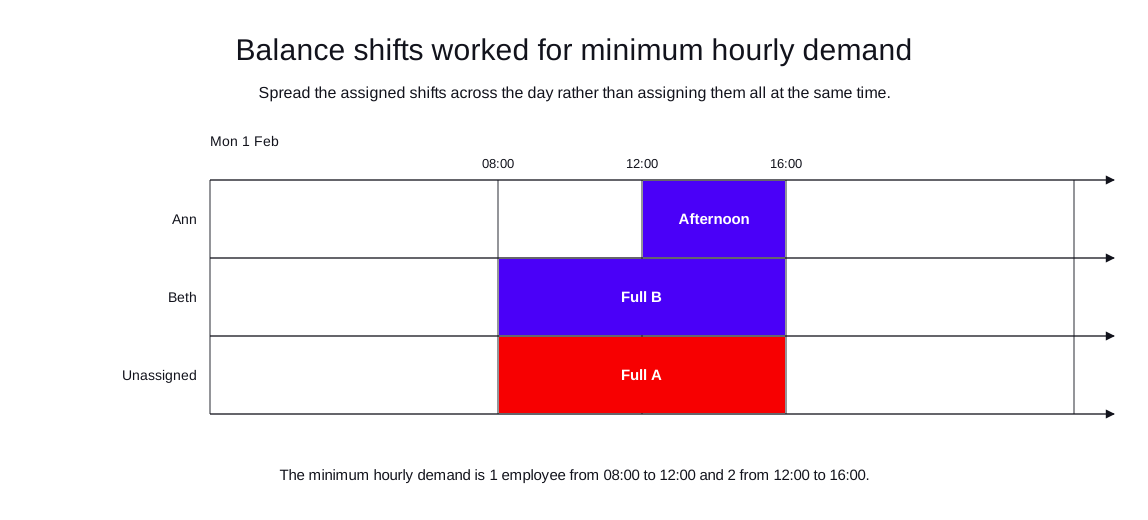
In the following example, the following hourly demand has been specified:
-
Between 08:00 and 12:00 there must be a minimum of one employee.
-
Between 12:00 and 16:00 there must be a minimum of two employees.
There are two available employees, and three possible shifts.
The satisfiability of the rule is preferred.
Both employees are assigned shifts. The shifts meet the demand period exactly, rather than assigning both employees at the same time.
One shift is left unassigned.
-
Input
-
Output
Try this example in Timefold Platform by saving this JSON into a file called sample.json and make the following API call:
|
curl -X POST -H "Content-type: application/json" -H 'X-API-KEY: <API_KEY>' https://app.timefold.ai/api/models/employee-scheduling/v1/schedules [email protected]{
"config": {
"run": {
"name": "Balance shifts for minimum hourly demand example"
}
},
"modelInput": {
"globalRules": {
"minimumMaximumShiftsPerHourlyDemand": [
{
"id": "HourlyDemand",
"demandDetails": [
{
"startDateTime": "2027-02-01T08:00:00Z",
"endDateTime": "2027-02-01T12:00:00Z",
"minDemand": 1
},
{
"startDateTime": "2027-02-01T12:00:00Z",
"endDateTime": "2027-02-01T16:00:00Z",
"minDemand": 2
}
],
"satisfiability": "PREFERRED"
}
]
},
"employees": [
{
"id": "Ann"
},
{
"id": "Beth"
}
],
"shifts": [
{
"id": "Full A",
"start": "2027-02-01T08:00:00Z",
"end": "2027-02-01T16:00:00Z"
},
{
"id": "Full B",
"start": "2027-02-01T08:00:00Z",
"end": "2027-02-01T16:00:00Z"
},
{
"id": "Afternoon",
"start": "2027-02-01T12:00:00Z",
"end": "2027-02-01T16:00:00Z"
}
]
}
}
To request the solution, locate the ID from the response to the post operation and append it to the following API call:
|
curl -X GET -H 'X-API-KEY: <API_KEY>' https://app.timefold.ai/api/models/employee-scheduling/v1/schedules/<ID>{
"metadata": {
"id": "ID",
"originId": "ID",
"name": "Balance shifts for minimum hourly demand example",
"submitDateTime": "2026-07-28T03:47:21.404632293Z",
"startDateTime": "2026-07-28T03:47:30.931373129Z",
"activeDateTime": "2026-07-28T03:47:31.022408351Z",
"completeDateTime": "2026-07-28T03:48:01.470991069Z",
"shutdownDateTime": "2026-07-28T03:48:01.470997202Z",
"solverStatus": "SOLVING_COMPLETED",
"score": "0hard/-1medium/0soft",
"tags": [
"system.type:from-request",
"system.profile:Standard profile"
],
"validationResult": {
"summary": "OK"
}
},
"modelOutput": {
"shifts": [
{
"id": "Full A"
},
{
"id": "Full B",
"employee": "Beth"
},
{
"id": "Afternoon",
"employee": "Ann"
}
],
"employees": [
{
"id": "Ann",
"metrics": {
"assignedShifts": 1,
"durationWorked": "PT4H"
}
},
{
"id": "Beth",
"metrics": {
"assignedShifts": 1,
"durationWorked": "PT8H"
}
}
],
"generatedShifts": []
},
"inputMetrics": {
"employees": 2,
"shifts": 3,
"pinnedShifts": 0,
"mandatoryShifts": 3,
"optionalShifts": 0
},
"kpis": {
"assignedShifts": 2,
"unassignedShifts": 1,
"disruptionPercentage": 0,
"activatedEmployees": 2,
"assignedMandatoryShifts": 2
},
"run": {
"id": "ID",
"originId": "ID",
"name": "Balance shifts for minimum hourly demand example",
"submitDateTime": "2026-07-28T03:47:21.404632293Z",
"startDateTime": "2026-07-28T03:47:30.931373129Z",
"activeDateTime": "2026-07-28T03:47:31.022408351Z",
"completeDateTime": "2026-07-28T03:48:01.470991069Z",
"shutdownDateTime": "2026-07-28T03:48:01.470997202Z",
"solverStatus": "SOLVING_COMPLETED",
"score": "0hard/-1medium/0soft",
"tags": [
"system.type:from-request",
"system.profile:Standard profile"
],
"validationResult": {
"summary": "OK"
}
}
}Shift generation (preview)
|
This is a preview feature subject to change. |
Organizations often know how many people they need and when (demand), but manually creating individual shifts is tedious. The shift generation feature automatically generates concrete shifts from demand curves and shift templates, as part of the scheduling workflow.
When shiftGeneration is defined on a minimumMaximumShiftsPerHourlyDemand rule, shifts are generated automatically before solving.
The generated shifts are considered for assignment alongside any manually defined shifts, but in the output they are returned in a separate generatedShifts collection under modelOutput, keeping them distinct from the shifts provided in the input.
Generating shifts from templates
Each shift template defines a base start time and duration.
To enable shift generation, add a shiftGeneration object to the demand rule with at least one template:
{
  "minimumMaximumShiftsPerHourlyDemand": [
        {
          "id": "icu-demand",
          "includeShiftTags": [
            "ICU"
          ],
          "demandDetails": [
            {
              "startDateTime": "2027-02-02T06:00:00Z",
              "endDateTime": "2027-02-02T14:00:00Z",
              "minDemand": 1,
              "maxDemand": 2
            },
            {
              "startDateTime": "2027-02-02T14:00:00Z",
              "endDateTime": "2027-02-02T22:00:00Z",
              "minDemand": 2,
              "maxDemand": 3
            },
            {
              "startDateTime": "2027-02-02T22:00:00Z",
              "endDateTime": "2027-02-03T06:00:00Z",
              "minDemand": 1,
              "maxDemand": 1
            }
          ],
          "shiftGeneration": {
            "templates": [
              {
                "id": "morning-8h",
                "baseStartTime": "06:00",
                "baseDuration": "PT8H"
              },
              {
                "id": "afternoon-8h",
                "baseStartTime": "14:00",
                "baseDuration": "PT8H"
              },
              {
                "id": "night-8h",
                "baseStartTime": "22:00",
                "baseDuration": "PT8H"
              }
            ]
          }
        }
      ]
}
This generates six shifts: two morning, three afternoon, and one night shift, matching the maxDemand at each time slot.
Shift generation derives the number of shifts to generate from maxDemand.
Define the maximum demand for every demand detail.
|
Each generated shift has:
-
An
idfollowing the patterngenerated-{templateId}-{date}-{index}. -
A
startandendtimestamp derived from the template’s base start time and duration, with deviations applied when configured. -
tags: the union of the demand rule’sincludeShiftTagsand the template’sadditionalTags. -
requiredSkills: copied from the template, if set. -
costGroup: copied from the template, if set. -
location: copied from the template, if set. -
employee: the assigned employee in the output; absent if unassigned.
Configuration details
The shift generation process allows for configuration of the granularity and time zone.
{
  "config": {
    "granularity": "PT30M",
    "timeZoneId": "Z"
  }
}
The config.granularity controls the smallest unit of time allowed for shift template start times, shift template durations, and demand detail start and end times.
The config.granularity must be either PT30M (default) or PT1H.
Demand detail start and end times and template start times must be aligned to the granularity.
With PT30M granularity, a template can only start at a full hour (06:00) or half hour (06:30).
|
The following example shows a valid configuration of both a demand detail and a template, using the default PT30M granularity:
{
  "demandDetails": [
    {
      "startDateTime": "2027-02-02T06:30:00Z",
      "endDateTime": "2027-02-02T14:00:00Z",
      "minDemand": 1,
      "maxDemand": 2
    }
  ],
  "shiftGeneration": {
    "templates": [
      {
        "id": "morning-8h",
        "baseStartTime": "06:30",
        "baseDuration": "PT8H"
      }
    ]
  }
}
The config.timeZoneId controls the time zone used for the start and end times of generated shifts.
It defaults to Z (UTC).
For a time zone Z, a possible shift generated from the template above would be (only the core fields are shown):
{
  "generatedShifts": [
    {
      "id": "generated-morning-8h-2027-02-02-1",
      "start": "2027-02-02T06:30:00Z",
      "end": "2027-02-02T14:30:00Z"
    }
  ]
}
Flexible shift templates and over-generation
In many real-world scenarios, demand does not perfectly align with standard shift start times, and generating exactly the number of shifts that matches demand can be too rigid. Flexible shift templates allow the generation algorithm to explore a range of start times and durations, while over-generation gives the model extra candidate shifts to choose from, it can leave some unassigned and pick the combination that leads to the best overall schedule.
Adding startDeviationBefore and startDeviationAfter to a template allows the generation algorithm to adjust shift start times within a range:
{
  "id": "morning-8h",
  "baseStartTime": "06:00",
  "baseDuration": "PT8H",
  "startDeviationBefore": "PT1H",
  "startDeviationAfter": "PT1H"
}
A template with baseStartTime: "06:00", startDeviationBefore: "PT1H", and startDeviationAfter: "PT1H" can generate shifts starting anywhere from 05:00 to 07:00.
Each deviation must be a multiple of the granularity and cannot exceed two hours.
The number of generated shift variants is influenced by granularity, see Configuration details.
For example, with a granularity of PT1H, the template above generates shifts starting at 05:00, 06:00, 07:00. With a granularity of PT30M, the template above generates shifts starting at 05:00, 05:30, 06:00, 06:30, 07:00.
Similarly, durationDeviationShorter and durationDeviationLonger allow the shift duration to vary.
For example, adding durationDeviationShorter: "PT1H" allows the algorithm to generate seven-hour shifts if that better fits the demand.
The optional overGeneration setting in config controls how many extra candidate shifts are generated:
{
  "config": {
    "overGeneration": {
      "factor": 1.5,
      "minExtraShiftsPerDemandInterval": 3
    }
  }
}-
factor: a multiplier applied to the demand per time slot. Must be between1.0and3.0, in steps of0.1. For example, a factor of1.5turns a demand of 2 into a budget of 3. -
minExtraShiftsPerDemandInterval: guarantees at least this many extra shifts per demand interval on top of the base demand. Must be between0and5.
We recommend starting with a low factor (for example 1.5) and a small number of extra shifts (for example 2) and adjusting based on the results.
|
The per-slot budget is whichever is higher: the demand scaled by the factor, or the demand plus the guaranteed minimum extra. Slots with zero demand always stay at zero. Over-generation only applies where demand exists.
When overGeneration is omitted (default), no over-generation is applied.
Flexible shift templates and over-generation example
The following example covers a one-day café schedule with two four-hour shifts: one in the morning (08:00–12:00) and one in the afternoon (12:00–16:00). Each template allows the start time to move by up to one hour in either direction and the duration to be extended by up to one hour, letting the generator align shifts with the lunch peak. Over-generation produces additional candidate shifts so that the model can pick the combination that best fits the demand curve.
-
Input
-
Output
Try this example in Timefold Platform by saving this JSON into a file called sample.json and make the following API call:
|
curl -X POST -H "Content-type: application/json" -H 'X-API-KEY: <API_KEY>' https://app.timefold.ai/api/models/employee-scheduling/v1/schedules [email protected]{
"config": {
"run": {
"name": "Cafe schedule with flexible shift generation"
}
},
"modelInput": {
"globalRules": {
"minimumMaximumShiftsPerHourlyDemand": [
{
"id": "cafe-demand",
"includeShiftTags": [
"Cafe"
],
"demandDetails": [
{
"startDateTime": "2027-02-02T08:00:00Z",
"endDateTime": "2027-02-02T11:00:00Z",
"minDemand": 1,
"maxDemand": 1
},
{
"startDateTime": "2027-02-02T11:00:00Z",
"endDateTime": "2027-02-02T13:00:00Z",
"minDemand": 2,
"maxDemand": 2
},
{
"startDateTime": "2027-02-02T13:00:00Z",
"endDateTime": "2027-02-02T16:00:00Z",
"minDemand": 1,
"maxDemand": 1
}
],
"shiftGeneration": {
"templates": [
{
"id": "morning-4h",
"baseStartTime": "08:00",
"baseDuration": "PT4H",
"startDeviationBefore": "PT1H",
"startDeviationAfter": "PT1H",
"durationDeviationLonger": "PT1H"
},
{
"id": "afternoon-4h",
"baseStartTime": "12:00",
"baseDuration": "PT4H",
"startDeviationBefore": "PT1H",
"startDeviationAfter": "PT1H",
"durationDeviationLonger": "PT1H"
}
],
"config": {
"granularity": "PT1H",
"overGeneration": {
"factor": 3,
"minExtraShiftsPerDemandInterval": 3
}
}
},
"satisfiability": "REQUIRED"
}
],
"balanceShiftCountRules": [
{
"id": "balanceShifts"
}
]
},
"employees": [
{
"id": "Ann"
},
{
"id": "Beth"
}
]
}
}
To request the solution, locate the ID from the response to the post operation and append it to the following API call:
|
curl -X GET -H 'X-API-KEY: <API_KEY>' https://app.timefold.ai/api/models/employee-scheduling/v1/schedules/<ID>{
"metadata": {
"id": "2580131c-c501-4d01-aa59-8f9a85103ef8",
"originId": "2580131c-c501-4d01-aa59-8f9a85103ef8",
"name": "Cafe schedule with flexible shift generation",
"submitDateTime": "2026-04-15T16:33:23.948945+02:00",
"startDateTime": "2026-04-15T16:33:24.014285+02:00",
"activeDateTime": "2026-04-15T16:33:24.014968+02:00",
"completeDateTime": "2026-04-15T16:33:54.088539+02:00",
"shutdownDateTime": "2026-04-15T16:33:54.088547+02:00",
"solverStatus": "SOLVING_COMPLETED",
"score": "0hard/-10medium/0soft",
"validationResult": {
"summary": "OK"
}
},
"modelOutput": {
"shifts": [],
"employees": [
{
"id": "Ann",
"metrics": {
"assignedShifts": 1,
"durationWorked": "PT5H"
}
},
{
"id": "Beth",
"metrics": {
"assignedShifts": 1,
"durationWorked": "PT5H"
}
}
],
"generatedShifts": [
{
"id": "generated-morning-4h-2027-02-02-8",
"start": "2027-02-02T07:00:00Z",
"end": "2027-02-02T11:00:00Z",
"requiredSkills": [],
"tags": [
"Cafe"
]
},
{
"id": "generated-morning-4h-2027-02-02-12",
"start": "2027-02-02T07:00:00Z",
"end": "2027-02-02T12:00:00Z",
"requiredSkills": [],
"tags": [
"Cafe"
]
},
{
"id": "generated-morning-4h-2027-02-02-2",
"start": "2027-02-02T08:00:00Z",
"end": "2027-02-02T12:00:00Z",
"requiredSkills": [],
"tags": [
"Cafe"
]
},
{
"id": "generated-morning-4h-2027-02-02-6",
"start": "2027-02-02T08:00:00Z",
"end": "2027-02-02T13:00:00Z",
"requiredSkills": [],
"tags": [
"Cafe"
],
"employee": "Beth"
},
{
"id": "generated-morning-4h-2027-02-02-4",
"start": "2027-02-02T09:00:00Z",
"end": "2027-02-02T13:00:00Z",
"requiredSkills": [],
"tags": [
"Cafe"
]
},
{
"id": "generated-morning-4h-2027-02-02-10",
"start": "2027-02-02T09:00:00Z",
"end": "2027-02-02T14:00:00Z",
"requiredSkills": [],
"tags": [
"Cafe"
]
},
{
"id": "generated-afternoon-4h-2027-02-02-3",
"start": "2027-02-02T11:00:00Z",
"end": "2027-02-02T15:00:00Z",
"requiredSkills": [],
"tags": [
"Cafe"
]
},
{
"id": "generated-afternoon-4h-2027-02-02-11",
"start": "2027-02-02T11:00:00Z",
"end": "2027-02-02T16:00:00Z",
"requiredSkills": [],
"tags": [
"Cafe"
],
"employee": "Ann"
},
{
"id": "generated-afternoon-4h-2027-02-02-1",
"start": "2027-02-02T12:00:00Z",
"end": "2027-02-02T16:00:00Z",
"requiredSkills": [],
"tags": [
"Cafe"
]
},
{
"id": "generated-afternoon-4h-2027-02-02-7",
"start": "2027-02-02T12:00:00Z",
"end": "2027-02-02T17:00:00Z",
"requiredSkills": [],
"tags": [
"Cafe"
]
},
{
"id": "generated-afternoon-4h-2027-02-02-5",
"start": "2027-02-02T13:00:00Z",
"end": "2027-02-02T17:00:00Z",
"requiredSkills": [],
"tags": [
"Cafe"
]
},
{
"id": "generated-afternoon-4h-2027-02-02-9",
"start": "2027-02-02T13:00:00Z",
"end": "2027-02-02T18:00:00Z",
"requiredSkills": [],
"tags": [
"Cafe"
]
}
]
},
"inputMetrics": {
"employees": 2,
"shifts": 12,
"pinnedShifts": 0,
"mandatoryShifts": 12,
"optionalShifts": 0
},
"kpis": {
"assignedShifts": 2,
"unassignedShifts": 10,
"disruptionPercentage": 0.0,
"activatedEmployees": 2,
"assignedMandatoryShifts": 2,
"demandGeneratedShifts": 12,
"totalDemandPersonSlots": 10,
"coveredDemandPersonSlots": 10,
"uncoveredDemandPersonSlots": 0
}
}modelOutput.generatedShifts contains all candidate shifts, with the employee assigned to each.
No employee is listed if the shift is not assigned.
With factor: 3 and minExtraShiftsPerDemandInterval: 3, the generator produces 12 candidate shifts.
The solver assigns 2 that best cover the 11:00–13:00 peak and leaves the remaining 10 unassigned.
Template properties
Templates support the following optional properties:
-
additionalTags: additional tags merged with the demand rule’sincludeShiftTagson generated shifts. -
requiredSkills: copied to the generated shifts'requiredSkills. -
location: copied to the generated shifts. -
costGroup: copied to the generated shifts. -
applicableDaysOfWeek: limits the template to specific days of the week. If empty or null, the template applies to all days.
Shift generation example
The following example schedules an ICU ward with automatically generated shifts.
No shifts are provided in the input, they are generated from the templates and demand before solving.
-
Input
-
Output
Try this example in Timefold Platform by saving this JSON into a file called sample.json and make the following API call:
|
curl -X POST -H "Content-type: application/json" -H 'X-API-KEY: <API_KEY>' https://app.timefold.ai/api/models/employee-scheduling/v1/schedules [email protected]{
"config": {
"run": {
"name": "ICU schedule with shift generation"
}
},
"modelInput": {
"globalRules": {
"minimumMaximumShiftsPerHourlyDemand": [
{
"id": "icu-demand",
"includeShiftTags": [
"ICU"
],
"demandDetails": [
{
"startDateTime": "2027-02-02T06:00:00Z",
"endDateTime": "2027-02-02T14:00:00Z",
"minDemand": 2,
"maxDemand": 2
},
{
"startDateTime": "2027-02-02T14:00:00Z",
"endDateTime": "2027-02-02T22:00:00Z",
"minDemand": 3,
"maxDemand": 3
},
{
"startDateTime": "2027-02-02T22:00:00Z",
"endDateTime": "2027-02-03T06:00:00Z",
"minDemand": 1,
"maxDemand": 1
}
],
"shiftGeneration": {
"templates": [
{
"id": "morning-8h",
"baseStartTime": "06:00",
"baseDuration": "PT8H"
},
{
"id": "afternoon-8h",
"baseStartTime": "14:00",
"baseDuration": "PT8H"
},
{
"id": "night-8h",
"baseStartTime": "22:00",
"baseDuration": "PT8H"
}
],
"config": {
"granularity": "PT1H"
}
},
"satisfiability": "REQUIRED"
}
],
"balanceShiftCountRules": [
{
"id": "balanceShifts"
}
]
},
"employees": [
{
"id": "Ann",
"skills": [
{
"id": "ICU"
}
]
},
{
"id": "Beth",
"skills": [
{
"id": "ICU"
}
]
},
{
"id": "Carl",
"skills": [
{
"id": "ICU"
}
]
},
{
"id": "Dan",
"skills": [
{
"id": "ICU"
}
]
}
]
}
}
To request the solution, locate the ID from the response to the post operation and append it to the following API call:
|
curl -X GET -H 'X-API-KEY: <API_KEY>' https://app.timefold.ai/api/models/employee-scheduling/v1/schedules/<ID>{
"metadata": {
"id": "c4c4ee25-ea4c-4f27-bc69-e0a64bdaef49",
"originId": "c4c4ee25-ea4c-4f27-bc69-e0a64bdaef49",
"name": "ICU schedule with shift generation",
"submitDateTime": "2026-04-15T16:31:22.165821+02:00",
"startDateTime": "2026-04-15T16:31:22.236666+02:00",
"activeDateTime": "2026-04-15T16:31:22.237347+02:00",
"completeDateTime": "2026-04-15T16:31:52.286191+02:00",
"shutdownDateTime": "2026-04-15T16:31:52.286198+02:00",
"solverStatus": "SOLVING_COMPLETED",
"score": "0hard/0medium/-100soft",
"validationResult": {
"summary": "OK"
}
},
"modelOutput": {
"shifts": [],
"employees": [
{
"id": "Ann",
"metrics": {
"assignedShifts": 2,
"durationWorked": "PT16H"
}
},
{
"id": "Beth",
"metrics": {
"assignedShifts": 2,
"durationWorked": "PT16H"
}
},
{
"id": "Carl",
"metrics": {
"assignedShifts": 1,
"durationWorked": "PT8H"
}
},
{
"id": "Dan",
"metrics": {
"assignedShifts": 1,
"durationWorked": "PT8H"
}
}
],
"generatedShifts": [
{
"id": "generated-morning-8h-2027-02-02-3",
"start": "2027-02-02T06:00:00Z",
"end": "2027-02-02T14:00:00Z",
"requiredSkills": [],
"tags": [
"ICU"
],
"employee": "Ann"
},
{
"id": "generated-morning-8h-2027-02-02-5",
"start": "2027-02-02T06:00:00Z",
"end": "2027-02-02T14:00:00Z",
"requiredSkills": [],
"tags": [
"ICU"
],
"employee": "Beth"
},
{
"id": "generated-afternoon-8h-2027-02-02-2",
"start": "2027-02-02T14:00:00Z",
"end": "2027-02-02T22:00:00Z",
"requiredSkills": [],
"tags": [
"ICU"
],
"employee": "Carl"
},
{
"id": "generated-afternoon-8h-2027-02-02-4",
"start": "2027-02-02T14:00:00Z",
"end": "2027-02-02T22:00:00Z",
"requiredSkills": [],
"tags": [
"ICU"
],
"employee": "Dan"
},
{
"id": "generated-afternoon-8h-2027-02-02-6",
"start": "2027-02-02T14:00:00Z",
"end": "2027-02-02T22:00:00Z",
"requiredSkills": [],
"tags": [
"ICU"
],
"employee": "Ann"
},
{
"id": "generated-night-8h-2027-02-02-1",
"start": "2027-02-02T22:00:00Z",
"end": "2027-02-03T06:00:00Z",
"requiredSkills": [],
"tags": [
"ICU"
],
"employee": "Beth"
}
]
},
"inputMetrics": {
"employees": 4,
"shifts": 6,
"pinnedShifts": 0,
"mandatoryShifts": 6,
"optionalShifts": 0
},
"kpis": {
"assignedShifts": 6,
"unassignedShifts": 0,
"disruptionPercentage": 0.0,
"activatedEmployees": 4,
"assignedMandatoryShifts": 6,
"demandGeneratedShifts": 6,
"totalDemandPersonSlots": 48,
"coveredDemandPersonSlots": 48,
"uncoveredDemandPersonSlots": 0
}
}modelOutput.generatedShifts contains the shifts generated from the templates, together with the employee assigned to each.
Because no manual shifts were provided in the input, modelOutput.shifts is empty.
The output metrics include demandGeneratedShifts, totalDemandPersonSlots, coveredDemandPersonSlots, and uncoveredDemandPersonSlots to verify the generation result.
|
Use Priority and optional shifts when specific shifts already exist and some are required, while others should only be staffed if another requirement dictates it, for example if an employee must work an amount of minimum hours for the week. Use Demand-based scheduling when the set of shifts isn’t fixed and the optimizer should decide how many/which shifts to generate or fill to hit an hourly headcount target. |
Next
-
See the full API spec or try the online API.
-
Learn more about employee shift scheduling from our YouTube playlist.