Daily shift pairings
Daily shift pairing rules are used to pair shifts together.
For instance, when employees are required to work weekends, there could be a requirement or a preference that they work both Saturday and Sunday, but that they don’t work two consecutive weekends.
Shift pairing rules can also be used to prohibit certain shift pairings, for instance, an employee shouldn’t work a late shift followed by an early shift the following day.
This guide explains managing daily shift pairings:
Define daily shift pairings
Learn how to configure an API Key to run the examples in this guide:
In the examples, replace |
Daily shift pairing rules are configured in contracts:
{
  "contracts": [
    {
      "id": "fullTimeContract",
      "dailyShiftPairingRules": [
        {
          "id": "sundayAndSaturdayShift",
          "shiftTags": [
            "Saturday"
          ],
          "pairedShiftTags": [
            "Sunday"
          ],
          "satisfiability": "PREFERRED",
          "shiftTagMatches": "ALL",
          "dayOffset": 1
        }
      ]
    }
  ]
}
dailyShiftPairingRules must include an ID.
shiftTags must include a tag that is associated with the first shift that will be paired.
pairedShiftTags must include a tag that is associated with the second shift that will be paired.
shiftTagMatches can be set to ALL or ANY.
The default behavior for shiftTagMatches is ALL, and if omitted, the default ALL will be used.
dayOffSet is the difference in days between start day of the shift matched by shiftTags and the start day of the shift matched by pairedShiftTags.
dayOffSet can be both positive or negative.
The default value is 0.
When pairing shifts on subsequent days, set dayOffSet to 1.
Shifts must include tags:
{
  "id": "Mon 0300",
  "start": "2027-02-01T03:00:00Z",
  "end": "2027-02-01T07:00:00Z",
  "tags": ["Early"]
}Required daily shift pairings
When the satisfiability of the rule is REQUIRED, the Employee does not have required daily shift pairing hard constraint is invoked, making sure that shifts that are required to be paired together are assigned to the same employee.
Shifts will be left unassigned if assigning the shifts breaks the constraint.
|
Modeling one-way shift dependencies The required pairing constraint fires whenever an employee is assigned a shift matching To express "shift B can only be staffed when shift A is also assigned, but shift A can be assigned on its own", set B as the primary shift ( If you set it up the other way around (A as primary, B as paired), the constraint fires whenever A is assigned, preventing A from ever being staffed without B. |
Required daily shift pairings example
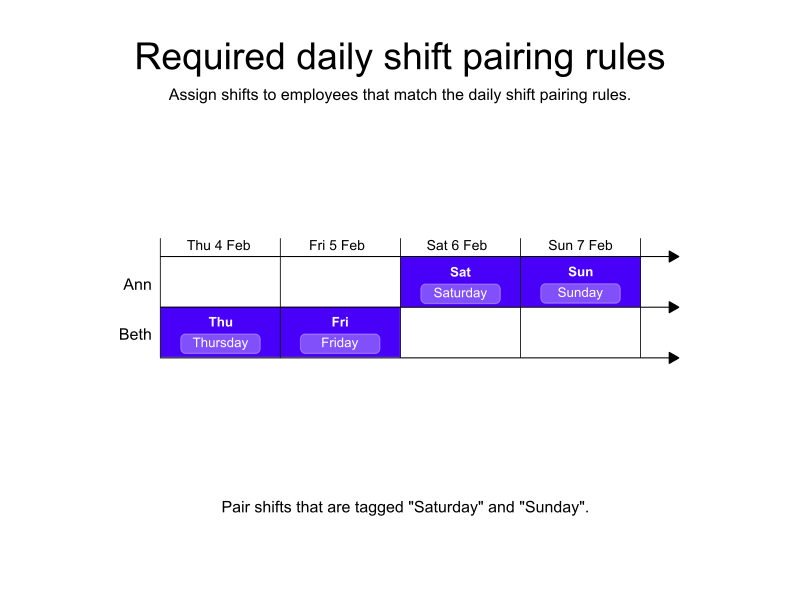
In the following example, there are four shifts and two employees.
There is a single dailyShiftPairingRules that specifies that shifts tagged Saturday must be paired with shifts tagged Sunday.
A global rule makes sure the shifts are assigned fairly. See the fairness guide for more details about fairness.
Beth is assigned the shifts tagged Thursday and Friday, and Ann is assigned the shifts tagged Saturday and Sunday.
-
Input
-
Output
Try this example in Timefold Platform by saving this JSON into a file called sample.json and make the following API call:
|
curl -X POST -H "Content-type: application/json" -H 'X-API-KEY: <API_KEY>' https://app.timefold.ai/api/models/employee-scheduling/v1/schedules [email protected]{
"config": {
"run": {
"name": "Required daily shift pairing example"
}
},
"modelInput": {
"globalRules": {
"balanceTimeWorkedRules": [
{
"id": "balanceTime"
}
]
},
"contracts": [
{
"id": "fullTimeContract",
"dailyShiftPairingRules": [
{
"id": "sundayAndSaturdayShift",
"shiftTags": [
"Saturday"
],
"pairedShiftTags": [
"Sunday"
],
"satisfiability": "REQUIRED",
"shiftTagMatches": "ALL",
"dayOffset": 1
}
]
}
],
"employees": [
{
"id": "Ann",
"contracts": [
"fullTimeContract"
]
},
{
"id": "Beth",
"contracts": [
"fullTimeContract"
]
}
],
"shifts": [
{
"id": "Thu",
"start": "2027-02-04T09:00:00Z",
"end": "2027-02-04T17:00:00Z",
"tags": ["Thursday"]
},
{
"id": "Fri",
"start": "2027-02-05T09:00:00Z",
"end": "2027-02-05T17:00:00Z",
"tags": ["Friday"]
},
{
"id": "Sat",
"start": "2027-02-06T09:00:00Z",
"end": "2027-02-06T17:00:00Z",
"tags": ["Saturday"]
},
{
"id": "Sun",
"start": "2027-02-07T09:00:00Z",
"end": "2027-02-07T17:00:00Z",
"tags": ["Sunday"]
}
]
}
}
To request the solution, locate the ID from the response to the post operation and append it to the following API call:
|
curl -X GET -H 'X-API-KEY: <API_KEY>' https://app.timefold.ai/api/models/employee-scheduling/v1/schedules/<ID>{
"metadata": {
"id": "ID",
"originId": "ID",
"name": "Required daily shift pairing example",
"submitDateTime": "2026-02-13T05:42:56.118237428Z",
"startDateTime": "2026-02-13T05:44:29.785637099Z",
"activeDateTime": "2026-02-13T05:44:29.872427781Z",
"completeDateTime": "2026-02-13T05:45:00.219413166Z",
"shutdownDateTime": "2026-02-13T05:45:00.219420757Z",
"solverStatus": "SOLVING_COMPLETED",
"score": "0hard/0medium/0soft",
"tags": [
"system.type:from-request",
"system.profile:Standard profile"
],
"validationResult": {
"summary": "OK"
}
},
"modelOutput": {
"shifts": [
{
"id": "Thu",
"employee": "Beth"
},
{
"id": "Fri",
"employee": "Beth"
},
{
"id": "Sat",
"employee": "Ann"
},
{
"id": "Sun",
"employee": "Ann"
}
],
"employees": [
{
"id": "Ann",
"metrics": {
"assignedShifts": 2,
"durationWorked": "PT16H"
}
},
{
"id": "Beth",
"metrics": {
"assignedShifts": 2,
"durationWorked": "PT16H"
}
}
]
},
"inputMetrics": {
"employees": 2,
"shifts": 4,
"pinnedShifts": 0,
"mandatoryShifts": 4,
"optionalShifts": 0
},
"kpis": {
"assignedShifts": 4,
"unassignedShifts": 0,
"workingTimeFairnessPercentage": 100,
"disruptionPercentage": 0,
"activatedEmployees": 2,
"assignedMandatoryShifts": 4
},
"run": {
"id": "ID",
"originId": "ID",
"name": "Required daily shift pairing example",
"submitDateTime": "2026-02-13T05:42:56.118237428Z",
"startDateTime": "2026-02-13T05:44:29.785637099Z",
"activeDateTime": "2026-02-13T05:44:29.872427781Z",
"completeDateTime": "2026-02-13T05:45:00.219413166Z",
"shutdownDateTime": "2026-02-13T05:45:00.219420757Z",
"solverStatus": "SOLVING_COMPLETED",
"score": "0hard/0medium/0soft",
"tags": [
"system.type:from-request",
"system.profile:Standard profile"
],
"validationResult": {
"summary": "OK"
}
}
}Preferred daily shift pairings
The Employee does not have preferred daily shift pairing soft constraint is invoked when the satisfiability of the rule is PREFERRED and an employee is assigned to a shift that matches shiftTags but is not assigned to a shift that matches the corresponding pairedShiftTags on the date determined by the rule’s dayOffset.
The constraint adds a soft penalty to the dataset score that is calculated by multiplying 480 (the estimated average shift duration in minutes) by the employee’s priority multiplier and the contract’s resolved priority weight, incentivizing Timefold to assign employees the paired shift alongside the first.
Shifts will still be assigned even if assigning them breaks this constraint.
|
Every soft constraint has a weight that can be configured to change the relative importance of the constraint compared to other constraints. Learn about constraint weights. |
| This rule is more likely to be satisfied for employees with a higher employee priority. See Employee priority for more details. |
Preferred daily shift pairings example
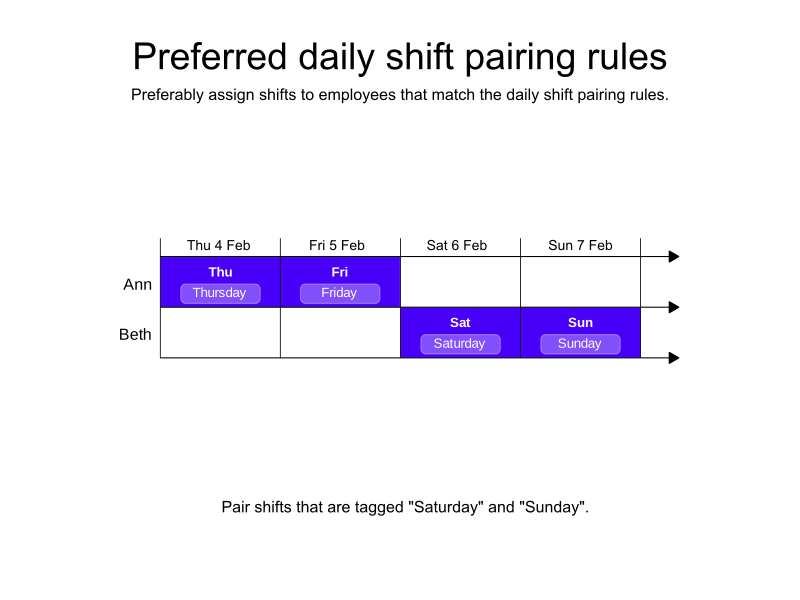
In the following example, there are four shifts and two employees.
There is a single dailyShiftPairingRules that specifies that shifts tagged Saturday should be paired with shifts tagged Sunday.
A global rule makes sure the shifts are assigned fairly. See the fairness guide for more details about fairness.
Ann is assigned the shifts tagged Thursday and Friday, and Beth is assigned the shifts tagged Saturday and Sunday.
-
Input
-
Output
Try this example in Timefold Platform by saving this JSON into a file called sample.json and make the following API call:
|
curl -X POST -H "Content-type: application/json" -H 'X-API-KEY: <API_KEY>' https://app.timefold.ai/api/models/employee-scheduling/v1/schedules [email protected]{
"config": {
"run": {
"name": "Preferred daily shift pairing example"
}
},
"modelInput": {
"globalRules": {
"balanceTimeWorkedRules": [
{
"id": "balanceTime"
}
]
},
"contracts": [
{
"id": "fullTimeContract",
"dailyShiftPairingRules": [
{
"id": "sundayAndSaturdayShift",
"shiftTags": [
"Saturday"
],
"pairedShiftTags": [
"Sunday"
],
"satisfiability": "PREFERRED",
"shiftTagMatches": "ALL",
"dayOffset": 1
}
]
}
],
"employees": [
{
"id": "Ann",
"contracts": [
"fullTimeContract"
]
},
{
"id": "Beth",
"contracts": [
"fullTimeContract"
]
}
],
"shifts": [
{
"id": "Thu",
"start": "2027-02-04T09:00:00Z",
"end": "2027-02-04T17:00:00Z",
"tags": ["Thursday"]
},
{
"id": "Fri",
"start": "2027-02-05T09:00:00Z",
"end": "2027-02-05T17:00:00Z",
"tags": ["Friday"]
},
{
"id": "Sat",
"start": "2027-02-06T09:00:00Z",
"end": "2027-02-06T17:00:00Z",
"tags": ["Saturday"]
},
{
"id": "Sun",
"start": "2027-02-07T09:00:00Z",
"end": "2027-02-07T17:00:00Z",
"tags": ["Sunday"]
}
]
}
}
To request the solution, locate the ID from the response to the post operation and append it to the following API call:
|
curl -X GET -H 'X-API-KEY: <API_KEY>' https://app.timefold.ai/api/models/employee-scheduling/v1/schedules/<ID>{
"metadata": {
"id": "ID",
"name": "Preferred daily shift pairing example",
"submitDateTime": "2025-04-15T05:17:41.594630886Z",
"startDateTime": "2025-04-15T05:17:58.30896309Z",
"activeDateTime": "2025-04-15T05:17:58.514501331Z",
"completeDateTime": "2025-04-15T05:18:29.561996949Z",
"shutdownDateTime": "2025-04-15T05:18:29.905517566Z",
"solverStatus": "SOLVING_COMPLETED",
"score": "0hard/0medium/0soft",
"tags": [
"system.profile:default"
],
"validationResult": {
"summary": "OK"
}
},
"modelOutput": {
"shifts": [
{
"id": "Thu",
"employee": "Ann"
},
{
"id": "Fri",
"employee": "Ann"
},
{
"id": "Sat",
"employee": "Beth"
},
{
"id": "Sun",
"employee": "Beth"
}
]
},
"inputMetrics": {
"employees": 2,
"shifts": 4,
"pinnedShifts": 0
},
"kpis": {
"assignedShifts": 4,
"unassignedShifts": 0,
"assignedShiftGroups": 0,
"unassignedShiftGroups": 0,
"workingTimeFairnessPercentage": 100.0,
"disruptionPercentage": 0.0,
"averageDurationOfEmployeesPreferencesMet": null,
"minimumDurationOfPreferencesMetAcrossEmployees": null,
"averageDurationOfEmployeesUnpreferencesViolated": null,
"maximumDurationOfUnpreferencesViolatedAcrossEmployees": null,
"activatedEmployees": 2,
"assignedMandatoryShifts": 4,
"assignedOptionalShifts": 0,
"travelDistance": 0
}
}{
"assignedShifts": 4,
"workingTimeFairnessPercentage": 100.0,
"activatedEmployees": 2,
"assignedMandatoryShifts": 4
}Unpreferred daily shift pairings
When the satisfiability of the rule is UNPREFERRED, the Employee has unpreferred daily shift pairing soft constraint is invoked.
{
  "dailyShiftPairingRules": [
    {
      "id": "noConsecutiveWeekends",
      "shiftTags": [
        "Weekend"
      ],
      "pairedShiftTags": [
        "Weekend"
      ],
      "satisfiability": "UNPREFERRED",
      "shiftTagMatches": "ALL",
      "dayOffset": 7
    }
  ]
}
The Employee has unpreferred daily shift pairing soft constraint is invoked when the satisfiability of the rule is UNPREFERRED and an employee is assigned a shift that matches shiftTags and is also assigned a shift that matches the rule’s pairedShiftTags on the date determined by the rule’s dayOffset.
The constraint adds a soft penalty to the dataset score that is calculated by multiplying 480 (the estimated average shift duration in minutes) by the employee’s priority multiplier and the contract’s resolved priority weight, incentivizing Timefold to avoid assigning the paired shift alongside the first.
Shifts will still be assigned even if assigning them breaks this constraint.
|
Every soft constraint has a weight that can be configured to change the relative importance of the constraint compared to other constraints. Learn about constraint weights. |
| This rule is more likely to be satisfied for employees with a higher employee priority. See Employee priority for more details. |
Unpreferred daily shift pairings example
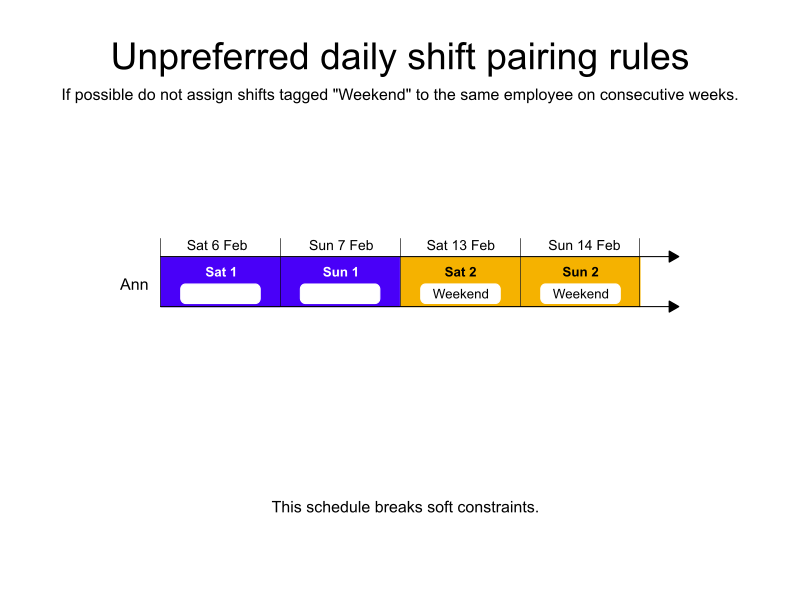
In the following example, there are four weekend shifts over two weeks and only one employee.
There is a single dailyShiftPairingRules that specifies that shifts tagged Weekend that occur seven days apart should preferably not be assigned to the same employee.
Ann is assigned all four shifts and the solution is penalized with a negative soft score.
-
Input
-
Output
Try this example in Timefold Platform by saving this JSON into a file called sample.json and make the following API call:
|
curl -X POST -H "Content-type: application/json" -H 'X-API-KEY: <API_KEY>' https://app.timefold.ai/api/models/employee-scheduling/v1/schedules [email protected]{
"config": {
"run": {
"name": "Unpreferred daily shift pairing example"
}
},
"modelInput": {
"contracts": [
{
"id": "fullTimeContract",
"dailyShiftPairingRules": [
{
"id": "noConsecutiveWeekends",
"shiftTags": [
"Weekend"
],
"pairedShiftTags": [
"Weekend"
],
"satisfiability": "UNPREFERRED",
"shiftTagMatches": "ALL",
"dayOffset": 7
}
]
}
],
"employees": [
{
"id": "Ann",
"contracts": [
"fullTimeContract"
]
}
],
"shifts": [
{
"id": "Sat 1",
"start": "2027-02-06T09:00:00Z",
"end": "2027-02-06T17:00:00Z",
"tags": ["Weekend"]
},
{
"id": "Sun 1",
"start": "2027-02-07T09:00:00Z",
"end": "2027-02-07T17:00:00Z",
"tags": ["Weekend"]
},
{
"id": "Sat 2",
"start": "2027-02-13T09:00:00Z",
"end": "2027-02-13T17:00:00Z",
"tags": ["Weekend"]
},
{
"id": "Sun 2",
"start": "2027-02-14T09:00:00Z",
"end": "2027-02-14T17:00:00Z",
"tags": ["Weekend"]
}
]
}
}
To request the solution, locate the ID from the response to the post operation and append it to the following API call:
|
curl -X GET -H 'X-API-KEY: <API_KEY>' https://app.timefold.ai/api/models/employee-scheduling/v1/schedules/<ID>{
"metadata": {
"id": "ID",
"name": "Unpreferred daily shift pairing example",
"submitDateTime": "2025-04-15T06:19:36.737780839Z",
"startDateTime": "2025-04-15T06:19:48.000200061Z",
"activeDateTime": "2025-04-15T06:19:48.179594336Z",
"completeDateTime": "2025-04-15T06:20:19.1089142Z",
"shutdownDateTime": "2025-04-15T06:20:19.369215721Z",
"solverStatus": "SOLVING_COMPLETED",
"score": "0hard/0medium/-1920soft",
"tags": [
"system.profile:default"
],
"validationResult": {
"summary": "OK"
}
},
"modelOutput": {
"shifts": [
{
"id": "Sat 1",
"employee": "Ann"
},
{
"id": "Sun 1",
"employee": "Ann"
},
{
"id": "Sat 2",
"employee": "Ann"
},
{
"id": "Sun 2",
"employee": "Ann"
}
]
},
"inputMetrics": {
"employees": 1,
"shifts": 4,
"pinnedShifts": 0
},
"kpis": {
"assignedShifts": 4,
"unassignedShifts": 0,
"assignedShiftGroups": 0,
"unassignedShiftGroups": 0,
"workingTimeFairnessPercentage": null,
"disruptionPercentage": 0.0,
"averageDurationOfEmployeesPreferencesMet": null,
"minimumDurationOfPreferencesMetAcrossEmployees": null,
"averageDurationOfEmployeesUnpreferencesViolated": null,
"maximumDurationOfUnpreferencesViolatedAcrossEmployees": null,
"activatedEmployees": 1,
"assignedMandatoryShifts": 4,
"assignedOptionalShifts": 0,
"travelDistance": 0
}
}{
"assignedShifts": 4,
"activatedEmployees": 1,
"assignedMandatoryShifts": 4
}Prohibited daily shift pairings
When the satisfiability of the rule is PROHIBITED, the Employee has prohibited daily shift pairing hard constraint is invoked.
{
  "contracts": [
    {
      "id": "fullTimeContract",
      "dailyShiftPairingRules": [
        {
          "id": "noEarlyShiftAfterLate",
          "shiftTags": [
            "Late"
          ],
          "pairedShiftTags": [
            "Early"
          ],
          "satisfiability": "PROHIBITED",
          "shiftTagMatches": "ALL",
          "dayOffset": 1
        }
      ]
    }
  ]
}
Shifts will be left unassigned if assigning them would break Employee has prohibited daily shift pairing constraint.
Prohibited daily shift pairings example
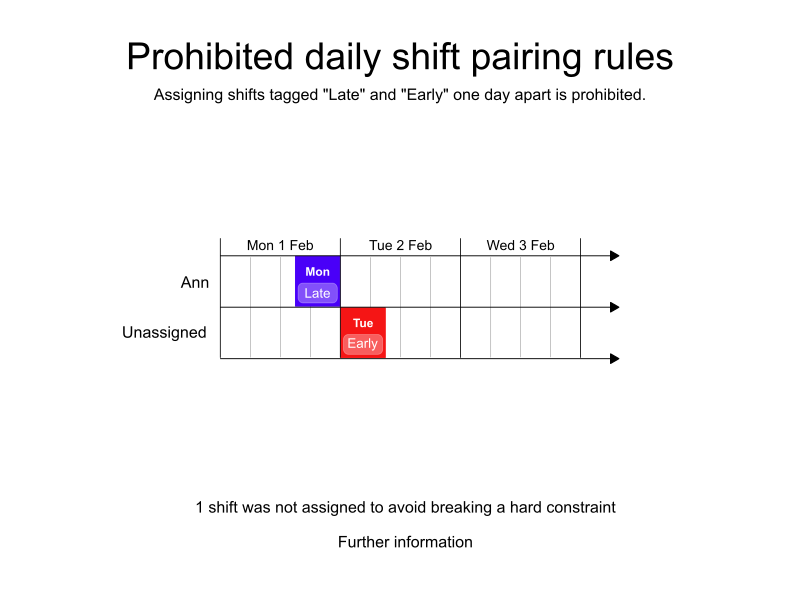
In the following example, there is one dailyShiftPairingRules:
Shifts tagged "Late" and "Early" are prohibited from being assigned together to individual employees when the "Early" shift is the day after the "Late" shift.
Ann is assigned the shift tagged "Late", but the shift tagged "Early" is left unassigned to avoid breaking the hard constraint.
-
Input
-
Output
Try this example in Timefold Platform by saving this JSON into a file called sample.json and make the following API call:
|
curl -X POST -H "Content-type: application/json" -H 'X-API-KEY: <API_KEY>' https://app.timefold.ai/api/models/employee-scheduling/v1/schedules [email protected]{
"config": {
"run": {
"name": "Prohibited daily shift pairing example"
}
},
"modelInput": {
"contracts": [
{
"id": "fullTimeContract",
"dailyShiftPairingRules": [
{
"id": "noEarlyShiftAfterLate",
"shiftTags": [
"Late"
],
"pairedShiftTags": [
"Early"
],
"satisfiability": "PROHIBITED",
"shiftTagMatches": "ALL",
"dayOffset": 1
}
]
}
],
"employees": [
{
"id": "Ann",
"contracts": [
"fullTimeContract"
]
}
],
"shifts": [
{
"id": "Mon Late",
"start": "2027-02-01T16:00:00Z",
"end": "2027-02-02T00:00:00Z",
"tags": ["Late"]
},
{
"id": "Tue Early",
"start": "2027-02-02T00:00:00Z",
"end": "2027-02-02T08:00:00Z",
"tags": ["Early"]
}
]
}
}
To request the solution, locate the ID from the response to the post operation and append it to the following API call:
|
curl -X GET -H 'X-API-KEY: <API_KEY>' https://app.timefold.ai/api/models/employee-scheduling/v1/schedules/<ID>{
"metadata": {
"id": "ID",
"name": "Prohibited daily shift pairing example",
"submitDateTime": "2025-04-15T08:03:38.67979918Z",
"startDateTime": "2025-04-15T08:03:49.9208183Z",
"activeDateTime": "2025-04-15T08:03:50.015353229Z",
"completeDateTime": "2025-04-15T08:04:20.916004482Z",
"shutdownDateTime": "2025-04-15T08:04:21.106144893Z",
"solverStatus": "SOLVING_COMPLETED",
"score": "0hard/-1medium/0soft",
"tags": [
"system.profile:default"
],
"validationResult": {
"summary": "OK"
}
},
"modelOutput": {
"shifts": [
{
"id": "Mon Late",
"employee": "Ann"
},
{
"id": "Tue Early",
"employee": null
}
]
},
"inputMetrics": {
"employees": 1,
"shifts": 2,
"pinnedShifts": 0
},
"kpis": {
"assignedShifts": 1,
"unassignedShifts": 1,
"assignedShiftGroups": 0,
"unassignedShiftGroups": 0,
"workingTimeFairnessPercentage": null,
"disruptionPercentage": 0.0,
"averageDurationOfEmployeesPreferencesMet": null,
"minimumDurationOfPreferencesMetAcrossEmployees": null,
"averageDurationOfEmployeesUnpreferencesViolated": null,
"maximumDurationOfUnpreferencesViolatedAcrossEmployees": null,
"activatedEmployees": 1,
"assignedMandatoryShifts": 1,
"assignedOptionalShifts": 0,
"travelDistance": 0
}
}{
"assignedShifts": 1,
"unassignedShifts": 1,
"activatedEmployees": 1,
"assignedMandatoryShifts": 1
}Next
-
See the full API spec or try the online API.
-
Learn more about employee shift scheduling from our YouTube playlist.
-
Working with Employee availability and preferences.