Shift selection
Assigning employees to the correct number of shifts during specific periods is an important aspect of employee shift scheduling. This guide explains how to assign the correct number of shifts for:
Define shifts worked per period
Learn how to configure an API Key to run the examples in this guide:
In the examples, replace |
Rules to set a preferred number of shifts to be worked in a specific period are defined as global rules:
{
  "globalRules": {
    "minimumMaximumShiftsPerPeriod": [
      {
        "id": "max2ShiftsPerDay",
        "period": "DAY",
        "satisfiability": "PREFERRED",
        "shiftsWorkedMax": 2
      }
    ]
  }
}
minimumMaximumShiftsPerPeriod must include an ID.
period sets the period the rule applies to, for instance, DAY, WEEK, MONTH, YEAR, SCHEDULE.
shiftsWorkedMax sets the maximum number of shifts that can be worked in the specified period.
Required shifts worked per period
When the satisfiability of the rule is REQUIRED, the Shifts worked per period not in required range hard constraint is invoked, which makes sure no more shifts are scheduled for the period than the limit specified in shiftsWorkedMax.
Shifts will be left unassigned if assigning them would break the Shifts worked per period not in required range constraint.
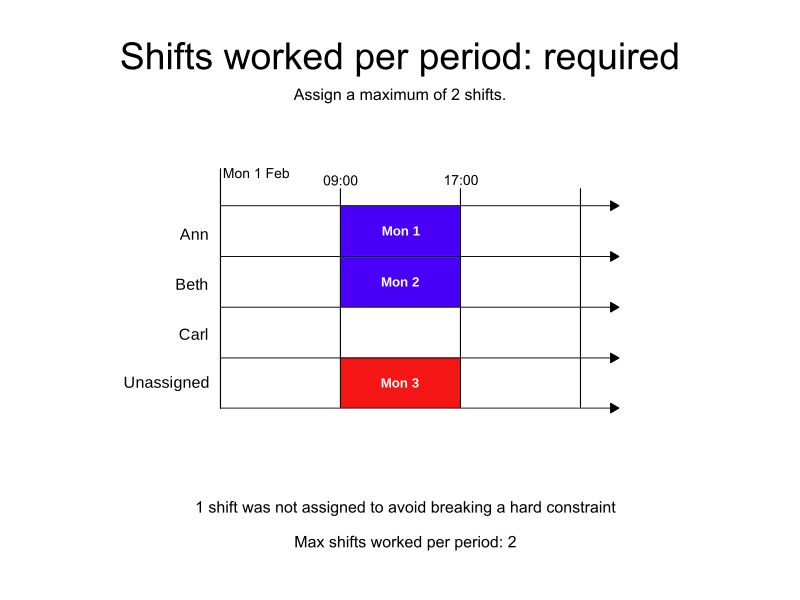
In the following example, there are three shifts that could be assigned and three employees who could take the shifts, however, the minimumMaximumShiftsPerPeriod rule states a maximum of two shifts can be assigned.
One of the shifts is left unassigned.
-
Input
-
Output
Try this example in Timefold Platform by saving this JSON into a file called sample.json and make the following API call:
|
curl -X POST -H "Content-type: application/json" -H 'X-API-KEY: <API_KEY>' https://app.timefold.ai/api/models/employee-scheduling/v1/schedules [email protected]{
"config": {
"run": {
"name": "Shifts worked per period - required"
}
},
"modelInput": {
"globalRules": {
"minimumMaximumShiftsPerPeriod": [
{
"id": "max2ShiftsPerDay",
"period": "DAY",
"satisfiability": "REQUIRED",
"shiftsWorkedMax": 2
}
]
},
"employees": [
{
"id": "Ann"
},
{
"id": "Beth"
},
{
"id": "Carl"
}
],
"shifts": [
{
"id": "Mon 1",
"start": "2027-02-01T09:00:00Z",
"end": "2027-02-01T17:00:00Z"
},
{
"id": "Mon 2",
"start": "2027-02-01T09:00:00Z",
"end": "2027-02-01T17:00:00Z"
},
{
"id": "Mon 3",
"start": "2027-02-01T09:00:00Z",
"end": "2027-02-01T17:00:00Z"
}
]
}
}
To request the solution, locate the ID from the response to the post operation and append it to the following API call:
|
curl -X GET -H 'X-API-KEY: <API_KEY>' https://app.timefold.ai/api/models/employee-scheduling/v1/schedules/<ID>{
"metadata": {
"id": "ID",
"name": "Shifts worked per period - required",
"submitDateTime": "2025-04-24T05:19:36.331833692Z",
"startDateTime": "2025-04-24T05:19:48.545373777Z",
"activeDateTime": "2025-04-24T05:19:48.733080296Z",
"completeDateTime": "2025-04-24T05:20:19.614737754Z",
"shutdownDateTime": "2025-04-24T05:20:19.981922025Z",
"solverStatus": "SOLVING_COMPLETED",
"score": "0hard/-1medium/0soft",
"tags": [
"system.profile:default"
],
"validationResult": {
"summary": "OK"
}
},
"modelOutput": {
"shifts": [
{
"id": "Mon 1",
"employee": "Ann"
},
{
"id": "Mon 2",
"employee": "Beth"
},
{
"id": "Mon 3",
"employee": null
}
]
},
"inputMetrics": {
"employees": 3,
"shifts": 3,
"pinnedShifts": 0
},
"kpis": {
"assignedShifts": 2,
"unassignedShifts": 1,
"workingTimeFairnessPercentage": null,
"disruptionPercentage": 0.0,
"averageDurationOfEmployeesPreferencesMet": null,
"minimumDurationOfPreferencesMetAcrossEmployees": null,
"averageDurationOfEmployeesUnpreferencesViolated": null,
"maximumDurationOfUnpreferencesViolatedAcrossEmployees": null,
"activatedEmployees": 2,
"assignedMandatoryShifts": 2,
"assignedOptionalShifts": 0,
"assignedShiftGroups": null,
"unassignedShiftGroups": null,
"travelDistance": 0
}
}Preferred shifts worked per period
With a satisfiability of PREFERRED a shiftsWorkedMin value can also be provided to set the minimum number of shifts to be assigned during the period.
The Shifts worked per period not in preferred range soft constraint is invoked when the satisfiability of the rule is PREFERRED and the total number of assigned shifts in a period is below shiftsWorkedMin or above shiftsWorkedMax.
The constraint adds a soft penalty to the dataset score based on the number of shifts outside the preferred range. To ensure shift-count constraints are comparable to time-based constraints, the penalty is also multiplied by 480 (an estimated average shift duration in minutes, used for normalization). This normalization helps Timefold balance shift limits against other scheduling preferences.
Shifts will still be assigned even if assigning them breaks this constraint.
|
Every soft constraint has a weight that can be configured to change the relative importance of the constraint compared to other constraints. Learn about constraint weights. |
{
  "globalRules": {
    "minimumMaximumShiftsPerPeriod": [
      {
        "id": "min1ShiftMax2ShiftsPerDay",
        "period": "DAY",
        "satisfiability": "PREFERRED",
        "shiftsWorkedMin": 1,
        "shiftsWorkedMax": 2
      }
    ]
  }
}
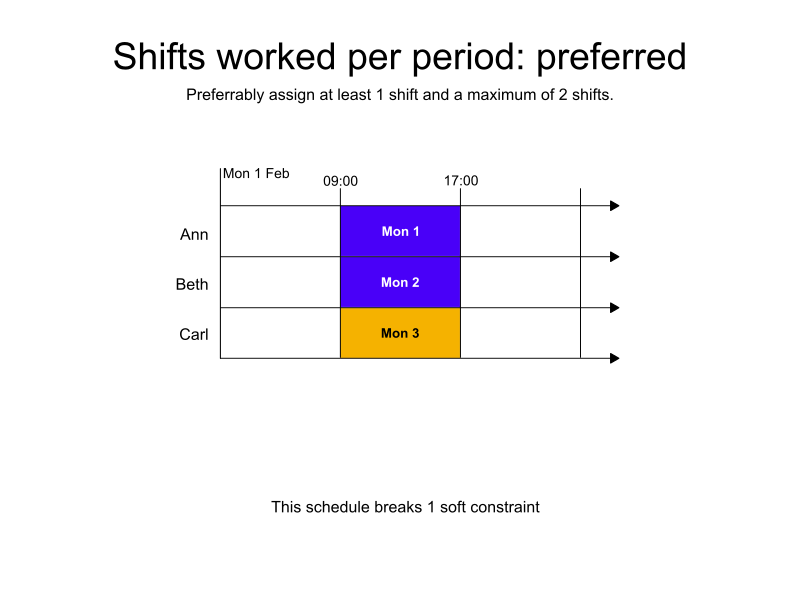
In the following example, there are three shifts available. All three shifts are assigned, and a soft penalty is added to the dataset score.
-
Input
-
Output
Try this example in Timefold Platform by saving this JSON into a file called sample.json and make the following API call:
|
curl -X POST -H "Content-type: application/json" -H 'X-API-KEY: <API_KEY>' https://app.timefold.ai/api/models/employee-scheduling/v1/schedules [email protected]{
"config": {
"run": {
"name": "Shifts worked per period - preferred"
}
},
"modelInput": {
"globalRules": {
"minimumMaximumShiftsPerPeriod": [
{
"id": "min1ShiftMax2ShiftsPerDay",
"period": "DAY",
"satisfiability": "PREFERRED",
"shiftsWorkedMin": 1,
"shiftsWorkedMax": 2
}
]
},
"employees": [
{
"id": "Ann"
},
{
"id": "Beth"
},
{
"id": "Carl"
}
],
"shifts": [
{
"id": "Mon 1",
"start": "2027-02-01T09:00:00Z",
"end": "2027-02-01T17:00:00Z"
},
{
"id": "Mon 2",
"start": "2027-02-01T09:00:00Z",
"end": "2027-02-01T17:00:00Z"
},
{
"id": "Mon 3",
"start": "2027-02-01T09:00:00Z",
"end": "2027-02-01T17:00:00Z"
}
]
}
}
To request the solution, locate the ID from the response to the post operation and append it to the following API call:
|
curl -X GET -H 'X-API-KEY: <API_KEY>' https://app.timefold.ai/api/models/employee-scheduling/v1/schedules/<ID>{
"metadata": {
"id": "ID",
"name": "Shifts worked per period - preferred",
"submitDateTime": "2025-04-24T06:03:46.727458076Z",
"startDateTime": "2025-04-24T06:03:59.351172697Z",
"activeDateTime": "2025-04-24T06:03:59.581194734Z",
"completeDateTime": "2025-04-24T06:04:30.925369499Z",
"shutdownDateTime": "2025-04-24T06:04:31.177456774Z",
"solverStatus": "SOLVING_COMPLETED",
"score": "0hard/0medium/-480soft",
"tags": [
"system.profile:default"
],
"validationResult": {
"summary": "OK"
}
},
"modelOutput": {
"shifts": [
{
"id": "Mon 1",
"employee": "Ann"
},
{
"id": "Mon 2",
"employee": "Beth"
},
{
"id": "Mon 3",
"employee": "Carl"
}
]
},
"inputMetrics": {
"employees": 3,
"shifts": 3,
"pinnedShifts": 0
},
"kpis": {
"assignedShifts": 3,
"unassignedShifts": 0,
"workingTimeFairnessPercentage": null,
"disruptionPercentage": 0.0,
"averageDurationOfEmployeesPreferencesMet": null,
"minimumDurationOfPreferencesMetAcrossEmployees": null,
"averageDurationOfEmployeesUnpreferencesViolated": null,
"maximumDurationOfUnpreferencesViolatedAcrossEmployees": null,
"activatedEmployees": 3,
"assignedMandatoryShifts": 3,
"assignedOptionalShifts": 0,
"assignedShiftGroups": null,
"unassignedShiftGroups": null,
"travelDistance": 0
}
}Limit shifts worked by employee type
Rules to set a required number of shifts to be worked in a specific period can be limited to apply to only certain employee types by using includeEmployeeTags and specifying the employee tags to include:
{
  "globalRules": {
    "minimumMaximumShiftsPerPeriod": [
      {
        "id": "max1ContractorShiftPerDay",
        "period": "DAY",
        "satisfiability": "REQUIRED",
        "shiftsWorkedMax": 1,
        "includeEmployeeTags": [
          "Contractor"
        ]
      }
    ]
  }
}
Employees must be tagged:
{
  "id": "Beth",
  "tags": [ "Contractor" ]
}
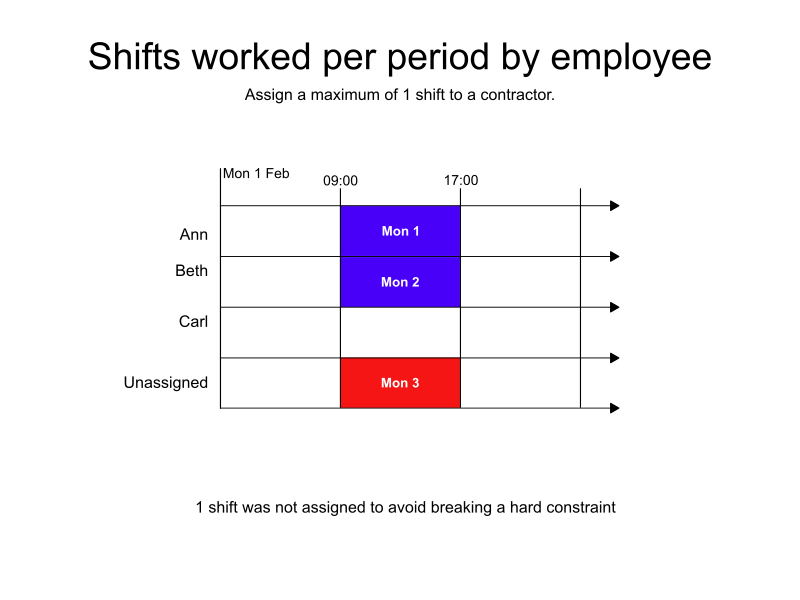
In the following example, there are three shifts and three employees, however, there is a rule that specifies only one employee tagged with Contractor can be assigned a shift during the period.
Two of the employees are contractors. One shift is assigned to a non-contractor employee and one shift is assigned to a contractor. One shift is left unassigned.
-
Input
-
Output
Try this example in Timefold Platform by saving this JSON into a file called sample.json and make the following API call:
|
curl -X POST -H "Content-type: application/json" -H 'X-API-KEY: <API_KEY>' https://app.timefold.ai/api/models/employee-scheduling/v1/schedules [email protected]{
"config": {
"run": {
"name": "Shifts worked per period by employee type"
}
},
"modelInput": {
"globalRules": {
"minimumMaximumShiftsPerPeriod": [
{
"id": "max1ContractorShiftPerDay",
"period": "DAY",
"satisfiability": "REQUIRED",
"shiftsWorkedMax": 1,
"includeEmployeeTags": [
"Contractor"
]
}
]
},
"employees": [
{
"id": "Ann"
},
{
"id": "Beth",
"tags": [ "Contractor" ]
},
{
"id": "Carl",
"tags": [ "Contractor" ]
}
],
"shifts": [
{
"id": "Mon 1",
"start": "2027-02-01T09:00:00Z",
"end": "2027-02-01T17:00:00Z"
},
{
"id": "Mon 2",
"start": "2027-02-01T09:00:00Z",
"end": "2027-02-01T17:00:00Z"
},
{
"id": "Mon 3",
"start": "2027-02-01T09:00:00Z",
"end": "2027-02-01T17:00:00Z"
}
]
}
}
To request the solution, locate the ID from the response to the post operation and append it to the following API call:
|
curl -X GET -H 'X-API-KEY: <API_KEY>' https://app.timefold.ai/api/models/employee-scheduling/v1/schedules/<ID>{
"metadata": {
"id": "ID",
"name": "Shifts worked per period by employee type",
"submitDateTime": "2025-04-24T06:20:01.157549149Z",
"startDateTime": "2025-04-24T06:20:13.410510105Z",
"activeDateTime": "2025-04-24T06:20:13.564903212Z",
"completeDateTime": "2025-04-24T06:20:44.383732264Z",
"shutdownDateTime": "2025-04-24T06:20:44.684966153Z",
"solverStatus": "SOLVING_COMPLETED",
"score": "0hard/-1medium/0soft",
"tags": [
"system.profile:default"
],
"validationResult": {
"summary": "OK"
}
},
"modelOutput": {
"shifts": [
{
"id": "Mon 1",
"employee": "Ann"
},
{
"id": "Mon 2",
"employee": "Beth"
},
{
"id": "Mon 3",
"employee": null
}
]
},
"inputMetrics": {
"employees": 3,
"shifts": 3,
"pinnedShifts": 0
},
"kpis": {
"assignedShifts": 2,
"unassignedShifts": 1,
"workingTimeFairnessPercentage": null,
"disruptionPercentage": 0.0,
"averageDurationOfEmployeesPreferencesMet": null,
"minimumDurationOfPreferencesMetAcrossEmployees": null,
"averageDurationOfEmployeesUnpreferencesViolated": null,
"maximumDurationOfUnpreferencesViolatedAcrossEmployees": null,
"activatedEmployees": 2,
"assignedMandatoryShifts": 2,
"assignedOptionalShifts": 0,
"assignedShiftGroups": null,
"unassignedShiftGroups": null,
"travelDistance": 0
}
}Limit shifts worked by shift type
Rules to set a required number of shifts to be worked in a specific period can be limited to apply to only certain shift types by using includeShiftTags and specifying shift tags to be included:
{
  "globalRules": {
    "minimumMaximumShiftsPerPeriod": [
      {
        "id": "max1ReliefShift",
        "period": "DAY",
        "satisfiability": "REQUIRED",
        "shiftsWorkedMax": 1,
        "includeShiftTags": ["Relief"],
        "shiftTagMatches": "ALL"
      }
    ]
  }
}
Shifts must be tagged:
{
  "id": "Mon 2",
  "start": "2027-02-01T09:00:00Z",
  "end": "2027-02-01T17:00:00Z",
  "tags": ["Relief"]
}
Further information about including or excluding shifts with shift tags:
Shifts with specific tags can be included or excluded by the rule. Tags are defined in shifts:
{
  "shifts": [
    {
      "id": "2027-02-01",
      "start": "2027-02-01T09:00:00Z",
      "end": "2027-02-01T17:00:00Z",
      "tags": ["Part-time"]
    }
  ]
}
Use includeShiftTags to include shifts with specific tags or excludeShiftTags to exclude shifts with specific tags.
shiftTagMatches can be set to ALL or ANY.
The default behavior for shiftTagMatches is ALL, and if omitted, the default ALL will be used.
The rule can define either includeShiftTags or excludeShiftTags, but not both.
{
  "includeShiftTags": ["Part-time", "Weekend"],
  "shiftTagMatches": "ALL"
}
With shiftTagMatches set to ALL, all tags defined by the rule’s includeShiftTags attribute must be present in the shift. With shiftTagMatches set to ANY, at least one tag defined by the rule’s includeShiftTags attribute must be present in the shift.
{
  "excludeShiftTags": ["Part-time", "Weekend"],
  "shiftTagMatches": "ALL"
}
With shiftTagMatches set to ALL, all tags defined by the rule’s excludeShiftTags attribute cannot be present in the shift.
This is useful when you want to exclude things in combination with each other.
For instance, excluding the shift tags Part-time and Weekend with shiftTagMatches set to All, will exclude shifts that include the tags Part-time and Weekend from the rule.
Shifts tagged only Part-time or only Weekend will not be excluded.
With shiftTagMatches set to ANY, any of the tags defined by the rule’s excludeShiftTags attribute cannot be present in the shift.
This is useful when you need to exclude tags regardless of their relationship to other tags.
For instance, excluding the shift tags Part-time and Weekend with shiftTagMatches set to ANY, will exclude any shift that includes the tags Part-time or Weekend, whether they occur together or not.
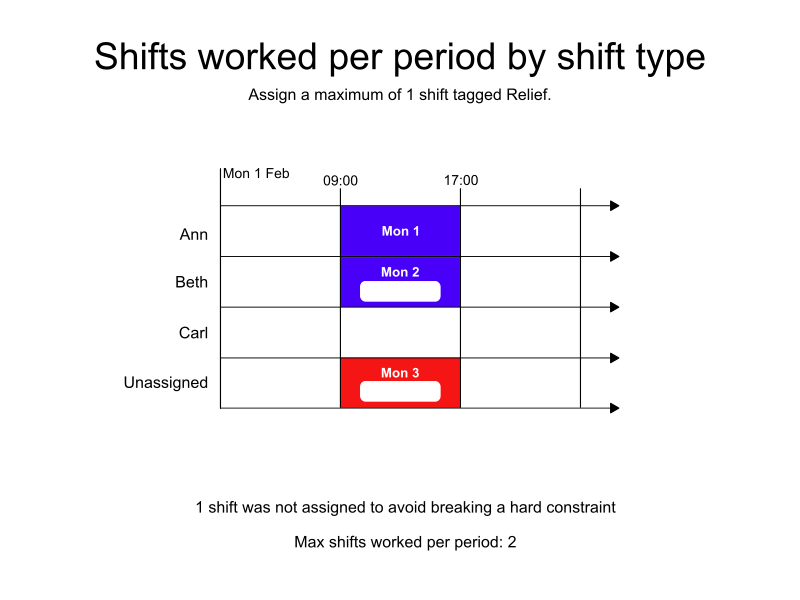
In the following example, there are three shifts and three employees, however, there is a rule that specifies only one shift tagged with Relief can be assigned during the period.
Two of the three shifts are tagged Relief.
The shift that is not tagged Relief and one of the shifts that is tagged Relief are assigned.
One of the Relief shifts is left unassigned.
-
Input
-
Output
Try this example in Timefold Platform by saving this JSON into a file called sample.json and make the following API call:
|
curl -X POST -H "Content-type: application/json" -H 'X-API-KEY: <API_KEY>' https://app.timefold.ai/api/models/employee-scheduling/v1/schedules [email protected]{
"config": {
"run": {
"name": "Shifts worked per period by shift type"
}
},
"modelInput": {
"globalRules": {
"minimumMaximumShiftsPerPeriod": [
{
"id": "max1ReliefShift",
"period": "DAY",
"satisfiability": "REQUIRED",
"shiftsWorkedMax": 1,
"includeShiftTags": ["Relief"],
"shiftTagMatches": "ALL"
}
]
},
"employees": [
{
"id": "Ann"
},
{
"id": "Beth"
},
{
"id": "Carl"
}
],
"shifts": [
{
"id": "Mon 1",
"start": "2027-02-01T09:00:00Z",
"end": "2027-02-01T17:00:00Z"
},
{
"id": "Mon 2",
"start": "2027-02-01T09:00:00Z",
"end": "2027-02-01T17:00:00Z",
"tags": ["Relief"]
},
{
"id": "Mon 3",
"start": "2027-02-01T09:00:00Z",
"end": "2027-02-01T17:00:00Z",
"tags": ["Relief"]
}
]
}
}
To request the solution, locate the ID from the response to the post operation and append it to the following API call:
|
curl -X GET -H 'X-API-KEY: <API_KEY>' https://app.timefold.ai/api/models/employee-scheduling/v1/schedules/<ID>{
"metadata": {
"id": "ID",
"name": "Shifts worked per period by shift type",
"submitDateTime": "2025-04-30T04:21:02.30985523Z",
"startDateTime": "2025-04-30T04:21:19.162387598Z",
"activeDateTime": "2025-04-30T04:21:19.333522963Z",
"completeDateTime": null,
"shutdownDateTime": null,
"solverStatus": "SOLVING_ACTIVE",
"score": "0hard/-1medium/0soft",
"tags": [
"system.profile:default"
],
"validationResult": {
"summary": "OK"
}
},
"modelOutput": {
"shifts": [
{
"id": "Mon 1",
"employee": "Ann"
},
{
"id": "Mon 2",
"employee": "Beth"
},
{
"id": "Mon 3",
"employee": null
}
]
},
"inputMetrics": {
"employees": 3,
"shifts": 3,
"pinnedShifts": 0
},
"kpis": {
"assignedShifts": 2,
"unassignedShifts": 1,
"workingTimeFairnessPercentage": null,
"disruptionPercentage": 0.0,
"averageDurationOfEmployeesPreferencesMet": null,
"minimumDurationOfPreferencesMetAcrossEmployees": null,
"averageDurationOfEmployeesUnpreferencesViolated": null,
"maximumDurationOfUnpreferencesViolatedAcrossEmployees": null,
"activatedEmployees": 2,
"assignedMandatoryShifts": 2,
"assignedOptionalShifts": 0,
"assignedShiftGroups": null,
"unassignedShiftGroups": null,
"travelDistance": 0
}
}Concurrent shift rules
Rules to set the number of concurrent shifts to be worked in a specific period are defined as global rules:
{
  "globalRules": {
    "concurrentShiftsRules": [
      {
        "id": "max2OrderPickingShifts",
        "includeShiftTags": ["Fork lift"],
        "shiftTagMatches": "ALL",
        "concurrentShiftsMax": 2
      }
    ]
  }
}
concurrentShiftsRules must include an ID.
concurrentShiftsMax sets the limit for the maximum number of concurrent shifts.
includeShiftTags specifies which shifts to include in the rule based on the specified tags.
Alternatively, excludeShiftTags can be used to specify which shifts to exclude in the rule based on the specified shift tags.
Further information about including or excluding shifts with shift tags:
Shifts with specific tags can be included or excluded by the rule. Tags are defined in shifts:
{
  "shifts": [
    {
      "id": "2027-02-01",
      "start": "2027-02-01T09:00:00Z",
      "end": "2027-02-01T17:00:00Z",
      "tags": ["Part-time"]
    }
  ]
}
Use includeShiftTags to include shifts with specific tags or excludeShiftTags to exclude shifts with specific tags.
shiftTagMatches can be set to ALL or ANY.
The default behavior for shiftTagMatches is ALL, and if omitted, the default ALL will be used.
The rule can define either includeShiftTags or excludeShiftTags, but not both.
{
  "includeShiftTags": ["Part-time", "Weekend"],
  "shiftTagMatches": "ALL"
}
With shiftTagMatches set to ALL, all tags defined by the rule’s includeShiftTags attribute must be present in the shift. With shiftTagMatches set to ANY, at least one tag defined by the rule’s includeShiftTags attribute must be present in the shift.
{
  "excludeShiftTags": ["Part-time", "Weekend"],
  "shiftTagMatches": "ALL"
}
With shiftTagMatches set to ALL, all tags defined by the rule’s excludeShiftTags attribute cannot be present in the shift.
This is useful when you want to exclude things in combination with each other.
For instance, excluding the shift tags Part-time and Weekend with shiftTagMatches set to All, will exclude shifts that include the tags Part-time and Weekend from the rule.
Shifts tagged only Part-time or only Weekend will not be excluded.
With shiftTagMatches set to ANY, any of the tags defined by the rule’s excludeShiftTags attribute cannot be present in the shift.
This is useful when you need to exclude tags regardless of their relationship to other tags.
For instance, excluding the shift tags Part-time and Weekend with shiftTagMatches set to ANY, will exclude any shift that includes the tags Part-time or Weekend, whether they occur together or not.
The Concurrent shifts worked not in required range hard constraint makes sure no more concurrent shifts are scheduled the limit specified in concurrentShiftsMax.
Shifts will be left unassigned if assigning them would break the Concurrent shifts worked not in required range constraint.
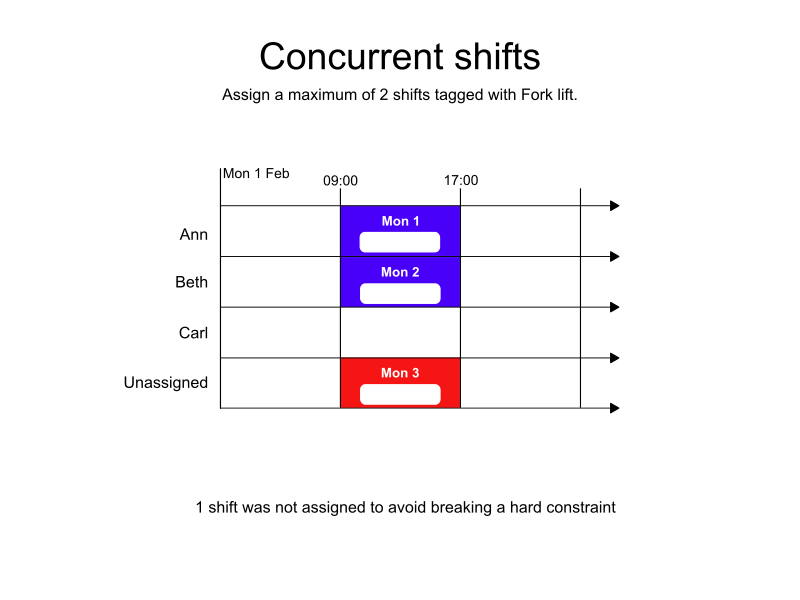
In the following example, there are three shifts and three employees, but the concurrentShiftsRules specifies only two shifts tagged with Fork lift can be assigned concurrently.
One of the shifts is left unassigned.
-
Input
-
Output
Try this example in Timefold Platform by saving this JSON into a file called sample.json and make the following API call:
|
curl -X POST -H "Content-type: application/json" -H 'X-API-KEY: <API_KEY>' https://app.timefold.ai/api/models/employee-scheduling/v1/schedules [email protected]{
"config": {
"run": {
"name": "Concurrent shifts"
}
},
"modelInput": {
"globalRules": {
"concurrentShiftsRules": [
{
"id": "max2OrderPickingShifts",
"includeShiftTags": ["Fork lift"],
"shiftTagMatches": "ALL",
"concurrentShiftsMax": 2,
"ruleValidityDateTimeSpan": {
"start": "2027-02-01T00:00:00",
"end": "2027-02-02T00:00:00"
}
}
]
},
"employees": [
{
"id": "Ann"
},
{
"id": "Beth"
},
{
"id": "Carl"
}
],
"shifts": [
{
"id": "Mon 1",
"start": "2027-02-01T09:00:00Z",
"end": "2027-02-01T17:00:00Z",
"tags": ["Fork lift"]
},
{
"id": "Mon 2",
"start": "2027-02-01T09:00:00Z",
"end": "2027-02-01T17:00:00Z",
"tags": ["Fork lift"]
},
{
"id": "Mon 3",
"start": "2027-02-01T09:00:00Z",
"end": "2027-02-01T17:00:00Z",
"tags": ["Fork lift"]
}
]
}
}
To request the solution, locate the ID from the response to the post operation and append it to the following API call:
|
curl -X GET -H 'X-API-KEY: <API_KEY>' https://app.timefold.ai/api/models/employee-scheduling/v1/schedules/<ID>{
"metadata": {
"id": "ID",
"name": "Concurrent shifts",
"submitDateTime": "2025-04-30T05:01:54.341228273Z",
"startDateTime": "2025-04-30T05:02:05.982084163Z",
"activeDateTime": "2025-04-30T05:02:06.134227222Z",
"completeDateTime": "2025-04-30T05:07:06.984436139Z",
"shutdownDateTime": "2025-04-30T05:07:07.274253679Z",
"solverStatus": "SOLVING_COMPLETED",
"score": "0hard/-1medium/0soft",
"tags": [
"system.profile:default"
],
"validationResult": {
"summary": "OK"
}
},
"modelOutput": {
"shifts": [
{
"id": "Mon 1",
"employee": "Ann"
},
{
"id": "Mon 2",
"employee": "Beth"
},
{
"id": "Mon 3",
"employee": null
}
]
},
"inputMetrics": {
"employees": 3,
"shifts": 3,
"pinnedShifts": 0
},
"kpis": {
"assignedShifts": 2,
"unassignedShifts": 1,
"workingTimeFairnessPercentage": null,
"disruptionPercentage": 0.0,
"averageDurationOfEmployeesPreferencesMet": null,
"minimumDurationOfPreferencesMetAcrossEmployees": null,
"averageDurationOfEmployeesUnpreferencesViolated": null,
"maximumDurationOfUnpreferencesViolatedAcrossEmployees": null,
"activatedEmployees": 2,
"assignedMandatoryShifts": 2,
"assignedOptionalShifts": 0,
"assignedShiftGroups": null,
"unassignedShiftGroups": null,
"travelDistance": 0
}
}Validity time span
A time span that controls when the rule is applied can be configured by adding ruleValidityDateTimeSpan with start and end times to the concurrentShiftsRules.
If not provided, the rule is always valid in the period configured.
{
  "globalRules": {
    "concurrentShiftsRules": [
      {
        "id": "max2OrderPickingShifts",
        "includeShiftTags": ["Fork lift"],
        "shiftTagMatches": "ALL",
        "concurrentShiftsMax": 2,
        "ruleValidityDateTimeSpan": {
          "start": "2027-02-01T00:00:00",
          "end": "2027-02-08T00:00:00"
        }
      }
    ]
  }
}
Next
-
See the full API spec, try the online API, or start a free trial.
-
Learn more about employee shift scheduling from our YouTube playlist.
-
Manage Shift rotations and patterns and Employee contracts.