Employee selection
There are also times when specific employees are preferred for specific shifts, while other employees might be unpreferred or prohibited from being assigned specific shifts.
This guide explains how to assign the correct employees to shifts:
Preferred Employee
When specific employees are preferred for a specific shift, this preference is added to the shift’s preferredEmployees:
{
  "id": "Mon 1",
  "start": "2027-02-01T09:00:00Z",
  "end": "2027-02-01T17:00:00Z",
  "preferredEmployees": ["Ann"]
}
The Preferred employee assigned soft constraint is invoked when the employee assigned to a shift is listed in that shift’s preferredEmployees.
The constraint adds a soft reward to the dataset score that is calculated by multiplying 480 (the estimated average shift duration in minutes) by the employee’s priority multiplier, incentivizing Timefold to assign shifts to their preferred employees.
If a preferred employee cannot be assigned, the shift will be assigned to another employee.
|
Every soft constraint has a weight that can be configured to change the relative importance of the constraint compared to other constraints. Learn about constraint weights. |
| This rule is more likely to be satisfied for employees with a higher employee priority. See Employee priority for more details. |
In the following example, Ann is the preferred employee for two shifts. She is assigned one of the shifts where she is preferred employee and a soft reward is added to the dataset score. The other shifts are assigned to other employees.
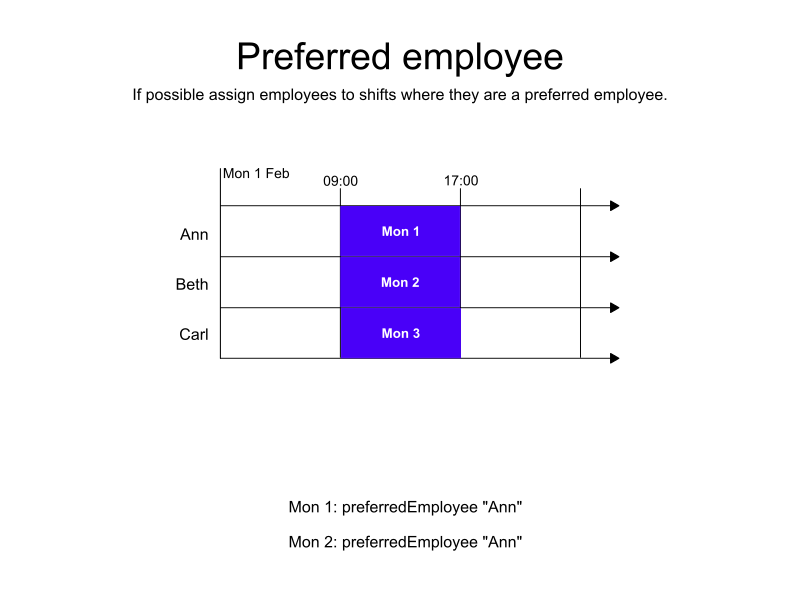
-
Input
-
Output
Try this example in Timefold Platform by saving this JSON into a file called sample.json and make the following API call:
|
curl -X POST -H "Content-type: application/json" -H 'X-API-KEY: <API_KEY>' https://app.timefold.ai/api/models/employee-scheduling/v1/schedules [email protected]{
"config": {
"run": {
"name": "Preferred employee"
}
},
"modelInput": {
"employees": [
{
"id": "Ann"
},
{
"id": "Beth"
},
{
"id": "Carl"
}
],
"shifts": [
{
"id": "Mon 1",
"start": "2027-02-01T09:00:00Z",
"end": "2027-02-01T17:00:00Z",
"preferredEmployees": ["Ann"]
},
{
"id": "Mon 2",
"start": "2027-02-01T09:00:00Z",
"end": "2027-02-01T17:00:00Z",
"preferredEmployees": ["Ann"]
},
{
"id": "Mon 3",
"start": "2027-02-01T09:00:00Z",
"end": "2027-02-01T17:00:00Z"
}
]
}
}
To request the solution, locate the ID from the response to the post operation and append it to the following API call:
|
curl -X GET -H 'X-API-KEY: <API_KEY>' https://app.timefold.ai/api/models/employee-scheduling/v1/schedules/<ID>{
"metadata": {
"id": "ID",
"name": "Preferred employee",
"submitDateTime": "2025-04-30T06:16:28.418040846Z",
"startDateTime": "2025-04-30T06:16:39.981929771Z",
"activeDateTime": "2025-04-30T06:16:40.143585558Z",
"completeDateTime": "2025-04-30T06:21:41.061626428Z",
"shutdownDateTime": "2025-04-30T06:21:41.330402481Z",
"solverStatus": "SOLVING_COMPLETED",
"score": "0hard/0medium/960soft",
"tags": [
"system.profile:default"
],
"validationResult": {
"summary": "OK"
}
},
"modelOutput": {
"shifts": [
{
"id": "Mon 1",
"employee": "Ann"
},
{
"id": "Mon 2",
"employee": "Beth"
},
{
"id": "Mon 3",
"employee": "Carl"
}
]
},
"inputMetrics": {
"employees": 3,
"shifts": 3,
"pinnedShifts": 0
},
"kpis": {
"assignedShifts": 3,
"unassignedShifts": 0,
"workingTimeFairnessPercentage": null,
"disruptionPercentage": 0.0,
"averageDurationOfEmployeesPreferencesMet": null,
"minimumDurationOfPreferencesMetAcrossEmployees": null,
"averageDurationOfEmployeesUnpreferencesViolated": null,
"maximumDurationOfUnpreferencesViolatedAcrossEmployees": null,
"activatedEmployees": 3,
"assignedMandatoryShifts": 3,
"assignedOptionalShifts": 0,
"assignedShiftGroups": null,
"unassignedShiftGroups": null,
"travelDistance": 0
}
}Unpreferred Employee
When specific employees are not preferred for a specific shift, this preference is added to the shift’s unpreferredEmployees:
{
  "id": "Mon 1",
  "start": "2027-02-01T09:00:00Z",
  "end": "2027-02-01T17:00:00Z",
  "unpreferredEmployees": ["Beth"]
}
The Unpreferred employee assigned soft constraint is invoked when the employee assigned to a shift is listed in that shift’s unpreferredEmployees.
The constraint adds a soft penalty to the dataset score that is calculated by multiplying 480 (the estimated average shift duration in minutes) by the employee’s priority multiplier, incentivizing Timefold to avoid assigning shifts to unpreferred employees.
Shifts will still be assigned even if assigning them breaks this constraint.
|
Every soft constraint has a weight that can be configured to change the relative importance of the constraint compared to other constraints. Learn about constraint weights. |
| This rule is more likely to be satisfied for employees with a higher employee priority. See Employee priority for more details. |
In the following example, Beth is an unpreferred employee for all three shifts. Beth is assigned one of the shifts and a soft penalty is added to the dataset score.
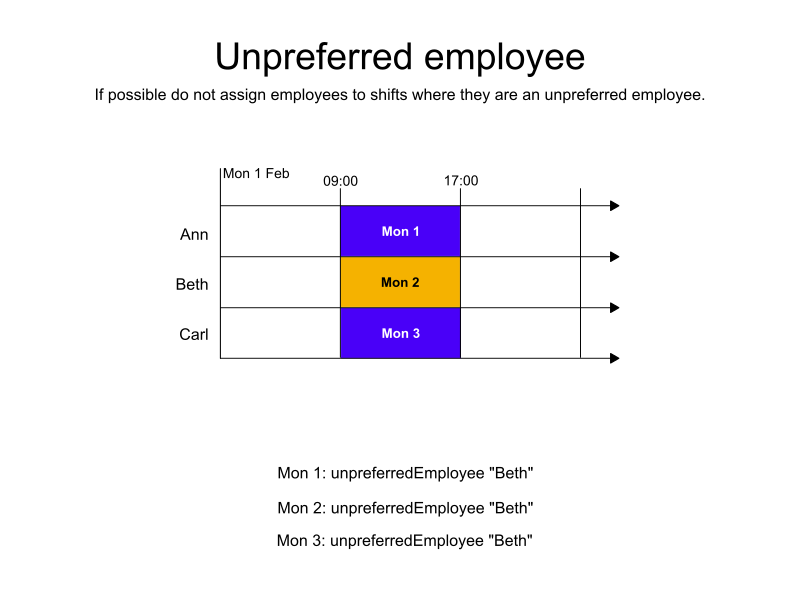
-
Input
-
Output
Try this example in Timefold Platform by saving this JSON into a file called sample.json and make the following API call:
|
curl -X POST -H "Content-type: application/json" -H 'X-API-KEY: <API_KEY>' https://app.timefold.ai/api/models/employee-scheduling/v1/schedules [email protected]{
"config": {
"run": {
"name": "Unpreferred employee"
}
},
"modelInput": {
"employees": [
{
"id": "Ann"
},
{
"id": "Beth"
},
{
"id": "Carl"
}
],
"shifts": [
{
"id": "Mon 1",
"start": "2027-02-01T09:00:00Z",
"end": "2027-02-01T17:00:00Z",
"unpreferredEmployees": ["Beth"]
},
{
"id": "Mon 2",
"start": "2027-02-01T09:00:00Z",
"end": "2027-02-01T17:00:00Z",
"unpreferredEmployees": ["Beth"]
},
{
"id": "Mon 3",
"start": "2027-02-01T09:00:00Z",
"end": "2027-02-01T17:00:00Z",
"unpreferredEmployees": ["Beth"]
}
]
}
}
To request the solution, locate the ID from the response to the post operation and append it to the following API call:
|
curl -X GET -H 'X-API-KEY: <API_KEY>' https://app.timefold.ai/api/models/employee-scheduling/v1/schedules/<ID>{
"metadata": {
"id": "ID",
"name": "Unpreferred employee",
"submitDateTime": "2025-04-30T06:50:59.215676663Z",
"startDateTime": "2025-04-30T06:51:16.863976097Z",
"activeDateTime": "2025-04-30T06:51:17.011331875Z",
"completeDateTime": "2025-04-30T06:56:17.833607342Z",
"shutdownDateTime": "2025-04-30T06:56:18.091323158Z",
"solverStatus": "SOLVING_COMPLETED",
"score": "0hard/0medium/-960soft",
"tags": [
"system.profile:default"
],
"validationResult": {
"summary": "OK"
}
},
"modelOutput": {
"shifts": [
{
"id": "Mon 1",
"employee": "Ann"
},
{
"id": "Mon 2",
"employee": "Carl"
},
{
"id": "Mon 3",
"employee": "Beth"
}
]
},
"inputMetrics": {
"employees": 3,
"shifts": 3,
"pinnedShifts": 0
},
"kpis": {
"assignedShifts": 3,
"unassignedShifts": 0,
"workingTimeFairnessPercentage": null,
"disruptionPercentage": 0.0,
"averageDurationOfEmployeesPreferencesMet": null,
"minimumDurationOfPreferencesMetAcrossEmployees": null,
"averageDurationOfEmployeesUnpreferencesViolated": null,
"maximumDurationOfUnpreferencesViolatedAcrossEmployees": null,
"activatedEmployees": 3,
"assignedMandatoryShifts": 3,
"assignedOptionalShifts": 0,
"assignedShiftGroups": null,
"unassignedShiftGroups": null,
"travelDistance": 0
}
}Prohibited Employee
When specific employees are prohibited for a specific shift, this preference is added to the shift’s prohibitedEmployees:
{
  "id": "Mon 1",
  "start": "2027-02-01T09:00:00Z",
  "end": "2027-02-01T17:00:00Z",
  "prohibitedEmployees": ["Carl"]
}
The Prohibited employee assigned hard constraint is invoked, which makes sure employees are not assigned to shifts where they are listed in prohibitedEmployee.
Shifts will be left unassigned if only a prohibited employee is available.
In the following example, there are three employees and three shifts. Carl is listed as a prohibited employee on all three shifts and is not assigned a shift.
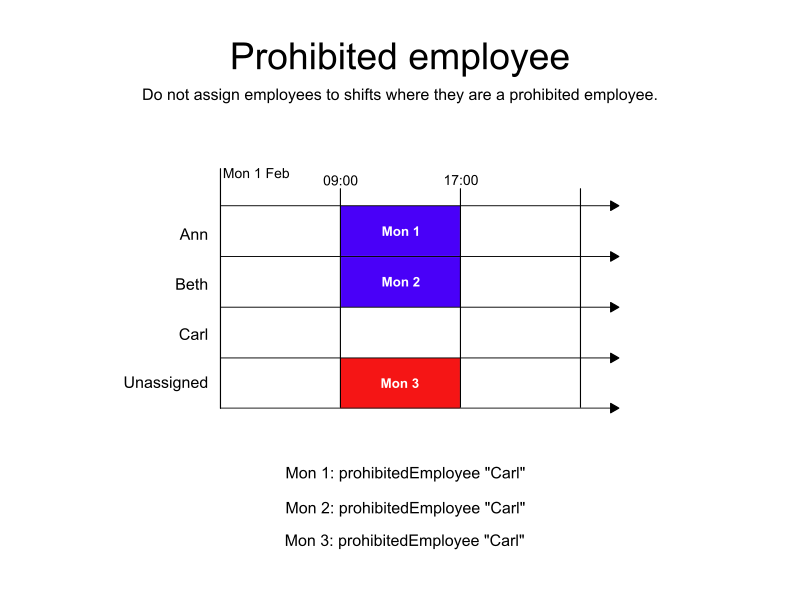
-
Input
-
Output
Try this example in Timefold Platform by saving this JSON into a file called sample.json and make the following API call:
|
curl -X POST -H "Content-type: application/json" -H 'X-API-KEY: <API_KEY>' https://app.timefold.ai/api/models/employee-scheduling/v1/schedules [email protected]{
"config": {
"run": {
"name": "Prohibited employee"
}
},
"modelInput": {
"employees": [
{
"id": "Ann"
},
{
"id": "Beth"
},
{
"id": "Carl"
}
],
"shifts": [
{
"id": "Mon 1",
"start": "2027-02-01T09:00:00Z",
"end": "2027-02-01T17:00:00Z",
"prohibitedEmployees": ["Carl"]
},
{
"id": "Mon 2",
"start": "2027-02-01T09:00:00Z",
"end": "2027-02-01T17:00:00Z",
"prohibitedEmployees": ["Carl"]
},
{
"id": "Mon 3",
"start": "2027-02-01T09:00:00Z",
"end": "2027-02-01T17:00:00Z",
"prohibitedEmployees": ["Carl"]
}
]
}
}
To request the solution, locate the ID from the response to the post operation and append it to the following API call:
|
curl -X GET -H 'X-API-KEY: <API_KEY>' https://app.timefold.ai/api/models/employee-scheduling/v1/schedules/<ID>{
"metadata": {
"id": "ID",
"name": "Prohibited employee",
"submitDateTime": "2025-04-30T07:23:07.956004888Z",
"startDateTime": "2025-04-30T07:23:19.755127437Z",
"activeDateTime": "2025-04-30T07:23:19.948102534Z",
"completeDateTime": "2025-04-30T07:28:20.858819064Z",
"shutdownDateTime": "2025-04-30T07:28:21.169653541Z",
"solverStatus": "SOLVING_COMPLETED",
"score": "0hard/-1medium/0soft",
"tags": [
"system.profile:default"
],
"validationResult": {
"summary": "OK"
}
},
"modelOutput": {
"shifts": [
{
"id": "Mon 1",
"employee": "Ann"
},
{
"id": "Mon 2",
"employee": "Beth"
},
{
"id": "Mon 3",
"employee": null
}
]
},
"inputMetrics": {
"employees": 3,
"shifts": 3,
"pinnedShifts": 0
},
"kpis": {
"assignedShifts": 2,
"unassignedShifts": 1,
"workingTimeFairnessPercentage": null,
"disruptionPercentage": 0.0,
"averageDurationOfEmployeesPreferencesMet": null,
"minimumDurationOfPreferencesMetAcrossEmployees": null,
"averageDurationOfEmployeesUnpreferencesViolated": null,
"maximumDurationOfUnpreferencesViolatedAcrossEmployees": null,
"activatedEmployees": 2,
"assignedMandatoryShifts": 2,
"assignedOptionalShifts": 0,
"assignedShiftGroups": null,
"unassignedShiftGroups": null,
"travelDistance": 0
}
}Next
-
See the full API spec, try the online API, or start a free trial.
-
Learn more about employee shift scheduling from our YouTube playlist.
-
Manage Shift rotations and patterns and Employee contracts.