Docs
  • Solver
  • Models
    • Field Service Routing
    • Employee Shift Scheduling
    • Pick-up and Delivery Routing
  • Platform
Try models
  • Employee Shift Scheduling
  • Employee resource constraints
  • Employee priority
  • latest
    • latest
    • 1.20.x

Employee Shift Scheduling

    • Introduction
    • Getting started: Hello world
    • User guide
      • Terms
      • Use case guide
      • Planning AI concepts
      • Integration
      • Constraints
      • Understanding the API
      • Demo datasets
      • Input datasets
        • Model configuration
        • Model input
        • Planning window
      • Planning window
      • Time zones and Daylight Saving Time (DST)
      • Tags and tag types
      • Input validation
      • Metrics and optimization goals
      • Score analysis
      • Visualizations
    • Employee resource constraints
      • Employee contracts
      • Employee availability
      • Employee priority
      • Pairing employees
      • Shift travel and locations
      • Employee activation
      • Work limits
        • Minutes worked per period
        • Minutes worked in a rolling window
        • Minutes logged per period
        • Days worked per period
        • Days worked in a rolling window
        • Consecutive days worked
        • Shifts worked per period
        • Shifts worked in a rolling window
        • Weekend minutes worked per period
        • Weekends worked per period
        • Weekends worked in a rolling window
        • Consecutive weekends worked
      • Time off
        • Days off per period
        • Consecutive days off per period
        • Consecutive days off in a rolling window
        • Consecutive minutes off in a rolling window
        • Shifts to avoid close to day off requests
        • Consecutive weekends off per period
      • Shift rotations and patterns
        • Shift rotations
        • Single day shift sequence patterns
        • Minimize gaps between shifts
        • Multi-day shift sequence patterns
        • Daily shift pairings
        • Overlapping shifts
        • Shift start times differences
        • Minutes between shifts
      • Shift type diversity
        • Shift tag types
        • Shift types worked per period
        • Unique tags per period
      • Fairness
        • Balance time worked
        • Balance shift count
    • Shift service constraints
      • Alternative shifts
      • Cost management
      • Demand-based scheduling
      • Mandatory and optional shifts
      • Shift assignments
      • Skills and risk factors
    • Manual intervention
    • Recommendations
    • Real-time planning
    • Real-time planning (preview)
    • Scenarios
      • Configuring labor law compliance
      • Configuring employee well-being
    • Changelog
    • Upgrade to the latest version
    • Feature requests

Employee priority

Employees have different levels of seniority and responsibility and can be assigned different priority levels.

Rules related to employees' preferences and working hours are more likely to be honored for employees with higher priorities.

Employee contracts can also have priorities. Contract priorities are applied to the all the employees with those contracts. See Employee contracts for more details.
  • 1. Defining employee priority
  • 2. Employee priority example
  • 3. Constraints influenced by employee priority

1. Defining employee priority

Priority is defined per employee:

{
  "employees": [
    {
      "id": "Ann",
      "priority": "LOW"
    },
    {
      "id": "Beth",
      "priority": "NORMAL"
    },
    {
      "id": "Carl",
      "priority": "HIGH"
    },
    {
      "id": "Dan",
      "priority": "CRITICAL"
    }
  ]
}

The priority can be CRITICAL, HIGH, NORMAL, or LOW.

CRITICAL is the highest priority and LOW is the lowest priority.

An employee with a CRITICAL priority is more likely to have their preferences met than an employee with a lower priority.

2. Employee priority example

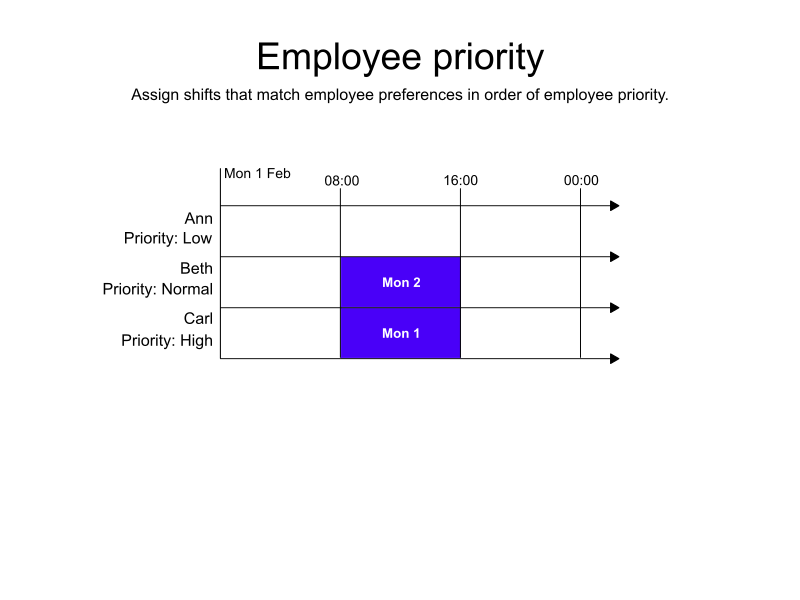
In the following example, there are three employees and two shifts. Ann’s priority is LOW, Beth’s priority is NORMAL, and Carl’s priority is HIGH.

All three employees have preferredTimeSpans for when they prefer to work that match the two available shifts.

Because Beth and Carl have higher priorities than Ann, they are assigned the shifts.
employee priority
  • Input

  • Output

Try this example in Timefold Platform by saving this JSON into a file called sample.json and make the following API call:
curl -X POST -H "Content-type: application/json" -H 'X-API-KEY: <API_KEY>' https://app.timefold.ai/api/models/employee-scheduling/v1/schedules [email protected]
{
  "config": {
    "run": {
      "name": "Employee priority example"
    }
  },
  "modelInput": {
    "employees": [
      {
        "id": "Ann",
        "priority": "LOW",
        "preferredTimeSpans": [
          {
            "start": "2027-02-01T08:00:00Z",
            "end": "2027-02-01T16:00:00Z"
          }
        ]
      },
      {
        "id": "Beth",
        "priority": "NORMAL",
        "preferredTimeSpans": [
          {
            "start": "2027-02-01T08:00:00Z",
            "end": "2027-02-01T16:00:00Z"
          }
        ]
      },
      {
        "id": "Carl",
        "priority": "HIGH",
        "preferredTimeSpans": [
          {
            "start": "2027-02-01T08:00:00Z",
            "end": "2027-02-01T16:00:00Z"
          }
        ]
      }
    ],
    "shifts": [
      {
        "id": "MON 1",
        "start": "2027-02-01T08:00:00Z",
        "end": "2027-02-01T16:00:00Z"
      },
      {
        "id": "MON 2",
        "start": "2027-02-01T08:00:00Z",
        "end": "2027-02-01T16:00:00Z"
      }
    ]
  }
}
To request the solution, locate the 'ID' from the response to the post operation and append it to the following API call:
curl -X GET -H 'X-API-KEY: <API_KEY>' https://app.timefold.ai/api/models/employee-scheduling/v1/schedules/<ID>
{
  "metadata": {
    "id": "f5a3b23c-f040-4228-88c9-d87b23299584",
    "originId": "f5a3b23c-f040-4228-88c9-d87b23299584",
    "name": "Employee priority example",
    "submitDateTime": "2026-02-09T05:52:15.439778882Z",
    "startDateTime": "2026-02-09T05:54:00.000699439Z",
    "activeDateTime": "2026-02-09T05:54:00.092894632Z",
    "solverStatus": "SOLVING_ACTIVE",
    "score": "0hard/0medium/2400soft",
    "tags": [
      "system.type:from-request",
      "system.profile:Standard profile"
    ],
    "validationResult": {
      "summary": "OK"
    }
  },
  "modelOutput": {
    "shifts": [
      {
        "id": "MON 1",
        "employee": "Carl"
      },
      {
        "id": "MON 2",
        "employee": "Beth"
      }
    ],
    "employees": [
      {
        "id": "Ann",
        "metrics": {
          "assignedShifts": 0,
          "durationWorked": "PT0S",
          "durationOfTimePreferencesMet": "PT0S"
        }
      },
      {
        "id": "Beth",
        "metrics": {
          "assignedShifts": 1,
          "durationWorked": "PT8H",
          "durationOfTimePreferencesMet": "PT8H"
        }
      },
      {
        "id": "Carl",
        "metrics": {
          "assignedShifts": 1,
          "durationWorked": "PT8H",
          "durationOfTimePreferencesMet": "PT8H"
        }
      }
    ]
  },
  "inputMetrics": {
    "employees": 3,
    "shifts": 2,
    "pinnedShifts": 0,
    "mandatoryShifts": 2,
    "optionalShifts": 0
  },
  "kpis": {
    "assignedShifts": 2,
    "unassignedShifts": 0,
    "disruptionPercentage": 0,
    "averageDurationOfEmployeesPreferencesMet": "PT5H20M",
    "minimumDurationOfPreferencesMetAcrossEmployees": "PT8H",
    "activatedEmployees": 2,
    "assignedMandatoryShifts": 2
  },
  "run": {
    "id": "f5a3b23c-f040-4228-88c9-d87b23299584",
    "originId": "f5a3b23c-f040-4228-88c9-d87b23299584",
    "name": "Employee priority example",
    "submitDateTime": "2026-02-09T05:52:15.439778882Z",
    "startDateTime": "2026-02-09T05:54:00.000699439Z",
    "activeDateTime": "2026-02-09T05:54:00.092894632Z",
    "solverStatus": "SOLVING_ACTIVE",
    "score": "0hard/0medium/2400soft",
    "tags": [
      "system.type:from-request",
      "system.profile:Standard profile"
    ],
    "validationResult": {
      "summary": "OK"
    }
  }
}

3. Constraints influenced by employee priority

The following constraints multiply their score impact by the employee’s priority. Violations of these constraints are penalized or rewarded more for higher-priority employees, making the solver more likely to satisfy them.

3.1. Employee availability

  • Employee works during preferred time

  • Employee works during unpreferred time

3.2. Pairing employees

  • Employee is paired with preferred employee

  • Employee is paired with unpreferred employee

3.3. Replanning

  • Employee assignment disrupted on replanning

3.4. Shift assignments

  • Preferred employee assigned

  • Unpreferred employee assigned

3.5. Shift rotations and patterns

  • Preferred shift rotation not met for employee

  • Custom rotation duration in days not in preferred range for employee

  • Preferred minimum time between different sequences not met for employee

  • Preferred sequence start day met for employee

  • Employee works compact sequence

  • Sequence ends on allowed sequence start day for employee

  • Minutes between shifts not in preferred range for employee

  • Minimize gaps between shifts for employee

  • Employee does not have preferred daily shift pairing

  • Employee has unpreferred daily shift pairing

  • Employee works preferred single day shift sequence pattern

  • Employee works unpreferred single day shift sequence pattern

  • Employee works preferred multi day shift sequence pattern

  • Employee works unpreferred multi day shift sequence pattern

  • Shift start time difference in minutes per period not in preferred range for employee

3.6. Shift travel and locations

  • Locations worked per period not in preferred range for employee

3.7. Shift type diversity

  • Unique tags per period not in preferred limit

  • Shift types worked per period not in preferred range for employee

3.8. Skills and risk factors

  • Preferred skill missing

3.9. Time off

  • Employee has unpreferred shift near day off request

  • Days off per period not in preferred range for employee

  • Consecutive days off per period not in preferred range for employee

  • Consecutive weekends off per period not in preferred range for employee

  • Consecutive days off in rolling window not in preferred range for employee

  • Consecutive minutes off in rolling window not in preferred range for employee

3.10. Work limits

  • Minutes worked per period not in preferred range for employee

  • Minutes logged per period not in preferred range for employee

  • Shifts worked per period not in preferred range for employee

  • Days worked per period not in preferred range for employee

  • Consecutive days worked not in preferred range for employee

  • Weekend minutes worked per period not in preferred range for employee

  • Weekends worked per period not in preferred range for employee

  • Consecutive weekends worked per period not in preferred range for employee

  • Shifts worked in rolling window not in preferred range for employee

  • Days worked in rolling window not in preferred range for employee

  • Weekends worked in rolling window not in preferred range for employee

  • Minutes worked in rolling window not in preferred range for employee

Next

  • See the full API spec or try the online API.

  • Learn more about employee shift scheduling from our YouTube playlist.

  • Learn about Employee contracts and Employee availability.

  • © 2026 Timefold BV
  • Timefold.ai
  • Documentation
  • Changelog
  • Send feedback
  • Privacy
  • Legal
    • Light mode
    • Dark mode
    • System default