Employee groups
employeeGroups is a preview feature and subject to change.
|
Employee groups are declared in the top-level employeeGroups collection, for cases where a set of employees must be considered together as group rather than individually or as a pair.
Each group has an explicit membership, split into requiredEmployees and preferredEmployees:
-
requiredEmployeesdon’t require any other group member to be present when they work, but prefer other members of the group to also be present. -
preferredEmployeesrequire at least one of the group’srequiredEmployeesto be present when they work, and prefer other employees of the group to also be present.
A common example is a carpooling arrangement: a driver (requiredEmployees) can drive alone if needed, but passengers (preferredEmployees) can’t be scheduled without a driver.
{
  "employees": [
    { "id": "Ann" },
    { "id": "Beth" },
    { "id": "Carl" }
  ],
  "employeeGroups": [
    {
      "id": "CAR 1",
      "requiredEmployees": [ "Ann" ],
      "preferredEmployees": [ "Beth", "Carl" ]
    }
  ]
}
In this example, Ann is the required driver of the CAR 1 employee group, and Beth and Carl are preferred passengers.
Beth and Carl can each only be assigned to a shift when Ann also has an overlapping shift.
Ann can be assigned to any shift on her own, but Timefold prefers to schedule her together with Beth or Carl when possible.
Requiring a shared tag type
Use commonTagType on an employee group, when the group’s members must not only work together but must also cover shifts in the same tag category, such as the same route, location, or department.
commonTagType takes a reference to a tag type defined in the tagTypes collection.
When set, all working members of the group must have a concurrent shift with the same tag belonging to that tag type.
{
  "tagTypes": [
    { "id": "Zone A" }
  ],
  "tags": [
    { "id": "Location 1", "tagType": "Zone A" },
    { "id": "Location 2", "tagType": "Zone A" }
  ],
  "employees": [
    { "id": "Ann" },
    { "id": "Beth" }
  ],
  "employeeGroups": [
    {
      "id": "CAR 1",
      "requiredEmployees": [ "Ann" ],
      "preferredEmployees": [ "Beth" ],
      "commonTagType": "Zone A"
    }
  ]
}
In this example, Ann and Beth are both members of the CAR 1 employee group, which specifies commonTagType: Zone A.
Beth can only be assigned to shifts with a tag belonging to Zone A where Ann is also assigned, and both must share the same Zone A tag when they work together.
The Grouped employees don’t work shifts with common tags hard constraint is invoked when two employees who belong to the same employee group are assigned to overlapping shifts that don’t share a common shift tag of the required tag type, meaning the grouped employees are working at the same time but not on shifts that share the tag (e.g. location or department) they are supposed to have in common.
The constraint adds a hard penalty to the dataset score that is calculated by the number of overlapping minutes between the two conflicting shifts, incentivizing Timefold to schedule grouped employees onto concurrent shifts that share the required common tag, so they end up working together at the same place rather than being split across differently tagged shifts.
Declare tags and tag types in the tagTypes and tags top-level collections so that commonTagType resolves correctly.
See Tags and tag types for details.
|
Requiring a shared tag type example
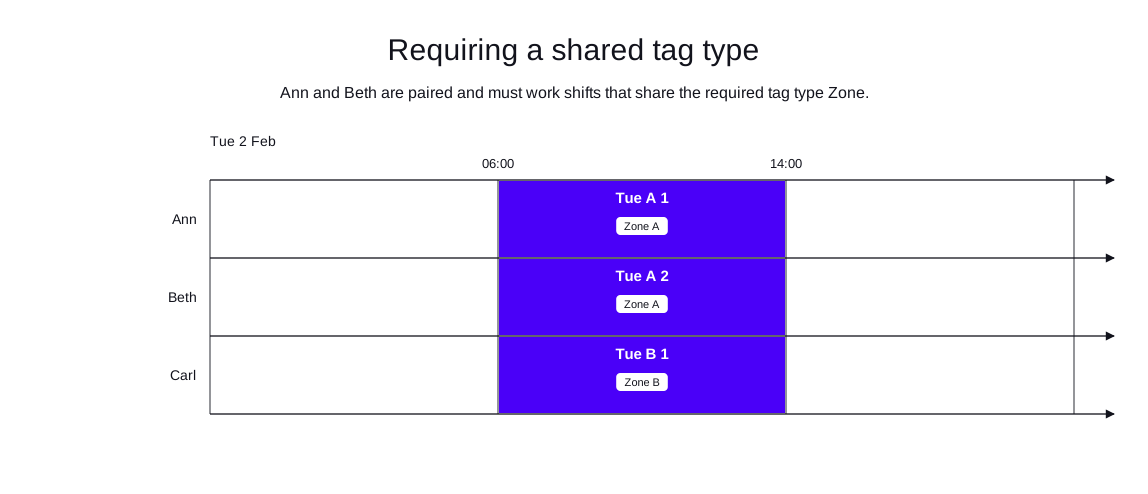
In the following example, Ann and Beth share a car and must cover shifts on the same route.
Two shifts are available in Zone A and one in Zone B.
Ann is the required driver of the CAR 1 employee group; Beth is a preferred passenger.
The solver assigns both Ann and Beth to the Zone A shifts and assigns Carl to the Zone B shift.
-
Input
-
Output
Try this example in Timefold Platform by saving this JSON into a file called sample.json and make the following API call:
|
curl -X POST -H "Content-type: application/json" -H 'X-API-KEY: <API_KEY>' https://app.timefold.ai/api/models/employee-scheduling/v1/schedules [email protected]{
"config": {
"run": {
"name": "Required tag type pairing example"
}
},
"modelInput": {
"tagTypes": [
{
"id": "Zone"
}
],
"tags": [
{
"id": "Zone A",
"tagType": "Zone"
},
{
"id": "Zone B",
"tagType": "Zone"
}
],
"contracts": [
{
"id": "fullTimeContract",
"periodRules": [
{
"id": "Max8HoursPerDayFullTime",
"period": "DAY",
"minutesWorkedLimit": {
"minutesWorkedMax": 480
}
}
]
}
],
"employees": [
{
"id": "Ann",
"contracts": [
"fullTimeContract"
],
"tags": [
"CAR 1",
"CAR 1 Driver"
]
},
{
"id": "Beth",
"contracts": [
"fullTimeContract"
],
"tags": [
"CAR 1",
"CAR 1 Passenger"
]
},
{
"id": "Carl",
"contracts": [
"fullTimeContract"
]
}
],
"employeeGroups": [
{
"id": "CAR 1 group",
"requiredEmployees": [
"Ann"
],
"preferredEmployees": [
"Beth"
],
"commonTagType": "Zone"
}
],
"shifts": [
{
"id": "Tue A 1",
"start": "2027-02-02T06:00:00Z",
"end": "2027-02-02T14:00:00Z",
"tags": [
"Zone A"
]
},
{
"id": "Tue A 2",
"start": "2027-02-02T06:00:00Z",
"end": "2027-02-02T14:00:00Z",
"tags": [
"Zone A"
]
},
{
"id": "Tue B 1",
"start": "2027-02-02T06:00:00Z",
"end": "2027-02-02T14:00:00Z",
"tags": [
"Zone B"
]
}
]
}
}
To request the solution, locate the ID from the response to the post operation and append it to the following API call:
|
curl -X GET -H 'X-API-KEY: <API_KEY>' https://app.timefold.ai/api/models/employee-scheduling/v1/schedules/<ID>{
"metadata": {
"id": "cb7d4ef2-d5d2-4021-8ead-a45a3418df54",
"originId": "cb7d4ef2-d5d2-4021-8ead-a45a3418df54",
"name": "Required tag type pairing example",
"submitDateTime": "2026-05-22T16:20:16.256271+02:00",
"startDateTime": "2026-05-22T16:20:16.417058+02:00",
"activeDateTime": "2026-05-22T16:20:16.417547+02:00",
"completeDateTime": "2026-05-22T16:20:46.430017+02:00",
"shutdownDateTime": "2026-05-22T16:20:46.430021+02:00",
"solverStatus": "SOLVING_COMPLETED",
"score": "0hard/0medium/960soft",
"validationResult": {
"summary": "OK"
}
},
"modelOutput": {
"shifts": [
{
"id": "Tue A 1",
"employee": "Ann"
},
{
"id": "Tue A 2",
"employee": "Beth"
},
{
"id": "Tue B 1",
"employee": "Carl"
}
],
"employees": [
{
"id": "Ann",
"metrics": {
"assignedShifts": 1,
"durationWorked": "PT8H",
"durationOfTimePreferencesMet": "PT0S"
}
},
{
"id": "Beth",
"metrics": {
"assignedShifts": 1,
"durationWorked": "PT8H"
}
},
{
"id": "Carl",
"metrics": {
"assignedShifts": 1,
"durationWorked": "PT8H"
}
}
],
"generatedShifts": []
},
"inputMetrics": {
"employees": 3,
"shifts": 3,
"pinnedShifts": 0,
"mandatoryShifts": 3,
"optionalShifts": 0
},
"kpis": {
"assignedShifts": 3,
"unassignedShifts": 0,
"disruptionPercentage": 0,
"averageDurationOfEmployeesPreferencesMet": "PT0S",
"minimumDurationOfPreferencesMetAcrossEmployees": "PT0S",
"activatedEmployees": 3,
"assignedMandatoryShifts": 3
},
"run": {
"id": "cb7d4ef2-d5d2-4021-8ead-a45a3418df54",
"originId": "cb7d4ef2-d5d2-4021-8ead-a45a3418df54",
"name": "Required tag type pairing example",
"submitDateTime": "2026-05-22T16:20:16.256271+02:00",
"startDateTime": "2026-05-22T16:20:16.417058+02:00",
"activeDateTime": "2026-05-22T16:20:16.417547+02:00",
"completeDateTime": "2026-05-22T16:20:46.430017+02:00",
"shutdownDateTime": "2026-05-22T16:20:46.430021+02:00",
"solverStatus": "SOLVING_COMPLETED",
"score": "0hard/0medium/960soft",
"validationResult": {
"summary": "OK"
}
}
}modelOutput contains the employee shift schedule with Ann and Beth both assigned to Zone A shifts and Carl assigned to the Zone B shift.
Limiting how many different shift hours a group can work per day
groupShiftsPerDayMax is a preview feature subject to change.
|
Use groupShiftsPerDayMax together with commonTagType on an employee group, to cap how many different shift hours the group’s members may work on the same day.
A common example is a fixed crew, such as a car pool or a work team, that should mostly cover a single shift together but may occasionally split into a small, limited number of sub-shifts.
Setting groupShiftsPerDayMax: 1 reproduces the strictest case: the crew must work identical shift hours on any day they work together and can never be split into multiple shifts.
Higher values, like groupShiftsPerDayMax: 2, allow the crew to legitimately split into at most that many different shift hours on the same day.
groupShiftsPerDayMax requires commonTagType to also be set on the employee group.
When set, group members who work a shift with the same commonTagType tag on the same day may not work more than groupShiftsPerDayMax different shift hours that day.
{
  "tagTypes": [
    { "id": "Zone A" }
  ],
  "tags": [
    { "id": "Location 1", "tagType": "Zone A" }
  ],
  "employees": [
    { "id": "Ann" },
    { "id": "Beth" }
  ],
  "employeeGroups": [
    {
      "id": "CAR 1",
      "requiredEmployees": [ "Ann", "Beth" ],
      "commonTagType": "Zone A",
      "groupShiftsPerDayMax": 1
    }
  ]
}
In this example, Ann and Beth are both members of the CAR 1 employee group, which specifies commonTagType: Zone A and groupShiftsPerDayMax: 1.
This means Ann and Beth must both work shifts tagged with Location 1 and those shifts must start and end at the same time.
Assigning Ann to a morning shift and Beth to an afternoon shift at Location 1 on the same day would exceed the limit, since they’d then have 2 distinct sets of shift hours instead of 1.
With groupShiftsPerDayMax: 2 instead, Ann, Beth, and a third crew member Carl could split into two different shift hours (for example, Ann and Beth on the morning shift, Carl on the afternoon shift) without violating the constraint, but a third different set of shift hours on the same day would exceed the limit.
The Group split into multiple shifts per day hard constraint is invoked when an employee group works more different shift hours on a day, among shifts sharing a common tag of the required tag type, than its configured groupShiftsPerDayMax allows.
Declare tags and tag types in the tagTypes and tags top-level collections so that commonTagType resolves correctly.
See Tags and tag types for details.
|
Next
-
See the full API spec, try the online API, or start a free trial.
-
Learn more about employee shift scheduling from our YouTube playlist.