Priority and optional shifts
In employee shift scheduling, resource-limited planning occurs when there are not enough employees to cover every shift that needs to be staffed.
You have two tools to control what happens when this occurs. Shift priorities control which shifts Timefold assigns first, and marking a shift as optional lets Timefold leave it unassigned when that produces a better schedule.
This guide explains both tools, along with the constraints that manage unassigned shifts.
Shift priorities
Learn how to configure an API Key to run the examples in this guide:
In the examples, replace |
By default, every shift must be assigned. When there are not enough employees, Timefold leaves a shift unassigned, and without priorities it can be any of the shifts.
Scheduling without priorities
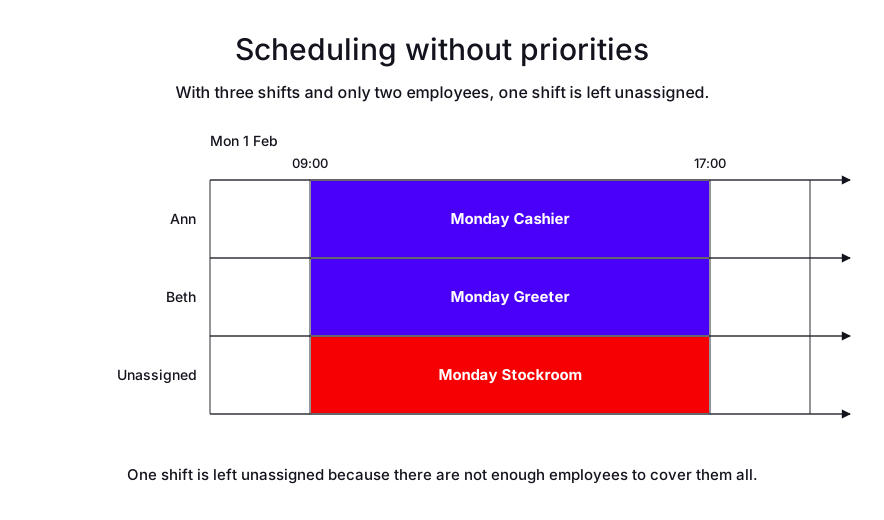
In the following example, three shifts need to be staffed, but only two employees can cover them. One of the shifts is left unassigned.
-
Input
-
Output
Try this example in Timefold Platform by saving this JSON into a file called sample.json and make the following API call:
|
curl -X POST -H "Content-type: application/json" -H 'X-API-KEY: <API_KEY>' https://app.timefold.ai/api/models/employee-scheduling/v1/schedules [email protected]{
"config": {
"run": {
"name": "Resource-limited planning - no priorities"
}
},
"modelInput": {
"employees": [
{
"id": "Ann"
},
{
"id": "Beth"
}
],
"shifts": [
{
"id": "Monday Cashier",
"start": "2027-02-01T09:00:00Z",
"end": "2027-02-01T17:00:00Z"
},
{
"id": "Monday Greeter",
"start": "2027-02-01T09:00:00Z",
"end": "2027-02-01T17:00:00Z"
},
{
"id": "Monday Stockroom",
"start": "2027-02-01T09:00:00Z",
"end": "2027-02-01T17:00:00Z"
}
]
}
}
To request the solution, locate the ID from the response to the post operation and append it to the following API call:
|
curl -X GET -H 'X-API-KEY: <API_KEY>' https://app.timefold.ai/api/models/employee-scheduling/v1/schedules/<ID>{
"metadata": {
"id": "ID",
"name": "Resource-limited planning - no priorities",
"submitDateTime": "2025-01-13T06:56:41.254037504Z",
"startDateTime": "2025-01-13T06:56:51.713981203Z",
"activeDateTime": "2025-01-13T06:56:51.776161178Z",
"completeDateTime": "2025-01-13T07:01:51.934602715Z",
"shutdownDateTime": "2025-01-13T07:01:52.199287953Z",
"solverStatus": "SOLVING_COMPLETED",
"score": "0hard/-1medium/0soft",
"tags": [],
"validationResult": {
"summary": "OK"
}
},
"modelOutput": {
"shifts": [
{
"id": "Monday Cashier",
"employee": "Ann"
},
{
"id": "Monday Greeter",
"employee": "Beth"
},
{
"id": "Monday Stockroom",
"employee": null
}
]
},
"kpis": {
"assignedShifts": 2,
"unassignedShifts": 1,
"workingTimeFairnessPercentage": null,
"disruptionPercentage": 0.0,
"averageDurationOfEmployeesPreferencesMet": null,
"minimumDurationOfPreferencesMetAcrossEmployees": null,
"averageDurationOfEmployeesUnpreferencesViolated": null,
"maximumDurationOfUnpreferencesViolatedAcrossEmployees": null
}
}modelOutput contains Ann’s and Beth’s assigned shifts.
To control which shifts are assigned first, you can add priorities to shifts. There are ten built-in priorities. Priority 1 is the highest and priority 10 is the lowest.
Priorities are added to shifts:
{
  "shifts": [
    {
      "id": "Monday Cashier",
      "start": "2027-02-01T09:00:00Z",
      "end": "2027-02-01T17:00:00Z",
      "priority": "1"
    },
    {
      "id": "Monday Greeter",
      "start": "2027-02-01T09:00:00Z",
      "end": "2027-02-01T17:00:00Z",
      "priority": "5"
    },
    {
      "id": "Monday Stockroom",
      "start": "2027-02-01T09:00:00Z",
      "end": "2027-02-01T17:00:00Z",
      "priority": "3"
    }
  ]
}
Scheduling with priorities
In the following example, a delivery is due on Monday, and a staff member must be present to accept the delivery and store the items. The Monday shifts have the following priorities:
-
Cashier: priority 1
-
Stockroom: priority 3
-
Greeter: priority 5
-
Input
-
Output
Try this example in Timefold Platform by saving this JSON into a file called sample.json and make the following API call:
|
curl -X POST -H "Content-type: application/json" -H 'X-API-KEY: <API_KEY>' https://app.timefold.ai/api/models/employee-scheduling/v1/schedules [email protected]{
"config": {
"run": {
"name": "Resource-limited planning - with priorities"
}
},
"modelInput": {
"employees": [
{
"id": "Ann"
},
{
"id": "Beth"
}
],
"shifts": [
{
"id": "Monday Cashier",
"start": "2027-02-01T09:00:00Z",
"end": "2027-02-01T17:00:00Z",
"priority": "1"
},
{
"id": "Monday Greeter",
"start": "2027-02-01T09:00:00Z",
"end": "2027-02-01T17:00:00Z",
"priority": "5"
},
{
"id": "Monday Stockroom",
"start": "2027-02-01T09:00:00Z",
"end": "2027-02-01T17:00:00Z",
"priority": "3"
}
]
}
}
To request the solution, locate the ID from the response to the post operation and append it to the following API call:
|
curl -X GET -H 'X-API-KEY: <API_KEY>' https://app.timefold.ai/api/models/employee-scheduling/v1/schedules/<ID>{
"metadata": {
"id": "ID",
"name": "Resource-limited planning - with priorities",
"submitDateTime": "2025-01-13T07:43:38.942914528Z",
"startDateTime": "2025-01-13T07:43:45.837804099Z",
"activeDateTime": "2025-01-13T07:43:45.927185678Z",
"completeDateTime": "2025-01-13T07:48:46.126452389Z",
"shutdownDateTime": "2025-01-13T07:48:46.291891316Z",
"solverStatus": "SOLVING_COMPLETED",
"score": "0hard/-100000medium/0soft",
"tags": [],
"validationResult": {
"summary": "OK"
}
},
"modelOutput": {
"shifts": [
{
"id": "Monday Cashier",
"employee": "Ann"
},
{
"id": "Monday Greeter",
"employee": null
},
{
"id": "Monday Stockroom",
"employee": "Beth"
}
]
},
"kpis": {
"assignedShifts": 2,
"unassignedShifts": 1,
"workingTimeFairnessPercentage": null,
"disruptionPercentage": 0.0,
"averageDurationOfEmployeesPreferencesMet": null,
"minimumDurationOfPreferencesMetAcrossEmployees": null,
"averageDurationOfEmployeesUnpreferencesViolated": null,
"maximumDurationOfUnpreferencesViolatedAcrossEmployees": null
}
}modelOutput contains Ann’s and Beth’s assigned shifts.
This time, the Monday Greeter shift is left unassigned because it has the lowest priority.
Mandatory and optional shifts
Shifts are mandatory by default, which means Timefold must assign them. You can also mark a shift as optional, so Timefold can leave it unassigned if that leads to a higher overall score.
Two constraints manage unassigned shifts:
-
The
Unassigned mandatory shiftmedium constraint is broken when a mandatory shift has no assigned employee, and it affects the medium score of the solution. -
The
Unassigned optional shiftsoft constraint is broken when an optional shift has no assigned employee, and it affects the soft score of the solution.
The Unassigned optional shift constraint adds a soft penalty equal to the shift’s resolved unassigned shift priority weight, which incentivizes Timefold to assign optional shifts, especially those with a higher priority weight.
Making a shift optional is useful when other soft constraints, such as employee preferences or multi-day shift patterns, can be satisfied instead of assigning the shift.
|
Every soft constraint has a weight that can be configured to change the relative importance of the constraint compared to other constraints. Learn about constraint weights. |
Configuration
To define mandatory and optional shifts, add a globalRules object with an unassignedShiftRule that sets the weight and assignment for each priority level:
{
  "globalRules": {
    "unassignedShiftRule": {
      "id": "unassignedShiftRule",
      "priorityWeights": [
        {
          "priority": "1",
          "weight": 100,
          "assignment": "MANDATORY"
        },
        {
          "priority": "3",
          "weight": 10,
          "assignment": "MANDATORY"
        },
        {
          "priority": "5",
          "weight": 1,
          "assignment": "OPTIONAL"
        }
      ]
    }
  }
}
In this rule, priority 1 is the highest priority with the greatest weight, and priority 5 is the lowest priority with a weight of 1. Shifts with a priority level of 1 or 3 are mandatory, and shifts with a priority level of 5 are optional.
Example
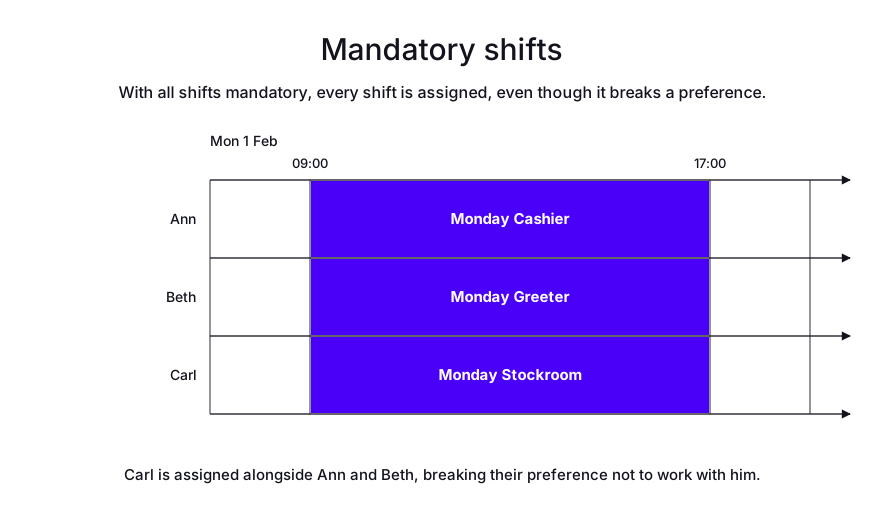
In the following example, three mandatory shifts need to be staffed by three employees. Ann and Beth have a preference not to work at the same time as Carl.
See unpreferred pairings for information about employee preferences.
Because all three shifts are mandatory, Timefold assigns Carl alongside Ann and Beth, breaking their preference:
-
Input
-
Output
Try this example in Timefold Platform by saving this JSON into a file called sample.json and make the following API call:
|
curl -X POST -H "Content-type: application/json" -H 'X-API-KEY: <API_KEY>' https://app.timefold.ai/api/models/employee-scheduling/v1/schedules [email protected]{
"config": {
"run": {
"name": "Resource-limited planning - with mandatory shifts"
}
},
"modelInput": {
"employees": [
{
"id": "Ann",
"unpreferredPairings": [
{
"pairedEmployee": "Carl"
}
]
},
{
"id": "Beth",
"unpreferredPairings": [
{
"pairedEmployee": "Carl"
}
]
},
{
"id": "Carl"
}
],
"shifts": [
{
"id": "Monday Cashier",
"start": "2027-02-01T09:00:00Z",
"end": "2027-02-01T17:00:00Z",
"priority": "1"
},
{
"id": "Monday Greeter",
"start": "2027-02-01T09:00:00Z",
"end": "2027-02-01T17:00:00Z",
"priority": "5"
},
{
"id": "Monday Stockroom",
"start": "2027-02-01T09:00:00Z",
"end": "2027-02-01T17:00:00Z",
"priority": "3"
}
]
}
}
To request the solution, locate the ID from the response to the post operation and append it to the following API call:
|
curl -X GET -H 'X-API-KEY: <API_KEY>' https://app.timefold.ai/api/models/employee-scheduling/v1/schedules/<ID>{
"metadata": {
"id": "ID",
"name": "Resource-limited planning - with mandatory shifts",
"submitDateTime": "2025-01-13T08:17:10.602715243Z",
"startDateTime": "2025-01-13T08:17:17.257947788Z",
"activeDateTime": "2025-01-13T08:17:17.332768003Z",
"completeDateTime": "2025-01-13T08:22:17.537407491Z",
"shutdownDateTime": "2025-01-13T08:22:17.69476057Z",
"solverStatus": "SOLVING_COMPLETED",
"score": "0hard/0medium/-1920soft",
"tags": [],
"validationResult": {
"summary": "OK"
}
},
"modelOutput": {
"shifts": [
{
"id": "Monday Cashier",
"employee": "Ann"
},
{
"id": "Monday Greeter",
"employee": "Beth"
},
{
"id": "Monday Stockroom",
"employee": "Carl"
}
]
},
"kpis": {
"assignedShifts": 3,
"unassignedShifts": 0,
"workingTimeFairnessPercentage": null,
"disruptionPercentage": 0.0,
"averageDurationOfEmployeesPreferencesMet": null,
"minimumDurationOfPreferencesMetAcrossEmployees": null,
"averageDurationOfEmployeesUnpreferencesViolated": "PT5H20M",
"maximumDurationOfUnpreferencesViolatedAcrossEmployees": "PT8H"
}
}modelOutput contains Ann’s, Beth’s, and Carl’s assigned shifts.
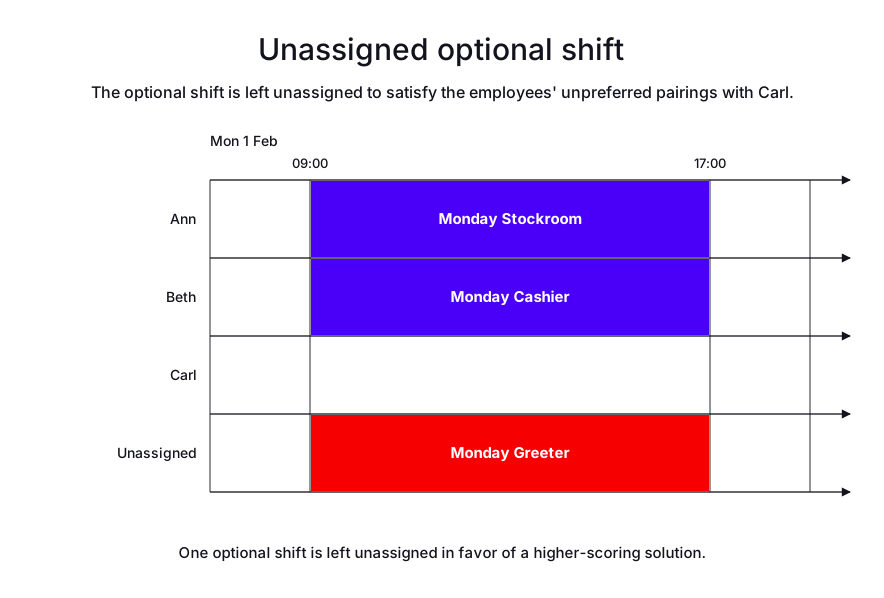
If the Monday Greeter shift is made optional, Timefold assigns Ann and Beth to the two mandatory shifts and leaves the optional shift unassigned, satisfying their preference not to work with Carl:
-
Input
-
Output
Try this example in Timefold Platform by saving this JSON into a file called sample.json and make the following API call:
|
curl -X POST -H "Content-type: application/json" -H 'X-API-KEY: <API_KEY>' https://app.timefold.ai/api/models/employee-scheduling/v1/schedules [email protected]{
"config": {
"run": {
"name": "Resource-limited planning - with optional shifts"
}
},
"modelInput": {
"globalRules": {
"unassignedShiftRule": {
"id": "unassignedShiftRule",
"priorityWeights": [
{
"priority": "1",
"weight": 100,
"assignment": "MANDATORY"
},
{
"priority": "3",
"weight": 10,
"assignment": "MANDATORY"
},
{
"priority": "5",
"weight": 1,
"assignment": "OPTIONAL"
}
]
}
},
"employees": [
{
"id": "Ann",
"unpreferredPairings": [
{
"pairedEmployee": "Carl"
}
]
},
{
"id": "Beth",
"unpreferredPairings": [
{
"pairedEmployee": "Carl"
}
]
},
{
"id": "Carl"
}
],
"shifts": [
{
"id": "Monday Cashier",
"start": "2027-02-01T09:00:00Z",
"end": "2027-02-01T17:00:00Z",
"priority": "1"
},
{
"id": "Monday Greeter",
"start": "2027-02-01T09:00:00Z",
"end": "2027-02-01T17:00:00Z",
"priority": "5"
},
{
"id": "Monday Stockroom",
"start": "2027-02-01T09:00:00Z",
"end": "2027-02-01T17:00:00Z",
"priority": "3"
}
]
}
}
To request the solution, locate the ID from the response to the post operation and append it to the following API call:
|
curl -X GET -H 'X-API-KEY: <API_KEY>' https://app.timefold.ai/api/models/employee-scheduling/v1/schedules/<ID>{
"metadata": {
"id": "ID",
"name": "Resource-limited planning - with optional shifts",
"submitDateTime": "2025-01-13T08:30:18.984846197Z",
"startDateTime": "2025-01-13T08:30:25.717208027Z",
"activeDateTime": "2025-01-13T08:30:25.82002715Z",
"completeDateTime": "2025-01-13T08:35:26.026473606Z",
"shutdownDateTime": "2025-01-13T08:35:26.184985497Z",
"solverStatus": "SOLVING_COMPLETED",
"score": "0hard/0medium/-1soft",
"tags": [],
"validationResult": {
"summary": "OK"
}
},
"modelOutput": {
"shifts": [
{
"id": "Monday Cashier",
"employee": "Beth"
},
{
"id": "Monday Greeter",
"employee": null
},
{
"id": "Monday Stockroom",
"employee": "Ann"
}
]
},
"kpis": {
"assignedShifts": 2,
"unassignedShifts": 1,
"workingTimeFairnessPercentage": null,
"disruptionPercentage": 0.0,
"averageDurationOfEmployeesPreferencesMet": null,
"minimumDurationOfPreferencesMetAcrossEmployees": null,
"averageDurationOfEmployeesUnpreferencesViolated": "PT0S",
"maximumDurationOfUnpreferencesViolatedAcrossEmployees": "PT0S"
}
}modelOutput contains Ann’s and Beth’s assigned shifts.
Example: minimum 3, up to 5 people on a shift
A common staffing pattern is a minimum number of employees required for a shift, with an upper limit on how many employees can be used if they’re available. Configure this pattern by marking the minimum number of shifts as mandatory and the remaining shifts, up to the maximum, as optional.
In the following example, the Cashier role needs a minimum of three employees and can use up to five.
Three shifts are marked mandatory with priority 1, and two shifts are marked optional with priority 5.
assignment is what creates the minimum/maximum split: a mandatory shift left unassigned breaks the Unassigned mandatory shift medium constraint, while an optional shift left unassigned only adds a soft penalty equal to its weight.
Medium constraints are optimized before soft ones, so Timefold always prioritizes filling the mandatory shifts first, whatever weight is set:
{
  "globalRules": {
    "unassignedShiftRule": {
      "id": "unassignedShiftRule",
      "priorityWeights": [
        {
          "priority": "1",
          "weight": 100,
          "assignment": "MANDATORY"
        },
        {
          "priority": "5",
          "weight": 1,
          "assignment": "OPTIONAL"
        }
      ]
    }
  }
}
Only three employees, Ann, Beth, and Carl, are available. Timefold assigns them to the three mandatory shifts and leaves the two optional shifts unassigned:
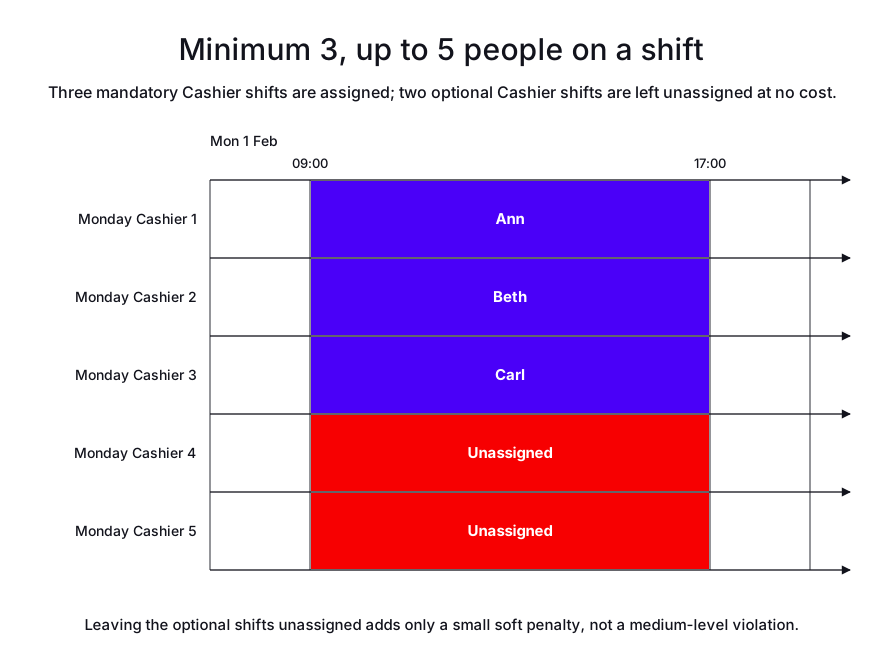
The resulting score, 0hard/0medium/-2soft, confirms the schedule is fully feasible: the two unassigned optional shifts cost only a small soft penalty, not the medium-level violation an unassigned mandatory shift would cause.
|
Use Priority and optional shifts when specific shifts already exist and some are required, while others should only be staffed if another requirement dictates it, for example if an employee must work an amount of minimum hours for the week. Use Demand-based scheduling when the set of shifts isn’t fixed and the optimizer should decide how many/which shifts to generate or fill to hit an hourly headcount target. |
Next
-
See the full API spec, try the online API, or start a free trial.
-
Learn more about employee shift scheduling from our YouTube playlist.