Assignability analysis
Learn how to use assignability analysis in the Employee Shift Scheduling model to identify shifts that are impossible or difficult to fill, before optimization runs.
Assignability analysis
|
This visualization is currently available as a preview feature. To request early access to this feature, contact us. |
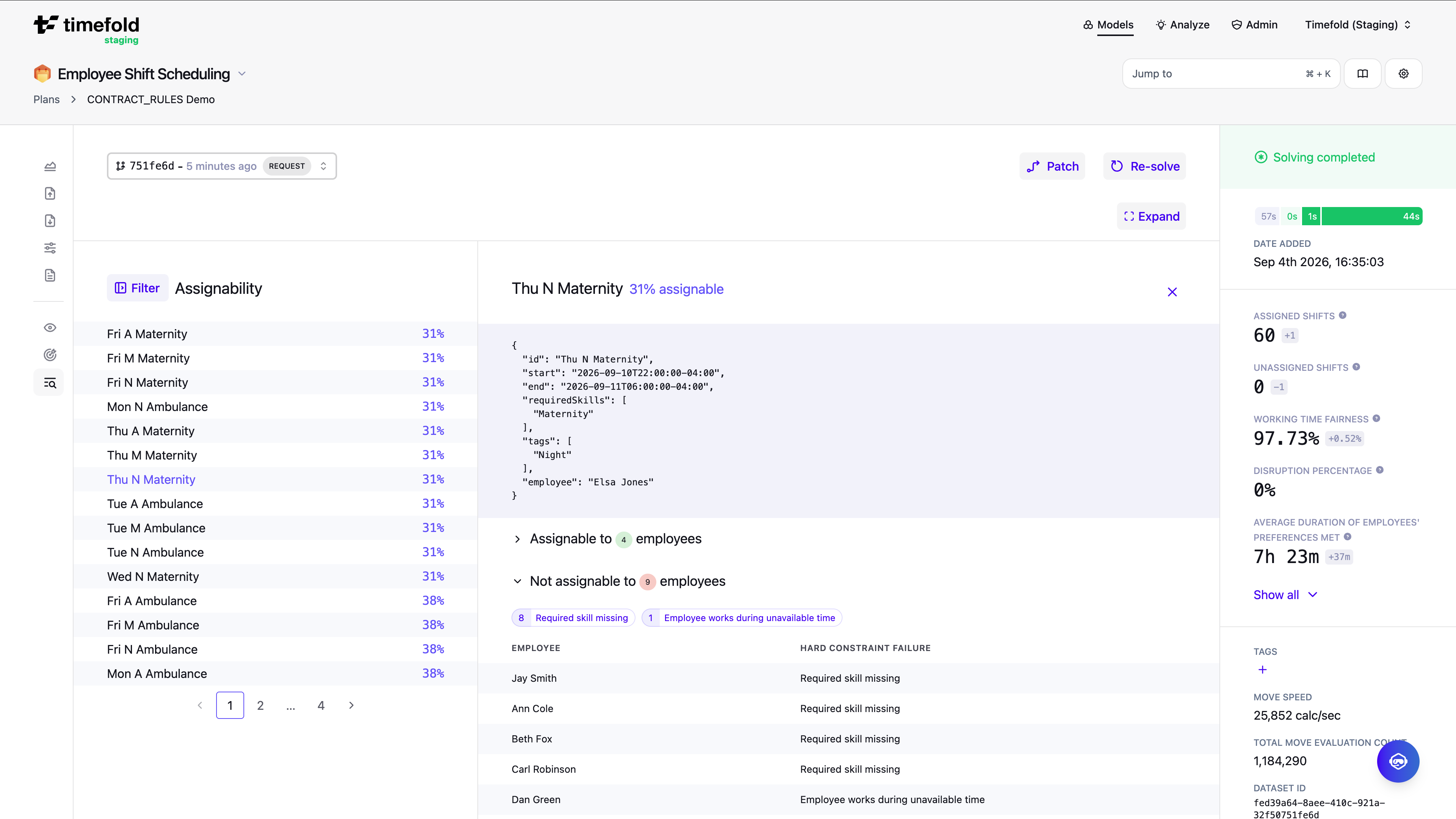
Primary focus: Identifying shifts that are impossible or difficult to fill, before optimization runs.
Unlike the other views, assignability analysis doesn’t examine an optimized schedule. It examines the input problem (the raw set of shifts and employees as submitted) and answers the question: given only hard constraints, how many employees could even be assigned to each shift if the rest of the schedule were empty?
The result for each shift is an assignability percentage: the share of employees who can be assigned without violating any hard constraint.
-
An assignability of 0% means no employee satisfies the hard constraints for that shift. The shift can’t be filled regardless of how optimization proceeds.
-
An assignability above 0% means at least one valid assignment exists. The Timefold model has options, though a low percentage means fewer options and a harder assignment problem.
Because the Timefold model computes assignability from the input before any solve, it doesn’t depend on a solve result. You can use it to audit a dataset immediately after submission, before committing to a full optimization run.
Understanding the results
The overview lists all unassigned shifts sorted by ascending assignability, so the most constrained shifts appear first. For each shift you can inspect which employees are blocked and which hard constraints prevent their assignment.
| Assignability | What it means |
|---|---|
0% |
No employee can be assigned. The shift is structurally impossible to fill. Check input data, employee availability, skills, or contract rules. |
Low (Only a few options) |
Very few employees qualify. The Timefold model has limited flexibility, increasing the risk that the shift goes unassigned even when a solution technically exists. |
High |
Many employees qualify. The Timefold model has ample flexibility for this shift. |
Filters and controls
Every visualization view supports filtering. Click Filter to open the filter pane and drill down into a subset of the data. Combine multiple filters to narrow the view to exactly the data you want to inspect. Each filter lists its values with the number of items that match it and the other selected filters, 0 included. The Filter button shows how many values are selected, and Reset filter clears the selection.
Use Include assigned to control whether already-assigned shifts appear in the overview. When enabled, the overview includes every shift, assigned and unassigned alike. Disable it to narrow the list down to only unassigned shifts, useful when you already have a solved schedule and want to focus specifically on the shifts the Timefold model couldn’t assign, rather than reviewing the entire dataset. When enabled, only those shifts appear in the list. When disabled, all shifts are analyzed regardless of how optimization resolved them. This is useful when you already have a solved schedule and want to focus specifically on the shifts the Timefold model couldn’t assign, rather than reviewing the entire dataset.
The view also shows a distribution chart of assignability percentages across all analyzed shifts. It gives an at-a-glance view of how assignability is spread across the dataset: for example, whether most shifts have high assignability with a few outliers at 0%, or whether the entire dataset skews toward low assignability. Use it to gauge the overall difficulty of the scheduling problem without scrolling through individual shifts.
When to use
Use this view when you want to:
-
Detect impossible shifts early: before running optimization, find shifts that will always be unassigned due to hard constraint violations, and fix the root cause in the input data.
-
Explain unassigned shifts: when a shift comes back unassigned, determine whether it was impossible to fill (0% assignability) or simply lost out in competition with other shifts (low but non-zero assignability).
-
Evaluate what-if scenarios: explore how adding employees with specific skills or changing availability windows would improve assignability for constrained shifts.
-
Gauge overall input difficulty: a dataset with many low-assignability shifts tells you the problem is inherently difficult to solve, regardless of how the Timefold model is configured.
API reference
The full request and response schema for the assignability analysis endpoints is available in the Employee Shift Scheduling API spec.
Other views
Assignability analysis examines the input problem before optimization, but it doesn’t validate an optimized result.
To detect coverage, overtime, and fairness issues in an optimized schedule, use the Efficiency X-Ray.
To inspect a specific shift or employee, use Visualization.
For a structured approach that combines all views, see the recommended analysis workflow.