Lesson 4: Strict work limits
Introduction
In the previous lesson, we learned about employee contracts, which are used to group employees together based on the rules that apply to them. One of the most common types of rules which differs across employees is limits to work over a fixed calendar period such as a day, week, or month.
Rules which are tied to a fixed calendar period are called "period rules" in Timefold. Period rules are defined in contracts. They can be used to apply a number of different limits to employees per period, such as:
-
Time worked
-
Shifts worked (regardless of time in those shifts)
-
Days off
-
Time worked over weekends
In this lesson, we will focus on time worked in a certain period and learn how to think about this rule and implement it in Timefold. The other types of period rules are implemented in a very similar way, and are extensively covered in our technical documentation. Once you can implement one period rule, the rest are approachable in the same way.
| If the limit is specified over a well-defined calendar period, then it is a good candidate for a period rule. If the limit is not tied to a well-defined period, and is for example an average over a period or worked over a sliding period, then it is not a period rule. |
Calendar periods supported in period rules
By default, all period rules support:
-
DAY: one calendar day, every day of the schedule, starting at 00:00 and ending at 23:59:59.999
-
WEEK: one calendar week, every week of the schedule, by default starting every Monday at 00:00 and ending on Sunday at 23:59:59.999
-
MONTH: one calendar month, every month of the schedule, starting on the first day of the month at 00:00 and ending on the last day of the month at 23:59:59.999
-
YEAR: one calendar year, every year of the schedule, starting on January 1st at 00:00 and ending on December 31st at 23:59:59.999
-
SCHEDULE: covers the entire period of the schedule being planned.
-
MONDAY: active on any day which is a Monday, from 00:00 to 23:59:59.999.
-
TUESDAY: active on any day which is a Tuesday, from 00:00 to 23:59:59.999.
-
WEDNESDAY: active on any day which is a Wednesday, from 00:00 to 23:59:59.999.
-
THURSDAY: active on any day which is a Thursday, from 00:00 to 23:59:59.999.
-
FRIDAY: active on any day which is a Friday, from 00:00 to 23:59:59.999.
-
SATURDAY: active on any day which is a Saturday, from 00:00 to 23:59:59.999.
-
SUNDAY: active on any day which is a Sunday, from 00:00 to 23:59:59.999.
| The period used for SCHEDULE is the entire period being actively planned. Most commonly, this is automatically calculated by Timefold. It is calculated to start at midnight before the earliest shift and end at midnight after the latest shift in the schedule. Optionally, it can be manually specified by the user by adding a planning window to the input dataset. For now, we will assume that the Timefold calculation is sufficient for our needs. |
| It is possible to adjust the week start to be any day of the week instead of the default Monday. This is described in the technical documentation for all period rules, and is not covered in this lesson. For now, we will assume that the week starts on Monday. If you wish to change the week start, see the technical documentation for any period rule, such as Minutes Worked Per Period. |
Building a period rule
Minimum requirements
Period rules are defined in contracts, and, as covered in Lesson 3, apply to all employees who are assigned that contract.
At minimum, each period rule object in a contract must include an id and a period.
-
idcan be any string of your choice. Theidis the globally unique identifier for each individual period rule. -
periodmust be a string which is one of the supported periods listed above. It defines the calendar period over which the rule applies.
{
  "contracts": [
    {
      "id": "fullTimeContract",
      "periodRules": [
        {
          "id": "periodRule1_fullTimeContract",
          "period": "DAY"
        },
        {
          "id": "periodRule2_fullTimeContract",
          "period": "WEEK"
        }
      ]
    },
    {
      "id": "partTimeContract",
      "periodRules": [
        {
          "id": "periodRule1_partTimeContract",
          "period": "DAY"
        },
        {
          "id": "periodRule2_partTimeContract",
          "period": "WEEK"
        }
      ]
    }
  ]
}
The id of each rule must be globally unique. This is true for every rule in a contract, not just period rules.
|
Limits
In their minimum form above, the period rules do not yet specify any limits over the specified period. A common limit used in contracts is the maximum time that an employee can work in a given period.
Let’s assume that we have two contracts in the schedule: a full-time contract and a part-time contract. The full-time contract has a maximum of ten hours of work per day and 50 hours of work per week. The part-time contract has a maximum of eight hours of work per day and 24 hours of work per week.
The minutes worked per period rule governs the amount of time that an employee can work in a given period. In order to apply this rule, the period rule must specify a minutesWorkedLimit object, which can include a minutesWorkedMax and/or a minutesWorkedMin. In this example, we will only use the minutesWorkedMax to limit the maximum time that an employee can work in a given period.
| Most time-related limits are specified in minutes in Timefold. So our limits will be: 8 hours = 480 minutes, 10 hours = 600 minutes, 24 hours = 1,440 minutes, and 50 hours = 3,000 minutes. |
Our period rules above can be updated to include the maximum time that an employee can work in a given period, as follows:
{
  "contracts": [
    {
      "id": "fullTimeContract",
      "periodRules": [
        {
          "id": "max10hoursPerDay_fullTimeContract",
          "period": "DAY",
          "minutesWorkedLimit": {
            "minutesWorkedMax": 600
          }
        },
        {
          "id": "max50hoursPerWeek_fullTimeContract",
          "period": "WEEK",
          "minutesWorkedLimit": {
            "minutesWorkedMax": 3000
          }
        }
      ]
    },
    {
      "id": "partTimeContract",
      "periodRules": [
        {
          "id": "max8hoursPerDay_partTimeContract",
          "period": "DAY",
          "minutesWorkedLimit": {
            "minutesWorkedMax": 480
          }
        },
        {
          "id": "max24hoursPerWeek_partTimeContract",
          "period": "WEEK",
          "minutesWorkedLimit": {
            "minutesWorkedMax": 1440
          }
        }
      ]
    }
  ]
}
Satisfiability
We must also add the satisfiability of the period rule. This tells the Timefold model if this rule is applied at the hard level (it is required to be followed) or at the soft level (it is a preference).
| If you wish to revisit the difference between hard and soft constraints, see Lesson 1 for a refresher. |
The satisfiability can be either REQUIRED or PREFERRED:
-
REQUIRED: hard constraint. -
PREFERRED: soft constraint.
Let’s assume that for both types of employees, the daily work limit is a soft constraint, but the weekly work limit is a hard constraint. Our period rules above can be updated to include the satisfiability of the rule, as follows:
{
  "contracts": [
    {
      "id": "fullTimeContract",
      "periodRules": [
        {
          "id": "max10hoursPerDay_fullTimeContract",
          "period": "DAY",
          "minutesWorkedLimit": {
            "minutesWorkedMax": 600
          },
          "satisfiability": "PREFERRED"
        },
        {
          "id": "max50hoursPerWeek_fullTimeContract",
          "period": "WEEK",
          "minutesWorkedLimit": {
            "minutesWorkedMax": 3000
          },
          "satisfiability": "REQUIRED"
        }
      ]
    },
    {
      "id": "partTimeContract",
      "periodRules": [
        {
          "id": "max8hoursPerDay_partTimeContract",
          "period": "DAY",
          "minutesWorkedLimit": {
            "minutesWorkedMax": 480
          },
          "satisfiability": "PREFERRED"
        },
        {
          "id": "max24hoursPerWeek_partTimeContract",
          "period": "WEEK",
          "minutesWorkedLimit": {
            "minutesWorkedMax": 1440
          },
          "satisfiability": "REQUIRED"
        }
      ]
    }
  ]
}
This is a fully implemented period rule, which will limit the working time of the employees.
Practical example
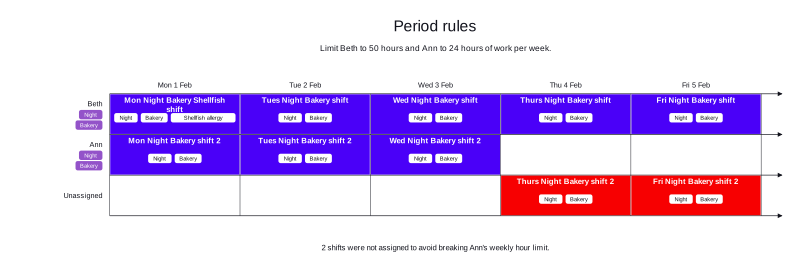
This example has two employees. Beth can work 50 hours per week, and Ann can work 24 hours per week. The schedule has ten shifts, each of which is eight hours long. Due to the period rules in each employee’s contract, and the shift make-up, Ann can work three shifts and Beth can work five. Therefore, two shifts remain unstaffed.
-
Input
-
Output
Try this example in Timefold Platform by saving this JSON into a file called sample.json and making the following API call:
|
curl -X POST -H "Content-type: application/json" -H 'X-API-KEY: <API_KEY>' https://app.timefold.ai/api/models/employee-scheduling/v1/schedules [email protected]{
"config": {
"run": {
"name": "Lesson 4: Period rules"
}
},
"modelInput": {
"contracts": [
{
"id": "fullTimeContract",
"periodRules": [
{
"id": "max10hoursPerDay_fullTimeContract",
"period": "DAY",
"minutesWorkedLimit": {
"minutesWorkedMax": 600
},
"satisfiability": "PREFERRED"
},
{
"id": "max50hoursPerWeek_fullTimeContract",
"period": "WEEK",
"minutesWorkedLimit": {
"minutesWorkedMax": 3000
},
"satisfiability": "REQUIRED"
}
]
},
{
"id": "partTimeContract",
"periodRules": [
{
"id": "max8hoursPerDay_partTimeContract",
"period": "DAY",
"minutesWorkedLimit": {
"minutesWorkedMax": 480
},
"satisfiability": "PREFERRED"
},
{
"id": "max24hoursPerWeek_partTimeContract",
"period": "WEEK",
"minutesWorkedLimit": {
"minutesWorkedMax": 1440
},
"satisfiability": "REQUIRED"
}
]
}
],
"employees": [
{
"id": "Beth",
"contracts": [
"fullTimeContract"
],
"skills": [
{
"id": "Night"
},
{
"id": "Bakery"
}
]
},
{
"id": "Ann",
"contracts": [
"partTimeContract"
],
"skills": [
{
"id": "Night"
},
{
"id": "Bakery"
}
],
"prohibitedRiskFactors": [
"Shellfish allergy"
]
}
],
"shifts": [
{
"id": "Mon Night Bakery Shellfish shift",
"start": "2027-02-01T00:00:00Z",
"end": "2027-02-01T08:00:00Z",
"requiredSkills": [
"Night",
"Bakery"
],
"riskFactors": [
"Shellfish allergy"
]
},
{
"id": "Mon Night Bakery shift 2",
"start": "2027-02-01T00:00:00Z",
"end": "2027-02-01T08:00:00Z",
"requiredSkills": [
"Night",
"Bakery"
]
},
{
"id": "Tues Night Bakery shift",
"start": "2027-02-02T00:00:00Z",
"end": "2027-02-02T08:00:00Z",
"requiredSkills": [
"Night",
"Bakery"
]
},
{
"id": "Tues Night Bakery shift 2",
"start": "2027-02-02T00:00:00Z",
"end": "2027-02-02T08:00:00Z",
"requiredSkills": [
"Night",
"Bakery"
]
},
{
"id": "Wed Night Bakery shift",
"start": "2027-02-03T00:00:00Z",
"end": "2027-02-03T08:00:00Z",
"requiredSkills": [
"Night",
"Bakery"
]
},
{
"id": "Wed Night Bakery shift 2",
"start": "2027-02-03T00:00:00Z",
"end": "2027-02-03T08:00:00Z",
"requiredSkills": [
"Night",
"Bakery"
]
},
{
"id": "Thurs Night Bakery shift",
"start": "2027-02-04T00:00:00Z",
"end": "2027-02-04T08:00:00Z",
"requiredSkills": [
"Night",
"Bakery"
]
},
{
"id": "Thurs Night Bakery shift 2",
"start": "2027-02-04T00:00:00Z",
"end": "2027-02-04T08:00:00Z",
"requiredSkills": [
"Night",
"Bakery"
]
},
{
"id": "Fri Night Bakery shift",
"start": "2027-02-05T00:00:00Z",
"end": "2027-02-05T08:00:00Z",
"requiredSkills": [
"Night",
"Bakery"
]
},
{
"id": "Fri Night Bakery shift 2",
"start": "2027-02-05T00:00:00Z",
"end": "2027-02-05T08:00:00Z",
"requiredSkills": [
"Night",
"Bakery"
]
}
]
}
}
To request the solution, locate the ID from the response to the post operation and append it to the following API call:
|
curl -X GET -H 'X-API-KEY: <API_KEY>' https://app.timefold.ai/api/models/employee-scheduling/v1/schedules/<ID>{
"metadata": {
"id": "b9c26bc4-8190-44da-aa76-7a4a25255672",
"originId": "b9c26bc4-8190-44da-aa76-7a4a25255672",
"name": "Lesson 4: Period rules",
"submitDateTime": "2026-09-22T15:28:49.230456143Z",
"startDateTime": "2026-09-22T15:28:59.44407139Z",
"activeDateTime": "2026-09-22T15:28:59.547425467Z",
"completeDateTime": "2026-09-22T15:29:29.963247863Z",
"shutdownDateTime": "2026-09-22T15:29:29.96326503Z",
"solverStatus": "SOLVING_COMPLETED",
"score": "0hard/-2medium/0soft",
"tags": [
"system.type:from-request",
"system.profile:Standard profile"
],
"validationResult": {
"summary": "OK"
}
},
"modelOutput": {
"shifts": [
{
"id": "Mon Night Bakery Shellfish shift",
"employee": "Beth"
},
{
"id": "Mon Night Bakery shift 2",
"employee": "Ann"
},
{
"id": "Tues Night Bakery shift",
"employee": "Beth"
},
{
"id": "Tues Night Bakery shift 2",
"employee": "Ann"
},
{
"id": "Wed Night Bakery shift",
"employee": "Beth"
},
{
"id": "Wed Night Bakery shift 2",
"employee": "Ann"
},
{
"id": "Thurs Night Bakery shift",
"employee": "Beth"
},
{
"id": "Thurs Night Bakery shift 2"
},
{
"id": "Fri Night Bakery shift",
"employee": "Beth"
},
{
"id": "Fri Night Bakery shift 2"
}
],
"employees": [
{
"id": "Beth",
"metrics": {
"assignedShifts": 5,
"durationWorked": "PT40H",
"overtimeThresholdDuration": "PT50H",
"overtimeWorked": "PT0S",
"maximumAvailabilityDuration": "PT50H"
}
},
{
"id": "Ann",
"metrics": {
"assignedShifts": 3,
"durationWorked": "PT24H",
"overtimeThresholdDuration": "PT24H",
"overtimeWorked": "PT0S",
"maximumAvailabilityDuration": "PT24H"
}
}
],
"generatedShifts": []
},
"inputMetrics": {
"employees": 2,
"shifts": 10,
"pinnedShifts": 0,
"mandatoryShifts": 10,
"optionalShifts": 0
},
"kpis": {
"assignedShifts": 8,
"unassignedShifts": 2,
"disruptionPercentage": 0,
"activatedEmployees": 2,
"assignedMandatoryShifts": 8
},
"run": {
"id": "b9c26bc4-8190-44da-aa76-7a4a25255672",
"originId": "b9c26bc4-8190-44da-aa76-7a4a25255672",
"name": "Lesson 4: Period rules",
"submitDateTime": "2026-09-22T15:28:49.230456143Z",
"startDateTime": "2026-09-22T15:28:59.44407139Z",
"activeDateTime": "2026-09-22T15:28:59.547425467Z",
"completeDateTime": "2026-09-22T15:29:29.963247863Z",
"shutdownDateTime": "2026-09-22T15:29:29.96326503Z",
"solverStatus": "SOLVING_COMPLETED",
"score": "0hard/-2medium/0soft",
"tags": [
"system.type:from-request",
"system.profile:Standard profile"
],
"validationResult": {
"summary": "OK"
}
}
}modelOutput contains the schedule with Beth assigned to five shifts and Ann assigned to three. Thurs Night Bakery shift 2 and Fri Night Bakery shift 2 remain unassigned, which gives a score of 0hard/-2medium/0soft.
Approaching other period rules
The other period rules follow a very similar approach to the one we have just covered. The main difference is that instead of specifying a minutesWorkedLimit, you must specify the appropriate limit for the type of period rule you are implementing. The limits are stated in the technical documentation for period rules:
-
Shifts worked (regardless of time in those shifts)
-
Days worked (regardless of time or shifts on those days)
-
Weekends worked (regardless of time)
-
Consecutive weekends worked (regardless of time)
Conclusion
In this lesson, we learned about:
-
How a period rule applies limits to calendar periods
-
How to implement a period rule in Timefold
-
How to implement a limit on time worked in a period rule
-
How to approach other types of period rules, which are implemented in a very similar way to the time worked limit.
Next
-
Proceed to Interlude: Basic demo data to learn about the Timefold basic demo example, which you should be able to fully comprehend based on Lessons 1 to 4.
-
Discover more in-depth technical details about period rules in their technical documentation linked above, such as the Minutes Worked Per Period documentation of the user guide.
-
Alternatively, go back to the Lessons overview to choose a different lesson to continue with.