Consecutive shifts worked
There are different techniques for managing employees' working hours.
For different scenarios see Work limits.
This guide shows you how to manage employees' hours with consecutive shifts worked per period, for instance, to limit the maximum number of consecutive shifts employees can be assigned to work, or to enforce a minimum rest period after a sequence of consecutive shifts.
Define consecutive shifts worked rules
Learn how to configure an API Key to run the examples in this guide:
In the examples, replace |
Consecutive shifts worked rules are defined in contracts.
{
  "contracts": [
    {
      "id": "NightShiftContract",
      "consecutiveShiftsWorkedRules": [
        {
          "id": "MaxConsecutiveNightShifts",
          "maximum": 5,
          "satisfiability": "REQUIRED",
          "sequenceDefinition": {
            "type": "MAX_MINUTES_BETWEEN_SHIFTS_STARTS",
            "triggerLimit": 2160
          },
          "condition": {
            "type": "MIN_SHIFTS_WORKED",
            "triggerLimit": 2,
            "includeShiftTags": ["Night"]
          },
          "timeOffAfterSequenceLimit": {
            "minTimeOffAfterSequence": "PT48H"
          }
        }
      ]
    }
  ]
}
A consecutiveShiftsWorkedRules must include an ID.
-
maximumdefines the maximum number of consecutive shifts an employee with this contract can work. At least one ofmaximumortimeOffAfterSequenceLimitmust be defined. They can be used together or independently. -
sequenceDefinitiondefines the type of sequence and the trigger limit for the consecutive shifts worked rule. In this example, the type isMAX_MINUTES_BETWEEN_SHIFTS_STARTSand the trigger limit is2160minutes (36 hours). This means that if an employee works a shift that starts within 36 hours of the previous shift’s start time, it will be considered part of the same sequence of consecutive shifts. -
conditiondefines the condition that triggers the consecutive shifts worked rule. In this example, the type isMIN_SHIFTS_WORKED, the trigger limit is2, and it includes shifts with the tagNight. This means that the consecutive shifts worked rule will only be triggered if at least two of the consecutive shifts have the tagNight. -
timeOffAfterSequenceLimitdefines the minimum rest time required after each consecutive shift sequence ends.
There are three options for sequenceDefinition:
-
Not including a
sequenceDefinitionmeans that shifts which start directly following on from each other are considered consecutive. For example, if an employee works a shift that ends at 8PM, and then directly after that works another shift that starts at 8PM, these two shifts would be considered consecutive. -
A
sequenceDefinitionwith typeMAX_MINUTES_BETWEEN_SHIFTS_STARTSdefines sequences by a customizable maximum number of minutes between the start times of consecutive shifts. For example, if the trigger limit is set to 1440 minutes (24 hours) and an employee works a shift that starts at 10AM, the next shift that they work which starts within 24 hours of this shift’s start time (i.e. starts up to 10AM the following day) would be considered part of the same sequence of consecutive shifts. -
A
sequenceDefinitionwith typeMAX_MINUTES_BETWEEN_SHIFT_END_AND_NEXT_STARTdefines sequences by a customizable maximum number of minutes between the end time of a shift and the start time of the next shift. For example, if the trigger limit is set to 1440 minutes (24 hours) and an employee works a shift that ends at 5PM, the next shift that they work which starts within 24 hours of this shift’s end time (i.e. up to 5PM the following day) would be considered part of the same sequence of consecutive shifts.
Filter shifts with tags
consecutiveShiftsWorkedRules can include or exclude shifts based on tags.
{
  "contracts": [
    {
      "id": "NightShiftContract",
      "consecutiveShiftsWorkedRules": [
        {
          "id": "MaxConsecutiveNightShifts",
          "maximum": 5,
          "satisfiability": "REQUIRED",
          "includeShiftTags": [
            "Night"
          ],
          "shiftTagMatches": "ALL",
          "sequenceDefinition": {
            "type": "MAX_MINUTES_BETWEEN_SHIFTS_STARTS",
            "triggerLimit": 2160
          }
        }
      ]
    }
  ]
}
Further information about including or excluding shifts with shift tags:
Shifts with specific tags can be included or excluded by the rule. Tags are defined in shifts:
{
  "shifts": [
    {
      "id": "2027-02-01",
      "start": "2027-02-01T09:00:00Z",
      "end": "2027-02-01T17:00:00Z",
      "tags": ["Part-time"]
    }
  ]
}
Use includeShiftTags to include shifts with specific tags or excludeShiftTags to exclude shifts with specific tags.
shiftTagMatches can be set to ALL or ANY.
The default behavior for shiftTagMatches is ALL, and if omitted, the default ALL will be used.
The rule can define either includeShiftTags or excludeShiftTags, but not both.
{
  "includeShiftTags": ["Part-time", "Weekend"],
  "shiftTagMatches": "ALL"
}
With shiftTagMatches set to ALL, all tags defined by the rule’s includeShiftTags attribute must be present in the shift. With shiftTagMatches set to ANY, at least one tag defined by the rule’s includeShiftTags attribute must be present in the shift.
{
  "excludeShiftTags": ["Part-time", "Weekend"],
  "shiftTagMatches": "ALL"
}
With shiftTagMatches set to ALL, all tags defined by the rule’s excludeShiftTags attribute cannot be present in the shift.
This is useful when you want to exclude things in combination with each other.
For instance, excluding the shift tags Part-time and Weekend with shiftTagMatches set to All, will exclude shifts that include the tags Part-time and Weekend from the rule.
Shifts tagged only Part-time or only Weekend will not be excluded.
With shiftTagMatches set to ANY, any of the tags defined by the rule’s excludeShiftTags attribute cannot be present in the shift.
This is useful when you need to exclude tags regardless of their relationship to other tags.
For instance, excluding the shift tags Part-time and Weekend with shiftTagMatches set to ANY, will exclude any shift that includes the tags Part-time or Weekend, whether they occur together or not.
|
Because the |
Condition types
The type field in condition controls how matching shifts are counted within a sequence.
MIN_SHIFTS_WORKED-
Counts the number of shifts assigned in the sequence and that match the
includeShiftTags. These shifts don’t have to be consecutive. For example, with a trigger limit of2and shifts tagged[Night, Day, Night], the count is 2 and the condition is met. MIN_SHIFTS_WORKED_CONSECUTIVELY-
Counts the number of consecutive shifts assigned in the sequence and that match the
includeShiftTags. For example, with a trigger limit of2,includeShiftTags: "Night"and three shifts in a sequence tagged with "Night", "Day" and "Night" respectively, the count reaches 1, resets to 0 onDay, then reaches 1 again. The condition is never met. If instead the shifts are respectively tagged with "Night", "Night" and "Day", the count reaches 2 and the condition is met.
{
  "contracts": [
    {
      "id": "EmergencyContract",
      "consecutiveShiftsWorkedRules": [
        {
          "id": "RestAfterConsecutiveEmergencyShifts",
          "satisfiability": "REQUIRED",
          "sequenceDefinition": {
            "type": "MAX_MINUTES_BETWEEN_SHIFTS_STARTS",
            "triggerLimit": 2160
          },
          "condition": {
            "type": "MIN_SHIFTS_WORKED_CONSECUTIVELY",
            "triggerLimit": 2,
            "includeShiftTags": ["Emergency"]
          },
          "timeOffAfterSequenceLimit": {
            "minTimeOffAfterSequence": "PT48H"
          }
        }
      ]
    }
  ]
}
Minimum rest after sequence
The timeOffAfterSequenceLimit field enforces the time off between the end of one consecutive shift sequence and the start of the next.
-
minTimeOffAfterSequencedefines the minimum duration of time off required after the last shift in a sequence before the next sequence can begin. The value is an ISO 8601 duration (for example,PT48Hfor 48 hours).
When timeOffAfterSequenceLimit is configured, the model measures the gap between the end of the last shift in each sequence and the start of the first shift in the following sequence. If that gap is shorter than minTimeOffAfterSequence, a constraint violation occurs.
|
|
Required consecutive shifts worked
When the satisfiability of the rule is REQUIRED, the Consecutive shifts worked not in required range for employee hard constraint is invoked, which makes sure the number of consecutive shifts does not exceed the limit specified in maximum.
Shifts will be left unassigned if assigning them would break the Consecutive shifts worked not in required range for employee constraint.
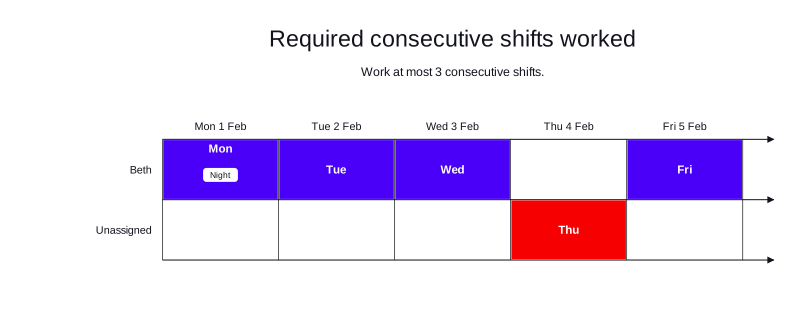
Required consecutive shifts worked example
In the following example, there are five shifts and one employee.
Beth has a contract that allows them to work a required maximum of three consecutive shifts if she works a night shift.
The sequenceDefinition specifies shifts are consecutive if they start within 24 hours of each other.
Beth is assigned three consecutive shifts and one shift is left unassigned.
-
Input
-
Output
Try this example in Timefold Platform by saving this JSON into a file called sample.json and make the following API call:
|
curl -X POST -H "Content-type: application/json" -H 'X-API-KEY: <API_KEY>' https://app.timefold.ai/api/models/employee-scheduling/v1/schedules [email protected]{
"config": {
"run": {
"name": "Required consecutive shifts worked example"
}
},
"modelInput": {
"contracts": [
{
"id": "fullTimeContract",
"consecutiveShiftsWorkedRules": [
{
"id": "Max3ConsecutiveShiftsIfOneIsANightShift",
"maximum": 3,
"satisfiability": "REQUIRED",
"sequenceDefinition": {
"triggerLimit": 1440,
"type": "MAX_MINUTES_BETWEEN_SHIFTS_STARTS"
},
"condition": {
"type": "MIN_SHIFTS_WORKED",
"triggerLimit": 1,
"includeShiftTags": [
"Night"
]
}
}
]
}
],
"employees": [
{
"id": "Beth",
"contracts": [
"fullTimeContract"
]
}
],
"shifts": [
{
"id": "Mon",
"start": "2027-02-01T20:00:00Z",
"end": "2027-02-02T04:00:00Z",
"tags": [
"Night"
]
},
{
"id": "Tue",
"start": "2027-02-02T09:00:00Z",
"end": "2027-02-02T17:00:00Z"
},
{
"id": "Wed",
"start": "2027-02-03T09:00:00Z",
"end": "2027-02-03T17:00:00Z"
},
{
"id": "Thu",
"start": "2027-02-04T09:00:00Z",
"end": "2027-02-04T17:00:00Z"
},
{
"id": "Fri",
"start": "2027-02-05T09:00:00Z",
"end": "2027-02-05T17:00:00Z"
}
]
}
}
To request the solution, locate the ID from the response to the post operation and append it to the following API call:
|
curl -X GET -H 'X-API-KEY: <API_KEY>' https://app.timefold.ai/api/models/employee-scheduling/v1/schedules/<ID>{
"metadata": {
"id": "df8e6f07-f8dd-49ab-8d0c-7a2296fd3ff6",
"originId": "df8e6f07-f8dd-49ab-8d0c-7a2296fd3ff6",
"name": "Required consecutive shifts worked example",
"submitDateTime": "2026-04-13T10:32:21.590421+02:00",
"startDateTime": "2026-04-13T10:32:21.601065+02:00",
"activeDateTime": "2026-04-13T10:32:21.601493+02:00",
"completeDateTime": "2026-04-13T10:32:51.606807+02:00",
"shutdownDateTime": "2026-04-13T10:32:51.606811+02:00",
"solverStatus": "SOLVING_COMPLETED",
"score": "0hard/-1medium/0soft",
"validationResult": {
"summary": "OK"
}
},
"modelOutput": {
"shifts": [
{
"id": "Mon",
"employee": "Beth"
},
{
"id": "Tue",
"employee": "Beth"
},
{
"id": "Wed",
"employee": "Beth"
},
{
"id": "Thu"
},
{
"id": "Fri",
"employee": "Beth"
}
],
"employees": [
{
"id": "Beth",
"metrics": {
"assignedShifts": 4,
"durationWorked": "PT32H"
}
}
]
},
"inputMetrics": {
"employees": 1,
"shifts": 5,
"pinnedShifts": 0,
"mandatoryShifts": 5,
"optionalShifts": 0
},
"kpis": {
"assignedShifts": 4,
"unassignedShifts": 1,
"disruptionPercentage": 0.0,
"activatedEmployees": 1,
"assignedMandatoryShifts": 4
},
"run": {
"id": "df8e6f07-f8dd-49ab-8d0c-7a2296fd3ff6",
"originId": "df8e6f07-f8dd-49ab-8d0c-7a2296fd3ff6",
"name": "Required consecutive shifts worked example",
"submitDateTime": "2026-04-13T10:32:21.590421+02:00",
"startDateTime": "2026-04-13T10:32:21.601065+02:00",
"activeDateTime": "2026-04-13T10:32:21.601493+02:00",
"completeDateTime": "2026-04-13T10:32:51.606807+02:00",
"shutdownDateTime": "2026-04-13T10:32:51.606811+02:00",
"solverStatus": "SOLVING_COMPLETED",
"score": "0hard/-1medium/0soft",
"validationResult": {
"summary": "OK"
}
}
}Required minimum rest after shift sequence
When satisfiability is REQUIRED and timeOffAfterSequenceLimit is set, the Time off after consecutive shifts worked not in required range for employee hard constraint is invoked.
The constraint measures the rest time between the end of the last shift in a sequence and the start of the first shift in the following sequence. The penalty is equal to the number of minutes of time off missing from the minimum, which requires the model to leave the offending shift unassigned rather than violate the minimum rest requirement.
Shifts will be left unassigned if assigning them would cause insufficient rest after the previous sequence.
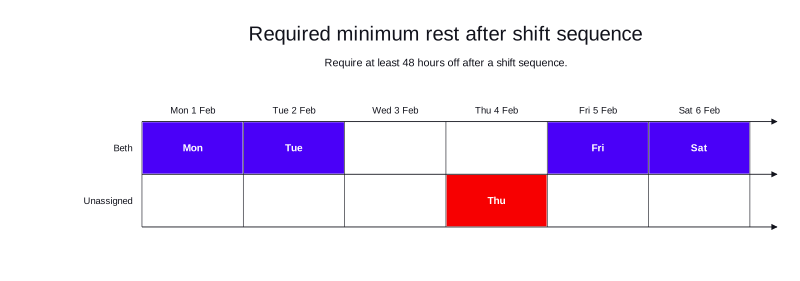
Required minimum rest after shift sequence example
In the following example, there are four shifts and one employee.
Beth has a contract requiring at least 48 hours of rest after each consecutive shift sequence.
The sequenceDefinition specifies that shifts are consecutive if they start within 36 hours of each other.
-
Mon and Tue night shifts form the first sequence (24-hour gap between starts, within the 36-hour window).
-
Thu day shift starts 37 hours after Tue night’s start, making it a new sequence. However, only 29 hours separate the end of the Mon–Tue sequence from Thu’s start, which is less than the required 48 hours.
-
Fri day shift starts within 24h of the Thu shift. If Thu is unassigned, the rest from the Mon–Tue sequence end to Fri is 53 hours, which satisfies the 48-hour requirement.
-
Sat day shift starts 24h hours after Fri’s start.
The optimal solution leaves Thu unassigned to avoid violating the rest requirement, while Mon, Tue, Fri and Sat are all assigned to Beth.
-
Input
-
Output
Try this example in Timefold Platform by saving this JSON into a file called sample.json and make the following API call:
|
curl -X POST -H "Content-type: application/json" -H 'X-API-KEY: <API_KEY>' https://app.timefold.ai/api/models/employee-scheduling/v1/schedules [email protected]{
"config": {
"run": {
"name": "Required minimum rest after shift sequence example"
}
},
"modelInput": {
"contracts": [
{
"id": "fullTimeContract",
"consecutiveShiftsWorkedRules": [
{
"id": "Min48HRestAfterSequence",
"satisfiability": "REQUIRED",
"sequenceDefinition": {
"triggerLimit": 2160,
"type": "MAX_MINUTES_BETWEEN_SHIFTS_STARTS"
},
"timeOffAfterSequenceLimit": {
"minTimeOffAfterSequence": "PT48H"
}
}
]
}
],
"employees": [
{
"id": "Beth",
"contracts": [
"fullTimeContract"
]
}
],
"shifts": [
{
"id": "Mon",
"start": "2027-02-01T20:00:00Z",
"end": "2027-02-02T04:00:00Z"
},
{
"id": "Tue",
"start": "2027-02-02T20:00:00Z",
"end": "2027-02-03T04:00:00Z"
},
{
"id": "Thu",
"start": "2027-02-04T09:00:00Z",
"end": "2027-02-04T17:00:00Z"
},
{
"id": "Fri",
"start": "2027-02-05T09:00:00Z",
"end": "2027-02-05T17:00:00Z"
},
{
"id": "Sat",
"start": "2027-02-06T09:00:00Z",
"end": "2027-02-06T17:00:00Z"
}
]
}
}
To request the solution, locate the ID from the response to the post operation and append it to the following API call:
|
curl -X GET -H 'X-API-KEY: <API_KEY>' https://app.timefold.ai/api/models/employee-scheduling/v1/schedules/<ID>{
"metadata": {
"id": "4feaf6ed-2787-4264-ab21-fd2e6eedef06",
"originId": "4feaf6ed-2787-4264-ab21-fd2e6eedef06",
"name": "Required minimum rest after shift sequence example",
"submitDateTime": "2026-06-01T16:22:31.772766+02:00",
"startDateTime": "2026-06-01T16:22:31.793653+02:00",
"activeDateTime": "2026-06-01T16:22:31.794418+02:00",
"completeDateTime": "2026-06-01T16:23:01.799625+02:00",
"shutdownDateTime": "2026-06-01T16:23:01.799628+02:00",
"solverStatus": "SOLVING_COMPLETED",
"score": "0hard/-1medium/0soft",
"validationResult": {
"summary": "OK"
}
},
"modelOutput": {
"shifts": [
{
"id": "Mon",
"employee": "Beth"
},
{
"id": "Tue",
"employee": "Beth"
},
{
"id": "Thu"
},
{
"id": "Fri",
"employee": "Beth"
},
{
"id": "Sat",
"employee": "Beth"
}
],
"employees": [
{
"id": "Beth",
"metrics": {
"assignedShifts": 4,
"durationWorked": "PT32H"
}
}
],
"generatedShifts": []
},
"inputMetrics": {
"employees": 1,
"shifts": 5,
"pinnedShifts": 0,
"mandatoryShifts": 5,
"optionalShifts": 0
},
"kpis": {
"assignedShifts": 4,
"unassignedShifts": 1,
"disruptionPercentage": 0,
"activatedEmployees": 1,
"assignedMandatoryShifts": 4
},
"run": {
"id": "4feaf6ed-2787-4264-ab21-fd2e6eedef06",
"originId": "4feaf6ed-2787-4264-ab21-fd2e6eedef06",
"name": "Required minimum rest after shift sequence example",
"submitDateTime": "2026-06-01T16:22:31.772766+02:00",
"startDateTime": "2026-06-01T16:22:31.793653+02:00",
"activeDateTime": "2026-06-01T16:22:31.794418+02:00",
"completeDateTime": "2026-06-01T16:23:01.799625+02:00",
"shutdownDateTime": "2026-06-01T16:23:01.799628+02:00",
"solverStatus": "SOLVING_COMPLETED",
"score": "0hard/-1medium/0soft",
"validationResult": {
"summary": "OK"
}
}
}Preferred consecutive shifts worked
When the satisfiability of the rule is PREFERRED, the Consecutive shifts worked not in preferred range for employee soft constraint is invoked.
With a satisfiability of PREFERRED a maximum value can be provided to set the maximum number of consecutive shifts an employee can be assigned.
{
  "contracts": [
    {
      "id": "FullTimeContract",
      "consecutiveShiftsWorkedRules": [
        {
          "id": "Min2Max3ConsecutiveShifts",
          "maximum": 3,
          "satisfiability": "PREFERRED"
        }
      ]
    }
  ]
}
The Consecutive shifts worked not in preferred range for employee soft constraint is invoked when satisfiability is PREFERRED and an employee’s consecutive worked-shift sequence is more than maximum.
The constraint adds a soft penalty to the dataset score based on the number of shifts outside the preferred range, multiplied by the employee priority multiplier and the contract’s priority weight. To ensure shift-count constraints are comparable to time-based constraints, the penalty is also multiplied by 480 (an estimated average shift duration in minutes, used for normalization). This normalization helps Timefold balance consecutive shift limits against other scheduling preferences.
Shifts will still be assigned even if assigning them breaks this constraint.
|
Every soft constraint has a weight that can be configured to change the relative importance of the constraint compared to other constraints. Learn about constraint weights. |
| This rule is more likely to be satisfied for employees with a higher employee priority. See Employee priority for more details. |
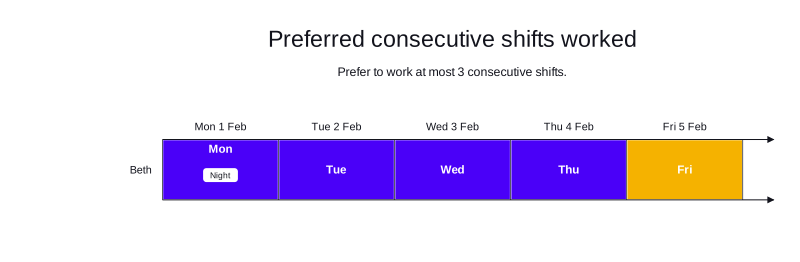
Preferred consecutive shifts worked example
In the following example, there are five shifts and one employee.
Beth has a contract that allows them to work a preferred maximum of three consecutive shifts if she works a night shift.
The sequenceDefinition specifies shifts are consecutive if they start within 24 hours of each other.
Beth is assigned all five consecutive shifts and a soft penalty is applied to the dataset score.
-
Input
-
Output
Try this example in Timefold Platform by saving this JSON into a file called sample.json and make the following API call:
|
curl -X POST -H "Content-type: application/json" -H 'X-API-KEY: <API_KEY>' https://app.timefold.ai/api/models/employee-scheduling/v1/schedules [email protected]{
"config": {
"run": {
"name": "Preferred consecutive shifts worked example"
}
},
"modelInput": {
"contracts": [
{
"id": "fullTimeContract",
"consecutiveShiftsWorkedRules": [
{
"id": "Max3ConsecutiveShiftsIfOneIsANightShift",
"maximum": 3,
"satisfiability": "PREFERRED",
"sequenceDefinition": {
"triggerLimit": 1440,
"type": "MAX_MINUTES_BETWEEN_SHIFTS_STARTS"
},
"condition": {
"type": "MIN_SHIFTS_WORKED",
"triggerLimit": 1,
"includeShiftTags": [
"Night"
]
}
}
]
}
],
"employees": [
{
"id": "Beth",
"contracts": [
"fullTimeContract"
]
}
],
"shifts": [
{
"id": "Mon",
"start": "2027-02-01T20:00:00Z",
"end": "2027-02-02T04:00:00Z",
"tags": [
"Night"
]
},
{
"id": "Tue",
"start": "2027-02-02T09:00:00Z",
"end": "2027-02-02T17:00:00Z"
},
{
"id": "Wed",
"start": "2027-02-03T09:00:00Z",
"end": "2027-02-03T17:00:00Z"
},
{
"id": "Thu",
"start": "2027-02-04T09:00:00Z",
"end": "2027-02-04T17:00:00Z"
},
{
"id": "Fri",
"start": "2027-02-05T09:00:00Z",
"end": "2027-02-05T17:00:00Z"
}
]
}
}
To request the solution, locate the ID from the response to the post operation and append it to the following API call:
|
curl -X GET -H 'X-API-KEY: <API_KEY>' https://app.timefold.ai/api/models/employee-scheduling/v1/schedules/<ID>{
"metadata": {
"id": "20159956-f814-41ab-9696-b05ccbf4daf7",
"originId": "20159956-f814-41ab-9696-b05ccbf4daf7",
"name": "Preferred consecutive shifts worked example",
"submitDateTime": "2026-04-13T10:40:14.440929+02:00",
"startDateTime": "2026-04-13T10:40:14.481294+02:00",
"activeDateTime": "2026-04-13T10:40:14.48177+02:00",
"completeDateTime": "2026-04-13T10:40:44.487597+02:00",
"shutdownDateTime": "2026-04-13T10:40:44.487601+02:00",
"solverStatus": "SOLVING_COMPLETED",
"score": "0hard/0medium/-1920soft",
"validationResult": {
"summary": "OK"
}
},
"modelOutput": {
"shifts": [
{
"id": "Mon",
"employee": "Beth"
},
{
"id": "Tue",
"employee": "Beth"
},
{
"id": "Wed",
"employee": "Beth"
},
{
"id": "Thu",
"employee": "Beth"
},
{
"id": "Fri",
"employee": "Beth"
}
],
"employees": [
{
"id": "Beth",
"metrics": {
"assignedShifts": 5,
"durationWorked": "PT40H"
}
}
]
},
"inputMetrics": {
"employees": 1,
"shifts": 5,
"pinnedShifts": 0,
"mandatoryShifts": 5,
"optionalShifts": 0
},
"kpis": {
"assignedShifts": 5,
"unassignedShifts": 0,
"disruptionPercentage": 0.0,
"activatedEmployees": 1,
"assignedMandatoryShifts": 5
},
"run": {
"id": "20159956-f814-41ab-9696-b05ccbf4daf7",
"originId": "20159956-f814-41ab-9696-b05ccbf4daf7",
"name": "Preferred consecutive shifts worked example",
"submitDateTime": "2026-04-13T10:40:14.440929+02:00",
"startDateTime": "2026-04-13T10:40:14.481294+02:00",
"activeDateTime": "2026-04-13T10:40:14.48177+02:00",
"completeDateTime": "2026-04-13T10:40:44.487597+02:00",
"shutdownDateTime": "2026-04-13T10:40:44.487601+02:00",
"solverStatus": "SOLVING_COMPLETED",
"score": "0hard/0medium/-1920soft",
"validationResult": {
"summary": "OK"
}
}
}Preferred minimum rest after shift sequence
When satisfiability is PREFERRED and timeOffAfterSequenceLimit is set, the Time off after consecutive shifts worked not in preferred range for employee soft constraint is invoked.
The penalty is equal to the number of minutes of time off missing from the minimum, multiplied by the employee’s priority multiplier and the contract’s priority weight. Shifts are still assigned even when they violate the minimum rest requirement, but the model is incentivized to find assignments that respect it.
|
Every soft constraint has a weight that can be configured to change the relative importance of the constraint compared to other constraints. Learn about constraint weights. |
| This rule is more likely to be satisfied for employees with a higher employee priority. See Employee priority for more details. |
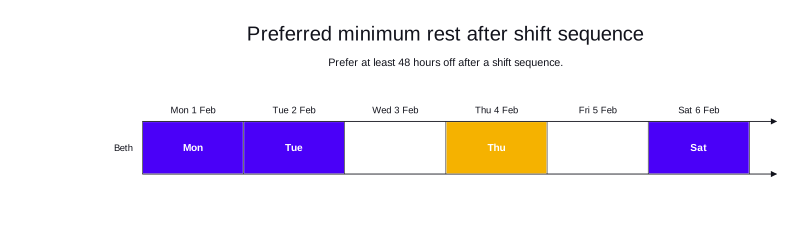
Preferred minimum rest after shift sequence example
In the following example, there are four shifts and one employee.
Beth has a contract preferring at least 48 hours of rest after each consecutive shift sequence.
The sequenceDefinition specifies that shifts are consecutive if they start within 36 hours of each other.
All four shifts are assigned to Beth. Thu and Sat each start new sequences with insufficient rest from the previous sequence, so a soft penalty is applied to the score.
-
Input
-
Output
Try this example in Timefold Platform by saving this JSON into a file called sample.json and make the following API call:
|
curl -X POST -H "Content-type: application/json" -H 'X-API-KEY: <API_KEY>' https://app.timefold.ai/api/models/employee-scheduling/v1/schedules [email protected]{
"config": {
"run": {
"name": "Preferred minimum rest after shift sequence example"
}
},
"modelInput": {
"contracts": [
{
"id": "fullTimeContract",
"consecutiveShiftsWorkedRules": [
{
"id": "Min48HRestAfterSequence",
"satisfiability": "PREFERRED",
"sequenceDefinition": {
"triggerLimit": 2160,
"type": "MAX_MINUTES_BETWEEN_SHIFTS_STARTS"
},
"timeOffAfterSequenceLimit": {
"minTimeOffAfterSequence": "PT48H"
}
}
]
}
],
"employees": [
{
"id": "Beth",
"contracts": [
"fullTimeContract"
]
}
],
"shifts": [
{
"id": "Mon",
"start": "2027-02-01T20:00:00Z",
"end": "2027-02-02T04:00:00Z"
},
{
"id": "Tue",
"start": "2027-02-02T20:00:00Z",
"end": "2027-02-03T04:00:00Z"
},
{
"id": "Thu",
"start": "2027-02-04T09:00:00Z",
"end": "2027-02-04T17:00:00Z"
},
{
"id": "Sat",
"start": "2027-02-06T09:00:00Z",
"end": "2027-02-06T17:00:00Z"
}
]
}
}
To request the solution, locate the ID from the response to the post operation and append it to the following API call:
|
curl -X GET -H 'X-API-KEY: <API_KEY>' https://app.timefold.ai/api/models/employee-scheduling/v1/schedules/<ID>{
"metadata": {
"id": "ccb61ff9-39ab-498d-8409-0f390f62d468",
"originId": "ccb61ff9-39ab-498d-8409-0f390f62d468",
"name": "Preferred minimum rest after shift sequence example",
"submitDateTime": "2026-06-01T16:20:40.055023+02:00",
"startDateTime": "2026-06-01T16:20:40.180841+02:00",
"activeDateTime": "2026-06-01T16:20:40.181271+02:00",
"solverStatus": "SOLVING_ACTIVE",
"score": "0hard/0medium/-3240soft",
"validationResult": {
"summary": "OK"
}
},
"modelOutput": {
"shifts": [
{
"id": "Mon",
"employee": "Beth"
},
{
"id": "Tue",
"employee": "Beth"
},
{
"id": "Thu",
"employee": "Beth"
},
{
"id": "Sat",
"employee": "Beth"
}
],
"employees": [
{
"id": "Beth",
"metrics": {
"assignedShifts": 4,
"durationWorked": "PT32H"
}
}
],
"generatedShifts": []
},
"inputMetrics": {
"employees": 1,
"shifts": 4,
"pinnedShifts": 0,
"mandatoryShifts": 4,
"optionalShifts": 0
},
"kpis": {
"assignedShifts": 4,
"unassignedShifts": 0,
"disruptionPercentage": 0,
"activatedEmployees": 1,
"assignedMandatoryShifts": 4
},
"run": {
"id": "ccb61ff9-39ab-498d-8409-0f390f62d468",
"originId": "ccb61ff9-39ab-498d-8409-0f390f62d468",
"name": "Preferred minimum rest after shift sequence example",
"submitDateTime": "2026-06-01T16:20:40.055023+02:00",
"startDateTime": "2026-06-01T16:20:40.180841+02:00",
"activeDateTime": "2026-06-01T16:20:40.181271+02:00",
"solverStatus": "SOLVING_ACTIVE",
"score": "0hard/0medium/-3240soft",
"validationResult": {
"summary": "OK"
}
}
}Managing overtime
Rules with a satisfiability of REQUIRED put a hard limit on how much work employees can be assigned (minutes, hours, days, shifts), and doesn’t assign overtime.
A rule with a satisfiability of REQUIRED that states an employee can work a maximum of 4 consecutive shifts, will never assign the employee more than 4 consecutive shifts, even if assigning overtime would be beneficial to the overall schedule.
To allow for the possibility of overtime, use rules with a satisfiability of PREFERRED.
Set a rule with a PREFERRED satisfiability for the maximum number of consecutive shifts.
Now, a rule with a satisfiability of PREFERRED that states an employee can preferably work a maximum of 4 consecutive shifts will allow the employee to be assigned more consecutive shifts (overtime) than specified by the rule when it is necessary to do so.
To place a limit on the total amount of overtime employees can be assigned, include both:
-
A rule with
PREFERREDsatisfiability for the maximum number of consecutive shifts that is equivalent to the employees normal consecutive shifts. -
A rule with
REQUIREDsatisfiability for the maximum number of consecutive shifts (regular hours plus overtime).
The difference between the PREFERRED maximum consecutive shifts and REQUIRED maximum consecutive shifts is the total amount of overtime that can be assigned to employees.
Next
-
See the full API spec or try the online API.
-
Learn more about employee shift scheduling from our YouTube playlist.
-
See other options for managing employees' work hours: Work limits.