Employee rates
Different employees have different rates of base pay and overtime pay. By defining employees rates, you can manage the cost of assigning different employees to shifts.
This guide explains managing employees' rates:
Define employee rates
Cost can also be defined for time worked by an employee during a certain period.
The example below defines a cost definition as a part of a period rule on a contract.
The period rule has a mandatory PREFERRED satisfiability and a configurable period DAY.
{
  "contracts": [
    {
      "id": "employeeOvertimeActivationCost",
      "periodRules": [
        {
          "id": "dailyWork",
          "period": "DAY",
          "satisfiability": "PREFERRED",
          "costDefinition": {
            "baseMinutesLimit": 480,
            "baseHourlyCost": 20,
            "overtimeCostDetails": [
              {
                "overtimeMinutesLimit": 120,
                "overtimeHourlyCost": 30
              },
              {
                "overtimeHourlyCost": 40
              }
            ]
          }
        }
      ]
    }
  ]
}
costDefinition includes baseMinutesLimit, baseHourlyCost and overtimeCostDetails.
baseMinutesLimit specifies how long the baseHourlyCost applies, for instance, 480 minutes (or 8 hours).
If this field is empty, then no overtimeCostDetails are allowed and the baseHourlyCost will be applied to all of the time worked within the period.
baseHourlyCost sets the hourly cost of the employee, for instance, $20 an hour.
overtimeCostDetails includes overtimeMinutesLimit and overtimeHourlyCost.
overtimeMinutesLimit specifies how long the overtimeHourlyCost applies, for instance, 120 minutes (or 2 hours).
The overtimeMinutesLimit can be omitted on the last overtimeCostDetail object.
This will apply the overtimeHourlyCost to all the remaining time worked in the period.
overtimeHourlyCost sets the hourly overtime cost, for instance, $30 an hour.
If the minutes worked for an employee surpass the 10 hours of work (baseMinutesLimit + first overtimeMinutesLimit),
the second overtime cost detail will define how the cost is calculated. In this case that would be $40.
You can add multiple overtimeCostDetails to cover different overtime periods.
The order in which you provide these details matters.
The first overtimeCostDetail provided, will be the first that will be processed.
In this example the minutes worked for an employee surpass the 10 hours of work (baseMinutesLimit + first overtimeMinutesLimit),
the second overtime cost detail will define how the cost is calculated. In this case, that would be $40.
The second overtime cost definition doesn’t have an overtimeMinutesLimit, so the overtimeHourlyCost will apply to all minutes worked till the period’s end.
| whenever an employee starts an hour, the cost of a full hour will be counted. So if, for example, an employee works 65min, then the cost of 2 hours will be counted towards their total. |
Filter shifts with tags
periodRules can include or exclude shifts based on shift tags.
Further information about including or excluding shifts with shift tags:
Shifts with specific tags can be included or excluded by the rule. Tags are defined in shifts:
{
  "shifts": [
    {
      "id": "2027-02-01",
      "start": "2027-02-01T09:00:00Z",
      "end": "2027-02-01T17:00:00Z",
      "tags": ["Part-time"]
    }
  ]
}
Use includeShiftTags to include shifts with specific tags or excludeShiftTags to exclude shifts with specific tags.
shiftTagMatches can be set to ALL or ANY.
The default behavior for shiftTagMatches is ALL, and if omitted, the default ALL will be used.
The rule can define either includeShiftTags or excludeShiftTags, but not both.
{
  "includeShiftTags": ["Part-time", "Weekend"],
  "shiftTagMatches": "ALL"
}
With shiftTagMatches set to ALL, all tags defined by the rule’s includeShiftTags attribute must be present in the shift. With shiftTagMatches set to ANY, at least one tag defined by the rule’s includeShiftTags attribute must be present in the shift.
{
  "excludeShiftTags": ["Part-time", "Weekend"],
  "shiftTagMatches": "ALL"
}
With shiftTagMatches set to ALL, all tags defined by the rule’s excludeShiftTags attribute cannot be present in the shift.
This is useful when you want to exclude things in combination with each other.
For instance, excluding the shift tags Part-time and Weekend with shiftTagMatches set to All, will exclude shifts that include the tags Part-time and Weekend from the rule.
Shifts tagged only Part-time or only Weekend will not be excluded.
With shiftTagMatches set to ANY, any of the tags defined by the rule’s excludeShiftTags attribute cannot be present in the shift.
This is useful when you need to exclude tags regardless of their relationship to other tags.
For instance, excluding the shift tags Part-time and Weekend with shiftTagMatches set to ANY, will exclude any shift that includes the tags Part-time or Weekend, whether they occur together or not.
Rule Validity Date Time Span
To define a time span when the rule is applied, add ruleValidityDateTimeSpan with start and end times.
start and end values do not accept a time zone specification.
|
If not provided, the rule is always valid in the period configured.
{
  "ruleValidityDateTimeSpan": {
    "start": "2027-02-01T00:00:00",
    "end": "2027-02-08T00:00:00"
  }
}
Overtime activation cost
The following example demonstrates how to include an activation cost that must be applied when the employee starts working overtime.
Here the employee must work 8 hours a day at the base rate $20/h.
After 8 hours of work they start working overtime.
This overtime costs $30/h, but also has an activation cost of $50.
That is why there are two overtimeCostDetails.
The former defines a overtimeHourlyCost of $80 ($30 + $50) and spans over the first hour.
Every subsequent hour costs $30 as per the latter overtime cost detail.
{
  "contracts": [
    {
      "id": "employeeOvertimeActivationCost",
      "periodRules": [
        {
          "id": "dailyWork",
          "period": "DAY",
          "satisfiability": "PREFERRED",
          "costDefinition": {
            "baseMinutesLimit": 480,
            "baseHourlyCost": 20,
            "overtimeCostDetails": [
              {
                "overtimeMinutesLimit": 60,
                "overtimeHourlyCost": 80
              },
              {
                "overtimeHourlyCost": 30
              }
            ]
          }
        }
      ]
    }
  ]
}
Mixed recurrent costs
The following example demonstrates how to deal with complex cost situations, like combining the cost of working on weekdays, weekend days or holidays.
Here the employee must work 8 hours a day at the base cost and costs double during overtime.
-
On weekdays the base cost is $15 and the overtime cost is $30.
-
During the weekend the base cost is $20 and the overtime cost is $40.
-
During holidays the base cost is $30 and the overtime cost is $60.
{
  "contracts": [
    {
      "id": "employeeMixedRecurrentCosts",
      "periodRules": [
        {
          "id": "weekdayCost",
          "period": "DAY",
          "includeShiftTags": ["WEEKDAY"],
          "satisfiability": "PREFERRED",
          "costDefinition": {
            "baseMinutesLimit": 480,
            "baseHourlyCost": 15,
            "overtimeCostDetails": [
              {
                "overtimeMinutesLimit": 960,
                "overtimeHourlyCost": 30
              }
            ]
          }
        },
        {
          "id": "weekendCost",
          "period": "DAY",
          "includeShiftTags": ["WEEKEND"],
          "satisfiability": "PREFERRED",
          "costDefinition": {
            "baseMinutesLimit": 480,
            "baseHourlyCost": 20,
            "overtimeCostDetails": [
              {
                "overtimeMinutesLimit": 960,
                "overtimeHourlyCost": 40
              }
            ]
          }
        },
        {
          "id": "holidayCost",
          "period": "DAY",
          "includeShiftTags": ["HOLIDAY"],
          "satisfiability": "PREFERRED",
          "costDefinition": {
            "baseMinutesLimit": 480,
            "baseHourlyCost": 30,
            "overtimeCostDetails": [
              {
                "overtimeMinutesLimit": 960,
                "overtimeHourlyCost": 60
              }
            ]
          }
        }
      ]
    }
  ]
}
Alternatively you can configure an hourly cost per day and configure other period rules to add to this hourly cost. The example below has 3 cost definitions that work together to achieve a correct overall cost. Firstly, a general cost, that is the cost that is applicable to every day. Secondly it defines a Sunday cost, that is only applied on Sundays. The general cost and the Sunday cost will be added together to get the real cost of time worked on a Sunday. Thirdly a cost is defined for holidays, which in this case is a bonus of $10.
With this configuration employees will be paid $20/h on weekdays, with a +50% increase on holidays. On Sundays they will also be paid +50%. But if a holiday coincides with a Sunday, then they will be paid +100%.
{
  "contracts": [
    {
      "id": "employeeMixedRecurrentCosts",
      "periodRules": [
        {
          "id": "generalCost",
          "period": "DAY",
          "satisfiability": "PREFERRED",
          "costDefinition": {
            "baseMinutesLimit": 480,
            "baseHourlyCost": 20
          }
        },
        {
          "id": "sundayCost",
          "period": "SUNDAY",
          "satisfiability": "PREFERRED",
          "costDefinition": {
            "baseMinutesLimit": 480,
            "baseHourlyCost": 10
          }
        },
        {
          "id": "holidayCost",
          "period": "DAY",
          "includeShiftTags": ["HOLIDAY"],
          "satisfiability": "PREFERRED",
          "costDefinition": {
            "baseMinutesLimit": 480,
            "baseHourlyCost": 10
          }
        }
      ]
    }
  ]
}
Manage overtime costs
When cost definitions are defined, the Minimize cost per period soft constraint is invoked, which adds a soft penalty to the dataset score based on the cost of the shift.
Timefold is incentivized to use solutions with the best score.
|
Every soft constraint has a weight that can be configured to change the relative importance of the constraint compared to other constraints. Learn about constraint weights. |
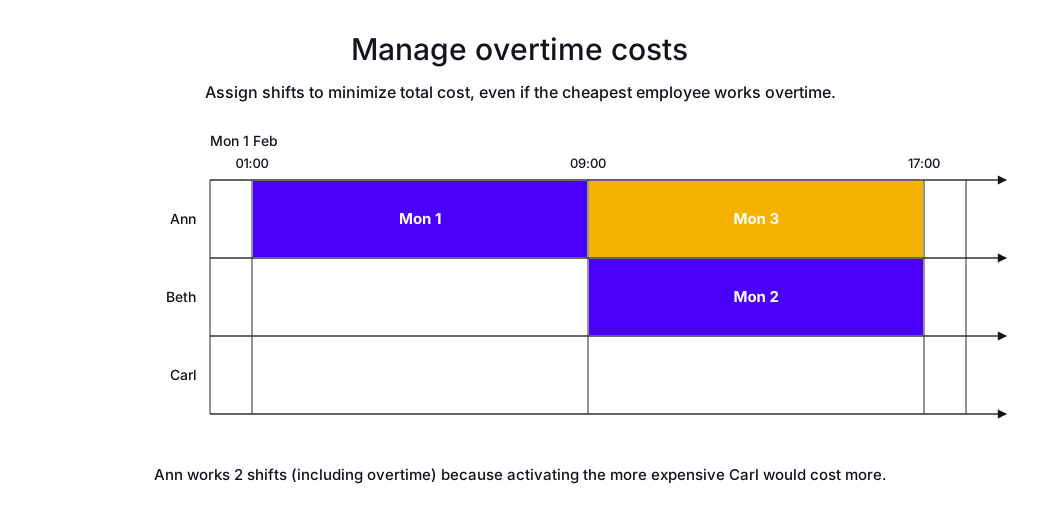
In the following example, there are three shifts and three employees with different contracts that specify different hourly rates. The cheapest employee is assigned to two of the shifts and the second cheapest employee is assigned to the remaining shift. If the cheapest employee were assigned to the remaining shift, it would cost more than if the second cheapest employee were assigned, due to overtime.
-
Input
-
Output
Try this example in Timefold Platform by saving this JSON into a file called sample.json and make the following API call:
|
curl -X POST -H "Content-type: application/json" -H 'X-API-KEY: <API_KEY>' https://app.timefold.ai/api/models/employee-scheduling/v1/schedules [email protected]{
"config": {
"run": {
"name": "Cost definition example"
}
},
"modelInput": {
"contracts": [
{
"id": "cheap employee",
"periodRules": [
{
"id": "cheap employee - cost definition",
"period": "DAY",
"satisfiability": "PREFERRED",
"costDefinition": {
"baseMinutesLimit": 480,
"baseHourlyCost": 20,
"overtimeCostDetails": [
{
"overtimeMinutesLimit": 1200,
"overtimeHourlyCost": 40
}
]
}
}
]
},
{
"id": "cheap employee, expensive overtime",
"periodRules": [
{
"id": "cheap employee, expensive overtime - cost definition",
"period": "DAY",
"satisfiability": "PREFERRED",
"costDefinition": {
"baseMinutesLimit": 480,
"baseHourlyCost": 20,
"overtimeCostDetails": [
{
"overtimeMinutesLimit": 1200,
"overtimeHourlyCost": 100
}
]
}
}
]
},
{
"id": "expensive employee",
"periodRules": [
{
"id": "expensive employee - cost definition",
"period": "DAY",
"satisfiability": "PREFERRED",
"costDefinition": {
"baseMinutesLimit": 480,
"baseHourlyCost": 200,
"overtimeCostDetails": [
{
"overtimeMinutesLimit": 1200,
"overtimeHourlyCost": 1000
}
]
}
}
]
}
],
"employees": [
{
"id": "Ann",
"contracts": [
"cheap employee"
]
},
{
"id": "Beth",
"contracts": [
"cheap employee, expensive overtime"
]
},
{
"id": "Carl",
"contracts": [
"expensive employee"
]
}
],
"shifts": [
{
"id": "Mon 1",
"start": "2027-02-01T01:00:00Z",
"end": "2027-02-01T09:00:00Z"
},
{
"id": "Mon 2",
"start": "2027-02-01T09:00:00Z",
"end": "2027-02-01T17:00:00Z"
},
{
"id": "Mon 3",
"start": "2027-02-01T09:00:00Z",
"end": "2027-02-01T17:00:00Z"
}
]
}
}
To request the solution, locate the ID from the response to the post operation and append it to the following API call:
|
curl -X GET -H 'X-API-KEY: <API_KEY>' https://app.timefold.ai/api/models/employee-scheduling/v1/schedules/<ID>{
"metadata": {
"id": "ID",
"name": "Cost definition example",
"submitDateTime": "2025-12-24T16:19:01.021361+01:00",
"startDateTime": "2025-12-24T16:19:01.033067+01:00",
"activeDateTime": "2025-12-24T16:19:01.033696+01:00",
"completeDateTime": "2025-12-24T16:19:23.286797+01:00",
"shutdownDateTime": "2025-12-24T16:19:23.286799+01:00",
"solverStatus": "SOLVING_COMPLETED",
"score": "0hard/0medium/-1280soft",
"validationResult": {
"summary": "OK"
}
},
"modelOutput": {
"shifts": [
{
"id": "Mon 1",
"employee": "Ann"
},
{
"id": "Mon 2",
"employee": "Beth"
},
{
"id": "Mon 3",
"employee": "Ann"
}
],
"employees": [
{
"id": "Ann",
"metrics": {
"assignedShifts": 2,
"durationWorked": "PT16H",
"costDefinitionTotalCost": 480,
"costDefinitionOvertime": 480
}
},
{
"id": "Beth",
"metrics": {
"assignedShifts": 1,
"durationWorked": "PT8H",
"costDefinitionTotalCost": 160,
"costDefinitionOvertime": 0
}
},
{
"id": "Carl",
"metrics": {
"assignedShifts": 0,
"durationWorked": "PT0S",
"costDefinitionTotalCost": 0,
"costDefinitionOvertime": 0
}
}
]
},
"inputMetrics": {
"employees": 3,
"shifts": 3,
"pinnedShifts": 0,
"mandatoryShifts": 3,
"optionalShifts": 0
},
"kpis": {
"assignedShifts": 3,
"unassignedShifts": 0,
"disruptionPercentage": 0.0,
"activatedEmployees": 2,
"assignedMandatoryShifts": 3
}
}modelOutput contains the schedule with all three shifts assigned. Ann was assigned two shifts, Beth one shift, and Carl zero shifts because assigning Carl would have been the more expensive option even though Ann has to do overtime.
Next
-
See the full API spec, try the online API, or start a free trial.
-
Learn more about employee shift scheduling from our YouTube playlist.
-
Learn about managing costs with Cost groups.