Employee preferences
Employee preferences define employees' preferred available times and unavailable times for work.
This guide explains employee preferences with the following:
Defining employee preferences
Employee preferences can be expressed as both preferred (positive) and unpreferred (negative). Typically, we suggest expressing preferences in terms of the employee’s intent.
For instance, if the employee prefers not to work on Thursday, define an unpreferredTimeSpans for Thursday. Do not define a preferredTimeSpans for every day except Thursday.
If an employee prefers to work in department A, define a preferredTimeSpans for department A. Do not define a unpreferredTimeSpans for every department except department A.
It is also possible to rank employee preferences, by attaching different weights to overlapping time spans. The higher the weight, the more importance is assigned to fulfilling that preference. Weights are optional, and when specified, must be an integer with a value of 1 or greater. The default weight is 1.
| Preferences are a soft constraint. It is possible that employees will not be assigned their preferences due to other factors such as skill distribution, shift distribution, prohibited employee pairings, and other factors. |
Employee preferred times
Employee preferences can express time spans when the employee prefers to work.
Employees' preferences are defined by adding a preferredTimeSpan array to the employee with a start and an end time for their preferred period.
{
  "employees": [
    {
      "id": "Ann",
      "preferredTimeSpans": [
        {
          "start": "2027-02-01T08:00:00Z",
          "end": "2027-02-01T16:00:00Z"
        },
        {
          "start": "2027-02-02T08:00:00Z",
          "end": "2027-02-02T16:00:00Z"
        }
      ]
    }
  ]
}-
startis a date and time (in ISO 8601 date time with offset to UTC format) for the start of the period the employee prefers. -
endis a date and time (in ISO 8601 date time with offset to UTC format) for the end of the period the employee prefers.
The Employee works during preferred time soft constraint is invoked when an employee is assigned to a shift that overlaps with one of their preferred time spans.
The constraint adds a soft reward to the dataset score that is calculated by multiplying the number of minutes the shift overlaps with the preferred time span by the time span’s weight and the employee’s priority multiplier, incentivizing Timefold to assign employees to shifts that fall within their preferred working times.
Shifts will still be assigned even if assigning them breaks this constraint.
| This rule is more likely to be satisfied for employees with a higher employee priority. See Employee priority for more details. |
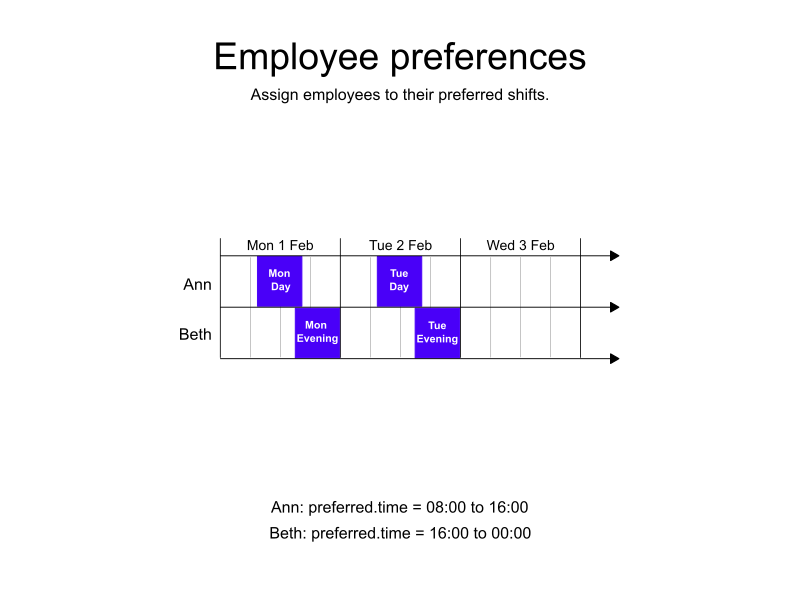
Ann and Beth are both full-time employees.
-
Ann prefers to work the day shift, 08:00 until 16:00.
-
Beth prefers to work the evening shift, 16:00 to 00:00.
-
Input
-
Output
Try this example in Timefold Platform by saving this JSON into a file called sample.json and make the following API call:
|
curl -X POST -H "Content-type: application/json" -H 'X-API-KEY: <API_KEY>' https://app.timefold.ai/api/models/employee-scheduling/v1/schedules [email protected]{
"config": {
"run": {
"name": "Preferred time spans example"
}
},
"modelInput": {
"employees": [
{
"id": "Ann",
"preferredTimeSpans": [
{
"start": "2027-02-01T08:00:00Z",
"end": "2027-02-01T16:00:00Z"
},
{
"start": "2027-02-02T08:00:00Z",
"end": "2027-02-02T16:00:00Z"
}
]
},
{
"id": "Beth",
"preferredTimeSpans": [
{
"start": "2027-02-01T16:00:00Z",
"end": "2027-02-02T00:00:00Z"
},
{
"start": "2027-02-02T16:00:00Z",
"end": "2027-02-03T00:00:00Z"
}
]
}
],
"shifts": [
{
"id": "Mon Day",
"start": "2027-02-01T08:00:00Z",
"end": "2027-02-01T16:00:00Z"
},
{
"id": "Mon Evening",
"start": "2027-02-01T16:00:00Z",
"end": "2027-02-02T00:00:00Z"
},
{
"id": "Tue Day",
"start": "2027-02-02T08:00:00Z",
"end": "2027-02-02T16:00:00Z"
},
{
"id": "Tue Evening",
"start": "2027-02-02T16:00:00Z",
"end": "2027-02-03T00:00:00Z"
}
]
}
}
To request the solution, locate the ID from the response to the post operation and append it to the following API call:
|
curl -X GET -H 'X-API-KEY: <API_KEY>' https://app.timefold.ai/api/models/employee-scheduling/v1/schedules/<ID>{
"metadata": {
"id": "ID",
"name": "Preferred time spans example",
"submitDateTime": "2024-09-19T06:23:13.430778281Z",
"startDateTime": "2024-09-19T06:23:18.972386292Z",
"activeDateTime": "2024-09-19T06:23:19.072386292Z",
"completeDateTime": "2024-09-19T06:28:19.350143099Z",
"shutdownDateTime": "2024-09-19T06:28:19.450143099Z",
"solverStatus": "SOLVING_COMPLETED",
"score": "0hard/0medium/3840soft",
"tags": null,
"validationResult": {
"summary": "OK"
}
},
"modelOutput": {
"shifts": [
{
"id": "Mon Day",
"employee": "Ann"
},
{
"id": "Tue Evening",
"employee": "Beth"
},
{
"id": "Tue Day",
"employee": "Ann"
},
{
"id": "Tue Evening",
"employee": "Beth"
}
]
},
"kpis": {
"unassignedShifts": 0
}
}modelOutput contains the employee schedule with both Ann and Beth assigned to shifts during their preferred times.
Employee preferred time not available
It is not always possible to schedule employees during their preferred time spans.
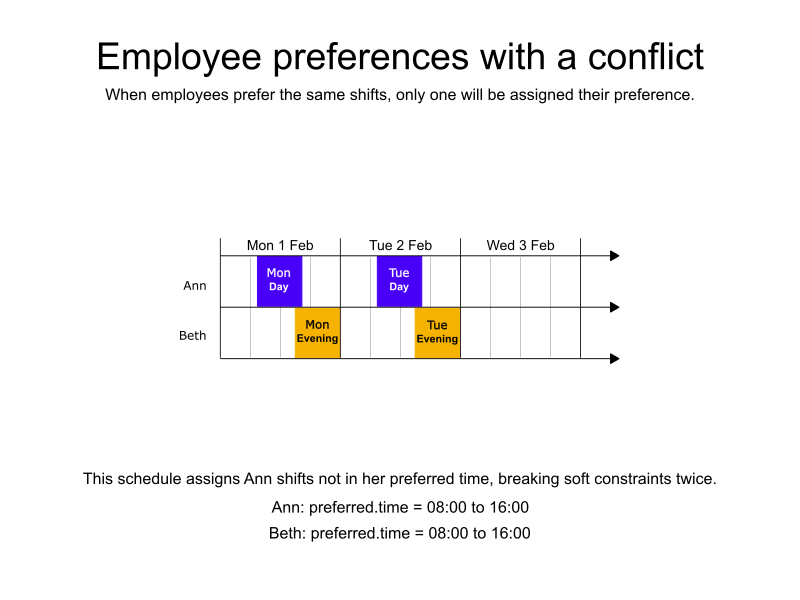
In a case where both Ann and Beth prefer the same shift. Only one of them will be assigned the day shift, and the other will be assigned the evening shift.
-
Input
-
Output
Try this example in Timefold Platform by saving this JSON into a file called sample.json and make the following API call:
|
curl -X POST -H "Content-type: application/json" -H 'X-API-KEY: <API_KEY>' https://app.timefold.ai/api/models/employee-scheduling/v1/schedules [email protected]{
"config": {
"run": {
"name": "Preferred time spans with conflict example"
}
},
"modelInput": {
"contracts": [
{
"id": "Default contract",
"periodRules": [
{
"id": "singleShiftPerDay",
"period": "DAY",
"shiftsWorkedMax": 1
}
]
}
],
"employees": [
{
"id": "Ann",
"contracts": [
"Default contract"
],
"preferredTimeSpans": [
{
"start": "2027-02-01T08:00:00Z",
"end": "2027-02-01T16:00:00Z"
},
{
"start": "2027-02-02T08:00:00Z",
"end": "2027-02-02T16:00:00Z"
}
]
},
{
"id": "Beth",
"contracts": [
"Default contract"
],
"preferredTimeSpans": [
{
"start": "2027-02-01T08:00:00Z",
"end": "2027-02-01T16:00:00Z"
},
{
"start": "2027-02-02T08:00:00Z",
"end": "2027-02-02T16:00:00Z"
}
]
}
],
"shifts": [
{
"id": "2027-02-01-day",
"start": "2027-02-01T08:00:00Z",
"end": "2027-02-01T16:00:00Z"
},
{
"id": "2027-02-01-evening",
"start": "2027-02-01T16:00:00Z",
"end": "2027-02-02T00:00:00Z"
},
{
"id": "2027-02-02-day",
"start": "2027-02-02T08:00:00Z",
"end": "2027-02-02T16:00:00Z"
},
{
"id": "2027-02-02-evening",
"start": "2027-02-02T16:00:00Z",
"end": "2027-02-03T00:00:00Z"
}
]
}
}
To request the solution, locate the ID from the response to the post operation and append it to the following API call:
|
curl -X GET -H 'X-API-KEY: <API_KEY>' https://app.timefold.ai/api/models/employee-scheduling/v1/schedules/<ID>{
"metadata": {
"id": "ID",
"name": "Preferred time spans with conflict example",
"submitDateTime": "2024-09-19T07:07:13.411491728Z",
"startDateTime": "2024-09-19T07:07:21.630221733Z",
"activeDateTime": "2024-09-19T07:07:21.730221733Z",
"completeDateTime": "2024-09-19T07:12:22.013369565Z",
"shutdownDateTime": "2024-09-19T07:12:22.113369565Z",
"solverStatus": "SOLVING_COMPLETED",
"score": "0hard/0medium/1920soft",
"tags": null,
"validationResult": {
"summary": "OK"
}
},
"modelOutput": {
"shifts": [
{
"id": "2027-02-01-day",
"employee": "Ann"
},
{
"id": "2027-02-01-evening",
"employee": "Beth"
},
{
"id": "2027-02-02-day",
"employee": "Ann"
},
{
"id": "2027-02-02-evening",
"employee": "Beth"
}
]
},
"kpis": {
"unassignedShifts": 0
}
}modelOutput contains the employee schedule. Ann is scheduled her preferred shifts, but Beth is not.
Employee preferred times, ranked
Sometimes employees prefer a certain kind of shift over another. Occasionally, one employee’s preferences will be more important than another’s.
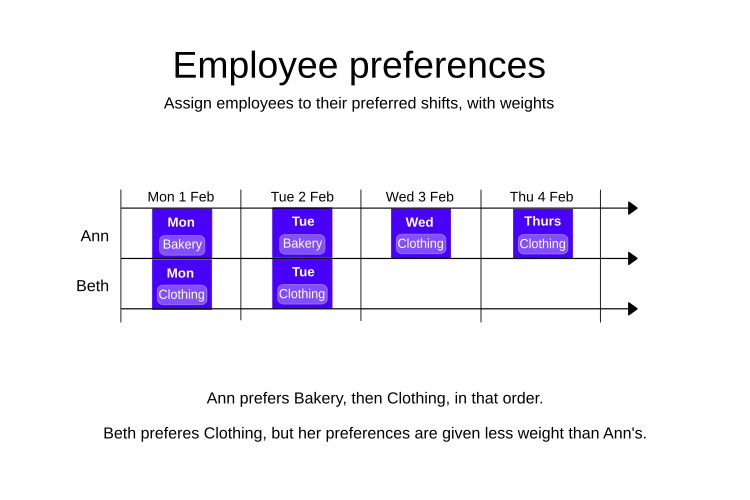
In this example, Ann and Beth both prefer to work "Bakery" shifts. However, Ann is more senior than Beth, and therefore her preferences are assigned a higher weight. Ann also likes to work shifts in the "Clothing" section, but not as much as she likes "Bakery" shifts. Ann will be preferentially assigned "Bakery" shifts over Beth, and in the case when there are no such shifts, she will be assigned "Clothing" shifts.
-
Input
-
Output
Try this example in Timefold Platform by saving this JSON into a file called sample.json and make the following API call:
|
curl -X POST -H "Content-type: application/json" -H 'X-API-KEY: <API_KEY>' https://app.timefold.ai/api/models/employee-scheduling/v1/schedules [email protected]{
"config": {
"run": {
"name": "Preferred time spans with weights example"
}
},
"modelInput": {
"employees": [
{
"id": "Ann",
"preferredTimeSpans": [
{
"start": "2027-02-01T08:00:00Z",
"end": "2027-02-05T16:00:00Z",
"includeShiftTags": ["Bakery"],
"weight": 10
},
{
"start": "2027-02-01T08:00:00Z",
"end": "2027-02-05T16:00:00Z",
"includeShiftTags": ["Clothing"],
"weight": 5
}
]
},
{
"id": "Beth",
"preferredTimeSpans": [
{
"start": "2027-02-01T08:00:00Z",
"end": "2027-02-05T16:00:00Z",
"includeShiftTags": ["Clothing"],
"weight": 2
}
]
}
],
"shifts": [
{
"id": "2027-02-01-Bakery",
"start": "2027-02-01T08:00:00Z",
"end": "2027-02-01T16:00:00Z",
"tags": ["Bakery"]
},
{
"id": "2027-02-01-Clothing",
"start": "2027-02-01T08:00:00Z",
"end": "2027-02-01T16:00:00Z",
"tags": ["Clothing"]
},
{
"id": "2027-02-02-Bakery",
"start": "2027-02-02T08:00:00Z",
"end": "2027-02-02T16:00:00Z",
"tags": ["Bakery"]
},
{
"id": "2027-02-02-Clothing",
"start": "2027-02-02T08:00:00Z",
"end": "2027-02-02T16:00:00Z",
"tags": ["Clothing"]
},
{
"id": "2027-02-03-Clothing",
"start": "2027-02-03T08:00:00Z",
"end": "2027-02-03T16:00:00Z",
"tags": ["Clothing"]
},
{
"id": "2027-02-04-Clothing",
"start": "2027-02-04T08:00:00Z",
"end": "2027-02-04T16:00:00Z",
"tags": ["Clothing"]
}
]
}
}
To request the solution, locate the ID from the response to the post operation and append it to the following API call:
|
curl -X GET -H 'X-API-KEY: <API_KEY>' https://app.timefold.ai/api/models/employee-scheduling/v1/schedules/<ID>{
"metadata": {
"id": "ID",
"originId": "ID",
"name": "Preferred time spans with weights example",
"submitDateTime": "2026-03-06T12:24:12.212377909Z",
"startDateTime": "2026-03-06T12:24:12.251212179Z",
"activeDateTime": "2026-03-06T12:24:12.254376106Z",
"completeDateTime": "2026-03-06T12:24:42.273787174Z",
"shutdownDateTime": "2026-03-06T12:24:42.273839699Z",
"solverStatus": "SOLVING_COMPLETED",
"score": "0hard/0medium/32640soft",
"validationResult": {
"summary": "OK"
}
},
"modelOutput": {
"shifts": [
{
"id": "2027-02-01-Bakery",
"employee": "Ann"
},
{
"id": "2027-02-01-Clothing",
"employee": "Beth"
},
{
"id": "2027-02-02-Bakery",
"employee": "Ann"
},
{
"id": "2027-02-02-Clothing",
"employee": "Beth"
},
{
"id": "2027-02-03-Clothing",
"employee": "Ann"
},
{
"id": "2027-02-04-Clothing",
"employee": "Ann"
}
],
"employees": [
{
"id": "Ann",
"metrics": {
"assignedShifts": 4,
"durationWorked": "PT32H",
"durationOfTimePreferencesMet": "PT32H"
}
},
{
"id": "Beth",
"metrics": {
"assignedShifts": 2,
"durationWorked": "PT16H",
"durationOfTimePreferencesMet": "PT16H"
}
}
]
},
"inputMetrics": {
"employees": 2,
"shifts": 6,
"pinnedShifts": 0,
"mandatoryShifts": 6,
"optionalShifts": 0
},
"kpis": {
"assignedShifts": 6,
"unassignedShifts": 0,
"disruptionPercentage": 0.0,
"averageDurationOfEmployeesPreferencesMet": "PT24H",
"minimumDurationOfPreferencesMetAcrossEmployees": "PT16H",
"activatedEmployees": 2,
"assignedMandatoryShifts": 6
},
"run": {
"id": "ID",
"originId": "ID",
"name": "Preferred time spans with weights example",
"submitDateTime": "2026-03-06T12:24:12.212377909Z",
"startDateTime": "2026-03-06T12:24:12.251212179Z",
"activeDateTime": "2026-03-06T12:24:12.254376106Z",
"completeDateTime": "2026-03-06T12:24:42.273787174Z",
"shutdownDateTime": "2026-03-06T12:24:42.273839699Z",
"solverStatus": "SOLVING_COMPLETED",
"score": "0hard/0medium/32640soft",
"validationResult": {
"summary": "OK"
}
}
}modelOutput contains the employee schedule. Ann is scheduled her preferred shifts, but Beth is not.
Employees unpreferred times
Employee preferences can also be expressed as time spans when they prefer not to work, but are available to work if required.
The Employee works during unpreferred time soft constraint is invoked when an employee is assigned to a shift that overlaps with one of their unpreferred time spans.
The constraint adds a soft penalty to the dataset score that is calculated by multiplying the number of minutes the shift overlaps with the unpreferred time span by the time span’s weight and the employee’s priority multiplier, incentivizing Timefold to avoid assigning employees to shifts that fall within their unpreferred working times.
Shifts will still be assigned even if assigning them breaks this constraint.
| This rule is more likely to be satisfied for employees with a higher employee priority. See Employee priority for more details. |
If we look at the first example again, but this time state Ann’s and Beth’s preferences in terms of times they would prefer not to work.
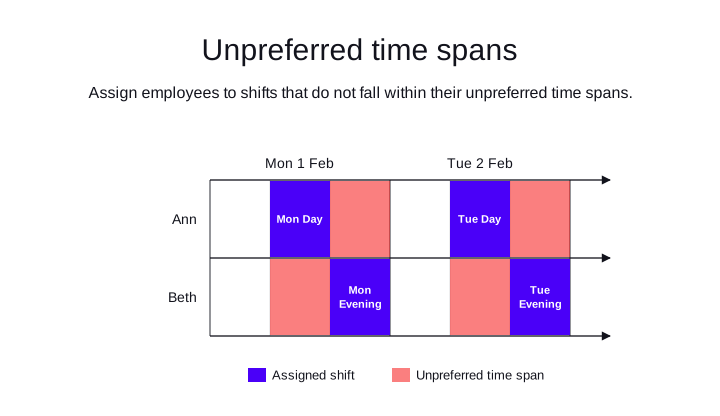
Ann and Beth are both full-time employees.
-
Ann prefers not to work the evening shift, 16:00 to 00:00.
-
Beth prefers not to work the day shift, 08:00 until 16:00.
In the first example, we defined these time spans as preferred, not unpreferred. By defining the unpreferred times, we are not limiting Ann and Beth to a single shift. For instance, if the company has a night shift, Ann’s preference not to work the evening shift, leaves her free to work either the day or night shift.
Similarly, Beth’s preference not to work the day shift, leaves her free to work either the evening or night shift.
{
  "employees": [
    {
      "id": "Ann",
      "unpreferredTimeSpans": [
        {
          "start": "2027-02-01T16:00:00Z",
          "end": "2027-02-02T00:00:00Z"
        },
        {
          "start": "2027-02-02T16:00:00Z",
          "end": "2027-02-03T00:00:00Z"
        }
      ]
    }
  ]
}
The following example, results in Ann and Beth not being assigned shifts during their unpreferred times.
-
Input
-
Output
Try this example in Timefold Platform by saving this JSON into a file called sample.json and make the following API call:
|
curl -X POST -H "Content-type: application/json" -H 'X-API-KEY: <API_KEY>' https://app.timefold.ai/api/models/employee-scheduling/v1/schedules [email protected]{
"config": {
"run": {
"name": "Unpreferred time spans example"
}
},
"modelInput": {
"employees": [
{
"id": "Ann",
"unpreferredTimeSpans": [
{
"start": "2027-02-01T16:00:00Z",
"end": "2027-02-02T00:00:00Z"
},
{
"start": "2027-02-02T16:00:00Z",
"end": "2027-02-03T00:00:00Z"
}
]
},
{
"id": "Beth",
"unpreferredTimeSpans": [
{
"start": "2027-02-01T08:00:00Z",
"end": "2027-02-01T16:00:00Z"
},
{
"start": "2027-02-02T08:00:00Z",
"end": "2027-02-02T16:00:00Z"
}
]
}
],
"shifts": [
{
"id": "Mon Day",
"start": "2027-02-01T08:00:00Z",
"end": "2027-02-01T16:00:00Z"
},
{
"id": "Mon Evening",
"start": "2027-02-01T16:00:00Z",
"end": "2027-02-02T00:00:00Z"
},
{
"id": "Tue Day",
"start": "2027-02-02T08:00:00Z",
"end": "2027-02-02T16:00:00Z"
},
{
"id": "Tue Evening",
"start": "2027-02-02T16:00:00Z",
"end": "2027-02-03T00:00:00Z"
}
]
}
}
To request the solution, locate the ID from the response to the post operation and append it to the following API call:
|
curl -X GET -H 'X-API-KEY: <API_KEY>' https://app.timefold.ai/api/models/employee-scheduling/v1/schedules/<ID>{
"metadata": {
"id": "ID",
"name": "Unpreferred time spans example",
"submitDateTime": "2024-09-20T06:56:27.642773329Z",
"startDateTime": "2024-09-20T06:56:33.281870696Z",
"activeDateTime": "2024-09-20T06:56:33.381870696Z",
"completeDateTime": "2024-09-20T07:01:33.635593953Z",
"shutdownDateTime": "2024-09-20T07:01:33.735593953Z",
"solverStatus": "SOLVING_COMPLETED",
"score": "0hard/0medium/0soft",
"tags": null,
"validationResult": {
"summary": "OK"
}
},
"modelOutput": {
"shifts": [
{
"id": "Mon Day",
"employee": "Ann"
},
{
"id": "Mon Evening",
"employee": "Beth"
},
{
"id": "Tue Day",
"employee": "Ann"
},
{
"id": "Tue Evening",
"employee": "Beth"
}
]
},
"kpis": {
"unassignedShifts": 0
}
}modelOutput contains the employee schedule with both Ann and Beth assigned to shifts that don’t occur during their unpreferred times.
Filtering preferences with tags
Tags can be added to preferredTimeSpans and unpreferredTimeSpans to control which shifts the time spans apply to.
Tags can be used to specify preferences that apply to other aspects of employees' jobs. Employees might prefer to work at specific locations or in specific departments.
Shifts are assigned tags that can be matched against the available employees.
{
  "shifts": [
    {
      "id": "2027-02-01",
      "start": "2027-02-01T08:00:00Z",
      "end": "2027-02-01T16:00:00Z",
      "tags": [
        "department a"
      ]
    }
  ]
}
Ann prefers to work in Department A, so her preferredTimeSpan includes "includeShiftTags": [ "department a" ]:
{
  "id": "Ann",
  "preferredTimeSpans": [
    {
      "start": "2027-02-01T00:00:00Z",
      "end": "2027-02-03T00:00:00Z",
      "includeShiftTags": [
        "department a"
      ]
    }
  ]
}
In the following example, Ann prefers to work in Department A, and Beth prefers to work in Department B.
-
Input
-
Output
Try this example in Timefold Platform by saving this JSON into a file called sample.json and make the following API call:
|
curl -X POST -H "Content-type: application/json" -H 'X-API-KEY: <API_KEY>' https://app.timefold.ai/api/models/employee-scheduling/v1/schedules [email protected]{
"config": {
"run": {
"name": "Preferences with tags example"
}
},
"modelInput": {
"employees": [
{
"id": "Ann",
"preferredTimeSpans": [
{
"start": "2027-02-01T00:00:00Z",
"end": "2027-02-03T00:00:00Z",
"includeShiftTags": [
"department a"
]
}
]
},
{
"id": "Beth",
"preferredTimeSpans": [
{
"start": "2027-02-01T00:00:00Z",
"end": "2027-02-03T00:00:00Z",
"includeShiftTags": [
"department b"
]
}
]
}
],
"shifts": [
{
"id": "2027-02-01",
"start": "2027-02-01T08:00:00Z",
"end": "2027-02-01T16:00:00Z",
"tags": [
"department a"
]
},
{
"id": "2027-02-02",
"start": "2027-02-02T08:00:00Z",
"end": "2027-02-02T16:00:00Z",
"tags": [
"department b"
]
}
]
}
}
To request the solution, locate the ID from the response to the post operation and append it to the following API call:
|
curl -X GET -H 'X-API-KEY: <API_KEY>' https://app.timefold.ai/api/models/employee-scheduling/v1/schedules/<ID>{
"metadata": {
"id": "ID",
"name": "Preferences with tags example",
"submitDateTime": "2024-09-24T04:46:48.692291772Z",
"startDateTime": "2024-09-24T04:46:54.278513444Z",
"activeDateTime": "2024-09-24T04:46:54.378513444Z",
"completeDateTime": "2024-09-24T04:51:54.633244732Z",
"shutdownDateTime": "2024-09-24T04:51:54.733244732Z",
"solverStatus": "SOLVING_COMPLETED",
"score": "0hard/0medium/1920soft",
"tags": null,
"validationResult": {
"summary": "OK"
}
},
"modelOutput": {
"shifts": [
{
"id": "2027-02-01",
"employee": "Ann"
},
{
"id": "2027-02-02",
"employee": "Beth"
}
]
},
"kpis": {
"unassignedShifts": 0
}
}modelOutput contains the employee schedule with both Ann and Beth assigned to shifts in their preferred departments.
If an employee prefers not work in a specific department, you can define this preference with excludeShiftTags:
{
  "id": "Ann",
  "preferredTimeSpans": [
    {
      "start": "2027-02-01T00:00:00Z",
      "end": "2027-02-03T00:00:00Z",
      "excludeShiftTags": [
        "department b"
      ]
    }
  ]
}
If shifts have multiple tags, you decide whether to match ALL or ANY of the tags based on employee preferences by including shiftTagMatches.
{
  "preferredTimeSpans": [
    {
      "start": "2027-02-01T00:00:00Z",
      "end": "2027-02-03T00:00:00Z",
      "includeShiftTags": [
        "department a",
        "location central"
      ],
      "shiftTagMatches": "ALL"
    }
  ]
}
With shiftTagMatches set to "ALL", a shift must include all the tags defined by the employee to match.
With shiftTagMatches set to "ANY", a shift must include at least one of the tags defined by the employee to match.
If shiftTagMatches is not included in the modelInput, all tags must match.
Next
-
See the full API spec or try the online API.
-
Learn more about employee shift scheduling from our YouTube playlist.