Input validation
Whenever you submit a dataset to Timefold through the API or UI the input is validated and if there are issues, you will see the following depending on the type of validation issue:
Invalid JSON
The submitted JSON file is validated to make sure the JSON is syntactically valid and valid according to the OpenAPI specification and can be processed by Timefold.
A POST call with an invalid JSON document will return a status 400 Bad Request.
The response will include a message specifying the input JSON has an invalid format and details that will help you locate the issue with the JSON.
Solution: Fix the invalid JSON and resubmit the dataset.
Validation errors
The JSON is valid according to the OpenAPI specification but the submitted dataset includes (or does not include) elements that need to be rectified before the dataset can be solved.
The dataset’s state will clearly indicate that it is invalid.
Validation errors include:
-
Referencing an undeclared tag type or tag.
-
A shift group matches multiple shift group rules with assignment mode defined. Only one rule with assignment mode per shift group is allowed.
-
A shift belongs to multiple shift groups. A shift can only belong to one shift group.
-
Start times must be earlier than end times.
-
A shift’s logged time must not be negative or longer than the duration of the shift.
-
An employee can only have one contract with travel configurations.
-
An employee must have a location if they are assigned a contract with a travel configuration.
-
An employee can only have one contract with a custom FTE configuration.
-
Either the
maxEmployeeToShiftTravelDistanceInMetersor theminMinutesBetweenShiftsInDifferentLocationsmust be set on thetravelConfigurationof a contract. -
A shift matches multiple rotation groups. A shift can only belong to one rotation group.
-
A contract defines non-consecutive weekend days in weekendConfiguration. Weekend days must be consecutive.
-
An employee defines a pairing with themself.
-
Minimums must be less than their associated maximums, for instance,
minDemandandmaxDemand,shiftsWorkedMinandshiftsWorkedMax. -
Rules use an invalid period that is not a built-in period or a custom period.
-
Rules for consecutive days worked are not properly formed.
Solution: Review the error message and resubmit the dataset.
Validation warnings
The JSON is valid according to the OpenAPI specification but there are some recoverable problems.
The dataset’s state will indicate its valid and the dataset can be solved.
Validation warnings include:
-
Uses a deprecated feature.
-
Is missing some element that is necessary to successfully assign a shift, including:
-
The planning window cannot be determined because there are no shifts.
-
The list of shifts is empty.
-
The list of employees is empty.
-
An employee defines both a required and prohibited pairing with another employee.
-
A multi-day shift pattern rule starts with OFF but the planning window was not provided.
-
A rolling window rule on a contract has a
daysWorkedLimitwith adaysWorkedMaxgreater than the rolling window size in full days. -
A rolling window rule on a contract has a
minutesWorkedLimitwith aminutesWorkedMaxgreater than the rolling window size in minutes. -
A shift requires or prefers a skill that is not defined by any employee.
-
An employee requires a
shiftTagMatchRulein the global rules to enable thepreferredShiftTagsandrequiredShiftTags. -
The employee to contract ratio is very high.
-
There is a rule that will prevent shifts from being assigned.
-
Solution: The dataset will be processed, but we recommend looking at the warnings and updating the dataset.
Machine-readable validation results
In addition to human-readable validation messages, Timefold provides machine-readable validation results through the API. Each validation issue includes a unique code, severity level, and structured details about the affected entities. This makes it easy to programmatically detect and handle validation issues in your data pipelines.
Retrieving validation results
After submitting a dataset, once the dataset lifecycle has progressed past the DATASET_VALIDATED or DATASET_INVALID status, you can retrieve the validation results by calling this endpoint:
GET /v1/schedules/<ID>/validation-result
The response includes a status field (ERRORS, WARNINGS, or OK) and an issues array.
Each issue has:
-
id: a numeric identifier for the issue within the dataset. -
code: a machine-readable code identifying the type of issue. -
severity: eitherERRORorWARNING. -
potentially extra properties identifying the affected entity (e.g. the employee or shift ID, time windows) and a
typefield indicating the entity type.
{
  "status": "ERRORS",
  "issues": [
    {
      "code": "<ISSUE_TYPE_CODE>",
      "severity": "ERROR",
      "<entityId>": "<ID>"
    },
    {
      "code": "<ISSUE_TYPE_CODE>",
      "severity": "WARNING",
      "<entityId>": "<ID>",
      "<extraProperty1>": "<extraValue1>"
    }
  ]
}
The code field contains a machine-readable identifier.
The object can vary per issue type to include the IDs and properties of the affected entities.
Validation issue types
Listing validation issue types
To see all validation issue types supported by the model, use:
GET /v1/schedules/validation-issue-types
To look up a specific issue type by its code:
GET /v1/schedules/validation-issue-types/<CODE>
Examples of validation issue details
The objects provide different data depending on the issue type.
Below are examples of what the detail object looks like for specific validation issues.
An employee that defined required shift tags without any matching shft tag match rules:
{
  "code": "EMPLOYEE_REQUIRED_TAGS_IGNORED",
  "severity": "WARNING",
  "employee": "employee_id_1"
  }
}
A dataset that defines a number of shifts exceeding the maximum of the model:
{
  "code": "TOO_MANY_SHIFTS",
  "severity": "ERROR"
}
Recommended usage patterns
Automated error mitigation
Use the code and other fields to implement targeted mitigations for specific validation issues.
For example, if a shift fails validation because its start time is after its end time, your pipeline could automatically remove that shift from the dataset and resubmit.
A typical flow looks like this:
-
Submit a dataset.
-
Retrieve the validation result.
-
If the status is
ERRORS, iterate over the issues. -
For each issue
code, apply a specific mitigation if one exists (e.g. remove the entity, correct values, add a missing field). -
Resubmit the corrected dataset.
Monitoring for new validation issue types
Periodically call the validation issue types endpoint to check whether the model supports new issue types that your pipeline doesn’t handle yet. This helps you stay ahead of unhandled validation issues as the model evolves.
For example, you could add a scheduled check to your CI/CD pipeline that compares the list of known issue codes against the current response from the validation issue types endpoint. If a new code appears, flag it for your team to implement a mitigation or acknowledge it.
Input validation in the Timefold Platform UI
In addition to the API-based validation described above, the Timefold Platform UI also provides built-in support to help you detect and manage input validation issues when working with datasets.
Invalid JSON
When uploading an input file through the New plan dialog in the Timefold Platform UI:
-
If the JSON is invalid, the upload is immediately rejected.
-
The dialog displays a clear error message to help you locate and fix the issue.
-
The dataset is not accepted until the JSON syntax is corrected.
This ensures that invalid JSON never enters the system.
Validation errors
Datasets (submitted via the UI or API) that are syntactically valid but contain validation errors:
-
The dataset is accepted and appears in the list of datasets.
-
Its state clearly indicates that it is invalid.
-
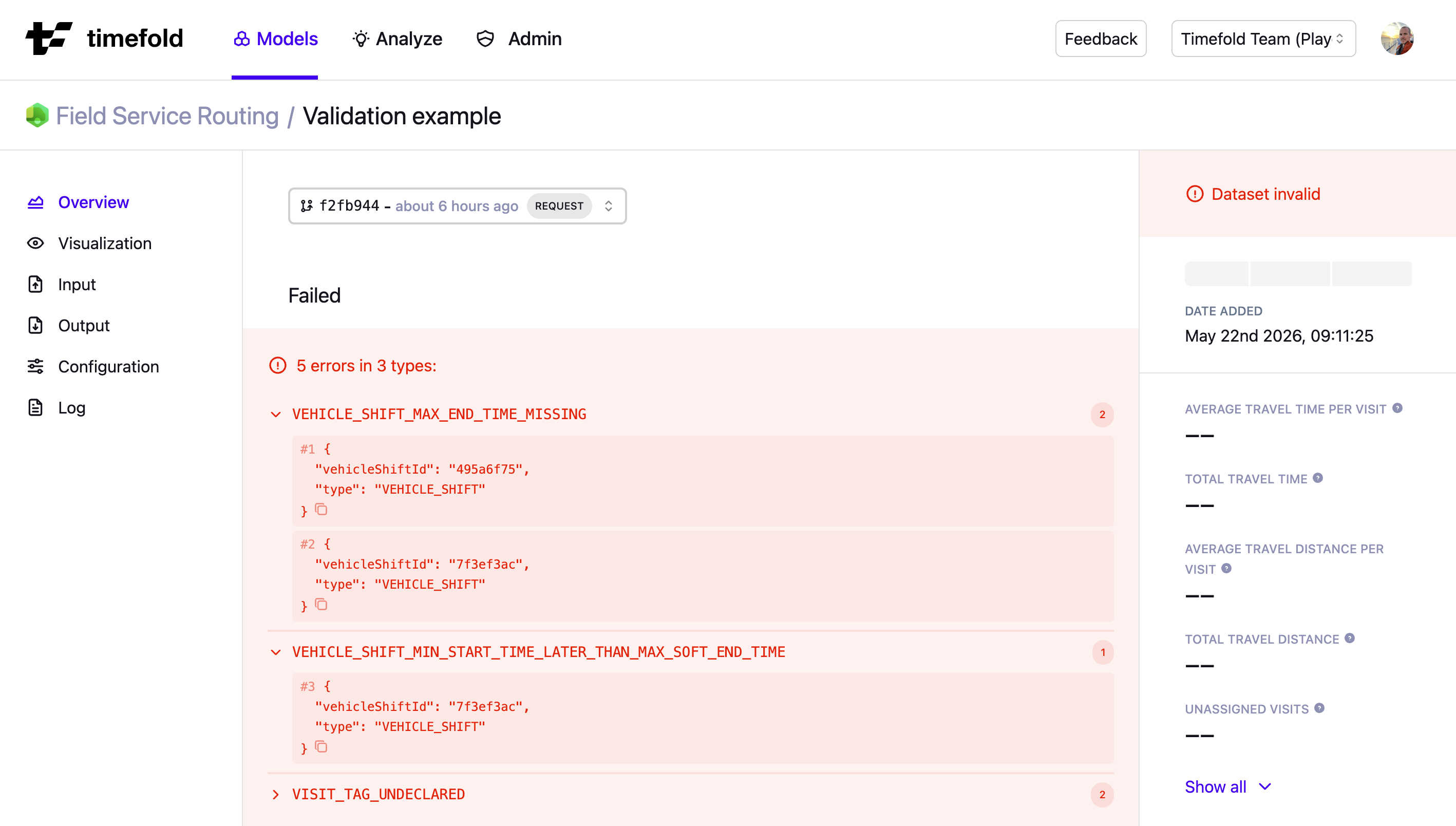
Clicking on the dataset opens the detail page, where you can see a complete list of validation errors.
You can also use the Timefold Platform UI to filter datasets by their state, making it easy to find all invalid datasets. This allows teams to quickly identify and fix problematic inputs.
The screenshot below shows an example from Field Service Routing, where five errors of three types were detected. Other models will show different validation error types specific to their domain.
Validation warnings
Datasets (submitted via the UI or API) that are syntactically valid but contain validation warnings:
-
The dataset is accepted.
-
The model can still solve successfully.
-
All standard dataset results are available, including metrics, optimization gain, and score analysis.
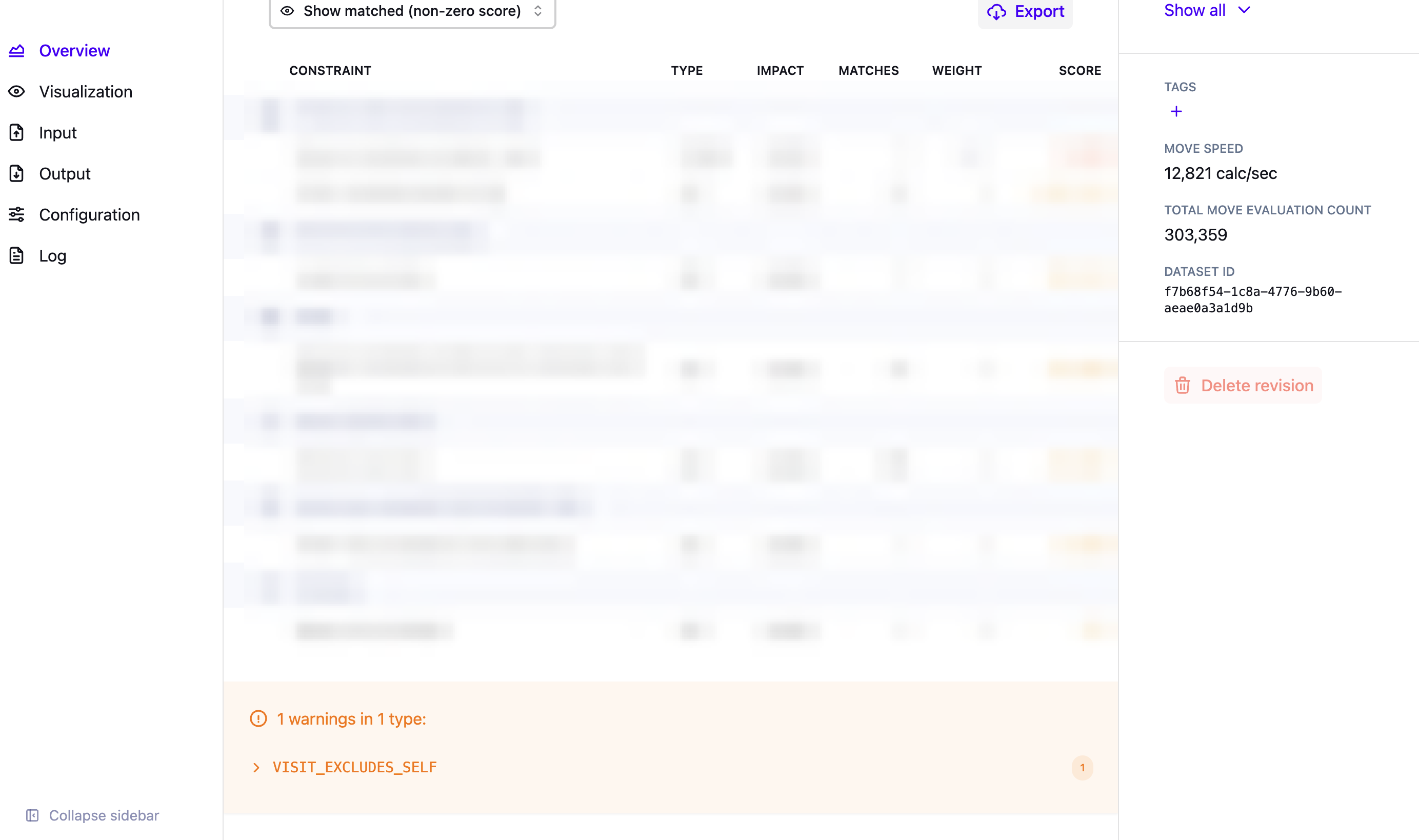
On the dataset detail page, the list of validation warnings is shown below the score analysis table, making it easy to review non-blocking issues while still analyzing optimization results.
The screenshot below shows an example from Field Service Routing, where one warning of one type is listed beneath the score analysis table. Other models will show different validation warning types specific to their domain.
Next
-
See the full API spec or try the online API.
-
Learn more about employee shift scheduling from our YouTube playlist.