Interlude 1: Basic demo data
Introduction
In this section, we will examine the Basic Demo data that is included with the Timefold Employee Shift Scheduling model. This is a brief departure from the lesson format, which focuses on building Timefold modeling knowledge. Instead, we will examine a dataset and apply the concepts from Lessons 1 to 4 to understand how the data is structured and what the resulting schedule looks like.
Accessing the demo data
It is possible to access the demo data through the platform UI and also over API. Both of these are described in the Demo datasets documentation. For this section, we will do everything over API.
Use the following API call to retrieve a list of all available demo datasets for the Employee Shift Scheduling model, along with a description of each:
curl -X GET -H 'X-API-KEY: <API_KEY>' https://app.timefold.ai/api/models/employee-scheduling/v1/demo-dataHere is a quick overview of what datasets to expect.
-
BASIC: A simple dataset with two employees, ten shifts, one contract and basic skill matching. This dataset is further examined in this interlude. -
CONTRACT_RULES: A dataset which builds more rules on top of the basic dataset. 13 employees, 60 shifts, and more scheduling complexity. -
MULTI_DAY_SHIFT_PATTERNS: A dataset which focuses on employees who must work stricter shift patterns. Their rules specifically dictate which shifts can follow which other shifts, and when they must have days off. -
HOURLY_DEMAND: Normally, the Timefold model attempts to assign as many shifts as possible out of those in the input. In this dataset, the Timefold model is given an hourly demand curve, for example two people needed at 12 PM and three people needed at 1 PM. The Timefold model will attempt to assign shifts to meet this demand curve, and may leave shifts unassigned in order to not exceed the demand. -
DEMAND_SHIFT_GENERATION: This dataset follows the same demand assignment rules as theHOURLY_DEMANDdataset, but instead of providing a list of shifts to assign, the Timefold model must generate shifts to meet that demand based on shift templates. -
CUSTOM_ROTATIONS_AND_SEQUENCES: Long-term rotations are demonstrated in this dataset, spanning two months. The Timefold model must assign shifts to employees while respecting their two-week rotation rules. -
MINIMIZE_ACTIVATED_EMPLOYEES_AND_REDUCE_COSTS: In this dataset, employees have varying costs associated with them. The Timefold model attempts to minimize cost by only activating the expensive employees if there are still unassigned shifts left after all the less costly employees have been assigned.
| It is a good idea to read the full descriptions of the demo datasets. They will give you a better understanding of what features the model supports. |
Examining the BASIC dataset
The BASIC dataset can be downloaded through the following API call:
curl -X GET -H 'X-API-KEY: <API_KEY>' https://app.timefold.ai/api/models/employee-scheduling/v1/demo-data/BASIC -o basic.jsonDownload the dataset now and open it in a text editor. It should look familiar to you, as it is very similar to the example dataset in Lesson 4.
Remember that the config section is optional. It is included in the downloaded dataset in order to specify the name of the dataset.
|
Take a look at the employees. Do you recognize the JSON structure? How many employees are there? What are their IDs? What skills does each employee have?
The BASIC dataset employees have a manually specified timeZoneId field. This is optional, and if all your employees and shifts are in the same time zone, then we recommend omitting it from the input. If you have a mix of time zones across shifts and employees, then it is important to specify them. More information can be found in the Time zones and Daylight Saving Time (DST) technical documentation.
|
Now look at the shifts. How many shifts are there? What are their IDs? What are their start and end times? Do you notice any patterns in their skill requirements?
Now take a look at the contracts. How many contracts are there? What are their IDs? What rules are there? The period rule should be familiar to you from Lesson 4.
There is one additional rule which has not been covered in previous lessons, the consecutive days worked rule, set in consecutiveDaysWorkedRules. This rule specifies the maximum number of consecutive days that an employee can work. In this dataset, the value is set to 5, meaning that an employee cannot work more than five days in a row at any point. This is not tied to a period, so it is not a period rule, as it is not specified on a DAY or WEEK basis or so forth. It is a general rule that applies to the entire schedule for the employees which are assigned this contract. Learn more about this rule in the Consecutive Days Worked technical documentation.
Solving the BASIC dataset
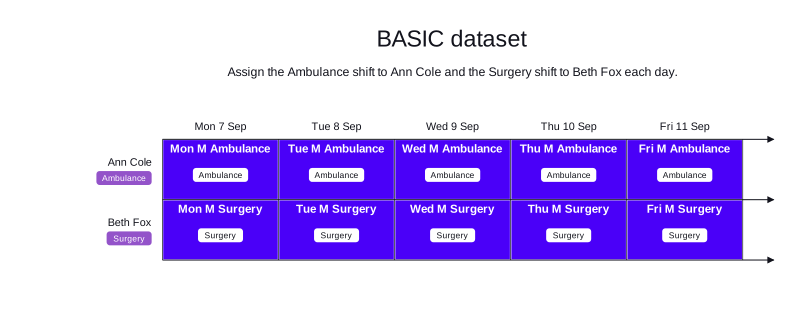
The BASIC dataset has two employees. Ann Cole has the Ambulance skill, and Beth Fox has the Surgery skill. The schedule has ten shifts across five weekdays: one Ambulance shift and one Surgery shift each day. Each employee can work at most five days in a row and 40 hours per week.
-
Input
-
Output
Try this example in Timefold Platform by saving this JSON into a file called basic.json and making the following API call:
|
curl -X POST -H "Content-type: application/json" -H 'X-API-KEY: <API_KEY>' https://app.timefold.ai/api/models/employee-scheduling/v1/schedules [email protected]{
"config": {
"run": {
"name": "BASIC Demo",
"tags": []
},
"model": {}
},
"modelInput": {
"contracts": [
{
"id": "fullTimeContract",
"priority": "10",
"consecutiveDaysWorkedRules": [
{
"id": "Max5ConsecutiveDays",
"maximum": 5,
"overlapKind": "START_ONLY"
}
],
"periodRules": [
{
"id": "Max40HoursPerWeek",
"period": "WEEK",
"minutesWorkedLimit": {
"minutesWorkedMax": 2400,
"breakTagMatches": "ALL"
},
"periodShiftOverlapKind": "START_ONLY"
}
],
"weekendConfiguration": {}
}
],
"employees": [
{
"id": "Ann Cole",
"contracts": [
"fullTimeContract"
],
"skills": [
{
"id": "Ambulance"
}
],
"timeZoneId": "-04:00"
},
{
"id": "Beth Fox",
"contracts": [
"fullTimeContract"
],
"skills": [
{
"id": "Surgery"
}
],
"timeZoneId": "-04:00"
}
],
"shifts": [
{
"id": "Mon M Ambulance",
"start": "2026-09-07T06:00:00-04:00",
"end": "2026-09-07T14:00:00-04:00",
"requiredSkills": [
"Ambulance"
]
},
{
"id": "Mon M Surgery",
"start": "2026-09-07T06:00:00-04:00",
"end": "2026-09-07T14:00:00-04:00",
"requiredSkills": [
"Surgery"
]
},
{
"id": "Tue M Ambulance",
"start": "2026-09-08T06:00:00-04:00",
"end": "2026-09-08T14:00:00-04:00",
"requiredSkills": [
"Ambulance"
]
},
{
"id": "Tue M Surgery",
"start": "2026-09-08T06:00:00-04:00",
"end": "2026-09-08T14:00:00-04:00",
"requiredSkills": [
"Surgery"
]
},
{
"id": "Wed M Ambulance",
"start": "2026-09-09T06:00:00-04:00",
"end": "2026-09-09T14:00:00-04:00",
"requiredSkills": [
"Ambulance"
]
},
{
"id": "Wed M Surgery",
"start": "2026-09-09T06:00:00-04:00",
"end": "2026-09-09T14:00:00-04:00",
"requiredSkills": [
"Surgery"
]
},
{
"id": "Thu M Ambulance",
"start": "2026-09-10T06:00:00-04:00",
"end": "2026-09-10T14:00:00-04:00",
"requiredSkills": [
"Ambulance"
]
},
{
"id": "Thu M Surgery",
"start": "2026-09-10T06:00:00-04:00",
"end": "2026-09-10T14:00:00-04:00",
"requiredSkills": [
"Surgery"
]
},
{
"id": "Fri M Ambulance",
"start": "2026-09-11T06:00:00-04:00",
"end": "2026-09-11T14:00:00-04:00",
"requiredSkills": [
"Ambulance"
]
},
{
"id": "Fri M Surgery",
"start": "2026-09-11T06:00:00-04:00",
"end": "2026-09-11T14:00:00-04:00",
"requiredSkills": [
"Surgery"
]
}
],
"globalRules": {}
}
}
To request the solution, locate the ID from the response to the post operation and append it to the following API call:
|
curl -X GET -H 'X-API-KEY: <API_KEY>' https://app.timefold.ai/api/models/employee-scheduling/v1/schedules/<ID>{
"metadata": {
"id": "5af91171-5d46-4064-ad39-b2193af1aa97",
"originId": "5af91171-5d46-4064-ad39-b2193af1aa97",
"name": "BASIC Demo",
"submitDateTime": "2026-09-23T10:47:51.929066641Z",
"startDateTime": "2026-09-23T10:48:01.925969193Z",
"activeDateTime": "2026-09-23T10:48:02.03114154Z",
"completeDateTime": "2026-09-23T10:48:32.459349735Z",
"shutdownDateTime": "2026-09-23T10:48:32.459353916Z",
"solverStatus": "SOLVING_COMPLETED",
"score": "0hard/0medium/0soft",
"tags": [
"system.type:from-request",
"system.profile:Standard profile"
],
"validationResult": {
"summary": "OK"
}
},
"modelOutput": {
"shifts": [
{
"id": "Mon M Ambulance",
"employee": "Ann Cole"
},
{
"id": "Mon M Surgery",
"employee": "Beth Fox"
},
{
"id": "Tue M Ambulance",
"employee": "Ann Cole"
},
{
"id": "Tue M Surgery",
"employee": "Beth Fox"
},
{
"id": "Wed M Ambulance",
"employee": "Ann Cole"
},
{
"id": "Wed M Surgery",
"employee": "Beth Fox"
},
{
"id": "Thu M Ambulance",
"employee": "Ann Cole"
},
{
"id": "Thu M Surgery",
"employee": "Beth Fox"
},
{
"id": "Fri M Ambulance",
"employee": "Ann Cole"
},
{
"id": "Fri M Surgery",
"employee": "Beth Fox"
}
],
"employees": [
{
"id": "Ann Cole",
"metrics": {
"assignedShifts": 5,
"durationWorked": "PT40H",
"overtimeThresholdDuration": "PT40H",
"overtimeWorked": "PT0S",
"maximumAvailabilityDuration": "PT40H"
}
},
{
"id": "Beth Fox",
"metrics": {
"assignedShifts": 5,
"durationWorked": "PT40H",
"overtimeThresholdDuration": "PT40H",
"overtimeWorked": "PT0S",
"maximumAvailabilityDuration": "PT40H"
}
}
],
"generatedShifts": []
},
"inputMetrics": {
"employees": 2,
"shifts": 10,
"pinnedShifts": 0,
"mandatoryShifts": 10,
"optionalShifts": 0
},
"kpis": {
"assignedShifts": 10,
"unassignedShifts": 0,
"disruptionPercentage": 0,
"activatedEmployees": 2,
"assignedMandatoryShifts": 10
},
"run": {
"id": "5af91171-5d46-4064-ad39-b2193af1aa97",
"originId": "5af91171-5d46-4064-ad39-b2193af1aa97",
"name": "BASIC Demo",
"submitDateTime": "2026-09-23T10:47:51.929066641Z",
"startDateTime": "2026-09-23T10:48:01.925969193Z",
"activeDateTime": "2026-09-23T10:48:02.03114154Z",
"completeDateTime": "2026-09-23T10:48:32.459349735Z",
"shutdownDateTime": "2026-09-23T10:48:32.459353916Z",
"solverStatus": "SOLVING_COMPLETED",
"score": "0hard/0medium/0soft",
"tags": [
"system.type:from-request",
"system.profile:Standard profile"
],
"validationResult": {
"summary": "OK"
}
}
}modelOutput contains the schedule with Ann Cole assigned to all five Ambulance shifts and Beth Fox assigned to all five Surgery shifts, which gives a score of 0hard/0medium/0soft.
Conclusion
In this brief interlude, we covered:
-
How to access demo data through the API.
-
What demo datasets are available for the Employee Shift Scheduling model.
-
How to download and examine the
BASICdemo dataset. -
How to solve the
BASICdemo dataset and obtain the resulting schedule.
Next
-
Explore the other demo datasets in the Demo datasets documentation.
-
See the full API spec, try the online API, or start a free trial.
-
Go back to the Lessons overview to choose a different lesson to continue with.