Lesson 2: Limiting employees to certain shifts
Introduction
One of the most common restrictions on employee schedules is that certain employees can or cannot work certain shifts. This may be due to any number of reasons, such as:
-
Missing required qualifications, such as "Forklift certified" or "Supervisor".
-
Having an incorrect level of qualifications, such as "Plumber level 1" instead of "Plumber level 3".
-
Not being old enough to work a shift, for example if employees aged 16 cannot handle adult beverages.
-
Not being allowed to work in a certain department or at a certain location.
-
Not being allowed to work a certain shift due to union rules, such as not being allowed to work night shifts.
-
Personal accommodations, such as not being allowed to work certain shifts due to the potential for allergen exposure.
This lesson covers how to handle any scenario in which some employees are included or excluded from working certain shifts in a simple yes/no manner.
Skills
Traditionally, a "skill" is the term used to describe some technical knowledge or proficiency that an employee has. In Timefold, this concept has evolved to include any type of inclusionary or exclusionary criteria that is used to determine if an employee is allowed to work a shift. This includes the traditional concept of skills. It also includes any other criteria which is used to match employees to shifts through a simple binary yes/no decision, such as age, department, location, union rules, and personal accommodations.
| Any inclusionary criteria that is used to determine whether an employee is allowed to work a shift can be thought of as a "skill" in Timefold. A skill can be any string, including coded or anonymized strings which do not represent real words in any language. |
When creating a schedule, think of all the requirements on your shifts which qualify certain employees to work those shifts. It is important to capture as much of this information as possible, so that the Timefold model can assign shifts to the most appropriate employees. The more information you provide, the better the Timefold model can approach the scheduling problem.
| It is a good idea to pause here briefly and think of all the particular requirements which your organization has for matching your shifts to employees. Gaining a deep understanding of your specific scheduling problem is very valuable before trying to convert it into Timefold constraints. |
Let’s re-visit the example schedule from the Getting Started guide. Here is the JSON input dataset for that example:
{
  "config": {
    "run": {
      "name": "Hello world example"
    }
  },
  "modelInput": {
    "employees": [
      {
        "id": "Beth"
      }
    ],
    "shifts": [
      {
        "id": "Mon",
        "start": "2027-02-01T00:00:00Z",
        "end": "2027-02-01T08:00:00Z"
      }
    ]
  }
}
Consider the shift in this example. Let’s pretend that this is a night shift in the bakery department of a supermarket. We can represent these requirements in Timefold by adding a list of requiredSkills to the shift:
{
  "shifts": [
    {
      "id": "Mon Night Bakery shift",
      "start": "2027-02-01T00:00:00Z",
      "end": "2027-02-01T08:00:00Z",
      "requiredSkills": [
        "Night",
        "Bakery"
      ]
    }
  ]
}
By default, an employee must have all the required skills in order to be assigned to that shift. requiredSkills are treated as hard constraints.
|
If Beth can work night shifts and is allowed to work in the bakery, then she can be assigned to this shift. We represent this in Timefold by adding a list of skills to Beth, each of which must have an id to be matched to the requiredSkills of the shift:
{
  "id": "Beth",
  "skills": [
    {
      "id": "Night"
    },
    {
      "id": "Bakery"
    }
  ]
}| By default, skills are active for the entire schedule. |
Let’s say that Ann can work in the bakery, but she cannot work night shifts because she has not received the correct training. In this case, she does not have the skill Night required to work this shift, and would never be assigned:
{
  "id": "Ann",
  "skills": [
    {
      "id": "Bakery"
    }
  ]
}| Skill requirements are case-sensitive. Make sure that the skill names match exactly between the employee and the shift. |
Skills are generally used to include those employees which can work the shift. If there is an exclusionary factor, for example one of the employees has a shellfish allergy and cannot work shifts that would expose them to their allergen, this is generally represented as a risk factor instead.
Risk factors
Risk factors are equivalent to skills, but work in the opposite manner. They exclude employees who have those risk factors from working those shifts.
| Similar to skills, a risk factor can be any string, including coded or anonymized strings which do not represent real words in any language. |
To exclude an employee based on risk factors, for instance, a shellfish allergy, add the list of riskFactors to the shift:
{
  "shifts": [
    {
      "id": "Mon Night Bakery Shellfish shift",
      "start": "2027-02-01T00:00:00Z",
      "end": "2027-02-01T08:00:00Z",
      "requiredSkills": [
        "Night",
        "Bakery"
      ],
      "riskFactors": [
        "Shellfish allergy"
      ]
    }
  ]
}
In this example, Beth has the skills required for the shift and does not have the risk factor. Suppose Ann has since completed her night training, so she now has the Night skill as well. However, she has a shellfish allergy, and therefore she has the risk factor which disqualifies her from being assigned to this shift. The employees would look like this:
{
  "employees": [
    {
      "id": "Beth",
      "skills": [
        {
          "id": "Night"
        },
        {
          "id": "Bakery"
        }
      ]
    },
    {
      "id": "Ann",
      "skills": [
        {
          "id": "Night"
        },
        {
          "id": "Bakery"
        }
      ],
      "prohibitedRiskFactors": [
        "Shellfish allergy"
      ]
    }
  ]
}| In general, we recommend representing anything which qualifies an employee for a shift as a skill, and anything which disqualifies an employee from a shift as a risk factor. This is a good practice to follow, but under the hood, they are equivalent. |
Practical example
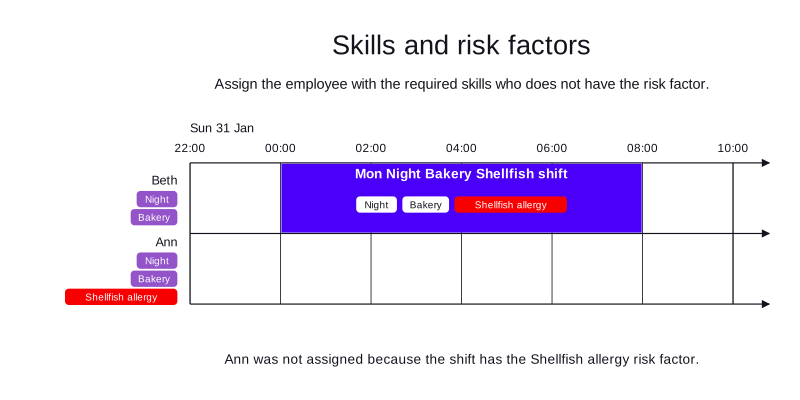
-
Input
-
Output
Try this example in Timefold Platform by saving this JSON into a file called sample.json and making the following API call:
|
curl -X POST -H "Content-type: application/json" -H 'X-API-KEY: <API_KEY>' https://app.timefold.ai/api/models/employee-scheduling/v1/schedules [email protected]{
"config": {
"run": {
"name": "Lesson 2: including and excluding employees"
}
},
"modelInput": {
"employees": [
{
"id": "Beth",
"skills": [
{
"id": "Night"
},
{
"id": "Bakery"
}
]
},
{
"id": "Ann",
"skills": [
{
"id": "Night"
},
{
"id": "Bakery"
}
],
"prohibitedRiskFactors": [
"Shellfish allergy"
]
}
],
"shifts": [
{
"id": "Mon Night Bakery Shellfish shift",
"start": "2027-02-01T00:00:00Z",
"end": "2027-02-01T08:00:00Z",
"requiredSkills": [
"Night",
"Bakery"
],
"riskFactors": [
"Shellfish allergy"
]
}
]
}
}
To request the solution, locate the ID from the response to the post operation and append it to the following API call:
|
curl -X GET -H 'X-API-KEY: <API_KEY>' https://app.timefold.ai/api/models/employee-scheduling/v1/schedules/<ID>{
"metadata": {
"id": "ID",
"name": "Lesson 2: including and excluding employees",
"submitDateTime": "2025-02-19T07:59:36.850272829Z",
"startDateTime": "2025-02-19T07:59:42.88054275Z",
"activeDateTime": "2025-02-19T07:59:42.93678946Z",
"completeDateTime": "2025-02-19T08:04:43.16445426Z",
"shutdownDateTime": "2025-02-19T08:04:43.307088825Z",
"solverStatus": "SOLVING_COMPLETED",
"score": "0hard/0medium/0soft",
"tags": [
"system.profile:default"
],
"validationResult": {
"summary": "OK"
}
},
"modelOutput": {
"shifts": [
{
"id": "Mon Night Bakery Shellfish shift",
"employee": "Beth"
}
]
},
"kpis": {
"assignedShifts": 1,
"unassignedShifts": 0,
"workingTimeFairnessPercentage": null,
"disruptionPercentage": 0.0,
"averageDurationOfEmployeesPreferencesMet": null,
"minimumDurationOfPreferencesMetAcrossEmployees": null,
"averageDurationOfEmployeesUnpreferencesViolated": null,
"maximumDurationOfUnpreferencesViolatedAcrossEmployees": null
}
}modelOutput contains the schedule with Beth assigned to the shift.
Conclusion
In this lesson, we have learned about:
-
Inclusionary and exclusionary criteria for matching employees to shifts, which are represented as skills and risk factors in Timefold.
-
Treating any criteria which lead to a binary yes/no decision as a skill or risk factor, rather than thinking of this as being limited to skills in the traditional sense of the word.
-
The equivalency between skills and risk factors, and where it is recommended to use one over the other.
Next
-
Proceed to Lesson 3 to learn about how to work with different contracts for different employees.
-
Alternatively, go back to the Lessons overview to choose a different lesson to continue with.
This lesson introduced the basics of how to think about Timefold skills as inclusionary criteria. However, skills have more advanced features, such as:
-
Being limited to certain dates, rather than being active for the entire schedule.
-
Shifts requiring one of a set of skills, rather than all of them.
-
Shifts requiring complex combinations of skills, such as "Skill A" and one of "Skill B" or "Skill C".
-
Shifts preferring employees with certain skills (soft constraint), rather than only requiring them (hard constraint).
Explore these features in the Skills technical documentation of the user guide.