Solve queue
When solving optimization workloads at scale, it is common to temporarily exceed the number of concurrent threads allowed by a tenant’s plan. The Solve queue ensures that such requests are not rejected, but instead queued and executed automatically as thread capacity becomes available.
What is the Solve queue?
The queue is a per-tenant queue that temporarily holds solve operations when all solver threads allowed by the tenant’s plan are already in use.
Instead of failing a request when the concurrency limit is reached:
-
The dataset is accepted.
-
The dataset is placed in the queue.
-
The dataset is started automatically as soon as enough solver threads become available.
The queue is designed to simplify client integrations by removing the need for custom retry or backoff logic.
Async vs synchronous operations
Not all operations go through the Solve queue. The queue only applies to async solve operations. Score analysis and recommendations are synchronous and bypass the queue entirely.
Async operations (queued)
Solve requests are asynchronous. When you submit a dataset for solving, the request is accepted immediately and the dataset is either started or placed in the queue, depending on thread availability. Your application doesn’t wait for solving to complete — it polls or receives a callback when the result is ready.
Synchronous operations (not queued)
Score analysis and recommendations are synchronous. The client sends a request and waits for the response before continuing. These operations are never queued, they either execute immediately or are rejected.
However, synchronous operations still consume a solver thread from the tenant’s resource pool while they run. This means they compete for the same threads as active solve jobs.
If all threads are currently in use — whether by running solve jobs or by concurrent synchronous requests — a synchronous request is rejected with a 429 error.
Synchronous requests will only run if there are enough available threads.
Synchronous threads will not be queued and will not wait.
|
Datasets waiting in the queue with status |
|
Even when a solver thread is available, synchronous operations on large datasets may fail with a gateway timeout (approximately 2 minutes).
This is a separate failure mode from the To work around this, submit the dataset asynchronously with |
Recommendation: keep a thread free for synchronous operations
If your integration uses score analysis or recommendations concurrently with solve jobs, avoid running the maximum number of solve jobs at the same time. Keeping at least one thread free ensures that synchronous requests can always execute without being rejected.
When is a dataset queued?
A dataset is queued when both of the following are true:
-
The operation requires solver threads.
-
The tenant has already reached the maximum number of concurrent solver threads defined by their plan.
All submitted datasets always enter the queue first. If solver threads are available at submission time, the dataset is picked up from the queue immediately and starts solving without delay.
Queue behavior
Per-tenant isolation
Each tenant has its own queue, and queue processing always respects the tenant’s plan limits. Queued datasets from one tenant never affect the execution of datasets from another tenant.
Experiments use a separate queue and resource pool from the main solve queue. Experiment solves never compete with production solves for threads, so running an experiment has no impact on live workloads.
Dataset statuses
Datasets that are in the queue will have the status SOLVING_SCHEDULED.
See Dataset lifecycle.
Datasets in this status are visible through both the API and the UI. On a Model’s dataset overview page you can easily filter on this status, see Datasets overview.
Queue ordering and priority
By default, the Solve Queue processes datasets using:
-
Priority (a higher number means higher priority).
-
Queued time (earlier submissions first).

Queue limits
To prevent unbounded growth, tenant plans define a maximum number of threads and a maximum amount of memory for the solve queue. Both limits cover the combined total of all datasets that are solving or waiting in the queue.
When you submit a solve request, the dataset’s requested threads and memory are added to that total. If either total would exceed the plan’s limit, the request is rejected. This also applies to a single dataset that requests more threads or memory than the plan allows.
As solving and queued datasets finish, capacity becomes available for new solve requests.
Using the Solve Queue via the UI
The Timefold Platform UI provides visibility into queued datasets.
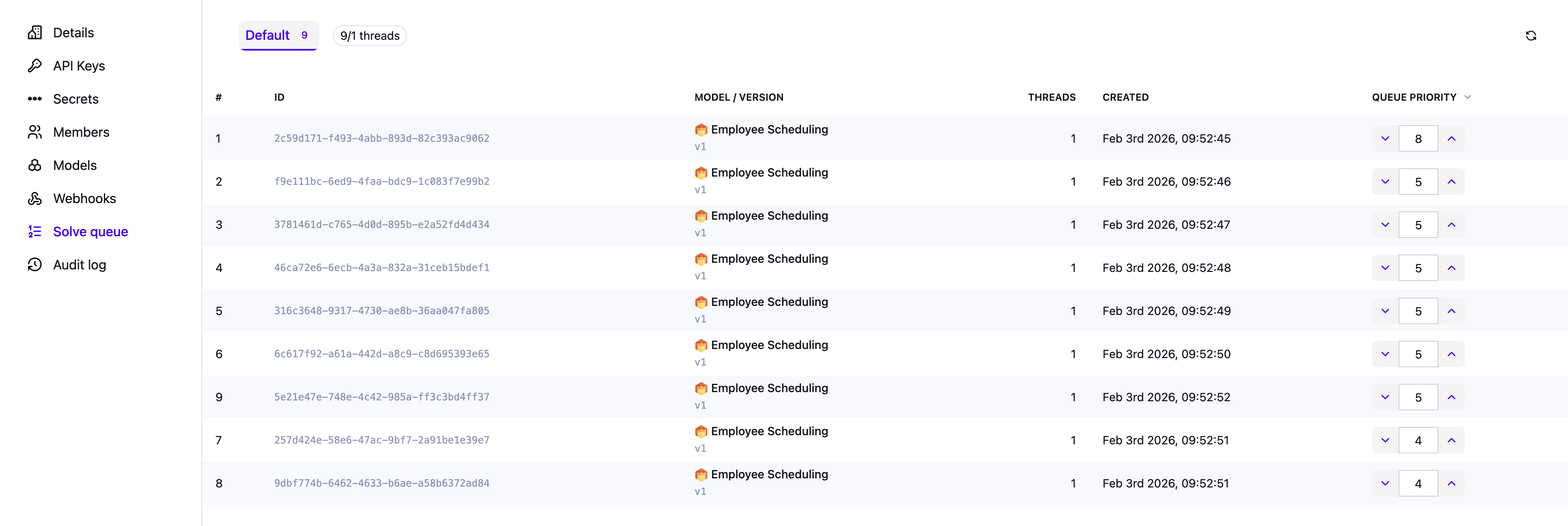
Go to Manage tenant → Solve queue to see the current status of the queue.
You can:
-
View all queued datasets for a tenant.
-
See their relative position in the queue.
-
See how many times a dataset has been attempted, in the Attempts column.
-
Update the priority of datasets in the queue to influence what will be solved next.
-
Delete a queued dataset instead of waiting for it to start automatically or expire.
Permissions and access control
Access to the Solve Queue depends on the role of the user within a tenant. The platform distinguishes between tenant admins and tenant users.
-
Tenant admins have full control over the Solve Queue for their tenant. They can view all queued datasets, see their position in the queue, change the priority, and delete queued datasets.
-
Tenant users have read-only access to the Solve Queue. They can view queued datasets, and see their position in the queue.
This ensures that all users can understand queue state and progress, while only tenant admins can modify queue behavior.