Air-gapped environments
If your environment has no internet connectivity, either by design (classified government systems, defense, critical infrastructure) or from internal policy (no external service calls from production systems), you can’t reach app.timefold.ai or app-us1.timefold.ai, and self-hosting is the only viable option.
What self-hosting means
In a self-hosted deployment, you run the Timefold Platform entirely within your own infrastructure. The platform is deployed on a Kubernetes cluster that you own and operate. Data never leaves your network.
| This is a significant undertaking. Before proceeding, ensure you’ve fully assessed the operational cost and limitations described in Self-Hosted vs. Timefold Cloud Platform. |
Prerequisites
Self-hosting the Timefold Platform requires the following:
- A valid Timefold license file
-
Self-hosting requires a commercial license. Contact Timefold to obtain one.
- A Kubernetes cluster
-
The platform is certified on Amazon EKS, Google GKE, Azure AKS, Red Hat OpenShift, and any compliant Kubernetes distribution, including on-premise installations.
- An OpenID Connect (OIDC) provider
-
The platform uses OIDC for user authentication. You must configure an OIDC provider such as Okta, Azure AD, Keycloak, or another compatible provider. In a fully air-gapped environment, the OIDC provider itself must also run within your network.
- A supported data store
-
The platform requires a database compatible with its data layer. Consult the Installation instructions for supported options.
- A DNS name and TLS certificate
-
Required for the platform’s web endpoint.
- Kubernetes expertise
-
The team operating the platform must be proficient with Kubernetes, including networking, storage, and upgrade procedures.
Key limitations in air-gapped deployments
No UI
The self-hosted platform is API-only. There is no graphical interface. All operations (submitting planning problems, retrieving solutions, configuring the platform, and troubleshooting) must be done via the REST API or Kubernetes tooling. The dashboards, visualizations, KPI graphs, run comparisons, and audit log UI available in Timefold Cloud aren’t available in the self-hosted version.
Teams integrating with the self-hosted platform will need to build any operational visibility they need (for example, dashboards and alerting) themselves, using the platform’s API and their own monitoring stack.
Single-tenant only
Each self-hosted installation supports exactly one tenant. If you need separate production and development environments, you must run two fully independent installations, each with its own Kubernetes cluster, OIDC configuration, data store, DNS name, and TLS certificate.
Maps service
The Timefold Platform includes an optional Maps service that provides routing and distance matrix capabilities. In an air-gapped environment, this service must also be deployed internally. The Maps service uses OSRM (Open Source Routing Machine) instances loaded with regional map data. You’re responsible for:
-
Obtaining and hosting OSRM instances with the relevant regional map data.
-
Deploying the Maps service API alongside the core platform.
-
Keeping map data up to date on your own schedule.
| Using an external map provider such as Google Maps or Mapbox as an alternative to the built-in OSRM can work with a limited proxy configuration. |
Manual upgrades and limited support
You’re responsible for applying Timefold Platform updates. Timefold provides limited support for older platform versions. Falling behind on upgrades increases the difficulty of resolving bugs and security vulnerabilities. Plan for a regular upgrade cycle.
Troubleshooting in a self-hosted environment is also harder for Timefold’s support team, because they can’t directly inspect your cluster. Be prepared to collect and share logs and configuration details when raising support cases.
Recommended architecture
For a typical air-gapped self-hosted deployment:
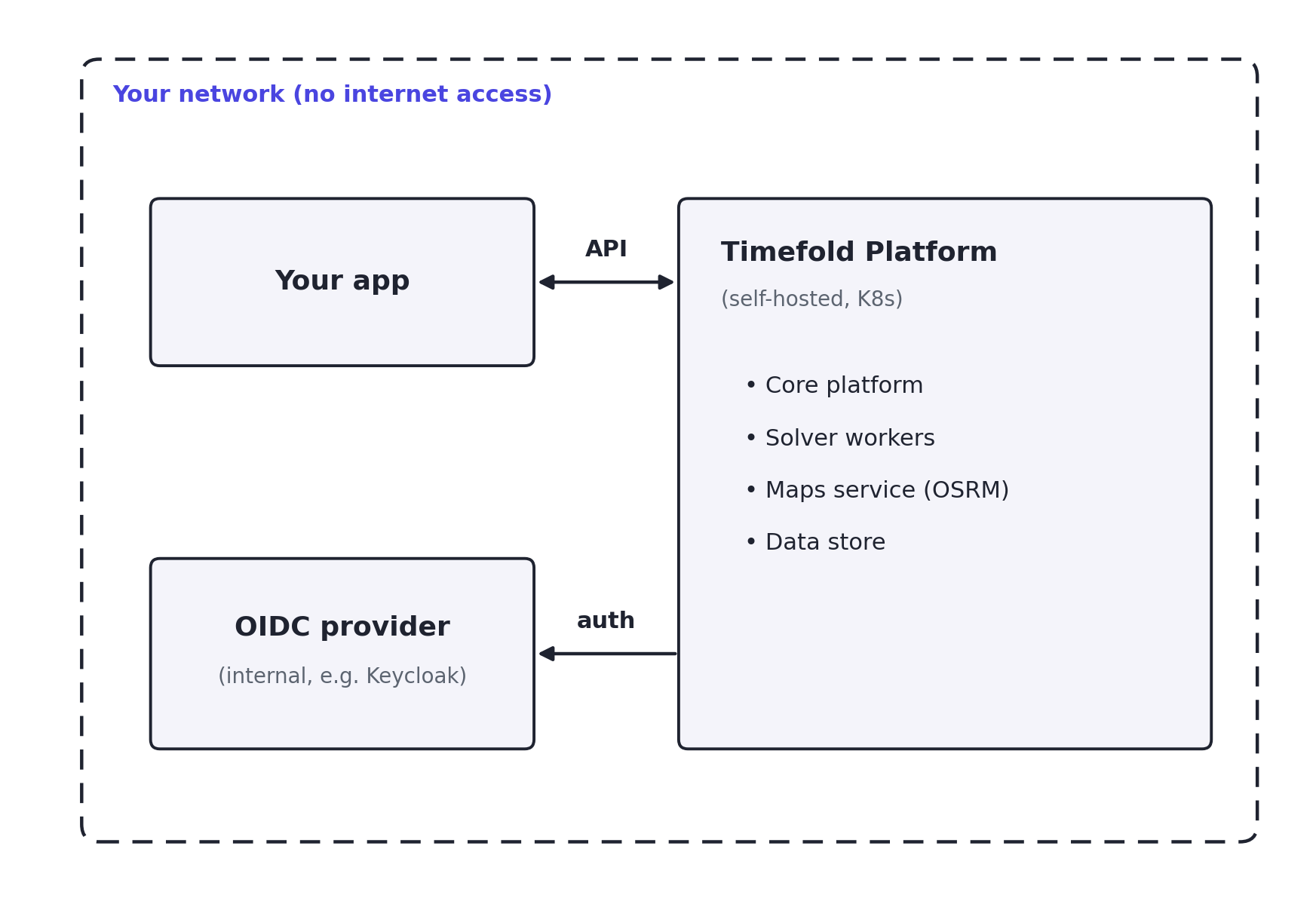
Your application talks to the Timefold Platform API over the internal network. No traffic leaves your environment.
Multiple environment considerations
As noted above, each self-hosted installation is single-tenant. If you want a production environment and a separate development or staging environment, you must run two installations.
| Environment | Installation |
|---|---|
Production |
Dedicated Kubernetes cluster, OIDC configuration, data store |
Staging / UAT |
Separate Kubernetes cluster (can be smaller), OIDC configuration, data store |
This doubles the operational overhead. Consider whether a lighter staging environment (a smaller cluster with fewer solver worker nodes) is sufficient for non-production use.
When to question the air-gapped requirement
Before committing to a self-hosted deployment, validate whether the restriction is genuine:
- Is the entire application air-gapped, or only certain systems?
-
If the application already makes outbound API calls for other purposes (payment gateways, mapping services, authentication), the restriction may not apply to a Timefold integration.
- Is the restriction a policy that can be reviewed?
-
Timefold Cloud is ISO 27001 certified and has a formal DPA. Some security teams will grant exceptions for well-documented, low-risk external services.
- Can a proxy or API gateway be used?
-
Some air-gapped environments permit outbound calls through a controlled egress proxy. If you can allowlist
app.timefold.ai, Timefold Cloud may be suitable. - Is the restriction based on data sensitivity rather than network topology?
-
If so, a data anonymization approach (as described in Data residency requirements) combined with Timefold Cloud may be sufficient.
Summary
| Consideration | Guidance |
|---|---|
Deployment option |
Self-hosted (only option for truly air-gapped networks) |
License |
Commercial license required. Contact Timefold to obtain one. |
Infrastructure |
Kubernetes cluster (EKS, GKE, AKS, OpenShift, or on-premise) |
Authentication |
Internal OIDC provider (for example, Keycloak or Azure AD internal) |
Maps |
Deploy OSRM instances internally; no external map providers |
UI |
Not available; API-only |
Multiple environments |
Separate installation per environment |
Upgrade responsibility |
Your responsibility; plan for a regular upgrade cycle |
First step |
Contact Timefold to obtain a license and discuss requirements |