Integration scenarios
This guide explains how to integrate your application with the Timefold Platform API, in the following scenarios:
Multiple environments
When your application runs in multiple environments (development, staging, production), each environment needs its own isolated integration with Timefold. The pattern is straightforward: one tenant and one set of API keys per environment.
API keys: create a separate API key for each environment. Never share API keys between environments. A key scoped to production should never appear in staging configuration, and test datasets should never consume production solver capacity.
Webhook endpoints: each environment needs its own webhook URL pointing to that environment’s receiver. Configure the webhook in the corresponding Timefold tenant (not in a shared tenant). This ensures that a solve triggered by a staging test notifies the staging application, not production.
Configuration profiles: use tenant-level configuration profiles to tune solver behavior per environment. For example, your development tenant might use shorter solve times to give faster feedback during integration testing, while production uses the full termination configuration.
| Environment | Timefold tenant | API key | Webhook URL |
|---|---|---|---|
Development |
|
|
|
Staging |
|
|
|
Production |
|
|
See Multiple environments and clusters for guidance on tenant and region setup. See Members for access control between tenants.
Data residency
If your application is subject to data residency requirements such as GDPR or HIPAA, the integration boundary is where compliance is enforced. The principle is: anonymize or pseudonymize planning data before it leaves your application, and map results back to real identifiers on receipt.
For example, a workforce scheduling application might handle employee names, contract details, and location data internally, but submit planning problems to Timefold using only internal IDs:
Internal data (stays in your systems):
  Employee "Beth Johnson" → internal ID "EMP-042"
  Location "123 Main Street" → internal ID "LOC-891"

Submitted to Timefold:
  { "employeeId": "EMP-042", "locationId": "LOC-891", ... }

Result from Timefold:
  { "employeeId": "EMP-042", "locationId": "LOC-891", assignment: ... }

Your application maps back:
  EMP-042 → "Beth Johnson", LOC-891 → "123 Main Street"
This pattern means that what Timefold stores and processes contains no PII, regardless of which deployment option you use. It also decouples the planning model from your internal data model, which makes the integration cleaner and easier to test.
Endpoint selection: point your application at the endpoint that matches your data residency requirement.
Use https://app.timefold.ai for EU residency and https://app-us1.timefold.ai for US residency.
If you operate in both regions, use separate tenants on each endpoint and route requests from each regional cluster to the appropriate endpoint.
See Data residency requirements for guidance on selecting the right deployment option for your residency requirements.
Air-gapped environments
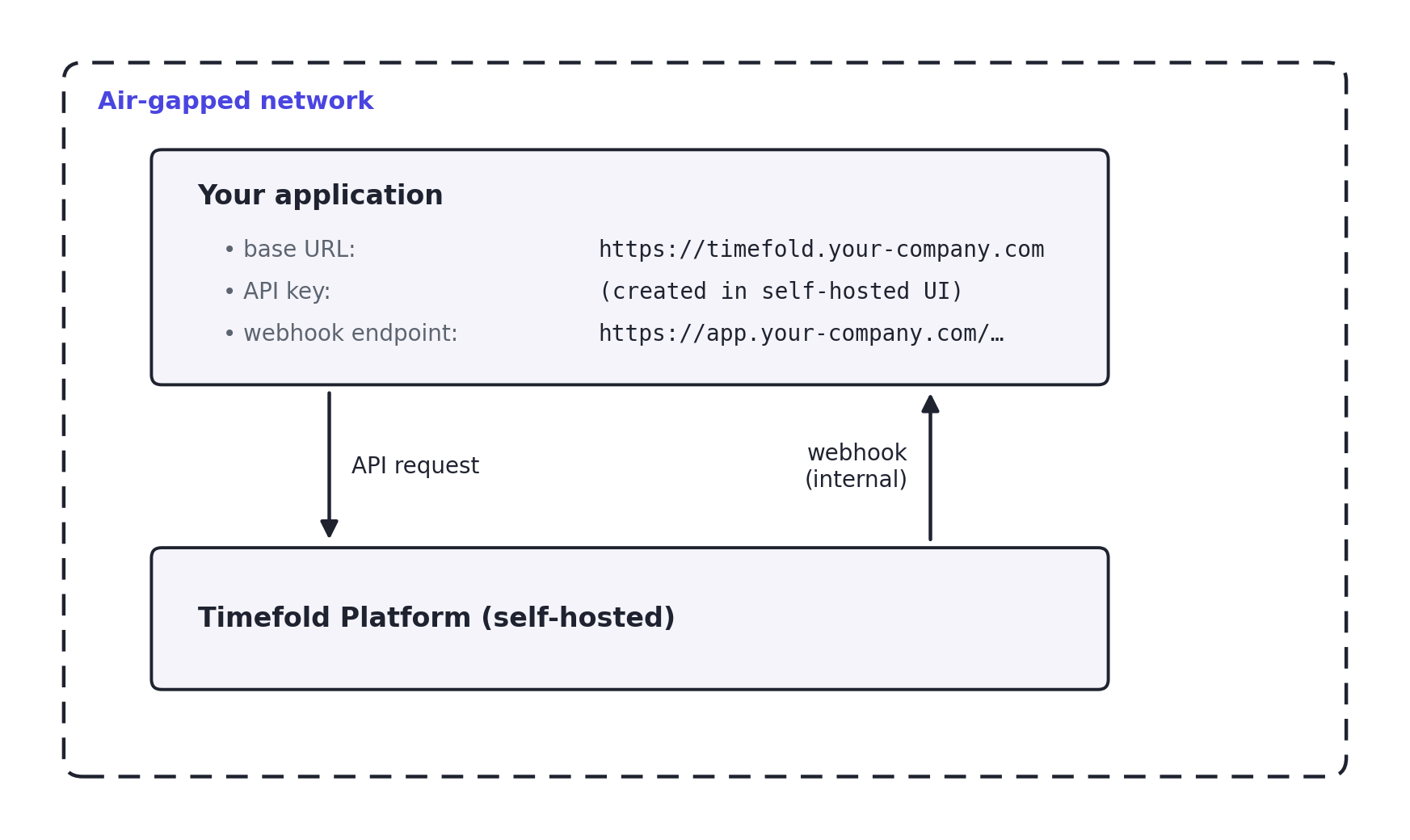
In a self-hosted, air-gapped deployment, the Timefold Platform runs inside your own network. The integration pattern is identical to Timefold Cloud, with two differences.
Base URL: replace https://app.timefold.ai with the internal URL of your self-hosted platform (for example, https://timefold.your-company.com).
This is the only change required in most integration code.
Store the base URL in configuration rather than hardcoding it so that the same application code can target different environments.
Webhook delivery: because Timefold and your application are both inside your network, webhooks are delivered internally. There is no need for a public endpoint or HMAC IP-allowlisting. HMAC signature verification is still recommended as a defense-in-depth measure.
Authentication: the platform still uses an OIDC provider for user authentication and API keys for API access. In an air-gapped environment, your internal OIDC provider handles user login. API key creation and management work the same way as in Timefold Cloud.
| The self-hosted platform has no UI for visualizing and comparing results. Any operational dashboards or solve-result visualizations must be built by your team using the API output. |
See Air-gapped environments for prerequisites and deployment guidance.
Quick reference
Use this table to identify the recommended deployment option for a given set of requirements.
| Requirement | Timefold Cloud (EU) | Timefold Cloud (US) | Managed service | Self-hosted |
|---|---|---|---|---|
Fastest time to value |
Yes |
Yes |
— |
— |
Full UI with insights and visualizations |
Yes |
Yes |
Yes |
No |
No infrastructure to manage |
Yes |
Yes |
Yes |
No |
Automatic upgrades and new features |
Yes |
Yes |
Yes |
No |
Multiple isolated tenants (dev/prod separation) |
Yes |
Yes |
Yes |
No (one tenant per installation) |
Data stored in the EU |
Yes |
No |
Negotiable |
Yes (your infrastructure) |
Data stored in the US |
No |
Yes |
Negotiable |
Yes (your infrastructure) |
Data stored in a specific non-EU/US region |
No |
No |
Yes (contact us) |
Yes (your infrastructure) |
ISO 27001 certified operations |
Yes |
Yes |
Yes |
Your responsibility |
No data leaves your network |
No |
No |
No |
Yes |
Air-gapped / no internet |
No |
No |
No |
Yes |
Contractual HIPAA BAA required |
No |
No |
Contact us |
Your responsibility |
Our recommendation: start with Timefold Cloud
For most teams, Timefold Cloud is the right choice.
Use app.timefold.ai for EU data residency, or app-us1.timefold.ai for US data residency.
Timefold Cloud delivers the most value with the least operational overhead.
Self-hosting is an option of last resort. It removes the full-featured UI, requires a dedicated Kubernetes team, and shifts all maintenance, security patching, and upgrade responsibility onto your team. Before choosing self-hosting, verify whether the actual blocker can be addressed through Timefold Cloud.
If you have requirements that Timefold Cloud can’t meet, such as data residency in a region we don’t yet serve, contact Timefold to discuss options. A Managed service (a private dedicated cluster we set up and operate) may be available in specific cases, though it carries a significant premium over Timefold Cloud.