Lesson 6: Treating shifts differently
Introduction
So far, all the rules that we have covered assume that all shifts are the same. They apply across the board to every shift. In this lesson, we will cover how to implement rules that do not apply to all shifts, but instead to a subset of shifts. This will allow you to express rules such as:
-
Maximum ten hours of hazardous shifts worked in one week.
-
Maximum five night shifts worked in four weeks.
-
Weekend shifts only count as weekend shifts if predefined, not according to calendar rules but by agreement of the manager or department.
We use tags to separate shifts in Timefold. All the period and rolling window rules that were covered previously can use for tags. In this lesson we learn how to implement tags.
Tags
Tags are labels which can be applied to shifts and employees. Similarly to skills, tags can be any string, including coded or anonymized strings which do not represent real words in any language.
| It is a good idea to pause here briefly and think of all the different kinds of shifts and shift categories that your organization uses. Some examples could be on-call shifts, night shifts, split shifts, short shifts, or over-long shifts. Gaining a deep understanding of your specific scheduling problem is very valuable before trying to convert it into Timefold constraints. |
To add tags to a shift, we add the tags JSON field:
{
  "shifts": [
    {
      "id": "Mon Night Bakery shift",
      "start": "2027-02-01T00:00:00Z",
      "end": "2027-02-01T08:00:00Z",
      "tags": [
        "Location 24601",
        "8 hours long"
      ]
    }
  ]
}
Generally, shift tags are more widely used than employee tags. You can add employee tags in a similar way, by adding the tags JSON field:
{
  "id": "Beth",
  "tags": [
    "Over-16",
    "Supervisor"
  ]
}| By themselves, tags do not do anything. They are just labels. They need to be used in rules in order to have an effect on the schedule. |
Tag types
Tag types are categories that tags belong to. Each tag can belong to exactly one category. Most rules do not require you to specify the tag’s type. It is enough to directly assign the tag to a shift or employee, and it will be automatically created by Timefold. However, some rules require tag types to be specified and tags to be pre-created before assignment in order to function correctly. To specify tag types and tags, we must create another two top-level fields in the JSON file, on the same level as employees and shifts:
{
  "modelInput": {
    "tagTypes": [
      {
        "id": "Locations"
      }
    ],
    "tags": [
      {
        "id": "Location 3",
        "tagType": "Locations"
      },
      {
        "id": "Location 759",
        "tagType": "Locations"
      },
      {
        "id": "Location 24601",
        "tagType": "Locations"
      }
    ]
  }
}
Each declared tag type must be referenced by at least one tag, otherwise the dataset will fail validation. Similarly, each tag type used by a tag must be declared in tagTypes, otherwise the dataset will fail validation.
|
Tag types are required for the following rules, which are not covered in this lesson but can be explored in the technical documentation:
Filtering by tags in rules
Specifying the tag list
The most common use of tags is to filter shifts in rules. We have two ways of specifying the list of tags that should be filtered, includeShiftTags and excludeShiftTags:
-
includeShiftTagsspecifies that the rule only applies to shifts which match the specified tags. Any other shifts are not counted toward the rule, and do not contribute to any penalties or rewards. -
excludeShiftTagsspecifies that the rule only applies to shifts which do not match the specified tags. Any other shifts are not counted toward the rule, and do not contribute to any penalties or rewards.
You can think of these fields as splitting the dataset of shifts into two groups: those that match the rule and those that do not. The rule only applies to the matching group, and the other group is ignored. They are functionally equivalent, because you can either:
-
specify the group that matches, and the non-matching group is automatically determined.
-
or specify the group that does not match, and the matching group is automatically determined.
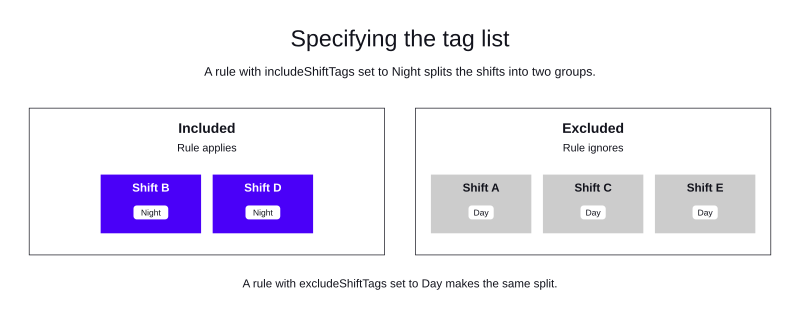
Because they are equivalent, you can only use one of includeShiftTags or excludeShiftTags in a rule. If you use both, the dataset will fail validation.
Matching the tag list
There are two ways of matching tags for filtering, specified by shiftTagMatches:
-
shiftTagMatchesset toANYmeans that a shift is included or excluded if it has at least one of the specified tags. -
shiftTagMatchesset toALLmeans that a shift is included or excluded if it has all the specified tags. It can have other tags as well.
shiftTagMatches is optional. The default behavior is ALL when not specified.
Using tags with a rule
Let’s assume that there are three different active rules for the maximum number of consecutive days worked:
-
Maximum six days in a row at any time.
-
Maximum five days in a row if no shifts worked are shorter than six hours (shifts are tagged
Short). -
Maximum three days in a row if all the shifts worked are hazardous or night shifts (shifts are tagged
HazardousorNight).
We can implement this by creating three different consecutive days worked rules in the same contract:
-
A limit of six days in a row for all shifts.
-
A limit of five days in a row which excludes
Shortshifts. -
A limit of three days in a row which only includes
HazardousandNightshifts.
{
  "contracts": [
    {
      "id": "MaxConsecutiveDaysWorkedContract",
      "consecutiveDaysWorkedRules": [
        {
          "id": "Max6ConsecutiveDaysWorked",
          "maximum": 6,
          "satisfiability": "REQUIRED"
        },
        {
          "id": "Max5ConsecutiveDaysWorked_ifNoShortShifts",
          "maximum": 5,
          "satisfiability": "REQUIRED",
          "excludeShiftTags": [
            "Short"
          ]
        },
        {
          "id": "Max3ConsecutiveDaysWorked_hazardousOrNightShiftsOnly",
          "maximum": 3,
          "satisfiability": "REQUIRED",
          "includeShiftTags": [
            "Night",
            "Hazardous"
          ],
          "shiftTagMatches": "ANY"
        }
      ]
    }
  ]
}
These three rules are all active and the schedule must obey all three rules at the same time.
Practical example
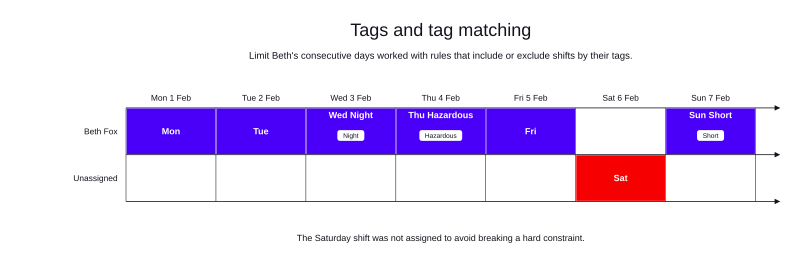
This example has one employee, Beth, who is subject to the rules above. The schedule has seven shifts, one on each day of the week, each shift is eight hours long with the exception of the Sunday shift which is five hours long and tagged Short. The Wednesday shift is a Night shift and the Thursday shift is Hazardous. The Saturday shift stays unassigned because Beth works the maximum of five consecutive days with no Short shifts.
The Sunday shift is assigned because, with Saturday unassigned, Sunday doesn’t continue the run of consecutive days, so the count resets.”
-
Input
-
Output
Try this example in Timefold Platform by saving this JSON into a file called sample.json and making the following API call:
|
curl -X POST -H "Content-type: application/json" -H 'X-API-KEY: <API_KEY>' https://app.timefold.ai/api/models/employee-scheduling/v1/schedules [email protected]{
"config": {
"run": {
"name": "Lesson 6: Tags and tag matching",
"tags": []
},
"model": {}
},
"modelInput": {
"contracts": [
{
"id": "MaxConsecutiveDaysWorkedContract",
"consecutiveDaysWorkedRules": [
{
"id": "Max6ConsecutiveDaysWorked",
"maximum": 6,
"satisfiability": "REQUIRED"
},
{
"id": "Max5ConsecutiveDaysWorked_ifNoShortShifts",
"maximum": 5,
"satisfiability": "REQUIRED",
"excludeShiftTags": [
"Short"
]
},
{
"id": "Max3ConsecutiveDaysWorked_hazardousOrNightShiftsOnly",
"maximum": 3,
"satisfiability": "REQUIRED",
"includeShiftTags": [
"Night",
"Hazardous"
],
"shiftTagMatches": "ANY"
}
]
}
],
"employees": [
{
"id": "Beth Fox",
"contracts": [
"MaxConsecutiveDaysWorkedContract"
]
}
],
"shifts": [
{
"id": "Mon",
"start": "2027-02-01T06:00:00-04:00",
"end": "2027-02-01T14:00:00-04:00"
},
{
"id": "Tue",
"start": "2027-02-02T06:00:00-04:00",
"end": "2027-02-02T14:00:00-04:00"
},
{
"id": "Wed Night",
"start": "2027-02-03T01:00:00-04:00",
"end": "2027-02-03T09:00:00-04:00",
"tags": [
"Night"
]
},
{
"id": "Thu Hazardous",
"start": "2027-02-04T06:00:00-04:00",
"end": "2027-02-04T14:00:00-04:00",
"tags": [
"Hazardous"
]
},
{
"id": "Fri",
"start": "2027-02-05T06:00:00-04:00",
"end": "2027-02-05T14:00:00-04:00"
},
{
"id": "Sat",
"start": "2027-02-06T06:00:00-04:00",
"end": "2027-02-06T14:00:00-04:00"
},
{
"id": "Sun Short",
"start": "2027-02-07T07:00:00-04:00",
"end": "2027-02-07T12:00:00-04:00",
"tags": [
"Short"
]
}
],
"globalRules": {}
}
}
To request the solution, locate the ID from the response to the post operation and append it to the following API call:
|
curl -X GET -H 'X-API-KEY: <API_KEY>' https://app.timefold.ai/api/models/employee-scheduling/v1/schedules/<ID>{
"metadata": {
"id": "ID",
"originId": "ID",
"name": "Lesson 6: Tags and tag matching",
"submitDateTime": "2026-10-07T14:53:50.754063981Z",
"startDateTime": "2026-10-07T14:54:00.698015475Z",
"activeDateTime": "2026-10-07T14:54:00.824795503Z",
"completeDateTime": "2026-10-07T14:54:31.305381869Z",
"shutdownDateTime": "2026-10-07T14:54:31.305385365Z",
"solverStatus": "SOLVING_COMPLETED",
"score": "0hard/-1medium/0soft",
"tags": [
"system.type:from-request",
"system.profile:Standard profile"
],
"validationResult": {
"summary": "OK"
}
},
"modelOutput": {
"shifts": [
{
"id": "Mon",
"employee": "Beth Fox"
},
{
"id": "Tue",
"employee": "Beth Fox"
},
{
"id": "Wed Night",
"employee": "Beth Fox"
},
{
"id": "Thu Hazardous",
"employee": "Beth Fox"
},
{
"id": "Fri",
"employee": "Beth Fox"
},
{
"id": "Sat"
},
{
"id": "Sun Short",
"employee": "Beth Fox"
}
],
"employees": [
{
"id": "Beth Fox",
"metrics": {
"assignedShifts": 6,
"durationWorked": "PT45H"
}
}
],
"generatedShifts": []
},
"inputMetrics": {
"employees": 1,
"shifts": 7,
"pinnedShifts": 0,
"mandatoryShifts": 7,
"optionalShifts": 0
},
"kpis": {
"assignedShifts": 6,
"unassignedShifts": 1,
"disruptionPercentage": 0,
"activatedEmployees": 1,
"assignedMandatoryShifts": 6
},
"run": {
"id": "ID",
"originId": "ID",
"name": "Lesson 6: Tags and tag matching",
"submitDateTime": "2026-10-07T14:53:50.754063981Z",
"startDateTime": "2026-10-07T14:54:00.698015475Z",
"activeDateTime": "2026-10-07T14:54:00.824795503Z",
"completeDateTime": "2026-10-07T14:54:31.305381869Z",
"shutdownDateTime": "2026-10-07T14:54:31.305385365Z",
"solverStatus": "SOLVING_COMPLETED",
"score": "0hard/-1medium/0soft",
"tags": [
"system.type:from-request",
"system.profile:Standard profile"
],
"validationResult": {
"summary": "OK"
}
}
}modelOutput contains the schedule with Beth assigned to five shifts from Monday to Friday and also the Sunday shift, which gives a score of 0hard/-1medium/0soft.
Explore what happens when the Friday shift is tagged Short or Hazardous, or both. Do this by changing the input to add the tag(s) to the shift, and re-running the input.
|
Conclusions
In this lesson, we covered:
-
How to add tags to shifts and employees in the dataset.
-
How to create tag types and assign tags to them.
-
How to filter shifts in rules using
includeShiftTagsandexcludeShiftTags. -
How to match tags using
shiftTagMatchesset toANYorALL. -
How to implement multiple rules for the same constraint, each with different tag filters, to express complex scheduling requirements.
Next
-
Proceed to Lesson 7 to learn about planning around employee absences.
-
Discover more information in the technical documentation on tags and tag types.
-
Discover information on including and excluding shift tags in the technical documentation for each constraint, for example minutes worked per period.
-
Go back to the Lessons overview to choose a different lesson to continue with.