Lesson 7: Planning around absences
Introduction
The past few lessons have focused on rules which limit working capacity in terms of hours worked, shifts worked, days worked, and other such limits. In this lesson, we focus on absences, which are a different type of constraint. Absences are not about limiting working capacity, but rather about planning around the fact that some employees are not available to work at certain times. This can be for any number of reasons, such as:
-
vacation
-
medical leave
-
bereavement leave
-
parental leave
-
jury duty
-
training or education
-
personal commitments at specific times
Ultimately, the reason for leave is not relevant to the scheduling model. What is relevant is the specific time that an employee is not available to work. In this lesson, we cover required absences, which must always be respected.
Required absences
Organizations can treat hard-level absences in one of two ways:
-
Assume employees are available to work unless unavailable time spans are specified.
-
Assume employees are unavailable to work unless available time spans are specified.
| These two approaches are equivalent, but mutually exclusive. If you are specifying one, you cannot also specify the other. If both were specified, Timefold would not know what to do with the time not covered by either or covered by both. |
Unavailable time spans
Unavailable time spans are defined for specific employees, and are used to indicate that the employee is not available to work during those time spans. At minimum, each entry in unavailableTimeSpans must have a start and an end.
-
startis the start datetime of the unavailability period in ISO 8601 date and time format. This format can be summarized asYYYY-MM-DDThh:mm:ssZ. -
endis the end datetime of the unavailability period in ISO 8601 date and time format, as for the start.
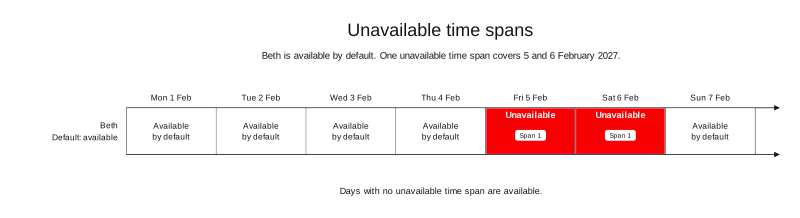
For example, if Beth has been approved to take two days off on 5 and 6 February 2027, we can specify this in one entry in unavailableTimeSpans as follows:
{
  "employees": [
    {
      "id": "Beth",
      "unavailableTimeSpans": [
        {
          "start": "2027-02-05T00:00:00Z",
          "end": "2027-02-07T00:00:00Z"
        }
      ]
    }
  ]
}
A shift that ends exactly at the start of the time span, or starts exactly at its end, doesn’t overlap it. Beth can be assigned a shift which ends on 5 February 2027 at 00:00. She is absent for the entirety of 6 February 2027, so the end of her unavailability period is 7 February 2027 at 00:00. She can be assigned shifts which start on 7 February 2027 at 00:00.
In this configuration, Timefold assumes that Beth is available at all times not covered by unavailableTimeSpans.
Available time spans
Available time spans are the reverse of unavailable time spans. They are defined in the same way as unavailable time spans, similarly requiring a start and end, but tell us when the employee can work.
As in the example used in the previous section, let’s assume a planning window which spans one week, from 1 to 7 February inclusive. Beth is unavailable on 5 and 6 February, so she is available from 1 to 5 February at 00:00, and again available from 7 February at 00:00 to 8 February at 00:00. This is how her availability would be expressed with availableTimeSpans:
{
  "employees": [
    {
      "id": "Beth",
      "availableTimeSpans": [
        {
          "start": "2027-02-01T00:00:00Z",
          "end": "2027-02-05T00:00:00Z"
        },
        {
          "start": "2027-02-07T00:00:00Z",
          "end": "2027-02-08T00:00:00Z"
        }
      ]
    }
  ]
}
As for unavailable time spans, shifts that end exactly at the start of the time span, or start exactly at its end, don’t overlap it. Beth is available for a shift starting at 00:00 on 1 February 2027. She is also available for a shift which ends at 00:00 on 5 February 2027.
In this configuration, Timefold assumes that Beth is unavailable for all times not covered by availableTimeSpans.
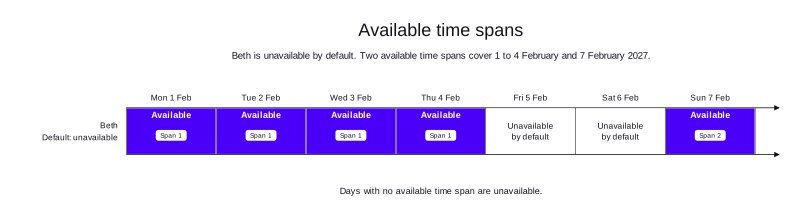
| In this case, we used unavailable and available time spans to give the same result. They are equivalent, but offer you different ways of passing the information to the model. It is a good idea to pause here to consider how availability is expressed in your organization. Does it make sense to use unavailable time spans, available time spans, or choose a different one for each employee based on their work arrangements? |
| Both unavailable and available time spans operate at the hard constraint level. Timefold will never assign shifts to an employee which overlap any amount of unavailability. |
Accounting for shift tags
Both of the constraints in the previous section can take shift tags into account. This makes the specified interval apply only to shifts which have the tags. Because in one instance we are specifying unavailability and in another availability, this leads to slightly different behaviors on both rules when includeShiftTags is specified.
| Go back to Lesson 6 to learn about including and excluding shift tags in rules. |
For unavailableTimeSpans, the default is that the employee is available. Adding includeShiftTags means that the employee is unavailable only for shifts that match those tags, but is still available for everything else. For example, if Beth is available by default, but unavailable for shifts with the Night tag on 5 and 6 February 2027, this would be expressed as follows:
{
  "employees": [
    {
      "id": "Beth",
      "unavailableTimeSpans": [
        {
          "start": "2027-02-05T00:00:00Z",
          "end": "2027-02-07T00:00:00Z",
          "includeShiftTags": ["Night"]
        }
      ]
    }
  ]
}
For availableTimeSpans, the default is that the employee is unavailable. Adding includeShiftTags means that the employee is available only for shifts that match those tags, but is still unavailable for everything else. For example, if Beth is unavailable by default, but available for shifts with the Day tag from 1 to 5 February 2027 and again on 7 February 2027, you can express this as follows:
{
  "employees": [
    {
      "id": "Beth",
      "availableTimeSpans": [
        {
          "start": "2027-02-01T00:00:00Z",
          "end": "2027-02-05T00:00:00Z",
          "includeShiftTags": ["Day"]
        },
        {
          "start": "2027-02-07T00:00:00Z",
          "end": "2027-02-08T00:00:00Z",
          "includeShiftTags": ["Day"]
        }
      ]
    }
  ]
}
Practical example
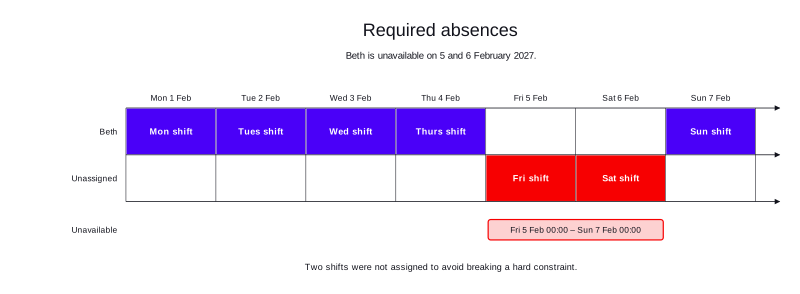
This example has one employee, Beth. It has seven eight-hour shifts, one shift per day for one week from 1 to 7 February 2027. Beth is unavailable for two days, and cannot be assigned shifts. Therefore, two shifts remain unassigned.
-
Input
-
Output
Try this example in Timefold Platform by saving this JSON into a file called sample.json and making the following API call:
|
curl -X POST -H "Content-type: application/json" -H 'X-API-KEY: <API_KEY>' https://app.timefold.ai/api/models/employee-scheduling/v1/schedules [email protected]{
"config": {
"run": {
"name": "Lesson 7: Absences"
}
},
"modelInput": {
"employees": [
{
"id": "Beth",
"unavailableTimeSpans": [
{
"start": "2027-02-05T00:00:00Z",
"end": "2027-02-07T00:00:00Z"
}
]
}
],
"shifts": [
{
"id": "Mon shift",
"start": "2027-02-01T00:00:00Z",
"end": "2027-02-01T08:00:00Z"
},
{
"id": "Tues shift",
"start": "2027-02-02T00:00:00Z",
"end": "2027-02-02T08:00:00Z"
},
{
"id": "Wed shift",
"start": "2027-02-03T00:00:00Z",
"end": "2027-02-03T08:00:00Z"
},
{
"id": "Thurs shift",
"start": "2027-02-04T00:00:00Z",
"end": "2027-02-04T08:00:00Z"
},
{
"id": "Fri shift",
"start": "2027-02-05T00:00:00Z",
"end": "2027-02-05T08:00:00Z"
},
{
"id": "Sat shift",
"start": "2027-02-06T00:00:00Z",
"end": "2027-02-06T08:00:00Z"
},
{
"id": "Sun shift",
"start": "2027-02-07T00:00:00Z",
"end": "2027-02-07T08:00:00Z"
}
]
}
}
To request the solution, locate the ID from the response to the post operation and append it to the following API call:
|
curl -X GET -H 'X-API-KEY: <API_KEY>' https://app.timefold.ai/api/models/employee-scheduling/v1/schedules/<ID>{
"metadata": {
"id": "ID",
"originId": "ID",
"name": "Lesson 7: Absences",
"submitDateTime": "2026-10-15T20:36:52.925993169Z",
"startDateTime": "2026-10-15T20:37:01.589794864Z",
"activeDateTime": "2026-10-15T20:37:01.71650243Z",
"solverStatus": "SOLVING_COMPLETED",
"score": "0hard/-2medium/0soft",
"tags": [
"system.type:from-request",
"system.profile:Standard profile"
],
"validationResult": {
"summary": "OK"
}
},
"modelOutput": {
"shifts": [
{
"id": "Mon shift",
"employee": "Beth"
},
{
"id": "Tues shift",
"employee": "Beth"
},
{
"id": "Wed shift",
"employee": "Beth"
},
{
"id": "Thurs shift",
"employee": "Beth"
},
{
"id": "Fri shift"
},
{
"id": "Sat shift"
},
{
"id": "Sun shift",
"employee": "Beth"
}
],
"employees": [
{
"id": "Beth",
"metrics": {
"assignedShifts": 5,
"durationWorked": "PT40H"
}
}
],
"generatedShifts": []
},
"inputMetrics": {
"employees": 1,
"shifts": 7,
"pinnedShifts": 0,
"mandatoryShifts": 7,
"optionalShifts": 0
},
"kpis": {
"assignedShifts": 5,
"unassignedShifts": 2,
"disruptionPercentage": 0,
"activatedEmployees": 1,
"assignedMandatoryShifts": 5
},
"run": {
"id": "ID",
"originId": "ID",
"name": "Lesson 7: Absences",
"submitDateTime": "2026-10-15T20:36:52.925993169Z",
"startDateTime": "2026-10-15T20:37:01.589794864Z",
"activeDateTime": "2026-10-15T20:37:01.71650243Z",
"solverStatus": "SOLVING_COMPLETED",
"score": "0hard/-2medium/0soft",
"tags": [
"system.type:from-request",
"system.profile:Standard profile"
],
"validationResult": {
"summary": "OK"
}
}
}modelOutput contains the schedule with Beth assigned to five shifts. Fri shift and Sat shift remain unassigned due to Beth’s unavailability, which gives a score of 0hard/-2medium/0soft.
Conclusion
In this lesson we learned about:
-
Unavailable time spans, and how Timefold treats the employee as available by default.
-
Available time spans, and how Timefold treats the employee as unavailable by default.
-
Why the two cannot be used for the same employee in the same dataset.
-
How to filter available and unavailable time spans based on shift tags.
Next
-
Discover more in-depth technical details about availability and unavailability in the Employee availability technical documentation.
-
Go back to the Lessons overview to choose a different lesson to continue with.
-
See the full API spec, try the online API, or start a free trial.